Designing a Scalable Notification System
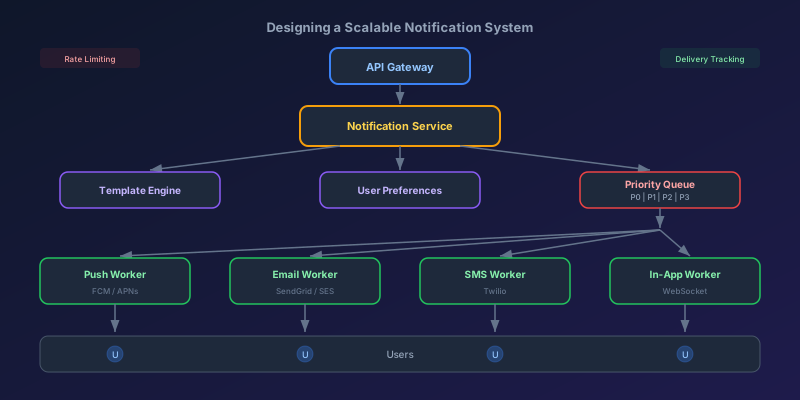
Every product eventually needs notifications. Email a user when their order ships. Push a mobile alert when someone comments on their post. Send an SMS for two-factor auth. Display an in-app badge for unread messages. What starts as a few sendEmail() calls scattered across your codebase turns into an unmanageable mess once you hit any real scale. This post walks through how to design a notification system from the ground up — one that is reliable, scalable, and does not annoy your users into disabling everything.
Types of Notifications
Before designing anything, understand the four primary channels:
| Channel | Latency | Cost | Reach | Best For |
|---|---|---|---|---|
| Push | Real-time | Free | Opt-in | Engagement, time-sensitive |
| Minutes | Low | High | Transactional, marketing | |
| SMS | Seconds | High | Highest | 2FA, critical alerts |
| In-App | Real-time | Free | App only | Activity feeds, badges |
Each channel has different delivery guarantees, cost profiles, and user expectations. Your system must treat them differently.
Requirements and Scale Estimation
For a system design interview or real implementation, start with numbers.
Functional requirements:
- Send notifications across push, email, SMS, and in-app channels
- Users can set per-channel preferences (opt-in/opt-out per notification type)
- Support notification templates with variable substitution
- Priority levels (critical, high, normal, low)
- Delivery tracking and analytics
- Rate limiting per user to prevent notification fatigue
Scale estimation (for a product with 50M users):
- 500M notifications per day across all channels
- Peak: 10,000 notifications per second
- 99.9% delivery SLA for critical notifications (2FA, password reset)
- Eventual consistency acceptable for non-critical notifications
High-Level Architecture
Here is the system broken into its core components:
                    ┌──────────────┐
                    │   API Layer  │
                    │ (REST/gRPC)  │
                    └──────┬───────┘
                           │
                    ┌──────▼───────┐
                    │ Notification │
                    │   Service    │
                    └──────┬───────┘
                           │
              ┌────────────┼────────────┐
              │            │            │
      ┌───────▼──┐  ┌─────▼────┐  ┌───▼────────┐
      │ Template │  │ User Pref│  │  Priority   │
      │  Engine  │  │  Service │  │   Queue     │
      └───────┬──┘  └─────┬────┘  └───┬────────┘
              │            │           │
              └────────────┼───────────┘
                           │
              ┌────────────┼────────────┐
              │            │            │
       ┌──────▼──┐  ┌─────▼───┐  ┌────▼────┐
       │  Push   │  │  Email  │  │   SMS   │
       │ Worker  │  │  Worker │  │  Worker │
       └────┬────┘  └────┬────┘  └────┬────┘
            │            │            │
       ┌────▼────┐  ┌────▼────┐  ┌────▼────┐
       │  FCM /  │  │ SendGrid│  │ Twilio  │
       │  APNs   │  │ /SES    │  │         │
       └─────────┘  └─────────┘  └─────────┘
Let us walk through each component.
The Notification Service
This is the brain of the system. It receives notification requests, validates them, and orchestrates the entire pipeline.
class NotificationService:
    def send(self, request: NotificationRequest):
        # 1. Validate the request
        self.validate(request)

        # 2. Check user preferences
        preferences = self.pref_service.get(request.user_id)
        channels = self.resolve_channels(request, preferences)

        if not channels:
            return  # User has opted out of all channels for this type

        # 3. Render templates for each channel
        messages = {}
        for channel in channels:
            messages[channel] = self.template_engine.render(
                template_id=request.template_id,
                channel=channel,
                variables=request.variables
            )

        # 4. Enqueue to priority queue
        for channel, message in messages.items():
            self.queue.enqueue(
                channel=channel,
                message=message,
                priority=request.priority,
                user_id=request.user_id,
                metadata=request.metadata
            )
The key design decision here is that the notification service does not send anything directly. It validates, resolves preferences, renders templates, and enqueues. The actual delivery is handled by channel-specific workers that pull from the queue.
Template Engine
Hardcoding notification content in application code is a maintenance disaster. Use a template engine that separates content from logic.
# Template stored in database
{
    "id": "order_shipped",
    "channels": {
        "email": {
            "subject": "Your order {{order_id}} has shipped!",
            "body": "Hi {{user_name}}, your order is on its way. Track it here: {{tracking_url}}"
        },
        "push": {
            "title": "Order Shipped",
            "body": "Your order {{order_id}} is on its way!"
        },
        "sms": {
            "body": "Your order {{order_id}} has shipped. Track: {{tracking_url}}"
        },
        "in_app": {
            "title": "Order Shipped",
            "body": "Your order {{order_id}} is on its way!",
            "action_url": "/orders/{{order_id}}"
        }
    }
}
This approach lets product managers update notification copy without deploying code. Each channel gets its own template because character limits and formatting differ — an email can be rich HTML, but an SMS must be under 160 characters.
User Preference Management
Users must control what they receive. Model preferences as a matrix of notification type versus channel:
# User preferences schema
{
    "user_id": "user_42",
    "preferences": {
        "order_updates": {
            "email": true,
            "push": true,
            "sms": false,
            "in_app": true
        },
        "marketing": {
            "email": true,
            "push": false,
            "sms": false,
            "in_app": false
        },
        "security_alerts": {
            "email": true,   # Cannot be disabled
            "push": true,
            "sms": true,     # Cannot be disabled
            "in_app": true
        }
    },
    "quiet_hours": {
        "enabled": true,
        "start": "22:00",
        "end": "08:00",
        "timezone": "America/New_York"
    }
}
Important design decisions:
- Some notifications cannot be disabled (security alerts, legal notices). Mark these as
mandatoryin the notification type definition. - Quiet hours should delay non-critical notifications, not drop them. Queue them and deliver at the end of quiet hours.
- Global unsubscribe must be supported for legal compliance (CAN-SPAM, GDPR).
Priority Queues
Not all notifications are equal. A 2FA code must arrive in seconds. A weekly digest can wait hours. Use separate queues or priority levels:
Critical (P0): 2FA codes, security alerts, payment failures
  → Dedicated queue, highest throughput, retry immediately

High (P1): Order confirmations, shipping updates
  → Processed within 30 seconds

Normal (P2): Social notifications, comments, likes
  → Processed within 5 minutes, subject to rate limiting

Low (P3): Marketing, digests, recommendations
  → Processed during off-peak, heavily rate-limited
Implementation with a message broker like Kafka or RabbitMQ:
# Separate topics/queues per priority
QUEUE_CONFIG = {
    "critical": {
        "topic": "notifications.critical",
        "consumers": 20,
        "max_retry": 5,
        "retry_delay": "1s"
    },
    "high": {
        "topic": "notifications.high",
        "consumers": 10,
        "max_retry": 3,
        "retry_delay": "10s"
    },
    "normal": {
        "topic": "notifications.normal",
        "consumers": 5,
        "max_retry": 3,
        "retry_delay": "60s"
    },
    "low": {
        "topic": "notifications.low",
        "consumers": 2,
        "max_retry": 1,
        "retry_delay": "300s"
    }
}
Critical notifications get 20 consumer instances and retry within 1 second. Low-priority marketing notifications get 2 consumers and a single retry after 5 minutes. This ensures your 2FA code is never stuck behind a million marketing emails.
Fan-Out Strategies
When a single event needs to notify many users (e.g., a celebrity posts on social media and 10 million followers need to know), you have two options:
Fan-Out on Write
Generate a notification record for every recipient at the time of the event:
def on_new_post(post, author):
    followers = get_all_followers(author.id)  # Could be millions
    for follower_id in followers:
        notification_service.send(
            user_id=follower_id,
            template="new_post",
            variables={"author": author.name, "post_title": post.title},
            priority="normal"
        )
Pros: reading notifications is fast (pre-computed). Cons: write amplification is massive. One post from a user with 10M followers = 10M queue entries.
Fan-Out on Read
Store the event once. When a user checks their notifications, compute what they should see at read time:
def get_notifications(user_id):
    # Get users this person follows
    following = get_following(user_id)

    # Fetch recent events from followed users
    events = db.query("""
        SELECT * FROM events
        WHERE author_id IN (:following_ids)
        AND created_at > :user_last_checked
        ORDER BY created_at DESC
        LIMIT 50
    """, following_ids=following, user_last_checked=get_last_checked(user_id))

    return events
Pros: no write amplification. Cons: read is expensive (must query and merge many sources).
Hybrid Approach (What Twitter/X Does)
Use fan-out on write for users with fewer than N followers (say 10,000). For celebrities and viral accounts, use fan-out on read. This gives you fast reads for 99% of users while avoiding the write explosion for the top 1%.
Rate Limiting Per User
Nobody wants 47 notifications in an hour. Implement per-user rate limiting:
class NotificationRateLimiter:
    def __init__(self, redis_client):
        self.redis = redis_client

    def should_send(self, user_id, channel, priority):
        # Critical notifications bypass rate limiting
        if priority == "critical":
            return True

        key = f"notif_rate:{user_id}:{channel}"
        current = self.redis.get(key)

        limits = {
            "push": 10,    # Max 10 push notifications per hour
            "email": 5,    # Max 5 emails per hour
            "sms": 3,      # Max 3 SMS per hour
            "in_app": 50   # Max 50 in-app per hour
        }

        if current and int(current) >= limits[channel]:
            # Rate limit exceeded — batch remaining notifications
            self.add_to_batch(user_id, channel)
            return False

        self.redis.incr(key)
        self.redis.expire(key, 3600)  # Reset every hour
        return True

    def add_to_batch(self, user_id, channel):
        # Accumulate and send as a digest later
        self.redis.rpush(f"notif_batch:{user_id}:{channel}", notification_data)
When a user exceeds their rate limit, batch the excess notifications into a digest that gets sent once the window resets.
Retry and Failure Handling
External delivery services (FCM, SendGrid, Twilio) fail. Your system must handle this gracefully.
Exponential backoff with jitter:
def calculate_retry_delay(attempt, base_delay=1.0, max_delay=300.0):
    # Exponential backoff: 1s, 2s, 4s, 8s, 16s...
    delay = min(base_delay * (2 ** attempt), max_delay)

    # Add jitter to prevent thundering herd
    jitter = random.uniform(0, delay * 0.3)
    return delay + jitter
Dead letter queue for permanent failures:
def process_notification(message):
    for attempt in range(max_retries):
        try:
            result = deliver(message)
            track_delivery(message, status="delivered")
            return result
        except TransientError:
            delay = calculate_retry_delay(attempt)
            time.sleep(delay)
        except PermanentError as e:
            # Bad token, invalid email, unsubscribed number
            track_delivery(message, status="failed", reason=str(e))
            move_to_dead_letter_queue(message)
            return

    # Exhausted retries
    track_delivery(message, status="failed", reason="max_retries_exceeded")
    move_to_dead_letter_queue(message)
Distinguish between transient errors (network timeout, rate limit from provider, 503) and permanent errors (invalid device token, bounced email, deactivated phone number). Retry transient, dead-letter permanent.
Delivery Tracking and Analytics
You need visibility into what is happening. Track every notification through its lifecycle:
# Notification status transitions
PENDING -> QUEUED -> SENT -> DELIVERED -> READ
                  -> FAILED (permanent)
                  -> RETRYING -> SENT (retry succeeded)
                  -> RETRYING -> FAILED (retries exhausted)
Store delivery events in an append-only log:
CREATE TABLE notification_events (
    id            BIGSERIAL PRIMARY KEY,
    notification_id UUID NOT NULL,
    user_id       VARCHAR(64) NOT NULL,
    channel       VARCHAR(16) NOT NULL,
    status        VARCHAR(16) NOT NULL,
    timestamp     TIMESTAMP NOT NULL DEFAULT NOW(),
    metadata      JSONB
);

-- Indexes for common queries
CREATE INDEX idx_notif_user ON notification_events(user_id, timestamp DESC);
CREATE INDEX idx_notif_status ON notification_events(status, channel);
Key metrics to track:
- Delivery rate per channel (what percentage of sent notifications actually get delivered)
- Open rate (email opens, push tap-throughs)
- Time to deliver (P50, P95, P99 latency from enqueue to delivery)
- Opt-out rate per notification type (if a type has high opt-out, the content is wrong)
- Failure rate by provider and error type
Real-Time In-App Notifications with WebSockets
In-app notifications need special treatment because they must appear instantly without the user refreshing the page.
// Server: WebSocket connection manager
class NotificationWebSocket {
  constructor() {
    this.connections = new Map(); // userId -> Set<WebSocket>
  }

  onConnect(userId, ws) {
    if (!this.connections.has(userId)) {
      this.connections.set(userId, new Set());
    }
    this.connections.get(userId).add(ws);

    // Send unread count on connect
    const unreadCount = await this.getUnreadCount(userId);
    ws.send(JSON.stringify({ type: "unread_count", count: unreadCount }));
  }

  async pushToUser(userId, notification) {
    const sockets = this.connections.get(userId);
    if (sockets) {
      const payload = JSON.stringify({
        type: "notification",
        data: notification
      });
      for (const ws of sockets) {
        ws.send(payload);
      }
    }
    // Also store in database for when user is offline
    await this.store(userId, notification);
  }
}
For multi-server deployments, use Redis Pub/Sub to broadcast notifications across all WebSocket servers:
# When notification service processes an in-app notification:
redis.publish(f"notifications:{user_id}", json.dumps(notification))

# Each WebSocket server subscribes to relevant channels:
pubsub = redis.pubsub()
pubsub.psubscribe("notifications:*")
for message in pubsub.listen():
    user_id = message["channel"].split(":")[1]
    push_to_local_connections(user_id, message["data"])
This ensures that regardless of which server the user's WebSocket is connected to, they receive the notification in real time.
Scaling Considerations
As your notification system grows, keep these patterns in mind:
- Partition queues by channel — push, email, SMS, and in-app have different throughput profiles. Separate queues let you scale each independently.
- Use connection pooling for external APIs — Twilio, SendGrid, and FCM all have rate limits. Pool connections and implement client-side throttling.
- Batch where possible — sending 1,000 emails through a single SendGrid API call is orders of magnitude cheaper than 1,000 individual calls.
- Warm device token caches — APNs and FCM token lookups are expensive. Cache device tokens in Redis with a TTL.
- Implement circuit breakers — if SendGrid goes down, stop sending traffic and switch to a backup provider or queue for later.
- Compress notification payloads — at 500M notifications per day, even a few bytes per message adds up.
Summary
A scalable notification system is not just "send an email when something happens." It is a distributed pipeline with clear separation of concerns: an API layer that accepts requests, a service layer that orchestrates, a template engine that renders, a preference layer that filters, priority queues that order, channel workers that deliver, and a tracking system that observes everything. Build it in layers, scale each layer independently, and always respect the user's preferences. The best notification is the one the user actually wants to receive.
Keep reading
Write Skew: The Anomaly Snapshot Isolation Does Not Catch
Two transactions each read what the other writes, both commit, and an invariant dies. Snapshot isolation allows write skew — here is how to close the hole.
Designing a Shopping Cart: Price Snapshots, Merge, and No Inventory Hold
A cart is a per-user document, not a reservation. What to store on the line, how to merge an anonymous cart at login, and when the price is allowed to change.
Designing Snowflake-Style IDs: Ordering, Workers, and Clock Rollback
A 64-bit id from a timestamp, a worker number, and a per-millisecond sequence. How many you can issue, why the clock must not step backwards, and why JavaScript cannot hold one.
PostgreSQL 19 on October 29: WAIT for Read-Your-Writes, REPACK Without the Lock, and What Got Pulled
PostgreSQL 19 GA is scheduled for October 29, 2026. The WAIT command gives standbys read-your-writes, REPACK CONCURRENTLY replaces VACUUM FULL and CLUSTER, autovacuum goes parallel, and SQL/PGQ, online checksums, and FOR PORTION OF were reverted in Beta 4.
Idempotency Keys for Write APIs
How to make POST safe to retry: the key, the stored response, the race between two identical requests, and the expiry that forgets too soon.
Read-Your-Writes: The User Just Saved and the Read Replica Does Not Know
Why a write to the primary followed by a read from a replica shows stale data, and the practical ways to pin the next read without sending all traffic to the primary.
Newsletter
New posts, straight to your inbox
One email per post. No spam, no tracking pixels, unsubscribe anytime.
Comments
- No comments yet. Be the first.