Rate Limiter Design: Algorithms and Distributed Patterns
Every production API needs a rate limiter. Without one, a single misbehaving client can bring down your entire service — whether through a bug that fires requests in a tight loop, a DDoS attack, or simply an unexpectedly viral feature that causes a traffic spike. Rate limiting is not optional infrastructure; it is survival infrastructure.
This post covers the core algorithms, their tradeoffs, distributed implementations with Redis, and where rate limiting belongs in your architecture.
Why Rate Limiting Matters
Rate limiting serves four critical purposes:
- Prevent resource starvation: A single user should not be able to consume all your server resources
- Improve reliability: By rejecting excess traffic early, you keep the service healthy for everyone else
- Reduce cost: Especially with cloud/serverless billing, runaway traffic translates directly to money
- Security: Rate limiting is your first line of defense against brute-force attacks, credential stuffing, and scraping
Real-World Failures
- GitHub (2018): A memcached amplification DDoS attack sent 1.35 Tbps of traffic to GitHub. Rate limiting at the edge helped them recover.
- Twitter API abuse: Without rate limits, bots would scrape the entire platform in hours. Twitter enforces 300 requests per 15-minute window on most endpoints.
- Stripe's approach: Stripe uses a sophisticated token bucket with separate limits per endpoint, per API key, and per IP — protecting both their infrastructure and their customers.
Algorithm 1: Token Bucket
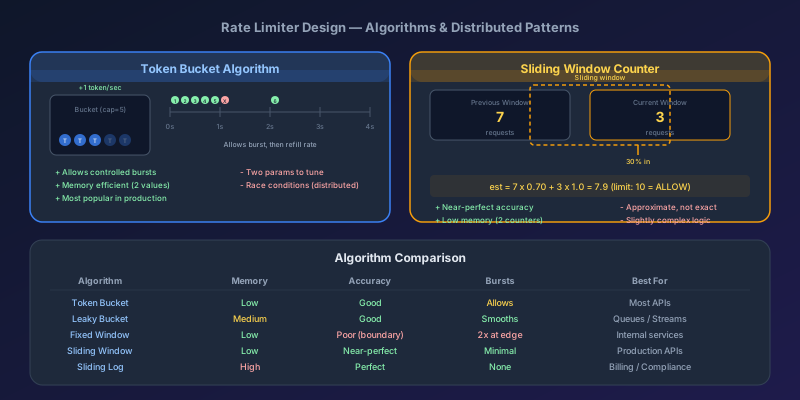
The token bucket is the most widely used rate limiting algorithm. It is simple, memory-efficient, and allows bursts.
How It Works
- A bucket holds tokens, with a maximum capacity of
btokens - Tokens are added to the bucket at a fixed rate of
rtokens per second - When a request arrives, it consumes one token
- If the bucket is empty, the request is rejected
- The bucket never exceeds its maximum capacity
Time 0s: Bucket has 5 tokens (capacity = 5, rate = 1/sec)

Request 1: ✓ (4 tokens remaining)
Request 2: ✓ (3 tokens remaining)
Request 3: ✓ (2 tokens remaining)

Time 1s: Refill +1 token (3 tokens)

Request 4: ✓ (2 tokens remaining)
Request 5: ✓ (1 token remaining)
Request 6: ✓ (0 tokens remaining)
Request 7: ✗ REJECTED (bucket empty)

Time 2s: Refill +1 token (1 token)

Request 8: ✓ (0 tokens remaining)
Implementation
import time

class TokenBucket:
    def __init__(self, capacity: int, refill_rate: float):
        self.capacity = capacity
        self.refill_rate = refill_rate  # tokens per second
        self.tokens = capacity
        self.last_refill = time.monotonic()

    def allow_request(self) -> bool:
        now = time.monotonic()
        elapsed = now - self.last_refill

        # Refill tokens based on elapsed time
        self.tokens = min(
            self.capacity,
            self.tokens + elapsed * self.refill_rate
        )
        self.last_refill = now

        if self.tokens >= 1:
            self.tokens -= 1
            return True
        return False

# Example: 10 requests per second, burst of 20
limiter = TokenBucket(capacity=20, refill_rate=10)
Pros and Cons
Pros:
- Memory efficient — only stores token count and timestamp
- Allows bursts up to the bucket capacity
- Smooth rate limiting over time
- Simple to understand and implement
Cons:
- Tuning two parameters (capacity and rate) requires thought
- Race conditions in distributed environments without proper locking
Algorithm 2: Leaky Bucket
The leaky bucket is like a FIFO queue with a fixed drain rate. Requests enter the bucket and are processed at a constant rate, regardless of input burstiness.
How It Works
- Requests enter a queue (the bucket)
- The queue has a fixed capacity — if full, new requests are rejected
- Requests are drained (processed) from the queue at a constant rate
- Unlike token bucket, the output rate is perfectly smooth
Input rate varies:   |||  |    |||||  ||  |
                     v v v  v   v v v v v  v v  v
                    ┌─────────────────────────┐
Bucket (queue):     │ ● ● ● ● ● ●            │  capacity = 10
                    └─────────┬───────────────┘
                              │
Output rate constant:  ─ ● ─ ● ─ ● ─ ● ─ ● ─  (drain rate)
Implementation
from collections import deque
import time

class LeakyBucket:
    def __init__(self, capacity: int, drain_rate: float):
        self.capacity = capacity
        self.drain_rate = drain_rate  # requests per second
        self.queue = deque()
        self.last_drain = time.monotonic()

    def allow_request(self) -> bool:
        now = time.monotonic()
        elapsed = now - self.last_drain

        # Drain processed requests
        drain_count = int(elapsed * self.drain_rate)
        if drain_count > 0:
            for _ in range(min(drain_count, len(self.queue))):
                self.queue.popleft()
            self.last_drain = now

        # Check if bucket has room
        if len(self.queue) < self.capacity:
            self.queue.append(now)
            return True
        return False
Pros and Cons
Pros:
- Produces a perfectly smooth output rate
- Predictable processing time for queued requests
Cons:
- Bursts of traffic fill the queue — recent requests may wait behind old ones
- Not ideal when you want to allow controlled bursts
- Uses more memory (stores queue of request timestamps)
Algorithm 3: Fixed Window Counter
The simplest algorithm. Divide time into fixed windows and count requests per window.
How It Works
- Divide time into windows of size
w(e.g., 1 minute) - Each window has a counter starting at 0
- Each request increments the counter for the current window
- If the counter exceeds the limit, reject the request
Window 1 (0:00 - 0:59)     Window 2 (1:00 - 1:59)
Limit: 5 requests           Limit: 5 requests

|●|●|●|●|●|✗|              |●|●|●|              |
 1  2  3  4  5  rejected     1  2  3

But what about the boundary?

          ←─── 1 minute ───→
Window 1: .........|●●●●●|
Window 2:          |●●●●●|.........
                    ↑
              Boundary burst: 10 requests in ~1 second!
The Boundary Problem
The critical flaw is that a user can send limit requests at the end of one window and limit requests at the start of the next, effectively doubling their rate at the boundary.
Implementation
import time
from collections import defaultdict

class FixedWindowCounter:
    def __init__(self, limit: int, window_seconds: int):
        self.limit = limit
        self.window_seconds = window_seconds
        self.counters = defaultdict(int)

    def _get_window_key(self, user_id: str) -> str:
        window = int(time.time() // self.window_seconds)
        return f"{user_id}:{window}"

    def allow_request(self, user_id: str) -> bool:
        key = self._get_window_key(user_id)
        self.counters[key] += 1
        return self.counters[key] <= self.limit
Pros and Cons
Pros:
- Extremely simple and memory-efficient (one counter per window)
- Easy to implement with Redis
INCR+EXPIRE
Cons:
- Boundary burst problem allows 2x the intended rate
- Not suitable for strict rate limiting requirements
Algorithm 4: Sliding Window Log
Fixes the boundary problem by tracking individual request timestamps.
How It Works
- Store the timestamp of every request in a sorted set
- When a new request arrives, remove all timestamps older than the window
- Count the remaining timestamps
- If count exceeds the limit, reject
import time

class SlidingWindowLog:
    def __init__(self, limit: int, window_seconds: int):
        self.limit = limit
        self.window_seconds = window_seconds
        self.requests = {}  # user_id -> list of timestamps

    def allow_request(self, user_id: str) -> bool:
        now = time.time()
        window_start = now - self.window_seconds

        if user_id not in self.requests:
            self.requests[user_id] = []

        # Remove expired timestamps
        self.requests[user_id] = [
            ts for ts in self.requests[user_id]
            if ts > window_start
        ]

        if len(self.requests[user_id]) < self.limit:
            self.requests[user_id].append(now)
            return True
        return False
Pros and Cons
Pros:
- Perfectly accurate — no boundary burst problem
- Smooth, fair rate limiting
Cons:
- High memory usage — stores every request timestamp
- O(n) cleanup on each request (can optimize with sorted sets)
Algorithm 5: Sliding Window Counter (Recommended)
The best of both worlds. Combines the memory efficiency of fixed windows with the accuracy of sliding windows.
How It Works
- Track counters for the current and previous fixed windows
- Estimate the count in the sliding window using a weighted average
Previous window count: 7 (limit: 10)
Current window count:  3
Current position: 30% into the current window

Estimated count = (7 * 0.70) + (3 * 1.0) = 4.9 + 3 = 7.9
Since 7.9 < 10: ALLOW
Implementation
import time
import math

class SlidingWindowCounter:
    def __init__(self, limit: int, window_seconds: int):
        self.limit = limit
        self.window_seconds = window_seconds
        self.windows = {}  # user_id -> {window_id: count}

    def allow_request(self, user_id: str) -> bool:
        now = time.time()
        current_window = int(now // self.window_seconds)
        previous_window = current_window - 1

        # Position within current window (0.0 to 1.0)
        window_progress = (now % self.window_seconds) / self.window_seconds

        if user_id not in self.windows:
            self.windows[user_id] = {}

        prev_count = self.windows[user_id].get(previous_window, 0)
        curr_count = self.windows[user_id].get(current_window, 0)

        # Weighted estimate
        estimated = prev_count * (1 - window_progress) + curr_count

        if estimated < self.limit:
            self.windows[user_id][current_window] = curr_count + 1
            return True
        return False
Why This Is the Best Choice
| Algorithm | Memory | Accuracy | Burst Handling |
|---|---|---|---|
| Token Bucket | Low | Good | Allows controlled bursts |
| Leaky Bucket | Medium | Good | Smooths output |
| Fixed Window | Low | Poor (boundary) | 2x burst at boundary |
| Sliding Window Log | High | Perfect | No bursts |
| Sliding Window Counter | Low | Near-perfect | Minimal boundary effect |
For most production systems, use sliding window counter for general rate limiting and token bucket when you explicitly want to allow bursts.
Distributed Rate Limiting with Redis
In a multi-server environment, you cannot use in-memory rate limiters — each server would maintain its own count, effectively multiplying the limit by the number of servers. You need a centralized counter, and Redis is the standard choice.
Token Bucket in Redis (Lua Script)
We use a Lua script to make the check-and-update atomic:
-- rate_limit.lua
-- KEYS[1] = rate limit key
-- ARGV[1] = bucket capacity
-- ARGV[2] = refill rate (tokens per second)
-- ARGV[3] = current timestamp (seconds)
-- ARGV[4] = tokens to consume (usually 1)

local key = KEYS[1]
local capacity = tonumber(ARGV[1])
local refill_rate = tonumber(ARGV[2])
local now = tonumber(ARGV[3])
local requested = tonumber(ARGV[4])

-- Get current state
local data = redis.call('HMGET', key, 'tokens', 'last_refill')
local tokens = tonumber(data[1]) or capacity
local last_refill = tonumber(data[2]) or now

-- Calculate refill
local elapsed = math.max(0, now - last_refill)
tokens = math.min(capacity, tokens + elapsed * refill_rate)

-- Check if request is allowed
local allowed = 0
if tokens >= requested then
    tokens = tokens - requested
    allowed = 1
end

-- Save state
redis.call('HMSET', key, 'tokens', tokens, 'last_refill', now)
redis.call('EXPIRE', key, math.ceil(capacity / refill_rate) * 2)

return { allowed, tokens }
Sliding Window Counter in Redis
import redis
import time

class DistributedSlidingWindow:
    def __init__(self, redis_client: redis.Redis,
                 limit: int, window_seconds: int):
        self.redis = redis_client
        self.limit = limit
        self.window = window_seconds

    def allow_request(self, identifier: str) -> bool:
        now = time.time()
        current_window = int(now // self.window)
        previous_window = current_window - 1
        window_progress = (now % self.window) / self.window

        pipe = self.redis.pipeline()
        curr_key = f"rl:{identifier}:{current_window}"
        prev_key = f"rl:{identifier}:{previous_window}"
        pipe.get(prev_key)
        pipe.get(curr_key)
        prev_count, curr_count = pipe.execute()

        prev_count = int(prev_count or 0)
        curr_count = int(curr_count or 0)

        estimated = prev_count * (1 - window_progress) + curr_count

        if estimated >= self.limit:
            return False

        # Increment current window counter
        pipe = self.redis.pipeline()
        pipe.incr(curr_key)
        pipe.expire(curr_key, self.window * 2)
        pipe.execute()

        return True
Handling Redis Failures
What happens when Redis is down? You have three options:
- Fail open: Allow all requests (risk overload, but maintain availability)
- Fail closed: Reject all requests (safe, but causes outages)
- Local fallback: Switch to an in-memory rate limiter per server (best option)
class ResilientRateLimiter:
    def __init__(self, redis_limiter, local_limiter):
        self.redis_limiter = redis_limiter
        self.local_limiter = local_limiter

    def allow_request(self, identifier: str) -> bool:
        try:
            return self.redis_limiter.allow_request(identifier)
        except redis.ConnectionError:
            # Fall back to local limiter
            # Divide the limit by estimated server count
            return self.local_limiter.allow_request(identifier)
Rate Limiting at Different Layers
Rate limiting is not a single-point solution. You should apply it at multiple layers:
Layer 1: Client-Side
Prevent well-behaved clients from accidentally flooding your API:
class RateLimitedClient {
  private queue: Array<() => void> = [];
  private processing = false;
  private minInterval = 100; // ms between requests

  async request(url: string, options?: RequestInit): Promise<Response> {
    return new Promise((resolve, reject) => {
      this.queue.push(async () => {
        try {
          const response = await fetch(url, options);
          if (response.status === 429) {
            const retryAfter = response.headers.get('Retry-After');
            await this.sleep(parseInt(retryAfter || '1') * 1000);
            resolve(await fetch(url, options));
          } else {
            resolve(response);
          }
        } catch (err) {
          reject(err);
        }
      });
      this.processQueue();
    });
  }

  private async processQueue() {
    if (this.processing) return;
    this.processing = true;
    while (this.queue.length > 0) {
      const task = this.queue.shift()!;
      await task();
      await this.sleep(this.minInterval);
    }
    this.processing = false;
  }

  private sleep(ms: number) {
    return new Promise(resolve => setTimeout(resolve, ms));
  }
}
Layer 2: API Gateway / Load Balancer
This is your coarse-grained defense. Apply broad limits here:
- Per-IP rate limiting: Protect against DDoS
- Per-API-key limiting: Enforce plan-based quotas
- Global rate limiting: Protect downstream services from overload
Most cloud providers offer this built-in (AWS API Gateway, Cloudflare, nginx):
# nginx rate limiting
limit_req_zone $binary_remote_addr zone=api:10m rate=10r/s;

server {
    location /api/ {
        limit_req zone=api burst=20 nodelay;
        limit_req_status 429;
        proxy_pass http://backend;
    }
}
Layer 3: Application Level
Fine-grained, business-logic-aware rate limiting:
# Different limits for different operations
RATE_LIMITS = {
    "login":        {"limit": 5,    "window": 300},   # 5 per 5 min
    "password_reset": {"limit": 3,  "window": 3600},  # 3 per hour
    "api_read":     {"limit": 1000, "window": 60},     # 1000 per min
    "api_write":    {"limit": 100,  "window": 60},     # 100 per min
    "file_upload":  {"limit": 10,   "window": 3600},   # 10 per hour
}

async def rate_limit_middleware(request, call_next):
    operation = classify_request(request)
    config = RATE_LIMITS.get(operation)

    if config is None:
        return await call_next(request)

    identifier = get_identifier(request)  # user ID or IP
    limiter = SlidingWindowCounter(**config)

    if not limiter.allow_request(identifier):
        return JSONResponse(
            status_code=429,
            content={"error": "Rate limit exceeded"},
            headers={
                "Retry-After": str(config["window"]),
                "X-RateLimit-Limit": str(config["limit"]),
                "X-RateLimit-Remaining": "0",
                "X-RateLimit-Reset": str(int(time.time()) + config["window"]),
            }
        )

    return await call_next(request)
Response Headers: Be a Good API Citizen
Always include rate limit information in your responses so clients can self-regulate:
HTTP/1.1 200 OK
X-RateLimit-Limit: 1000
X-RateLimit-Remaining: 742
X-RateLimit-Reset: 1679270400

HTTP/1.1 429 Too Many Requests
Retry-After: 30
X-RateLimit-Limit: 1000
X-RateLimit-Remaining: 0
X-RateLimit-Reset: 1679270400
These headers tell the client exactly how many requests they have left and when the window resets. Well-designed clients use these to avoid hitting the limit in the first place.
Advanced Patterns
Tiered Rate Limiting
Different users get different limits based on their plan:
TIER_LIMITS = {
    "free":       {"rpm": 60,    "rpd": 1000},
    "basic":      {"rpm": 600,   "rpd": 10000},
    "pro":        {"rpm": 6000,  "rpd": 100000},
    "enterprise": {"rpm": 60000, "rpd": 1000000},
}

def get_rate_limit(user) -> dict:
    return TIER_LIMITS.get(user.plan, TIER_LIMITS["free"])
Adaptive Rate Limiting
Adjust limits dynamically based on system health:
class AdaptiveRateLimiter:
    def __init__(self, base_limit: int):
        self.base_limit = base_limit
        self.current_limit = base_limit

    def adjust(self, cpu_usage: float, error_rate: float):
        """Called periodically by health monitor."""
        if cpu_usage > 0.8 or error_rate > 0.05:
            # System under stress — reduce limit
            self.current_limit = max(
                self.base_limit * 0.5,
                self.current_limit * 0.9
            )
        elif cpu_usage < 0.5 and error_rate < 0.01:
            # System healthy — gradually restore
            self.current_limit = min(
                self.base_limit,
                self.current_limit * 1.1
            )
Rate Limiting with Priorities
Not all requests are equal. A payment webhook should never be rate-limited while an analytics query can wait:
PRIORITY_OVERRIDES = {
    "webhook": float('inf'),     # Never rate limit webhooks
    "health_check": float('inf'),
    "critical_write": 10.0,      # 10x normal limit
    "normal": 1.0,               # Base limit
    "background": 0.5,           # Half the normal limit
}
Summary: Choosing the Right Algorithm
Here is a decision framework:
- Need to allow bursts? Use token bucket (most APIs)
- Need smooth, constant output? Use leaky bucket (message queues, stream processing)
- Need simplicity and approximate limiting? Use fixed window counter (internal services)
- Need accuracy without boundary issues? Use sliding window counter (production APIs)
- Need perfect accuracy? Use sliding window log (compliance, billing)
For a system design interview, start with the sliding window counter for general rate limiting, then discuss token bucket when the interviewer asks about burst handling. Always mention the distributed Redis implementation and the multi-layer approach. These details demonstrate that you understand how rate limiting works in real production systems, not just in textbook examples.
Keep Reading
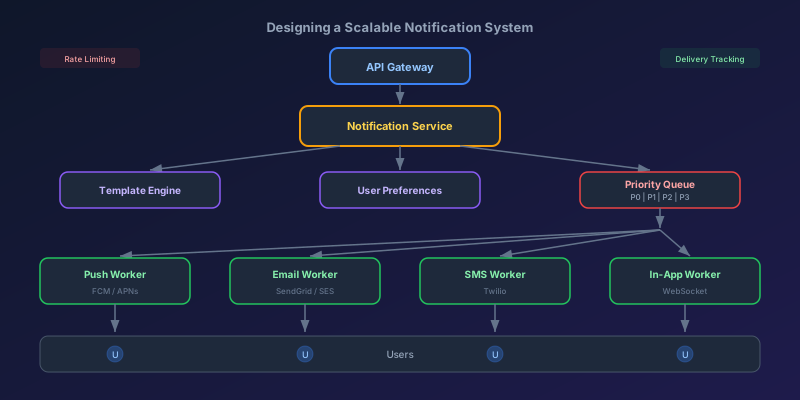
Designing a Scalable Notification System
A system design deep dive into building a notification platform that handles push, email, SMS, and in-app notifications at scale — covering architecture, priority queues, fan-out strategies, rate limiting, and delivery tracking.
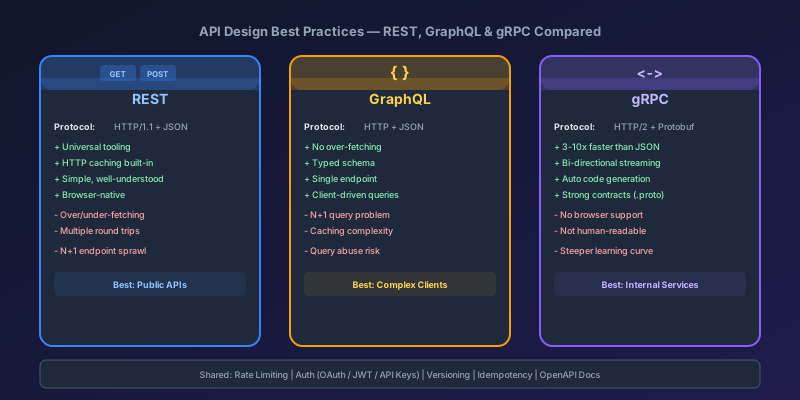
API Design Best Practices: REST, GraphQL, and gRPC Compared
A deep dive into the three dominant API paradigms — REST, GraphQL, and gRPC — covering design principles, pagination strategies, versioning, authentication patterns, and practical guidance on choosing the right one for your system.
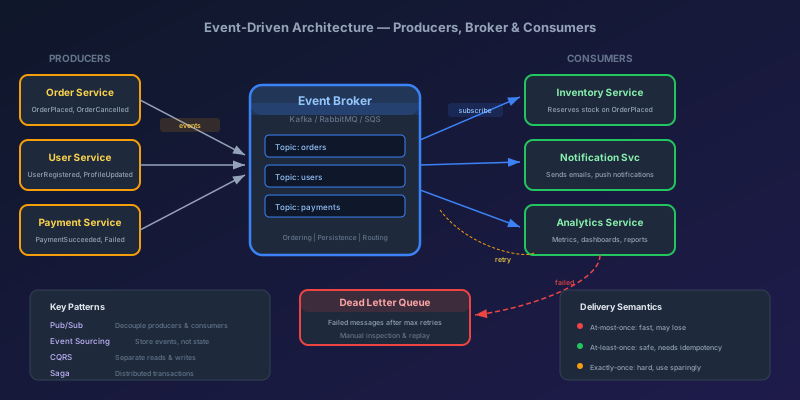
Event-Driven Architecture: Patterns, Pitfalls, and Practical Guidance
A comprehensive guide to event-driven architecture — covering pub/sub, event sourcing, CQRS, saga patterns, message broker trade-offs, and the hard lessons teams learn in production.
Comments
No comments yet. Be the first!