Designing a Real-Time Chat System Like WhatsApp
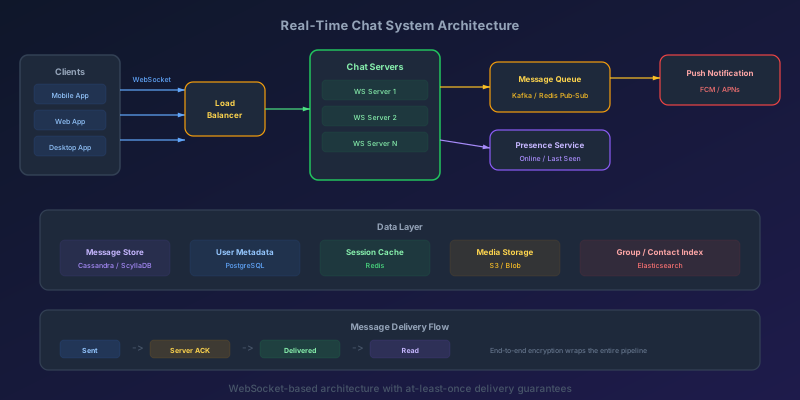
WhatsApp passed 3 billion monthly active users in 2025 and routinely handles around 100 billion messages per day. When you send a message, it arrives in milliseconds, displays a single checkmark (sent), then a double checkmark (delivered), then turns blue (read). The recipient sees a typing indicator before the message arrives. If they are offline, they get a push notification, and the message is waiting when they open the app.
Building this system is one of the most common — and most revealing — system design interview questions. It tests your understanding of real-time communication, distributed systems, storage design, and protocol selection all at once.
Let's design it from the ground up.
Functional Requirements
Before writing any architecture, pin down exactly what the system must do:
- 1:1 messaging — send and receive text messages between two users
- Group messaging — send messages to groups (WhatsApp's current cap is 1,024 members, which is a useful target to design against)
- Message delivery status — sent, delivered, read receipts
- Online/offline presence — show when users are online or last seen
- Media sharing — images, video, documents, voice messages
- Push notifications — notify offline users of new messages
- Message history — persist and retrieve past conversations
- Typing indicators — show when someone is composing a message
Non-Functional Requirements
These drive every architectural decision:
- Latency — message delivery under 200ms for online users in the same region
- Scale — support 500 million daily active users, 50 billion messages per day
- Reliability — zero message loss. Every message must be delivered at least once
- Ordering — messages within a conversation appear in the correct order
- Availability — 99.99% uptime (less than 52 minutes of downtime per year)
- Storage — retain messages for 30 days on the server (longer for undelivered)
Real-Time Communication: Choosing the Protocol
The first critical decision is how clients and servers communicate in real time.
HTTP Polling
The client repeatedly asks the server "any new messages?" at fixed intervals.
Client: GET /messages?since=timestamp  (every 5 seconds)
Server: 200 OK, [] (empty most of the time)
Problems: Wastes bandwidth. High latency (up to 5 seconds). Hammers the server with empty requests. Does not scale.
HTTP Long Polling
The client sends a request, and the server holds it open until there is new data or a timeout occurs.
Client: GET /messages?since=timestamp
Server: (holds connection for up to 30 seconds)
Server: 200 OK, [{message}] (when data arrives)
Client: immediately sends another request
Better, but each message requires a new HTTP request/response cycle. Connection management is complex. Still not truly bidirectional.
Server-Sent Events (SSE)
The server pushes events to the client over a single long-lived HTTP connection.
Client: GET /events (Accept: text/event-stream)
Server: data: {"type":"message","from":"user1","text":"hello"}\n\n
Server: data: {"type":"typing","from":"user1"}\n\n
Good for one-way push (notifications, feeds), but SSE is unidirectional. The client still needs regular HTTP requests to send messages. Not ideal for chat.
WebSocket
A full-duplex, bidirectional communication channel over a single TCP connection.
Client <-> Server: Persistent bidirectional connection
Client: {"type":"send","to":"user2","text":"hello"}
Server: {"type":"ack","messageId":"msg-123","status":"sent"}
Server: {"type":"message","from":"user1","text":"hello"}
This is the right choice for chat. Low latency. Bidirectional. Low overhead after the initial handshake. Both client and server can push data at any time.
Protocol Comparison
| Feature | Polling | Long Polling | SSE | WebSocket |
|---|---|---|---|---|
| Latency | High (interval) | Medium | Low | Very Low |
| Direction | Client to server | Client to server | Server to client | Bidirectional |
| Connection overhead | New per request | New per message | Single | Single |
| Server push | No | Simulated | Yes | Yes |
| Browser support | Universal | Universal | Good | Good |
| Best for | Legacy systems | Fallback | Feeds, dashboards | Chat, gaming |
Decision: WebSocket for primary communication, with long polling as a fallback for restrictive network environments.
Connection Management
At 500 million daily active users, you may have 50-100 million concurrent WebSocket connections. Each connection is a persistent TCP socket that consumes memory on the server.
Connection Server Design
                    ┌─────────────────────┐
                    │   Load Balancer      │
                    │  (L4 / sticky)       │
                    └──────────┬──────────┘
                               │
            ┌──────────────────┼──────────────────┐
            │                  │                  │
     ┌──────┴──────┐   ┌──────┴──────┐   ┌──────┴──────┐
     │  WS Server  │   │  WS Server  │   │  WS Server  │
     │  (50K conn) │   │  (50K conn) │   │  (50K conn) │
     └─────────────┘   └─────────────┘   └─────────────┘
Each WebSocket server handles approximately 50,000 concurrent connections. At 100 million concurrent users, you need around 2,000 WebSocket servers.
Session Registry
When User A sends a message to User B, the system must know which WebSocket server User B is connected to. This requires a global session registry.
// Redis-based session registry
// When a user connects:
await redis.hset("sessions", userId, JSON.stringify({
  serverId: "ws-server-042",
  connectedAt: Date.now(),
  deviceType: "mobile"
}));

// When routing a message to a user:
const session = await redis.hget("sessions", recipientId);
if (session) {
  const { serverId } = JSON.parse(session);
  // Route message to that specific WS server
  await publishToServer(serverId, message);
} else {
  // User is offline — queue for push notification
  await queueOfflineMessage(recipientId, message);
}
Heartbeat and Reconnection
WebSocket connections drop silently — the server must detect dead connections proactively.
// Server-side heartbeat
const HEARTBEAT_INTERVAL = 30_000; // 30 seconds
const HEARTBEAT_TIMEOUT = 10_000;  // 10 second grace period

function setupHeartbeat(ws) {
  ws.isAlive = true;
  ws.on('pong', () => { ws.isAlive = true; });

  const interval = setInterval(() => {
    if (!ws.isAlive) {
      clearInterval(interval);
      ws.terminate(); // Dead connection
      return;
    }
    ws.isAlive = false;
    ws.ping();
  }, HEARTBEAT_INTERVAL);
}
Message Delivery Guarantees
Chat messages require at-least-once delivery — it is acceptable to deliver a message twice (the client deduplicates), but never acceptable to lose a message.
The Message Lifecycle
1. Client A sends message     -> message stored with status "SENT"
2. Server persists message    -> server ACKs to Client A (single check ✓)
3. Server routes to Client B  -> if online, deliver via WebSocket
4. Client B ACKs receipt      -> status updated to "DELIVERED" (double check ✓✓)
5. Client B opens conversation -> status updated to "READ" (blue checks)
Server-Side Message Processing
async function handleIncomingMessage(senderId, payload) {
  const messageId = generateSnowflakeId(); // Globally unique, time-ordered

  // Step 1: Persist immediately (durability first)
  const message = {
    messageId,
    conversationId: payload.conversationId,
    senderId,
    recipientId: payload.recipientId,
    content: payload.encryptedContent,
    timestamp: Date.now(),
    status: "SENT"
  };
  await messageStore.write(message);

  // Step 2: ACK to sender (single checkmark)
  sendToUser(senderId, {
    type: "ack",
    messageId,
    status: "sent",
    timestamp: message.timestamp
  });

  // Step 3: Route to recipient
  const recipientSession = await sessionRegistry.get(payload.recipientId);
  if (recipientSession) {
    await routeToServer(recipientSession.serverId, message);
  } else {
    await pushNotificationQueue.enqueue({
      userId: payload.recipientId,
      messageId,
      preview: payload.notificationPreview
    });
  }
}
Handling Delivery Failures
If the recipient's WebSocket server cannot deliver the message (connection dropped between the registry lookup and delivery), the message enters a retry queue:
Message -> Route to WS Server -> Delivery failed
                                    |
                                    v
                              Retry Queue (exponential backoff)
                                    |
                         ┌──────────┼──────────┐
                         │          │          │
                     Retry 1    Retry 2    Give up
                     (1 sec)    (5 sec)    -> Push notification
Message Ordering
Messages within a single conversation must appear in order. Use a monotonically increasing sequence number per conversation:
// Atomic sequence number increment per conversation
const seqNum = await redis.hincrby(
  `conversation:${conversationId}:seq`, "counter", 1
);
message.sequenceNumber = seqNum;
The client uses sequence numbers to order messages and detect gaps (missing messages that need to be fetched from the server).
1:1 Chat Architecture
For direct messages, the flow is straightforward:
User A -> WS Server 1 -> Message Service -> Persist to DB
                                         -> Lookup User B's session
                                         -> Route to WS Server 2 -> User B
Each conversation is identified by a deterministic ID based on both user IDs:
function getConversationId(userId1, userId2) {
  const sorted = [userId1, userId2].sort();
  return `dm:${sorted[0]}:${sorted[1]}`;
}
Group Chat Architecture
Group messaging introduces a fan-out problem. When a user sends a message to a 200-person group, the system must deliver it to 199 other users.
Write-Time Fan-Out vs Read-Time Fan-Out
Write-time fan-out (push model): When a message is sent, immediately create a copy for each group member's inbox.
User sends to Group (200 members)
  -> Write 200 inbox entries
  -> Push to 200 users' WebSocket connections
Read-time fan-out (pull model): Store the message once in the group's timeline. When each member opens the group, they read from the group timeline.
User sends to Group
  -> Write 1 message to group timeline
  -> Each member reads from group timeline when they open it
Hybrid approach (recommended):
Small groups (< 50 members):
  -> Write-time fan-out (fast delivery, manageable duplication)

Large groups (50-1,024 members):
  -> Store once in group timeline
  -> Push notifications to all members
  -> Members fetch group timeline on open
Group Message Delivery
async function handleGroupMessage(senderId, groupId, payload) {
  const messageId = generateSnowflakeId();
  const members = await groupService.getMembers(groupId);

  // Persist the message once
  const message = {
    messageId,
    groupId,
    senderId,
    content: payload.encryptedContent,
    timestamp: Date.now()
  };
  await messageStore.write(message);

  // Fan out delivery
  const onlineMembers = [];
  const offlineMembers = [];

  for (const memberId of members) {
    if (memberId === senderId) continue;
    const session = await sessionRegistry.get(memberId);
    if (session) {
      onlineMembers.push({ memberId, session });
    } else {
      offlineMembers.push(memberId);
    }
  }

  // Deliver to online members via WebSocket
  await Promise.all(
    onlineMembers.map(({ session }) =>
      routeToServer(session.serverId, message)
    )
  );

  // Queue push notifications for offline members
  await pushNotificationQueue.enqueueBatch(
    offlineMembers.map(memberId => ({
      userId: memberId,
      messageId,
      groupId,
      preview: payload.notificationPreview
    }))
  );
}
Message Storage
Chat messages have a distinctive access pattern: recent messages are read frequently, old messages are read rarely, and writes are append-only.
Storage Design
Hot storage (recent messages):
  -> Cassandra / ScyllaDB
  -> Partition key: conversation_id
  -> Clustering key: message_timestamp (descending)
  -> TTL: 30 days on server (messages live on device permanently)

Cold storage (media, old messages):
  -> S3 / Azure Blob Storage
  -> Tiered storage with lifecycle policies

User metadata:
  -> PostgreSQL
  -> User profiles, group membership, settings

Session and presence data:
  -> Redis
  -> Ephemeral, high read/write throughput
Cassandra Schema for Messages
CREATE TABLE messages (
  conversation_id text,
  message_id timeuuid,
  sender_id text,
  content blob,        -- encrypted message content
  content_type text,   -- 'text', 'image', 'video', 'audio'
  media_url text,      -- S3 URL for media messages
  status text,         -- 'sent', 'delivered', 'read'
  created_at timestamp,
  PRIMARY KEY (conversation_id, message_id)
) WITH CLUSTERING ORDER BY (message_id DESC)
  AND default_time_to_live = 2592000;  -- 30 days
Why Cassandra for Messages
- Write-optimized — append-only log-structured merge tree
- Partition-friendly — messages for one conversation live on the same node
- Horizontal scaling — add nodes to handle more conversations
- Tunable consistency — use
ONEfor availability,QUORUMfor consistency - Time-series friendly — clustering by timestamp makes "load recent messages" efficient
Presence System
The presence system tracks which users are online and their "last seen" time.
Naive Approach: Heartbeat to Database
// Every 30 seconds:
await redis.set(`presence:${userId}`, Date.now(), "EX", 60);

// Check if user is online:
const lastSeen = await redis.get(`presence:${userId}`);
const isOnline = lastSeen && (Date.now() - lastSeen < 60000);
This works but has a problem at scale: if every user sends a heartbeat every 30 seconds, and you have 100 million online users, that is 3.3 million writes per second just for presence.
Scalable Approach: Channel-Based Presence
Only track and broadcast presence for users who are in each other's contact lists and have the app open:
// When User A opens a chat with User B:
subscribeToPresence(userBId);

// Presence updates only go to subscribers:
function updatePresence(userId, status) {
  const subscribers = await getPresenceSubscribers(userId);
  for (const sub of subscribers) {
    sendToUser(sub, {
      type: "presence",
      userId,
      status, // "online" | "offline" | "typing"
      lastSeen: Date.now()
    });
  }
}
Typing Indicators
Typing indicators are ephemeral — they do not need persistence or reliability guarantees.
// Client sends typing event:
ws.send(JSON.stringify({
  type: "typing",
  conversationId: "conv-123",
  status: "started" // or "stopped"
}));

// Server forwards to conversation participants (no persistence):
function handleTypingEvent(senderId, conversationId, status) {
  const participants = await getConversationParticipants(conversationId);
  for (const participant of participants) {
    if (participant !== senderId) {
      sendToUser(participant, {
        type: "typing",
        conversationId,
        userId: senderId,
        status
      });
    }
  }
}
Push Notifications
When a user is offline, messages must be delivered via push notifications through platform-specific services.
Push Notification Pipeline
Offline message detected
  -> Push Notification Queue (Kafka)
  -> Notification Worker
  -> Device token lookup (PostgreSQL)
  -> Platform-specific delivery:
       iOS    -> Apple Push Notification Service (APNs)
       Android -> Firebase Cloud Messaging (FCM)
       Web    -> Web Push API
Batching and Rate Limiting
If a user has 50 unread messages across 10 conversations, do not send 50 push notifications. Batch them:
async function processNotificationBatch(userId) {
  const pendingNotifications = await notificationQueue.drain(userId);

  if (pendingNotifications.length === 1) {
    // Single message: show full preview
    await sendPush(userId, {
      title: pendingNotifications[0].senderName,
      body: pendingNotifications[0].preview
    });
  } else {
    // Multiple messages: show summary
    const uniqueSenders = new Set(pendingNotifications.map(n => n.senderId));
    await sendPush(userId, {
      title: "New messages",
      body: `${pendingNotifications.length} messages from ${uniqueSenders.size} conversations`
    });
  }
}
Media Handling
Images and videos require a different pipeline than text messages — they are large, need processing, and should not flow through the WebSocket connection.
Media Upload Flow
1. Client requests upload URL from server
2. Server generates pre-signed S3 URL
3. Client uploads media directly to S3 (bypasses chat server)
4. Client sends message with S3 reference through WebSocket
5. Server generates thumbnails asynchronously
6. Recipient downloads media from CDN
// Step 1-2: Generate pre-signed upload URL
async function getUploadUrl(userId, fileType, fileSize) {
  const key = `media/${userId}/${generateId()}.${fileType}`;
  const url = await s3.getSignedUrl("putObject", {
    Bucket: "chat-media",
    Key: key,
    ContentType: `image/${fileType}`,
    Expires: 300 // 5 minutes
  });
  return { uploadUrl: url, mediaKey: key };
}

// Step 4: Message with media reference
{
  type: "message",
  conversationId: "conv-123",
  content: { mediaKey: "media/user1/abc123.jpg", caption: "Check this out" },
  contentType: "image"
}
End-to-End Encryption Overview
End-to-end encryption (E2EE) ensures that only the sender and recipient can read messages. The server stores and routes encrypted blobs without access to the plaintext.
Signal Protocol (Used by WhatsApp)
Key Exchange:
1. Each device generates a long-term identity key pair
2. Each device generates a set of ephemeral pre-keys
3. Pre-keys are uploaded to the server
4. When User A wants to message User B:
   a. A fetches B's pre-key bundle from server
   b. A performs X3DH key agreement -> shared secret
   c. A uses Double Ratchet to derive message keys
   d. Each message is encrypted with a unique key

Result:
- Server cannot decrypt messages
- Forward secrecy: compromising one key doesn't reveal past messages
- Future secrecy: compromising one key doesn't reveal future messages
Impact on System Design
E2EE affects several design decisions:
- Server-side search is impossible — the server cannot index encrypted content
- Message previews for push notifications must be generated client-side and sent separately (or the notification is generic)
- Group chats require sender to encrypt the message separately for each member's key (or use a shared group key with sender key protocol)
- Multi-device support requires each device to have its own encryption session
Scaling WebSocket Servers
Horizontal Scaling
WebSocket connections are stateful — a connection lives on a specific server. Scaling requires careful coordination.
                 ┌───────────────────────┐
                 │     API Gateway /      │
                 │    Load Balancer       │
                 │  (sticky sessions)     │
                 └───────────┬───────────┘
                             │
         ┌───────────────────┼───────────────────┐
         │                   │                   │
   ┌─────┴──────┐     ┌─────┴──────┐     ┌─────┴──────┐
   │ WS Server 1│     │ WS Server 2│     │ WS Server 3│
   │ 50K conns  │     │ 50K conns  │     │ 50K conns  │
   └─────┬──────┘     └─────┬──────┘     └─────┬──────┘
         │                   │                   │
         └───────────────────┼───────────────────┘
                             │
                    ┌────────┴────────┐
                    │  Redis Pub/Sub  │
                    │  or Kafka       │
                    └─────────────────┘
Cross-Server Message Routing
When User A (on WS Server 1) sends a message to User B (on WS Server 3), the servers need an internal communication channel:
// Option 1: Redis Pub/Sub
// Each WS server subscribes to its own channel
await redis.subscribe(`ws-server:${serverId}`);

// Routing a message to another server:
await redis.publish(`ws-server:${targetServerId}`, JSON.stringify(message));

// Option 2: Kafka (better for durability)
// Each WS server consumes from its own partition
await kafka.produce({
  topic: "chat-messages",
  key: targetServerId,
  value: JSON.stringify(message)
});
Connection Draining
When deploying new code or scaling down, you cannot just kill WebSocket connections. Implement graceful draining:
async function drainServer(server) {
  // 1. Stop accepting new connections
  server.stopAccepting();

  // 2. Notify all connected clients to reconnect
  for (const ws of server.connections) {
    ws.send(JSON.stringify({ type: "reconnect", reason: "server_drain" }));
  }

  // 3. Wait for clients to disconnect (with timeout)
  await waitForEmpty(server.connections, { timeout: 30_000 });

  // 4. Force close remaining connections
  for (const ws of server.connections) {
    ws.close(1001, "Server shutting down");
  }
}
Putting It All Together: Complete Architecture
┌─────────┐         ┌──────────────┐         ┌─────────────┐
│ Clients  │ ──WS──>│ WS Servers   │──Kafka──>│ Message     │
│          │<──WS── │ (stateful)   │         │ Processors  │
└─────────┘         └──────┬───────┘         └──────┬──────┘
                           │                        │
                    ┌──────┴───────┐         ┌──────┴──────┐
                    │ Redis        │         │ Cassandra   │
                    │ (sessions,   │         │ (messages)  │
                    │  presence)   │         └─────────────┘
                    └──────────────┘
                                             ┌─────────────┐
                                             │ PostgreSQL  │
                                             │ (users,     │
                                             │  groups)    │
                                             └─────────────┘
                                             ┌─────────────┐
                                             │ S3 + CDN    │
                                             │ (media)     │
                                             └─────────────┘
                                             ┌─────────────┐
                                             │ Push Service│
                                             │ (APNs/FCM) │
                                             └─────────────┘
Key Numbers to Remember
| Metric | Value |
|---|---|
| Connections per WS server | ~50,000 |
| Memory per connection | ~10 KB |
| Message size (avg) | ~200 bytes |
| Messages per second (global, derived from 100 B/day) | ~1.16 million |
| Storage per day (messages only, ~200 B × 100 B msgs) | ~20 TB raw / less compressed |
| Heartbeat interval | 30 seconds |
| Message delivery SLA | < 200ms (same region) |
| Push notification SLA | < 2 seconds |
This architecture handles the core challenges of real-time chat: persistent connections, reliable delivery, presence tracking, and horizontal scaling. In a real interview, you would zoom into whichever component the interviewer finds most interesting — the key is demonstrating that you understand the full picture and can reason about trade-offs at each layer.
Keep reading
Write Skew: The Anomaly Snapshot Isolation Does Not Catch
Two transactions each read what the other writes, both commit, and an invariant dies. Snapshot isolation allows write skew — here is how to close the hole.
Designing a Shopping Cart: Price Snapshots, Merge, and No Inventory Hold
A cart is a per-user document, not a reservation. What to store on the line, how to merge an anonymous cart at login, and when the price is allowed to change.
Designing Snowflake-Style IDs: Ordering, Workers, and Clock Rollback
A 64-bit id from a timestamp, a worker number, and a per-millisecond sequence. How many you can issue, why the clock must not step backwards, and why JavaScript cannot hold one.
PostgreSQL 19 on October 29: WAIT for Read-Your-Writes, REPACK Without the Lock, and What Got Pulled
PostgreSQL 19 GA is scheduled for October 29, 2026. The WAIT command gives standbys read-your-writes, REPACK CONCURRENTLY replaces VACUUM FULL and CLUSTER, autovacuum goes parallel, and SQL/PGQ, online checksums, and FOR PORTION OF were reverted in Beta 4.
Idempotency Keys for Write APIs
How to make POST safe to retry: the key, the stored response, the race between two identical requests, and the expiry that forgets too soon.
Read-Your-Writes: The User Just Saved and the Read Replica Does Not Know
Why a write to the primary followed by a read from a replica shows stale data, and the practical ways to pin the next read without sending all traffic to the primary.
Newsletter
New posts, straight to your inbox
One email per post. No spam, no tracking pixels, unsubscribe anytime.
Comments
- No comments yet. Be the first.