Next.js Partial Prerendering: The Production Migration Guide

Partial Prerendering (PPR) was the marquee experimental feature of Next.js 15 — the static-shell-with-dynamic-holes approach you opted into via experimental.ppr. In Next.js 16 it has been retired as a standalone flag and rolled into a broader primitive called Cache Components (cacheComponents: true). The mental model carries over; the migration story is more involved than it looks. This guide covers both, with the setup that actually makes it through to production.
What PPR Actually Means
The marketing pitch is "static shell, dynamic holes." The reality is more nuanced.
With PPR, Next.js generates a static HTML shell at build time (or on first request with ISR). This shell is sent to the browser instantly. Parts of the page marked as dynamic — wrapped in <Suspense> boundaries — are streamed in afterwards, rendered on the server per-request.
The mental model shift: you don't choose static or dynamic at the page level anymore. You choose it at the component level.
Without PPR, a single cookies() call anywhere in the page's component tree makes the entire page dynamic. With PPR, that cookies() call makes that component's subtree dynamic — the rest of the page stays static.
Enabling PPR
In next.config.ts:
import type { NextConfig } from 'next';

const nextConfig: NextConfig = {
  experimental: {
    ppr: true, // or 'incremental' to opt-in page-by-page
  },
};

export default nextConfig;
With ppr: 'incremental', you enable PPR per-layout or per-page:
// app/dashboard/layout.tsx
export const experimental_ppr = true;
This is the safer migration path for existing apps — you adopt PPR one route at a time without touching the rest of the app.
What Becomes the Static Shell
The static shell is everything outside your <Suspense> boundaries. Next.js renders this at build time and caches it at the CDN edge.
// app/product/[id]/page.tsx
export default function ProductPage({ params }: { params: { id: string } }) {
  return (
    <main>
      {/* Static — rendered at build time */}
      <ProductNav />
      <ProductHero productId={params.id} />

      {/* Dynamic — streamed per-request */}
      <Suspense fallback={<PricingSkeleton />}>
        <LivePricing productId={params.id} />
      </Suspense>

      <Suspense fallback={<ReviewsSkeleton />}>
        <UserReviews productId={params.id} />
      </Suspense>
    </main>
  );
}
ProductHero uses only params — no cookies, no headers, no uncached fetches — so it's static. LivePricing calls an uncached pricing API per-request, so wrapping it in <Suspense> makes it a dynamic hole.
Identifying Dynamic Components
The main signals that make a component subtree dynamic:
cookies()orheaders()fromnext/headerssearchParamsprop on a page componentunstable_noStore()or{ cache: 'no-store' }fetch options- Any
awaiton a non-cached external call
Run your app in development and watch the build output: Next.js logs which routes are static, dynamic, or partially-prerendered, and the same information appears at next build time. The fastest way to audit an existing app before touching any code is to do a production build and check the route tree it prints.
The Migration Process
Step 1: Enable incremental PPR
Set ppr: 'incremental' in next.config.ts. Nothing changes yet — you're just unlocking the per-page opt-in.
Step 2: Audit your highest-traffic pages
For each page, ask: "What on this page actually needs to be per-request?" Common answers:
- Shopping carts, auth state, personalisation → dynamic
- Product descriptions, blog content, navigation → static
- Prices, inventory, recommendations → depends on your caching strategy
Step 3: Add Suspense boundaries
Wrap dynamic subtrees in <Suspense> with meaningful fallbacks:
<Suspense fallback={<CartIconSkeleton />}>
  <CartIcon /> {/* reads cookies for session cart */}
</Suspense>
Don't add <Suspense> speculatively. If the component isn't dynamic, the boundary has no effect on PPR (though it still affects streaming behaviour).
Step 4: Opt the page in
// app/product/[id]/page.tsx
export const experimental_ppr = true;
Check your build output. The route should now show Static (PPR) rather than Dynamic.
Step 5: Validate the static shell
The static shell should match what a logged-out, zero-personalisation user sees. Verify:
- No user-specific data appears in the raw HTML (view source)
- Fallback skeletons render correctly before dynamic content arrives
- Core Web Vitals improve — LCP should drop significantly for content-heavy pages
Caching Interaction
PPR works alongside Next.js's Data Cache. A fetch with { cache: 'force-cache' } contributes to the static shell. A fetch with { cache: 'no-store' } creates a dynamic hole.
The practical pattern for a product page:
// Static: product details are slow-changing
const product = await fetch(`/api/products/${id}`, {
  next: { revalidate: 3600 }, // ISR: revalidate hourly
});

// Dynamic: pricing changes per-request
const pricing = await fetch(`/api/pricing/${id}`, {
  cache: 'no-store',
});
product contributes to the static shell after the cache entry is warm. pricing is a dynamic hole, streamed per-request.
Common Mistakes
Putting everything in Suspense. PPR degrades gracefully — if your "static" component is actually dynamic (due to a cookies() call you missed), the whole subtree falls back to dynamic. Run a production next build and check the route table it prints to verify your shells are actually static.
Missing fallback states. Dynamic holes stream in after the shell. If your fallback is null, users see a layout shift as content pops in. Always provide skeleton fallbacks that match the final content dimensions.
Conflating PPR with streaming. Streaming via <Suspense> works without PPR. PPR is specifically about pre-generating the static shell at build time and caching it at the edge. An app without PPR can still stream dynamic content — it just does so from a compute node, not a CDN-cached response.
Leftover force-dynamic exports. export const dynamic = 'force-dynamic' on a page overrides PPR and forces a per-request render. If you've got these from a previous Next.js version, remove them on routes where PPR is desired.
Measuring the Impact
After enabling PPR on a content-heavy page:
- TTFB drops: the static shell is served from the CDN edge, not a compute node.
- LCP drops: the largest content — usually in the static shell — arrives with the first byte.
- TBT/INP are unaffected: those are client-side metrics.
Compare p75 LCP before and after across a few days of traffic. PPR's benefit is most visible on cache-warm pages serving geographically distributed users — precisely the traffic profile of a high-growth e-commerce or content site.
The incremental adoption mode in Next.js 16 makes this migration low-risk. Start with your highest-traffic, most content-heavy page, validate the metrics, and roll out from there.
Keep reading
Server Components vs. Client Components: A Mental Model That Sticks
The hardest part of React Server Components isn't the syntax — it's knowing which kind of component you're writing and why. Here is the mental model that makes the boundary obvious.
Next.js 16 and React 19: What Actually Matters in 2026
A practical guide to the features that changed how we build React apps — Server Components, the new compiler, and the patterns that stuck.
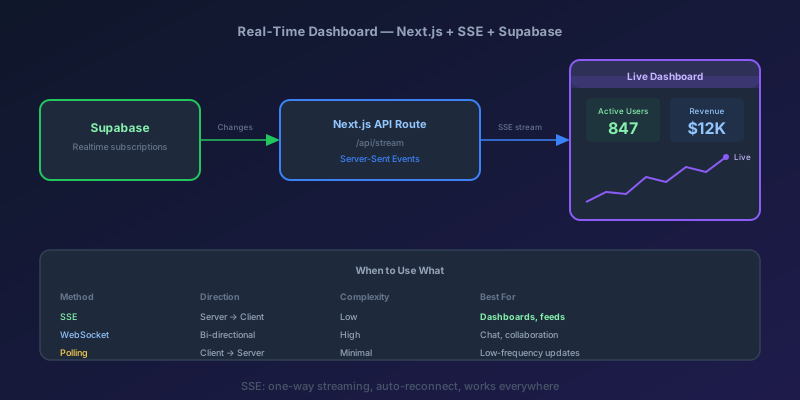
Building a Real-Time Dashboard with Next.js, Server-Sent Events, and Supabase
A step-by-step guide to building a live-updating dashboard using Next.js API routes, Server-Sent Events, and Supabase Realtime — with reconnection handling and smooth UI transitions.
React 19 useOptimistic: Instant UI Without Lying to the Server
How to wire useOptimistic with Actions so toggles and comments feel native, roll back on failure, and stay consistent when two mutations overlap.
Designing Webhook Delivery That Survives Flaky Consumers
Signing, retries, ordering, and dead-lettering: the design decisions that separate reliable webhook delivery from silent event loss.
Optimistic UI Updates: Making Apps Feel Instant Without Lying to Users
The like button that responds before the server confirms feels instant. The trick is updating the UI first and reconciling later — and handling the rollback so you never mislead the user.
Newsletter
New posts, straight to your inbox
One email per post. No spam, no tracking pixels, unsubscribe anytime.
Comments
- No comments yet. Be the first.