Building a Real-Time Dashboard with Next.js, Server-Sent Events, and Supabase
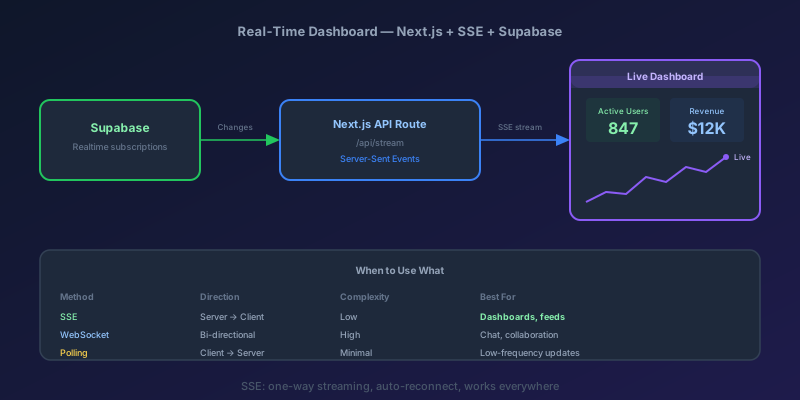
You build a dashboard. It shows metrics. The product manager asks: "Can this update in real time?" You think WebSockets. You start researching Socket.IO, connection management, reconnection logic, scaling across multiple server instances, sticky sessions, and suddenly your "simple dashboard" has more infrastructure than the app it is monitoring.
Stop. For dashboards, Server-Sent Events (SSE) are almost always the right answer. Let me show you why, and then we will build one with Next.js and Supabase.
Why SSE Beats WebSockets for Dashboards
Dashboards are fundamentally one-way: the server pushes data, the client displays it. WebSockets are bidirectional — which means you are paying the complexity tax for a feature you do not need.
| Concern | SSE | WebSockets |
|---|---|---|
| Direction | Server to client | Bidirectional |
| Protocol | HTTP (works with all proxies, CDNs, load balancers) | WS (requires upgrade, may need proxy config) |
| Reconnection | Built-in with EventSource | Manual implementation required |
| Infrastructure | Standard HTTP servers | May need sticky sessions or Redis pub/sub |
| Browser support | All modern browsers | All modern browsers |
| Data format | Text (typically JSON) | Text or binary |
| Connection limit | ~6 per domain (HTTP/1.1), unlimited (HTTP/2) | No hard limit |
The infrastructure story alone is decisive. SSE runs over plain HTTP. No WebSocket upgrade, no special proxy configuration, no sticky sessions when you scale horizontally. Your existing load balancer, CDN, and monitoring all work unchanged.
When to Use What
| Use Case | Recommendation |
|---|---|
| Dashboards & live feeds | SSE |
| Notifications | SSE |
| Chat applications | WebSockets |
| Collaborative editing | WebSockets |
| Simple polling (< 1 update/min) | Polling |
| Gaming / low-latency bidirectional | WebSockets |
Architecture Overview
Here is what we are building:
- Supabase stores the data and emits real-time change events
- Next.js API route subscribes to Supabase Realtime and streams changes as SSE
- React client connects to the SSE endpoint using
EventSourceand renders live updates
The API route acts as a bridge — it holds one Supabase Realtime subscription and fans out to multiple SSE clients. This avoids exposing your Supabase credentials to the browser.
Setting Up Supabase
First, create a table to hold your dashboard metrics. In the Supabase SQL editor:
create table metrics (
  id uuid default gen_random_uuid() primary key,
  name text not null,
  value numeric not null,
  unit text default '',
  updated_at timestamptz default now()
);

-- Enable realtime on this table
alter publication supabase_realtime add table metrics;

-- Seed some data
insert into metrics (name, value, unit) values
  ('Active Users', 1247, ''),
  ('Revenue Today', 48290, 'USD'),
  ('Error Rate', 0.23, '%'),
  ('Avg Response Time', 142, 'ms');
Install the Supabase client:
npm install @supabase/supabase-js
The SSE API Route
This is the core of the system. The API route opens a long-lived HTTP connection and streams data as SSE events.
// app/api/metrics/stream/route.ts
import { createClient } from "@supabase/supabase-js";

const supabase = createClient(
  process.env.NEXT_PUBLIC_SUPABASE_URL!,
  process.env.SUPABASE_SERVICE_ROLE_KEY!,
);

export const runtime = "nodejs";
export const dynamic = "force-dynamic";

export async function GET(request: Request) {
  const encoder = new TextEncoder();
  let heartbeat: ReturnType<typeof setInterval> | undefined;
  let channel: ReturnType<typeof supabase.channel> | undefined;

  const stream = new ReadableStream({
    start(controller) {
      const sendEvent = (event: string, data: unknown) => {
        controller.enqueue(
          encoder.encode(`event: ${event}\ndata: ${JSON.stringify(data)}\n\n`),
        );
      };

      // Fetch current metrics and send immediately
      supabase
        .from("metrics")
        .select("*")
        .order("name")
        .then(({ data }) => {
          if (data) sendEvent("init", data);
        });

      // Subscribe to real-time changes
      channel = supabase
        .channel("metrics-changes")
        .on(
          "postgres_changes",
          { event: "*", schema: "public", table: "metrics" },
          (payload) => sendEvent("update", payload),
        )
        .subscribe();

      // Heartbeat to keep connection alive through proxies
      heartbeat = setInterval(() => {
        try {
          controller.enqueue(encoder.encode(": heartbeat\n\n"));
        } catch {
          clearInterval(heartbeat!);
        }
      }, 30000);

      // The cleanest place to detect client disconnect in a Next.js
      // route handler is request.signal — it fires when the browser
      // closes the EventSource or navigates away.
      request.signal.addEventListener("abort", () => {
        if (heartbeat) clearInterval(heartbeat);
        if (channel) supabase.removeChannel(channel);
        try {
          controller.close();
        } catch {
          // already closed
        }
      });
    },
    cancel() {
      // Belt-and-braces cleanup if the stream is cancelled by the runtime
      if (heartbeat) clearInterval(heartbeat);
      if (channel) supabase.removeChannel(channel);
    },
  });

  return new Response(stream, {
    headers: {
      "Content-Type": "text/event-stream",
      "Cache-Control": "no-cache, no-transform",
      Connection: "keep-alive",
    },
  });
}
Key details:
- Heartbeat comments (lines starting with
:) keep the connection alive through proxies and load balancers that kill idle connections - Initial data is sent immediately so the client does not show an empty state
- Cleanup unsubscribes from Supabase when the client disconnects
The Client-Side EventSource Hook
Now build a custom React hook that manages the SSE connection with automatic reconnection.
// hooks/useMetricsStream.ts
"use client";

import { useEffect, useRef, useState, useCallback } from "react";

interface Metric {
  id: string;
  name: string;
  value: number;
  unit: string;
  updated_at: string;
}

export function useMetricsStream() {
  const [metrics, setMetrics] = useState<Metric[]>([]);
  const [status, setStatus] = useState<"connecting" | "connected" | "error">(
    "connecting",
  );
  const retryCount = useRef(0);
  const eventSourceRef = useRef<EventSource | null>(null);

  const connect = useCallback(() => {
    const es = new EventSource("/api/metrics/stream");
    eventSourceRef.current = es;

    es.onopen = () => {
      setStatus("connected");
      retryCount.current = 0;
    };

    es.addEventListener("init", (event) => {
      const data = JSON.parse(event.data) as Metric[];
      setMetrics(data);
    });

    es.addEventListener("update", (event) => {
      const payload = JSON.parse(event.data);
      setMetrics((prev) => {
        const updated = [...prev];
        const index = updated.findIndex((m) => m.id === payload.new?.id);
        if (payload.eventType === "DELETE") {
          return updated.filter((m) => m.id !== payload.old?.id);
        }
        if (index >= 0) {
          updated[index] = payload.new;
        } else if (payload.new) {
          updated.push(payload.new);
        }
        return updated;
      });
    });

    es.onerror = () => {
      es.close();
      setStatus("error");

      // Exponential backoff: 1s, 2s, 4s, 8s, max 30s
      const delay = Math.min(1000 * Math.pow(2, retryCount.current), 30000);
      retryCount.current++;
      setTimeout(connect, delay);
    };
  }, []);

  useEffect(() => {
    connect();
    return () => eventSourceRef.current?.close();
  }, [connect]);

  return { metrics, status };
}
The EventSource API has built-in reconnection, but its default behavior is not always sufficient. Browsers reconnect automatically after the onerror event, but the retry interval is browser-dependent and there is no backoff. This custom hook gives us control: exponential backoff starting at 1 second, capped at 30 seconds.
Building the Dashboard UI
Now wire it together with a dashboard component that shows live metrics with smooth transitions.
// app/dashboard/page.tsx
"use client";

import { useMetricsStream } from "@/hooks/useMetricsStream";

function MetricCard({ name, value, unit }: {
  name: string;
  value: number;
  unit: string;
}) {
  const formatted = unit === "USD"
    ? `$${value.toLocaleString()}`
    : unit === "%"
      ? `${value}%`
      : value.toLocaleString();

  return (
    <div className="rounded-xl border border-zinc-800 bg-zinc-900 p-6">
      <p className="text-sm text-zinc-400">{name}</p>
      <p className="mt-2 text-3xl font-bold text-white transition-all duration-500">
        {formatted}
      </p>
      {unit && unit !== "USD" && unit !== "%" && (
        <p className="mt-1 text-xs text-zinc-500">{unit}</p>
      )}
    </div>
  );
}

function ConnectionStatus({ status }: {
  status: "connecting" | "connected" | "error";
}) {
  const colors = {
    connecting: "bg-yellow-500",
    connected: "bg-green-500",
    error: "bg-red-500",
  };

  return (
    <div className="flex items-center gap-2 text-sm text-zinc-400">
      <span className={`h-2 w-2 rounded-full ${colors[status]}`} />
      {status === "connected" ? "Live" : status === "connecting" ? "Connecting..." : "Reconnecting..."}
    </div>
  );
}

export default function DashboardPage() {
  const { metrics, status } = useMetricsStream();

  return (
    <div className="mx-auto max-w-4xl p-8">
      <div className="flex items-center justify-between">
        <h1 className="text-2xl font-bold text-white">Live Metrics</h1>
        <ConnectionStatus status={status} />
      </div>

      <div className="mt-6 grid grid-cols-1 gap-4 sm:grid-cols-2 lg:grid-cols-4">
        {metrics.map((metric) => (
          <MetricCard
            key={metric.id}
            name={metric.name}
            value={metric.value}
            unit={metric.unit}
          />
        ))}
      </div>
    </div>
  );
}
The transition-all duration-500 class on the value gives you smooth CSS transitions when values change — a subtle but effective touch that makes the dashboard feel alive.
Handling Reconnection Gracefully
SSE connections will drop. Networks flake out, deployments restart servers, proxies time out. Here is a checklist for production-quality reconnection:
- Exponential backoff — do not hammer the server with immediate reconnects
- Visual indicator — always show connection status. Users need to know if they are looking at stale data
- Full state resync on reconnect — the
initevent in our implementation handles this. Never assume you can resume from where you left off; you may have missed events - Heartbeat monitoring — if you stop receiving heartbeats, proactively disconnect and reconnect rather than waiting for the browser's timeout
When Not to Use This Pattern
SSE is the wrong tool when:
- You need client-to-server messaging — use WebSockets (chat, collaborative editing)
- You need binary data — use WebSockets (audio/video streaming)
- Updates are infrequent (less than once per minute) — simple polling is simpler and cheaper. A 60-second
setIntervalwithfetchworks fine - You have hundreds of thousands of concurrent connections — at that scale, consider a dedicated push service like Ably, Pusher, or a custom WebSocket gateway with Redis pub/sub
Takeaway
For dashboards and live feeds, SSE gives you real-time updates with the simplicity of HTTP. Combined with Supabase Realtime for the database layer and a Next.js API route as the streaming bridge, you can build a production-quality real-time dashboard in under an hour. Start with SSE. Reach for WebSockets only when you genuinely need bidirectional communication.
Keep reading
Server Components vs. Client Components: A Mental Model That Sticks
The hardest part of React Server Components isn't the syntax — it's knowing which kind of component you're writing and why. Here is the mental model that makes the boundary obvious.
Next.js 16 and React 19: What Actually Matters in 2026
A practical guide to the features that changed how we build React apps — Server Components, the new compiler, and the patterns that stuck.
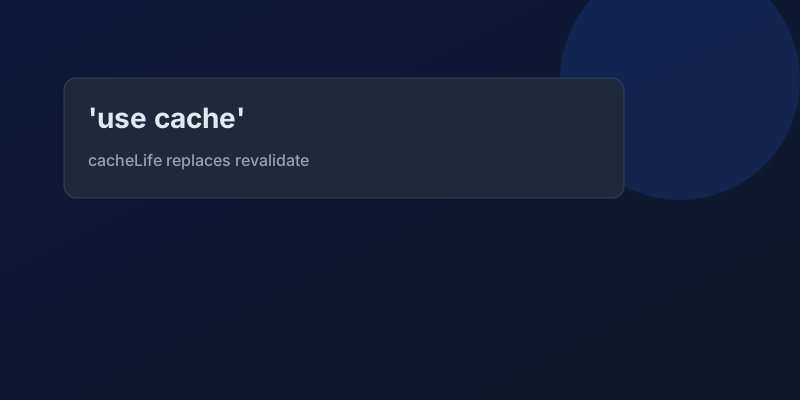
Next.js 16 Cache Components: Replacing revalidate and force-dynamic With 'use cache'
How Cache Components in Next.js 16 replace route segment configs with the use cache directive and cacheLife, what becomes a build error, and the cookies-outside-the-cache rule that trips every migration.
Optimistic UI Updates: Making Apps Feel Instant Without Lying to Users
The like button that responds before the server confirms feels instant. The trick is updating the UI first and reconciling later — and handling the rollback so you never mislead the user.
Debouncing and Throttling in React: Taming Expensive Event Handlers
A search box that fires a request on every keystroke, a scroll handler running 60 times a second — these are debounce and throttle problems. The concepts are simple; React makes them subtly tricky.
TypeScript 7 Upgrade: 10x Faster tsc, and the API Gap You Have to Plan Around
TypeScript 7.0 is the native Go compiler, stable since July 2026, with 8 to 12x faster full builds. Deprecations are hard errors, strict and esnext are defaults, and the programmatic API waits for 7.1. A migration order that keeps lint and frameworks working.
Newsletter
New posts, straight to your inbox
One email per post. No spam, no tracking pixels, unsubscribe anytime.
Comments
- No comments yet. Be the first.