Optimistic UI Updates: Making Apps Feel Instant Without Lying to Users
Tap "like" on a great app and the heart fills instantly — no spinner, no lag, no waiting for a round trip to a server that might be 200 milliseconds away. Tap it on a mediocre app and you watch a tiny loading indicator while the request flies to the backend and back. The first app isn't faster on the network. It's using optimistic UI updates: it assumes the action will succeed and updates the screen immediately, reconciling with the server in the background.
This single technique is one of the biggest perceived-performance wins available to a frontend, because it removes network latency from the user's experience of the action. But it comes with a responsibility most tutorials skim over: you're showing the user a result you don't actually have yet, so you'd better handle the case where reality disagrees. Done carelessly, optimistic UI lies to users. Done well, it feels like magic. Here's the difference.
The core idea
A normal "pessimistic" update waits for the truth before showing it:
user clicks → show spinner → send request → wait → server responds → update UI
                                    (user stares at a spinner the whole time)
An optimistic update flips the order: update the UI on the assumption of success, fire the request, and only touch the UI again if something goes wrong:
user clicks → update UI immediately → send request in background
                                       ├─ success → keep the update (done)
                                       └─ failure → roll back + tell the user
The bet is simple and usually correct: most actions succeed. Liking a post, toggling a setting, adding a to-do, sending a message — these fail rarely. So optimize the UI for the common case (instant feedback) and pay the cost of correction only in the rare failure case. You're trading a tiny bit of code complexity for the removal of perceived latency on every single successful action. That's an excellent trade.
A worked example
Say you're toggling a "favorite" star. The key is to save the previous state before you change it, so you have something to roll back to:
function FavoriteButton({ item }) {
  const [isFavorite, setIsFavorite] = useState(item.isFavorite);
  const [error, setError] = useState(null);

  async function toggle() {
    const previous = isFavorite;     // remember the truth before we guess
    setIsFavorite(!previous);        // optimistic: update immediately
    setError(null);

    try {
      await api.setFavorite(item.id, !previous);   // confirm with server
    } catch (e) {
      setIsFavorite(previous);       // rollback: reality disagreed
      setError("Couldn't save. Please try again.");
    }
  }

  return (
    <>
      <button onClick={toggle} aria-pressed={isFavorite}>
        {isFavorite ? "★" : "☆"}
      </button>
      {error && <span role="alert">{error}</span>}
    </>
  );
}
The structure is always the same three beats: snapshot the current state, apply the optimistic change, and on failure restore the snapshot and surface the error. That third beat — the honest, visible rollback — is what separates a trustworthy optimistic UI from one that quietly shows people things that aren't true.
React's built-in useOptimistic
React provides a hook designed for exactly this, which shines when the real state arrives asynchronously (for example, from a server action or a refetch). useOptimistic lets you show a temporary optimistic value that automatically reverts to the real state once it resolves:
function MessageList({ messages, sendMessage }) {
  const [optimisticMessages, addOptimistic] = useOptimistic(
    messages,
    (current, newText) => [
      ...current,
      { text: newText, sending: true },   // mark as pending
    ]
  );

  async function handleSend(formData) {
    const text = formData.get("text");
    addOptimistic(text);                  // appears instantly, greyed out
    await sendMessage(text);              // real state replaces it on success
  }

  return (
    <>
      {optimisticMessages.map((m, i) => (
        <div key={i} style={{ opacity: m.sending ? 0.5 : 1 }}>
          {m.text}
        </div>
      ))}
      <form action={handleSend}>
        <input name="text" /><button>Send</button>
      </form>
    </>
  );
}
The elegance here: you don't manage rollback by hand. When the underlying messages prop updates (or the action throws), React discards the optimistic overlay and renders the real state. The optimistic message even renders at half opacity to honestly signal it's still pending — instant feedback without pretending the work is finished.
The honesty problem
This is where optimistic UI earns or loses the user's trust, and it's the part naive implementations get wrong. You are showing the user a result you don't actually have yet. If you're sloppy about it, you mislead them. A few rules keep you honest:
- Roll back visibly, not silently. When an action fails, don't just quietly flip the state back and hope nobody noticed they "liked" something that didn't save. Show a clear, non-intrusive error: "Couldn't save your like — tap to retry." A silent rollback is worse than a spinner, because the user believed the action worked and walked away. The whole point of optimism is trust; don't squander it by hiding failures.
- Don't be optimistic about consequential or irreversible actions. Liking a post is a great candidate — low stakes, easily reversed. Confirming a payment, deleting an account, or placing an order is not. For high-stakes actions, the honest pessimistic flow ("Processing your payment...") is the right call. The user should wait for real confirmation when the consequences are real. Reserve optimism for actions that are cheap to be wrong about.
- Show pending state for slow-resolving optimism. If the confirmation might take a noticeable moment, signal it — the half-opacity message, a subtle "sending" tag. Instant and honest beats instant and misleading.
- Reconcile with the server's truth, don't assume it. The server may return a different result than you guessed — a sanitized message, a server-assigned ID, a slightly different timestamp. When the real response arrives, replace your optimistic guess with the server's actual data rather than keeping your prediction. Your optimistic value was a placeholder, not the source of truth.
Where it fits
Use optimistic updates for frequent, low-stakes, usually-successful, easily-reversible actions: likes and reactions, toggles and switches, adding/removing list items, reordering, marking things read, sending chat messages. These are the actions where latency is most annoying and the cost of a rare rollback is smallest. The payoff is an app that feels alive and responsive instead of one that makes you wait on the network for every tap.
Skip it — and embrace the honest spinner — for infrequent, high-stakes, or irreversible actions where the user genuinely needs to know the real outcome before moving on. Optimism is a tool for hiding latency, not for hiding uncertainty. When the outcome is truly uncertain or the consequences are serious, telling the user the truth (even if the truth is "please wait") is the better product decision. Master both modes, apply each where it belongs, and your app will feel both fast and trustworthy — which is the combination that actually wins users.
Keep reading
Server Components vs. Client Components: A Mental Model That Sticks
The hardest part of React Server Components isn't the syntax — it's knowing which kind of component you're writing and why. Here is the mental model that makes the boundary obvious.
Debouncing and Throttling in React: Taming Expensive Event Handlers
A search box that fires a request on every keystroke, a scroll handler running 60 times a second — these are debounce and throttle problems. The concepts are simple; React makes them subtly tricky.
Next.js 16 and React 19: What Actually Matters in 2026
A practical guide to the features that changed how we build React apps — Server Components, the new compiler, and the patterns that stuck.
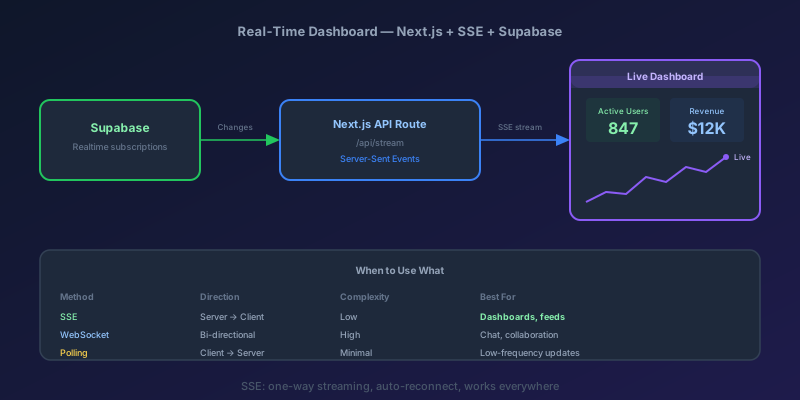
Building a Real-Time Dashboard with Next.js, Server-Sent Events, and Supabase
A step-by-step guide to building a live-updating dashboard using Next.js API routes, Server-Sent Events, and Supabase Realtime — with reconnection handling and smooth UI transitions.
Next.js 16 Cache Components: Replacing revalidate and force-dynamic With 'use cache'
How Cache Components in Next.js 16 replace route segment configs with the use cache directive and cacheLife, what becomes a build error, and the cookies-outside-the-cache rule that trips every migration.
TypeScript 7 Upgrade: 10x Faster tsc, and the API Gap You Have to Plan Around
TypeScript 7.0 is the native Go compiler, stable since July 2026, with 8 to 12x faster full builds. Deprecations are hard errors, strict and esnext are defaults, and the programmatic API waits for 7.1. A migration order that keeps lint and frameworks working.
Newsletter
New posts, straight to your inbox
One email per post. No spam, no tracking pixels, unsubscribe anytime.
Comments
- No comments yet. Be the first.