Snowflake Security in Layers: Roles, Column Masking, Row Policies, and Environment Controls
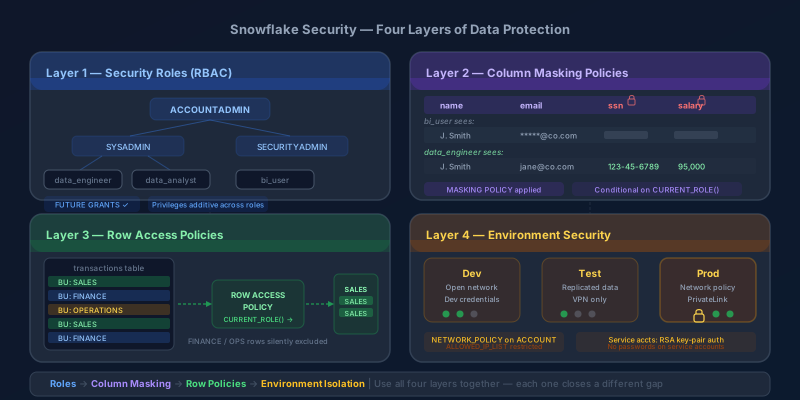
Snowflake's security model is deeper than it looks from the outside. Most teams get through onboarding by assigning SYSADMIN and calling it a day, then spend the next year undoing that decision as the data platform grows and compliance requirements arrive. The good news is that Snowflake gives you proper layered security controls — RBAC with role hierarchies, dynamic data masking at the column level, row access policies for row-level filtering, and account-level environment isolation. The bad news is that most teams do not use them together deliberately.
This post walks through all four layers with the SQL to implement them.
Layer 1: Security Roles and the Role Hierarchy
Snowflake uses role-based access control (RBAC). Every object — databases, schemas, tables, warehouses, stages — has privileges that can be granted to roles. Users are assigned roles and inherit the privileges those roles carry.
Snowflake's system-defined roles are:
| Role | What It Can Do |
|---|---|
ORGADMIN | Organization-level admin — manages accounts and organization-wide features |
ACCOUNTADMIN | Full account control, including billing and user management |
SECURITYADMIN | Holds the global MANAGE GRANTS privilege — creates, modifies, and audits grants on any object |
USERADMIN | Has CREATE USER and CREATE ROLE — manages users and the roles it owns, but is not the place to grant privileges across the account (that's SECURITYADMIN) |
SYSADMIN | Creates and manages databases, schemas, warehouses, tables |
PUBLIC | Automatically granted to every user — use for minimal shared access only |
The critical thing most teams miss: ACCOUNTADMIN should almost never be used day-to-day. It is your break-glass role. Assign it to a small number of trusted users and audit its usage. Most operations should be done with SYSADMIN or a custom role lower in the hierarchy.
Building a Role Hierarchy
The power of Snowflake RBAC comes from role inheritance. When a role is granted to another role, the parent inherits all the privileges of the child.
-- Create roles for each function
CREATE ROLE data_engineer;
CREATE ROLE data_analyst;
CREATE ROLE bi_user;

-- Build the hierarchy: SYSADMIN owns everything below it
GRANT ROLE data_engineer TO ROLE sysadmin;
GRANT ROLE data_analyst  TO ROLE data_engineer;  -- engineers can do what analysts do
GRANT ROLE bi_user       TO ROLE data_analyst;   -- analysts can do what BI users do

-- Grant privileges to the lowest role that needs them
GRANT USAGE ON DATABASE analytics_db TO ROLE bi_user;
GRANT USAGE ON SCHEMA analytics_db.reporting TO ROLE bi_user;
GRANT SELECT ON ALL TABLES IN SCHEMA analytics_db.reporting TO ROLE bi_user;

-- Analysts get write access to a working schema
GRANT CREATE TABLE ON SCHEMA analytics_db.sandbox TO ROLE data_analyst;
GRANT INSERT, UPDATE ON ALL TABLES IN SCHEMA analytics_db.sandbox TO ROLE data_analyst;

-- Engineers get DDL rights
GRANT CREATE SCHEMA ON DATABASE analytics_db TO ROLE data_engineer;
Now assign roles to users:
CREATE USER jsmith
  PASSWORD = '...'
  DEFAULT_ROLE = data_analyst
  DEFAULT_WAREHOUSE = analytics_wh
  MUST_CHANGE_PASSWORD = TRUE;

GRANT ROLE data_analyst TO USER jsmith;
Warehouse Privileges Are Separate
This catches people out. A role can have full access to a database but still fail to run queries if it cannot use a warehouse. Warehouses are compute resources — they need their own privilege grants.
GRANT USAGE ON WAREHOUSE analytics_wh TO ROLE bi_user;
GRANT USAGE ON WAREHOUSE engineering_wh TO ROLE data_engineer;
Separate warehouses for different workloads (BI tools, ad-hoc analysis, ETL) also lets you control cost and concurrency separately — which is a performance and cost management concern as much as a security one.
Future Grants
If you grant SELECT on all current tables, new tables added later do not inherit that grant. Use future grants to cover new objects automatically:
GRANT SELECT ON FUTURE TABLES IN SCHEMA analytics_db.reporting TO ROLE bi_user;
GRANT SELECT ON FUTURE VIEWS IN SCHEMA analytics_db.reporting TO ROLE bi_user;
Do this for every schema where roles need ongoing access. The alternative is a growing backlog of "why can't I see this table?" tickets.
Layer 2: Column-Level Security with Dynamic Data Masking
Column-level security in Snowflake is implemented through masking policies — SQL functions attached to specific columns that transform the returned value based on the querying role. The underlying data is not changed; what the user sees depends on who they are.
Creating a Masking Policy
-- Mask email addresses: show full value to data_engineer, mask for everyone else
CREATE OR REPLACE MASKING POLICY mask_email AS (val STRING) RETURNS STRING ->
  CASE
    WHEN CURRENT_ROLE() IN ('DATA_ENGINEER', 'SECURITYADMIN') THEN val
    ELSE REGEXP_REPLACE(val, '.+\@', '*****@')
  END;

-- Mask SSNs: show only last 4 digits to analysts, full value to engineers
CREATE OR REPLACE MASKING POLICY mask_ssn AS (val STRING) RETURNS STRING ->
  CASE
    WHEN CURRENT_ROLE() = 'DATA_ENGINEER' THEN val
    WHEN CURRENT_ROLE() = 'DATA_ANALYST'  THEN CONCAT('***-**-', RIGHT(val, 4))
    ELSE '***-**-****'
  END;
Applying the Policy to a Column
ALTER TABLE customers
  MODIFY COLUMN email SET MASKING POLICY mask_email;

ALTER TABLE customers
  MODIFY COLUMN ssn SET MASKING POLICY mask_ssn;
Now when a bi_user queries the table:
SELECT name, email, ssn FROM customers LIMIT 5;
-- Returns: Jane Smith | *****@example.com | ***-**-****
And when a data_engineer queries the same table:
SELECT name, email, ssn FROM customers LIMIT 5;
-- Returns: Jane Smith | jane@example.com | 123-45-6789
Same table, same query, different results based on role.
Conditional Masking on Multiple Columns
Policies can reference other columns in the same row, which lets you build more nuanced logic:
-- Show salary only if the querying user is in HR or is viewing their own record
CREATE OR REPLACE MASKING POLICY mask_salary AS (val NUMBER) RETURNS NUMBER ->
  CASE
    WHEN CURRENT_ROLE() IN ('HR_ADMIN', 'DATA_ENGINEER') THEN val
    ELSE NULL
  END;
Finding What Is Currently Masked
Use the INFORMATION_SCHEMA to audit which columns have policies applied:
SELECT table_name, column_name, masking_policy_name
FROM information_schema.policy_references
WHERE policy_kind = 'MASKING_POLICY'
ORDER BY table_name, column_name;
Layer 3: Row-Level Security with Row Access Policies
Masking controls what values users see within a column. Row access policies control which rows they see at all. Where column masking is about data sensitivity, row policies are about data ownership and segmentation — business units should only see their own records, regional teams should only see their region, and so on.
How Row Access Policies Work
A row access policy is a mapping function: given a row, does the current user get to see it? Snowflake evaluates the policy for every row the query touches. If the policy returns false for a row, that row is silently excluded from the result.
-- Create a mapping table: which roles can see which business units
CREATE TABLE security.row_access_map (
  role_name    STRING,
  business_unit STRING
);

INSERT INTO security.row_access_map VALUES
  ('SALES_ANALYST',    'SALES'),
  ('FINANCE_ANALYST',  'FINANCE'),
  ('OPS_ANALYST',      'OPERATIONS'),
  ('DATA_ENGINEER',    'SALES'),
  ('DATA_ENGINEER',    'FINANCE'),
  ('DATA_ENGINEER',    'OPERATIONS');  -- engineers see all BUs
-- Create the row access policy
CREATE OR REPLACE ROW ACCESS POLICY policy_by_business_unit
AS (row_business_unit STRING) RETURNS BOOLEAN ->
  CURRENT_ROLE() IN ('ACCOUNTADMIN', 'SYSADMIN', 'SECURITYADMIN')
  OR EXISTS (
    SELECT 1
    FROM security.row_access_map
    WHERE role_name     = CURRENT_ROLE()
      AND business_unit = row_business_unit
  );
Applying the Policy to a Table
ALTER TABLE transactions
  ADD ROW ACCESS POLICY policy_by_business_unit ON (business_unit);
Now a SALES_ANALYST querying transactions only gets rows where business_unit = 'SALES' — the filter is enforced transparently, regardless of whether they try WHERE business_unit = 'FINANCE' or not.
User-Level Filtering with SESSION_CONTEXT
For more granular control — filtering down to individual users rather than roles — use CURRENT_USER() or session context variables:
CREATE OR REPLACE ROW ACCESS POLICY policy_by_manager
AS (manager_id STRING) RETURNS BOOLEAN ->
  CURRENT_ROLE() IN ('ACCOUNTADMIN', 'DATA_ENGINEER')
  OR manager_id = CURRENT_USER()
  OR EXISTS (
    SELECT 1 FROM hr.reporting_chain
    WHERE employee_id = manager_id
      AND reports_to  = CURRENT_USER()
  );
This pattern lets managers see records for their direct reports, and nobody else's.
Testing Row Policies Without Switching Users
-- Simulate what SALES_ANALYST would see
ALTER SESSION SET CURRENT_ROLE = SALES_ANALYST;
SELECT COUNT(*) FROM transactions;
-- Returns only SALES rows

ALTER SESSION SET CURRENT_ROLE = DATA_ENGINEER;
SELECT COUNT(*) FROM transactions;
-- Returns all rows
Or use POLICY_CONTEXT to simulate policy evaluation against a query without actually changing context. The shape is EXECUTE USING POLICY_CONTEXT(<context_function> => '<value>') AS <query>:
EXECUTE USING POLICY_CONTEXT(CURRENT_ROLE => 'BI_USER')
AS
  SELECT COUNT(*) FROM transactions;
For inspecting which policies are attached to which objects, use the INFORMATION_SCHEMA.POLICY_REFERENCES table function (note: it's a function, not a queryable view):
SELECT *
FROM TABLE(INFORMATION_SCHEMA.POLICY_REFERENCES(
  POLICY_NAME => 'MY_DATABASE.MY_SCHEMA.MASK_PII'
));
Layer 4: Environment Security — Account Separation and Network Policies
The three layers above protect data within an account. This layer protects the account boundary itself.
Separate Accounts for Dev, Test, and Prod
The most important environment security practice in Snowflake is using separate Snowflake accounts for development, testing, and production — not just separate databases within one account. Separate accounts means:
- A developer cannot accidentally run a DROP TABLE on a production table
- Prod credentials are not accessible in dev
- Compute costs are isolated per environment
- ACCOUNTADMIN in dev does not mean ACCOUNTADMIN in prod
Use Snowflake's data sharing or replication features to move data between accounts in a controlled way:
-- In the PROD account: create a replication group for the sandbox dataset
CREATE REPLICATION GROUP prod_to_test
  OBJECT_TYPES = DATABASE
  ALLOWED_DATABASES = analytics_db
  ALLOWED_ACCOUNTS = myorg.test_account;

-- In the TEST account: create a secondary replication group
CREATE REPLICATION GROUP prod_to_test
  AS REPLICA OF myorg.prod_account.prod_to_test;

-- Refresh test from prod on a schedule
ALTER REPLICATION GROUP prod_to_test REFRESH;
Network Policies
Network policies restrict which IP addresses can connect to your Snowflake account. For production accounts, this is a non-negotiable control:
-- Create a network policy allowing only your corporate IP ranges
CREATE NETWORK POLICY corp_network_policy
  ALLOWED_IP_LIST = ('10.0.0.0/8', '203.0.113.0/24')
  BLOCKED_IP_LIST = ();

-- Apply to the entire account
ALTER ACCOUNT SET NETWORK_POLICY = corp_network_policy;

-- Or apply to a specific user (useful for service accounts)
ALTER USER etl_service_account SET NETWORK_POLICY = etl_network_policy;
For development accounts, a less restrictive policy is fine. For production, lock it to your VPN range and CI/CD runner IPs at minimum.
Private Connectivity
For production workloads, consider using AWS PrivateLink, Azure Private Link, or Google Cloud Private Service Connect to route Snowflake traffic over private network infrastructure rather than the public internet. This removes Snowflake from your public attack surface entirely.
-- Check if private connectivity is configured
SHOW PARAMETERS LIKE '%PRIVATE%' IN ACCOUNT;
Service Account Hygiene
Service accounts (ETL tools, BI platforms, dbt) need the same security treatment as user accounts:
-- Create a dedicated role for your ETL tool
CREATE ROLE dbt_role;
GRANT USAGE ON DATABASE analytics_db TO ROLE dbt_role;
GRANT USAGE ON ALL SCHEMAS IN DATABASE analytics_db TO ROLE dbt_role;
GRANT CREATE TABLE ON ALL SCHEMAS IN DATABASE analytics_db TO ROLE dbt_role;
GRANT SELECT, INSERT, UPDATE, DELETE ON ALL TABLES IN DATABASE analytics_db TO ROLE dbt_role;
-- Auto-grant on any future tables created under the database, so dbt
-- doesn't break when models add new tables.
GRANT SELECT, INSERT, UPDATE, DELETE ON FUTURE TABLES IN DATABASE analytics_db TO ROLE dbt_role;

-- Create the service account user
CREATE USER dbt_service
  DEFAULT_ROLE = dbt_role
  DEFAULT_WAREHOUSE = dbt_wh
  RSA_PUBLIC_KEY = '<your-public-key>'  -- use key-pair auth, not passwords
  MUST_CHANGE_PASSWORD = FALSE;

GRANT ROLE dbt_role TO USER dbt_service;
Use key-pair authentication instead of passwords for service accounts. Keys can be rotated programmatically and cannot be phished.
Audit Logging with ACCESS_HISTORY
Snowflake's ACCESS_HISTORY view (available in the SNOWFLAKE database) tracks what data was accessed, by whom, and when. Enable it and query it regularly:
-- Who accessed the customers table in the last 7 days?
SELECT
  query_start_time,
  user_name,
  role_name,
  query_id,
  direct_objects_accessed
FROM snowflake.account_usage.access_history
WHERE array_contains('ANALYTICS_DB.PUBLIC.CUSTOMERS'::variant,
                     direct_objects_accessed::variant)
  AND query_start_time >= DATEADD(day, -7, CURRENT_TIMESTAMP())
ORDER BY query_start_time DESC;
Set up a scheduled task to alert on anomalous access patterns — users querying tables outside their normal scope, access outside business hours, or unusually large result sets.
Putting It Together
The four layers are most effective when they are all in play simultaneously:
| Layer | Mechanism | What It Protects |
|---|---|---|
| Security Roles | RBAC, role hierarchy | Which objects a user can access at all |
| Column Masking | Dynamic masking policies | Sensitive field values within accessible tables |
| Row Policies | Row access policies | Which subset of rows a user can see |
| Environment | Separate accounts, network policies | Access to the account boundary itself |
A realistic setup for a mid-size data platform might look like this: DATA_ENGINEER has full access through a VPN-gated production account, DATA_ANALYST can query the analytics schema with SSNs and salary columns masked, BI_USER sees only the reporting schema with row policies filtering to their business unit, and all ETL runs through a service account with key-pair auth and a dedicated warehouse.
None of these controls are complicated to implement individually. The work is in doing them deliberately, in all four layers, before you have 50 users and a compliance audit on the calendar.
Key Takeaway
Snowflake gives you all the controls you need — RBAC with role inheritance, dynamic masking for sensitive columns, row access policies for per-unit filtering, and account-level isolation for environment separation. Use future grants so new objects pick up the right permissions automatically, apply masking and row policies on day one rather than retrofitting them later, use separate accounts for prod versus non-prod, and lock down service accounts with key-pair authentication and network policies. Security in Snowflake is not a configuration you set once; it is a model you build and maintain as the platform grows.
Keep reading
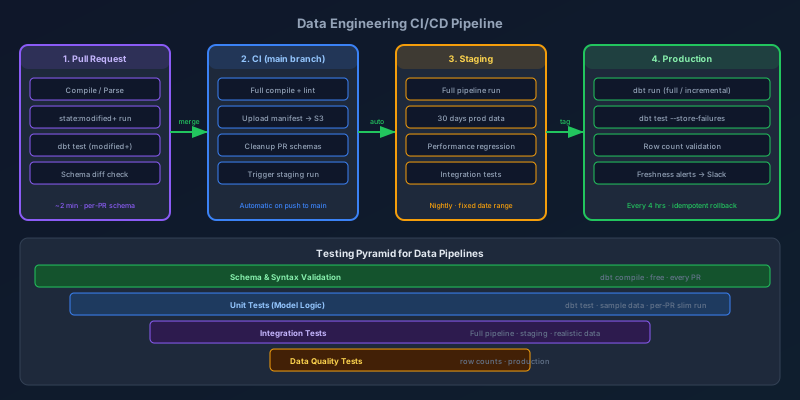
CI/CD Pipelines for Data Engineers
Data pipelines are production software. Here's how to build CI/CD that catches bad transforms before they corrupt dashboards: testing strategy, environment promotion, slim runs, and rollback patterns.
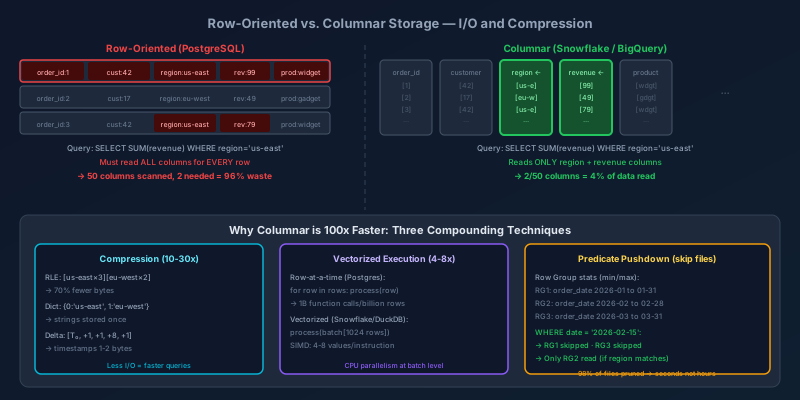
Columnar Storage: How Analytical Databases Work Under the Hood
Why column-oriented databases run analytical queries 100x faster than row-oriented ones — covering physical layout, compression algorithms, vectorized execution, and predicate pushdown with concrete examples.
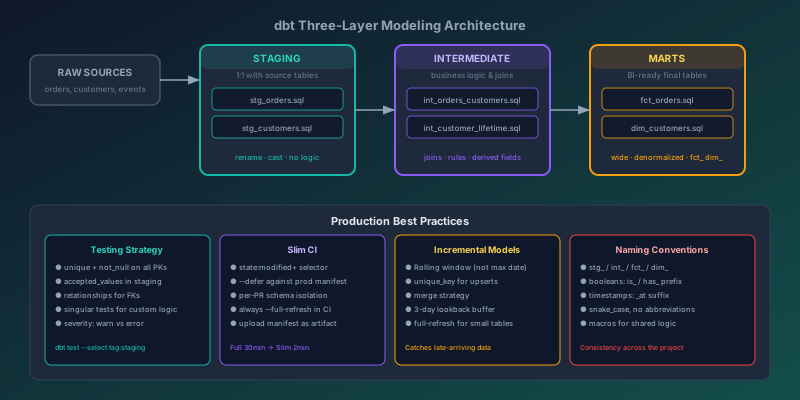
dbt Best Practices for Production Data Modeling
Hard-won lessons for structuring dbt projects that scale: layer conventions, testing strategies, slim CI runs, incremental models, and documentation that doesn't rot.
Newsletter
New posts, straight to your inbox
One email per post. No spam, no tracking pixels, unsubscribe anytime.
Comments
- No comments yet. Be the first.