Authentication Patterns for Modern Web Apps: Sessions, JWTs, and OAuth Compared
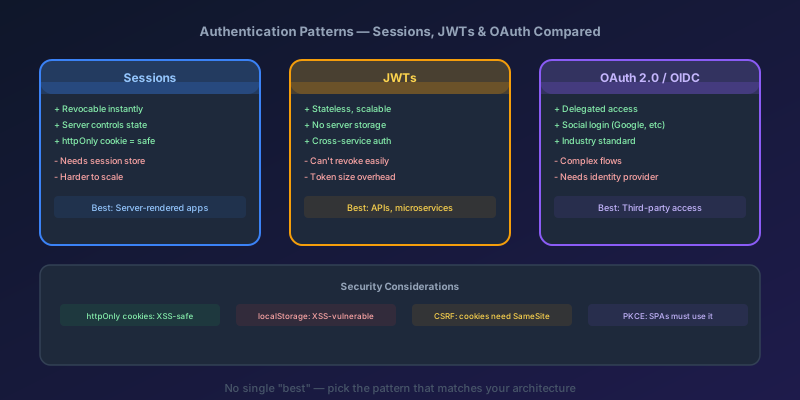
"Should we use JWTs or sessions?" is the wrong question. It is like asking "should we use a hammer or a screwdriver?" — the answer depends entirely on what you are building. But the internet is full of blog posts that declare one approach universally superior, so let me give you the real answer: it depends on your architecture, and here is how to decide.
The Three Patterns
Pattern 1: Session-Based Authentication
The oldest and most battle-tested pattern. Here is how it works:
- User submits credentials (username + password)
- Server validates credentials, creates a session record in a store (database, Redis, memory)
- Server sends back a session ID in an
httpOnlycookie - Browser automatically sends the cookie with every subsequent request
- Server looks up the session ID, finds the user, and processes the request
Client                          Server                    Session Store
  |-- POST /login (creds) ------>|                              |
  |                               |-- Create session ---------->|
  |<--- Set-Cookie: sid=abc123 --|                              |
  |                               |                              |
  |-- GET /api/data ------------>|                              |
  |   Cookie: sid=abc123          |-- Lookup session abc123 --->|
  |                               |<--- { userId: 42 } --------|
  |<--- 200 OK (data) ----------|                              |
Pros:
- Simple mental model — server has full control over sessions
- Instant revocation — delete the session record and the user is logged out immediately
- Small cookie size — just a random ID, typically 32-64 bytes
- Browser handles cookies automatically — no client-side token management
Cons:
- Requires server-side storage — scales with number of active users
- Sticky sessions or shared session store needed for multi-server deployments
- CSRF vulnerability — cookies are sent automatically, so you need CSRF tokens
- Not ideal for cross-origin APIs or mobile apps that do not use cookies
Pattern 2: JWT Authentication
JSON Web Tokens flip the model. Instead of storing session state on the server, the server encodes user information into a signed token that the client holds.
- User submits credentials
- Server validates credentials, generates a JWT containing user claims, signs it
- Server sends the JWT to the client
- Client stores the JWT and sends it in the
Authorizationheader with every request - Server verifies the JWT signature and extracts user information — no database lookup needed
Client                          Server
  |-- POST /login (creds) ------>|
  |<--- { token: "eyJ..." } ----|  (JWT = header.payload.signature)
  |                               |
  |-- GET /api/data ------------>|
  |   Authorization: Bearer eyJ.. |-- Verify signature (no DB call)
  |<--- 200 OK (data) ----------|
A JWT payload looks like this:
{
  "sub": "user-42",
  "name": "Jane Smith",
  "role": "admin",
  "iat": 1713100000,
  "exp": 1713103600
}
Pros:
- Stateless — no server-side session store needed. Any server can verify the token
- Scales horizontally without shared state
- Works across domains and for mobile apps
- Contains claims — the server can extract user info without a database call
Cons:
- Cannot be revoked before expiry — this is the big one. If a JWT is compromised, you cannot invalidate it until it expires (unless you add a blocklist, which reintroduces server state)
- Larger payload — a JWT is typically 800-2000 bytes vs a 32-byte session ID. Sent with every request
- Token refresh complexity — short-lived access tokens need a refresh flow
- Storage dilemma —
localStorageis vulnerable to XSS;httpOnlycookies bring back CSRF concerns
Pattern 3: OAuth 2.0 / OpenID Connect
OAuth 2.0 is not an authentication protocol — it is an authorization framework. OpenID Connect (OIDC) adds the authentication layer on top. Together, they let users authenticate through a third-party identity provider (Google, Microsoft, Auth0, Okta) instead of managing credentials yourself.
The most common and most secure flow is the Authorization Code flow with PKCE:
- Client redirects user to the identity provider's login page
- User authenticates with the provider
- Provider redirects back with an authorization code
- Client exchanges the code for tokens (access token, ID token, refresh token) — server-to-server
- Client uses the access token to call your API
Client            Your Server         Identity Provider
  |-- Click Login -->|                        |
  |                  |-- Redirect to IdP --->|
  |                  |                        |-- User logs in
  |                  |<--- Code callback ----|
  |                  |-- Exchange code ------>|
  |                  |<--- Tokens -----------|
  |<--- Session -----|                        |
PKCE (Proof Key for Code Exchange) prevents authorization code interception attacks and is now recommended for all OAuth clients — not just public clients like SPAs and mobile apps. It works by generating a random code_verifier, sending a hashed code_challenge in the authorize request, and proving possession of the original verifier when exchanging the code.
Pros:
- No credential management — the identity provider handles passwords, MFA, account recovery
- Industry-standard security — battle-tested by millions of applications
- Single sign-on (SSO) across applications
- Separation of concerns — your app focuses on its domain, not user management
Cons:
- Complex flow to implement correctly (use a library — do not roll your own)
- Dependency on a third-party provider
- Token management still applies (access tokens are usually JWTs)
The Security Comparison
| Attack | Sessions | JWT (localStorage) | JWT (httpOnly cookie) |
|---|---|---|---|
| XSS | Safe (cookie not accessible) | Vulnerable (token stolen) | Safe (cookie not accessible) |
| CSRF | Vulnerable (needs CSRF token) | Safe (not sent automatically) | Vulnerable (needs CSRF token) |
| Token theft | Revocable immediately | Cannot revoke until expiry | Revocable if blocklist added |
| Replay attack | Session timeout helps | Short expiry + rotation needed | Short expiry + rotation needed |
The critical insight: there is no option that is immune to both XSS and CSRF by default. You must defend against one or the other depending on your storage choice.
The localStorage vs httpOnly Cookie Debate
localStorage for JWTs — accessible to JavaScript, so any XSS vulnerability means your tokens are stolen. But not sent automatically with requests, so CSRF is not a concern.
httpOnly cookies for JWTs — not accessible to JavaScript, so XSS cannot steal the token directly (though XSS can still make authenticated requests). But sent automatically, so you need CSRF protection.
My recommendation: use httpOnly, Secure, SameSite=Strict cookies for the token and add a CSRF token for state-changing requests. XSS is harder to mitigate than CSRF, and a SameSite=Strict cookie eliminates most CSRF vectors on modern browsers.
Token Refresh: The Part Everyone Gets Wrong
Short-lived access tokens (5-15 minutes) limit the damage window if a token is stolen. But users should not have to log in every 15 minutes. That is where refresh tokens come in.
// Client-side token refresh pattern
async function fetchWithAuth(url: string, options: RequestInit = {}) {
  let response = await fetch(url, {
    ...options,
    headers: {
      ...options.headers,
      Authorization: `Bearer ${getAccessToken()}`,
    },
  });

  if (response.status === 401) {
    // Access token expired — try to refresh
    const refreshed = await refreshAccessToken();
    if (!refreshed) {
      // Refresh token also expired — redirect to login
      window.location.href = "/login";
      return response;
    }

    // Retry the original request with the new access token
    response = await fetch(url, {
      ...options,
      headers: {
        ...options.headers,
        Authorization: `Bearer ${getAccessToken()}`,
      },
    });
  }

  return response;
}
Critical rules for refresh tokens:
- Store refresh tokens in httpOnly cookies — never in localStorage or JavaScript-accessible storage
- Rotate refresh tokens — issue a new refresh token every time one is used. If a stolen refresh token is used after the legitimate user has already refreshed, you detect the reuse and invalidate the entire family
- Bind to device or session — store the refresh token's fingerprint server-side so you can revoke all tokens for a compromised session
Recommended Patterns by Application Type
Server-Rendered Web Apps (Next.js, Rails, Django)
Use session-based auth or OAuth with server-side sessions.
The server renders HTML and sends it to the browser. Cookies work naturally. You have a server to store sessions. There is no reason to add JWT complexity.
// Next.js middleware — session check
import { NextRequest, NextResponse } from "next/server";

export function middleware(request: NextRequest) {
  const session = request.cookies.get("session_id");
  if (!session && request.nextUrl.pathname.startsWith("/dashboard")) {
    return NextResponse.redirect(new URL("/login", request.url));
  }
  return NextResponse.next();
}
Single-Page Applications (React, Vue, Angular)
Use OAuth 2.0 Authorization Code flow with PKCE, with tokens stored in httpOnly cookies.
The SPA redirects to the identity provider for login. The token exchange happens server-side (via a BFF — Backend for Frontend — or your API). The access token is stored in an httpOnly cookie, not in the browser's JavaScript.
Do not store tokens in localStorage. Do not implement the Implicit flow (it is deprecated). Use PKCE.
Mobile Apps
Use OAuth 2.0 Authorization Code flow with PKCE.
Mobile apps use the system browser (not a WebView) for the login redirect. Tokens are stored in the platform's secure storage (Keychain on iOS, Keystore on Android). Refresh tokens enable long-lived sessions without re-authentication.
API-to-API (Machine-to-Machine)
Use OAuth 2.0 Client Credentials flow.
No user involved. The calling service authenticates with a client ID and client secret (or certificate) and receives an access token scoped to the permissions it needs.
The Decision Table
| Application Type | Recommended Pattern | Token Storage |
|---|---|---|
| Server-rendered web app | Sessions or OAuth + sessions | httpOnly cookie (session ID) |
| SPA with your own backend | OAuth + PKCE via BFF | httpOnly cookie |
| SPA calling third-party APIs | OAuth + PKCE | httpOnly cookie (BFF proxy) |
| Mobile app | OAuth + PKCE | Platform secure storage |
| Machine-to-machine API | OAuth Client Credentials | In-memory (short-lived) |
| Simple internal tool | Sessions | httpOnly cookie |
Takeaway
Do not default to JWTs because they sound modern. Do not default to sessions because they sound simple. Match the pattern to your architecture. For server-rendered apps, sessions are the simplest and most secure option. For SPAs and mobile apps, OAuth 2.0 with PKCE is the industry standard. For APIs between services, Client Credentials is the right flow. And regardless of which pattern you choose, store sensitive tokens in httpOnly cookies — not in localStorage — and defend against both XSS and CSRF. Authentication is not a feature you get to half-build.
Keep reading
TypeScript 7 Upgrade: 10x Faster tsc, and the API Gap You Have to Plan Around
TypeScript 7.0 is the native Go compiler, stable since July 2026, with 8 to 12x faster full builds. Deprecations are hard errors, strict and esnext are defaults, and the programmatic API waits for 7.1. A migration order that keeps lint and frameworks working.
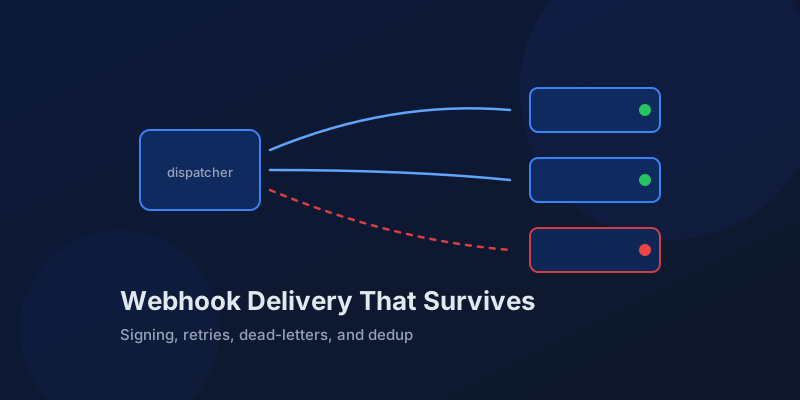
Designing Webhook Delivery That Survives Flaky Consumers
Signing, retries, ordering, and dead-lettering: the design decisions that separate reliable webhook delivery from silent event loss.
Server Components vs. Client Components: A Mental Model That Sticks
The hardest part of React Server Components isn't the syntax — it's knowing which kind of component you're writing and why. Here is the mental model that makes the boundary obvious.
Optimistic UI Updates: Making Apps Feel Instant Without Lying to Users
The like button that responds before the server confirms feels instant. The trick is updating the UI first and reconciling later — and handling the rollback so you never mislead the user.
Debouncing and Throttling in React: Taming Expensive Event Handlers
A search box that fires a request on every keystroke, a scroll handler running 60 times a second — these are debounce and throttle problems. The concepts are simple; React makes them subtly tricky.

Next.js 16 and React 19: What Actually Matters in 2026
A practical guide to the features that changed how we build React apps — Server Components, the new compiler, and the patterns that stuck.
Newsletter
New posts, straight to your inbox
One email per post. No spam, no tracking pixels, unsubscribe anytime.
Comments
- No comments yet. Be the first.