Kafka Consumer Groups, Partitions, and Offset Management Explained
We had a Kafka consumer that was processing 50,000 events per second — until it wasn't. An innocuous configuration change triggered a rebalance, which took 90 seconds to complete, during which zero events were processed. Downstream systems noticed. Alerts fired. The on-call engineer spent an hour determining whether the lag spike was normal recovery or a sign of something worse.
Understanding how Kafka distributes work under the hood — partitions, consumer groups, offset commits, and the rebalance protocol — is what separates engineers who can operate Kafka at scale from those who only know how to use it on the happy path.
Partitions: The Unit of Parallelism
A Kafka topic is split into one or more partitions. A partition is an ordered, immutable log of records. Each record in a partition gets a sequential offset number starting at 0.
Topic: orders (3 partitions)

Partition 0:  [0: OrderA] [1: OrderB] [2: OrderC] [3: OrderD] ...
Partition 1:  [0: OrderE] [1: OrderF] [2: OrderG] ...
Partition 2:  [0: OrderH] [1: OrderI] ...
The number of partitions controls the maximum parallelism for consumption. If a topic has 8 partitions, you can have at most 8 consumers reading from it in parallel. The ninth consumer would sit idle.
Partition Assignment
When a producer sends a message, Kafka decides which partition to route it to. The routing strategy matters because ordering is only guaranteed within a partition, not across partitions.
from confluent_kafka import Producer

producer = Producer({'bootstrap.servers': 'kafka:9092'})

# No key: round-robin across partitions (no ordering guarantee)
producer.produce('orders', value='{"order_id": "ord-123"}')

# With key: deterministic partition based on hash(key)
# All messages for the same customer_id go to the same partition
# This guarantees ordering per customer
producer.produce(
    'orders',
    key='customer-456',
    value='{"order_id": "ord-123", "customer_id": "customer-456"}'
)

producer.flush()
If you need ordered processing for a specific entity (all events for a given user, all transactions for a given account), always produce with a key. Without a key, the same entity's events can land in different partitions and be processed out of order.
Consumer Groups: Parallel Processing
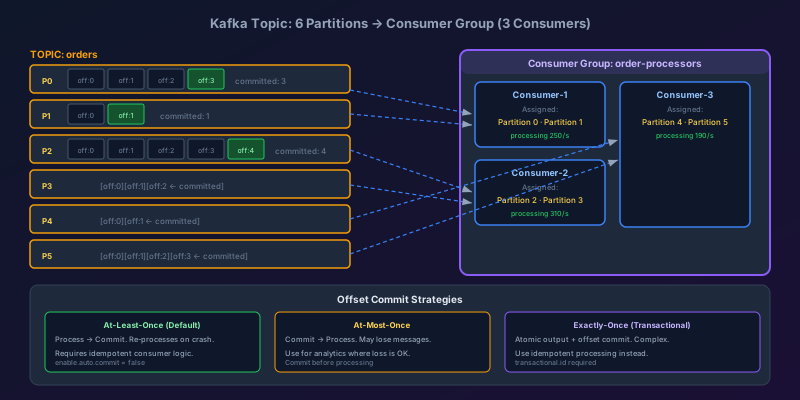
A consumer group is a set of consumers that jointly read from a topic. Kafka assigns partitions to consumers within the group such that each partition is consumed by exactly one consumer at a time.
Consumer Group: order-processors

Topic: orders (6 partitions)

Consumer-1 ← [Partition 0, Partition 1]
Consumer-2 ← [Partition 2, Partition 3]
Consumer-3 ← [Partition 4, Partition 5]
Adding a consumer to the group and triggering a rebalance redistributes the partitions. Removing a consumer triggers another rebalance where the remaining consumers pick up the orphaned partitions.
This is the key design decision: to increase throughput, add partitions to the topic and add consumers to the group. Both must scale together — adding consumers beyond the partition count provides no benefit.
from confluent_kafka import Consumer, KafkaError

consumer = Consumer({
    'bootstrap.servers': 'kafka:9092',
    'group.id': 'order-processors',
    'auto.offset.reset': 'earliest',
    # Disable auto-commit — we'll manage offsets manually
    'enable.auto.commit': False,
    # Heartbeat and session timeout: tune for your rebalance tolerance
    'heartbeat.interval.ms': 3000,
    'session.timeout.ms': 30000,
    'max.poll.interval.ms': 300000,  # 5 minutes max between poll() calls
})

consumer.subscribe(['orders'])

try:
    while True:
        msg = consumer.poll(timeout=1.0)
        if msg is None:
            continue
        if msg.error():
            if msg.error().code() == KafkaError._PARTITION_EOF:
                continue
            raise KafkaException(msg.error())

        # Process the message
        process_order(msg.value())

        # Commit the offset only after successful processing
        consumer.commit(message=msg)

finally:
    consumer.close()
The Rebalance Problem
A rebalance occurs whenever the group membership changes:
- A consumer joins the group (new deployment, scale-out)
- A consumer leaves (crash, shutdown, graceful scale-in)
- A consumer stops polling within
max.poll.interval.ms - Partitions are added to the topic
During an eager rebalance (the default in older Kafka clients), all consumers stop processing, all partition assignments are revoked, and the group coordinator reassigns partitions from scratch. This stop-the-world pause is the 90-second outage I described above.
Cooperative Rebalancing
Kafka clients from version 2.4+ support incremental cooperative rebalancing, which avoids the stop-the-world pause. Only the partitions that need to move are revoked — consumers keep processing their other partitions throughout the rebalance.
consumer = Consumer({
    'bootstrap.servers': 'kafka:9092',
    'group.id': 'order-processors',
    'enable.auto.commit': False,
    # Use cooperative rebalancing: only revoke partitions being reassigned
    'partition.assignment.strategy': 'cooperative-sticky',
})
The cooperative-sticky strategy is cooperative (incremental revocation) and sticky (tries to preserve existing assignments across rebalances, reducing the number of partitions that move).
The max.poll.interval.ms Trap
This is the most common misconfiguration I see. max.poll.interval.ms is the maximum time between consecutive calls to poll(). If your processing logic takes longer than this value, the broker assumes the consumer is dead, kicks it from the group, and triggers a rebalance.
# BAD: Processing is slow but max.poll.interval.ms is too short
consumer = Consumer({
    'max.poll.interval.ms': 30000,  # 30 seconds
    ...
})

while True:
    msg = consumer.poll(timeout=1.0)
    # This takes 45 seconds for large payloads
    upload_to_s3(msg.value())  # REBALANCE TRIGGERED
    consumer.commit(message=msg)
The fix is to either increase max.poll.interval.ms or move slow processing to a separate thread and poll on a dedicated thread:
import threading
from queue import Queue

work_queue = Queue(maxsize=100)

def consumer_thread():
    while True:
        msg = consumer.poll(timeout=1.0)
        if msg:
            work_queue.put(msg)
            # Poll happens fast; processing is offloaded

def worker_thread():
    while True:
        msg = work_queue.get()
        upload_to_s3(msg.value())
        # Commit after processing
        consumer.commit(message=msg)

threading.Thread(target=consumer_thread, daemon=True).start()
threading.Thread(target=worker_thread, daemon=True).start()
This pattern keeps the heartbeat alive regardless of how long processing takes.
Offset Management: Delivery Guarantees
The offset is a pointer to where a consumer is in a partition. Managing it correctly determines your delivery semantics.
At-Most-Once (Commit Before Processing)
msg = consumer.poll(timeout=1.0)
consumer.commit(message=msg)  # Commit first
process_order(msg.value())    # If this crashes, message is lost
The offset is committed before processing. If the consumer crashes during process_order, the message is lost — it will not be re-processed because the offset already advanced.
Use when: Downstream systems cannot tolerate duplicates and message loss is acceptable (analytics pipelines, metrics aggregation).
At-Least-Once (Commit After Processing)
msg = consumer.poll(timeout=1.0)
process_order(msg.value())    # Process first
consumer.commit(message=msg)  # If this crashes, message is re-processed
The offset is committed after processing. If the consumer crashes after processing but before committing, the message is re-processed. Your processing logic must be idempotent — processing the same message twice must produce the same result as processing it once.
Use when: Message loss is unacceptable and your system can handle duplicates (most transactional systems).
Exactly-Once Semantics
True exactly-once requires a transactional producer and an idempotent consumer. Kafka supports this natively via the transactional.id configuration, but it comes with significant overhead.
from confluent_kafka import Producer

producer = Producer({
    'bootstrap.servers': 'kafka:9092',
    'transactional.id': 'order-processor-tx-1',
    'enable.idempotence': True,
})

producer.init_transactions()

try:
    producer.begin_transaction()

    # Read from input topic
    msg = consumer.poll(timeout=1.0)

    # Process and produce to output topic
    result = process_order(msg.value())
    producer.produce('processed-orders', value=result)

    # Commit consumer offset within the transaction
    producer.send_offsets_to_transaction(
        consumer.position(consumer.assignment()),
        consumer.consumer_group_metadata()
    )

    producer.commit_transaction()  # Atomic: output + offset commit

except Exception:
    producer.abort_transaction()
For most use cases, at-least-once with idempotent processing is the right call. It is simpler to implement correctly than transactional exactly-once, and most downstream systems can be made idempotent with a ON CONFLICT DO NOTHING or a deduplication step.
Monitoring Consumer Lag
Consumer lag is the most important health metric for a Kafka consumer: the number of messages between the consumer's current position and the end of the partition.
# Calculate lag programmatically
from confluent_kafka.admin import AdminClient

admin = AdminClient({'bootstrap.servers': 'kafka:9092'})

# Get consumer group offsets (where each partition is committed)
consumer_offsets = admin.list_consumer_group_offsets(['order-processors'])

# Get latest offsets (end of each partition)
topic_metadata = admin.list_topics('orders')

for partition in topic_metadata.topics['orders'].partitions.values():
    tp = TopicPartition('orders', partition.id)
    committed = consumer_offsets['order-processors'][tp].offset
    end = consumer.get_watermark_offsets(tp)[1]  # high watermark
    lag = end - committed
    print(f"Partition {partition.id}: lag = {lag}")
In practice, use Kafka's built-in tooling or a metrics exporter (kafka-exporter for Prometheus) rather than computing lag yourself:
# Check lag for a consumer group
kafka-consumer-groups.sh \
  --bootstrap-server kafka:9092 \
  --describe \
  --group order-processors

# Output:
# TOPIC     PARTITION  CURRENT-OFFSET  LOG-END-OFFSET  LAG
# orders    0          14892           14892           0
# orders    1          14103           14900           797
# orders    2          13987           13987           0
Partition 1 has a lag of 797 — that consumer is behind. Causes to investigate: slow processing, the consumer died and its partitions haven't been reassigned yet, or a poison pill message is causing retries.
Lag-Based Alerting
Alert on lag rate of change, not just absolute lag. A lag of 10,000 is fine if the consumer is catching up. A lag that is growing by 5,000 per minute means the consumer cannot keep up with the producer — you need more consumers or faster processing.
# Prometheus alerting rule
- alert: KafkaConsumerLagGrowing
  expr: |
    rate(kafka_consumer_group_lag_sum{group="order-processors"}[5m]) > 1000
  for: 10m
  annotations:
    summary: "Consumer group {{ $labels.group }} lag is growing"
    description: "Lag growing at {{ $value }}/s. Consumer cannot keep up."
Partition Count: Choosing the Right Number
Once set, decreasing a topic's partition count requires deleting and recreating the topic. Increasing it is safe but changes the key-to-partition mapping, which breaks ordering guarantees for producers using key-based routing.
A practical framework:
- Target throughput per partition: measure your consumer's processing rate per partition. If each consumer thread handles 5,000 messages/sec and you need 50,000 messages/sec, you need at least 10 partitions.
- Start higher than you think you need: provisioning 24 partitions from day one is cheap. Doubling from 4 to 8 later requires a migration.
- Avoid very high partition counts on small topics: each partition adds overhead on brokers and clients. 100 partitions on a topic with 100 messages/day is wasteful.
The rule I follow: start with (target throughput / per-partition throughput) * 2 partitions. The 2x buffer covers uneven partition assignment and future growth without requiring a repartition.
Key Takeaways
- Partition count = max parallelism. You cannot have more active consumers than partitions. Scale both together.
- Always produce with a key when you need ordered processing for a specific entity.
- Use cooperative-sticky rebalancing to eliminate stop-the-world pauses during deployment.
- max.poll.interval.ms must exceed your processing time or you will trigger phantom rebalances.
- At-least-once + idempotent processing is the right default. True exactly-once is complex; prefer making your consumer idempotent instead.
- Monitor lag rate of change, not just absolute lag. A static lag is fine; a growing lag is a production problem.
- Provision more partitions than you think you need. You can always add consumers; you cannot safely reduce partitions.
Keep reading
Write Skew: The Anomaly Snapshot Isolation Does Not Catch
Two transactions each read what the other writes, both commit, and an invariant dies. Snapshot isolation allows write skew — here is how to close the hole.

Designing a Shopping Cart: Price Snapshots, Merge, and No Inventory Hold
A cart is a per-user document, not a reservation. What to store on the line, how to merge an anonymous cart at login, and when the price is allowed to change.
Designing Snowflake-Style IDs: Ordering, Workers, and Clock Rollback
A 64-bit id from a timestamp, a worker number, and a per-millisecond sequence. How many you can issue, why the clock must not step backwards, and why JavaScript cannot hold one.
PostgreSQL 19 on October 29: WAIT for Read-Your-Writes, REPACK Without the Lock, and What Got Pulled
PostgreSQL 19 GA is scheduled for October 29, 2026. The WAIT command gives standbys read-your-writes, REPACK CONCURRENTLY replaces VACUUM FULL and CLUSTER, autovacuum goes parallel, and SQL/PGQ, online checksums, and FOR PORTION OF were reverted in Beta 4.

Idempotency Keys for Write APIs
How to make POST safe to retry: the key, the stored response, the race between two identical requests, and the expiry that forgets too soon.

Read-Your-Writes: The User Just Saved and the Read Replica Does Not Know
Why a write to the primary followed by a read from a replica shows stale data, and the practical ways to pin the next read without sending all traffic to the primary.
Newsletter
New posts, straight to your inbox
One email per post. No spam, no tracking pixels, unsubscribe anytime.
Comments
- No comments yet. Be the first.