PostgreSQL Connection Pooling with PgBouncer
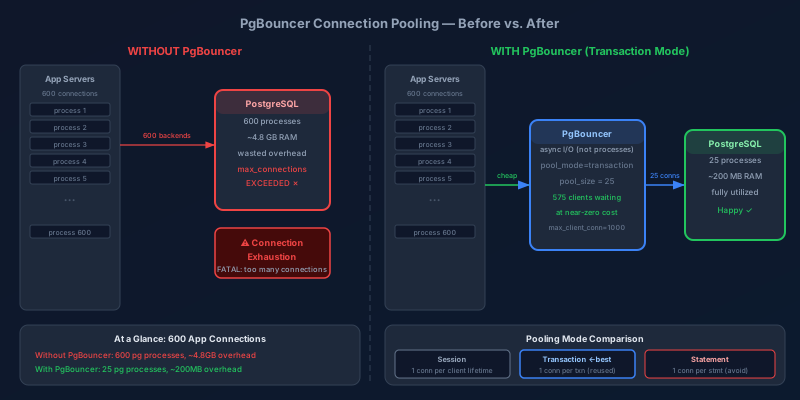
A startup I worked with scaled their PostgreSQL database without incident for two years. Then they crossed 200 concurrent web server processes. Connection errors started appearing intermittently. The database CPU was at 12%. Memory was fine. Disk I/O was minimal. The database was not under load — it was just exhausted from the overhead of managing 600 open connections, most of them idle.
This is the PostgreSQL connection problem. Every connection is a full operating system process on the server. Spawning it takes 5-10ms and 5-10MB of RAM. Keeping hundreds of them open and idle wastes memory and burns CPU on context switching. The solution is a connection pooler, and PgBouncer is the standard answer.
Why PostgreSQL Connections Are Expensive
Unlike databases that handle connections with threads (MySQL) or async I/O (SQL Server), PostgreSQL spawns a new backend process for every connection. This is a deliberate design choice that provides strong isolation — a crashing backend cannot corrupt other connections — but it makes connection overhead significant.
Without PgBouncer:

App Server 1  [process 1]  ─────────────────────────────> pg backend process
App Server 1  [process 2]  ─────────────────────────────> pg backend process
App Server 1  [process 3]  ─────────────────────────────> pg backend process
...
App Server N  [process 50] ─────────────────────────────> pg backend process

Total: 200 app processes × 3 DB connections each = 600 backend processes
Each consuming ~8MB RAM = 4.8GB RAM just for connection overhead
The practical limit for most PostgreSQL instances is 100-300 connections. Beyond that, you are spending more resources on connection management than on actual query execution.
-- Check current connections and their state
SELECT
    state,
    count(*) as count,
    max(now() - state_change) as max_duration
FROM pg_stat_activity
WHERE datname = 'production_db'
GROUP BY state;

-- state      | count | max_duration
-- active     |    12 | 00:00:00.043
-- idle        |  388 | 02:14:33.412  ← 388 connections doing nothing
-- idle in tx  |    3  | 00:08:22.014  ← dangerous: blocking vacuums
Those 388 idle connections represent 388 PostgreSQL backend processes consuming RAM, maintaining authentication state, and requiring the kernel to context-switch across them even when they have nothing to do.
What PgBouncer Does
PgBouncer sits between your application and PostgreSQL. Applications connect to PgBouncer (which is cheap — PgBouncer uses async I/O, not processes), and PgBouncer maintains a small pool of actual PostgreSQL connections that it reuses.
With PgBouncer:

App Server 1  [process 1]  ─────> PgBouncer ─────> pg backend (active query)
App Server 1  [process 2]  ─────> PgBouncer ─────> pg backend (active query)
App Server 1  [process 3]  ─────> PgBouncer ─┐
...                                           │ Wait for available connection
App Server N  [process 50] ─────> PgBouncer ─┘

Total connections to PostgreSQL: pool_size (e.g., 25)
Total PgBouncer connections from apps: unlimited (practically)
600 application connections → PgBouncer → 25 PostgreSQL connections. The 575 connections that are not actively executing queries wait in PgBouncer without touching PostgreSQL at all.
PgBouncer Pooling Modes
PgBouncer has three modes. The right one depends on what your application does between queries.
Session Mode
One server connection per client session, held for the lifetime of the client connection. Identical to connecting directly to PostgreSQL.
pool_mode = session
Session mode provides full PostgreSQL compatibility — you can use prepared statements, advisory locks, SET variables, temp tables, and anything else that requires persistent session state. The downside: if your application holds connections open while doing non-database work (HTTP requests to third parties, business logic, etc.), those connections sit idle in PostgreSQL, and you have solved nothing.
Use when: You need compatibility with features that require session state and your connections are short-lived.
Transaction Mode
One server connection per transaction. The connection is returned to the pool as soon as the transaction commits or rolls back.
pool_mode = transaction
This is where PgBouncer delivers real leverage. An application with 600 connections that executes short transactions gets multiplexed over a pool of 25 connections. At any given moment, 25 queries are executing in PostgreSQL and 575 connections are waiting in PgBouncer at near-zero cost.
Transaction mode timeline:

App connection 1: [QUERY]─────[COMMIT]─────────────────────[QUERY]─[COMMIT]
                       ↑ borrows       ↑ returns                  ↑ borrows
PG connection A:   ████████████████████░░░░░░░░░░░░░░░░░░░░████████████████
                                       ↑ idle, available

App connection 2: ────────────────────[QUERY]─[COMMIT]────────────────────
                                           ↑ borrows  ↑ returns
PG connection A:                        ████████████████
Two application connections share a single PostgreSQL connection without interference because each transaction completes before the next one begins.
Statement Mode
One server connection per statement. The most aggressive and least commonly used.
Avoid statement mode unless you have a very specific use case. Multi-statement transactions are broken in statement mode because each statement returns the connection to the pool, meaning BEGIN / statement 1 / statement 2 / COMMIT might execute on four different server connections.
Configuration Reference
# /etc/pgbouncer/pgbouncer.ini

[databases]
# Format: client_dbname = host=... port=... dbname=... user=...
production_db = host=postgres-primary port=5432 dbname=production_db

# Read-only pool pointing at replica
production_db_ro = host=postgres-replica port=5432 dbname=production_db

[pgbouncer]
listen_addr = 0.0.0.0
listen_port = 5432

# Authentication
auth_type = scram-sha-256
auth_file = /etc/pgbouncer/userlist.txt

# Pooling
pool_mode = transaction
default_pool_size = 25        # Server connections per db-user pair
max_client_conn = 1000        # Max app connections PgBouncer accepts
reserve_pool_size = 5         # Extra connections for high-load bursts
reserve_pool_timeout = 5      # Seconds before using reserve pool

# Connection lifecycle
server_idle_timeout = 600     # Close idle server connections after 10 min
client_idle_timeout = 0       # Never close idle client connections
server_lifetime = 3600        # Recycle server connections every hour
                              # (prevents stale connections + picks up
                              #  config changes on primary)

# Health
server_check_delay = 30       # How often to verify idle connections are alive
server_check_query = SELECT 1

# Logging
log_connections = 0           # Don't log every connect (very noisy at scale)
log_disconnections = 0
log_pooler_errors = 1         # Always log pooler-level errors

# Admin access
admin_users = pgbouncer_admin
stats_users = pgbouncer_monitor
Setting pool_size
default_pool_size controls how many real PostgreSQL connections PgBouncer maintains per (database, user) pair. Setting it correctly requires understanding PostgreSQL's max_connections and your query profile.
Formula for pool sizing:

max_connections (PostgreSQL) = sum of all pool sizes + reserved
default_pool_size × number_of_pools ≤ max_connections × 0.8

Example:
- PostgreSQL max_connections = 100
- Leave 20% headroom for direct connections (superusers, monitoring)
- Available for PgBouncer: 80
- If you have 2 pools (read-write + read-only): pool_size = 40 each
  Or: 1 RW pool at 60, 1 RO pool at 20
Start conservative and adjust based on metrics. Too small → connection wait times spike. Too large → PostgreSQL gets overloaded.
Transaction Mode Gotchas
Transaction mode breaks features that require persistent server-side state. These are the most common ones that cause production incidents.
Prepared Statements
Named prepared statements (PREPARE name AS ...) are session-scoped in PostgreSQL. In transaction mode, the connection that ran PREPARE is returned to the pool and the next transaction might get a different connection that does not have the prepared statement.
# BAD in transaction mode: named prepared statement
cursor.execute("PREPARE get_user AS SELECT * FROM users WHERE id = $1")
cursor.execute("EXECUTE get_user(42)")  # Might fail: prepared stmt not found

# GOOD: protocol-level prepared statements (ORM default behavior)
# psycopg2, asyncpg, and most ORMs use protocol-level preparation automatically
cursor.execute("SELECT * FROM users WHERE id = %s", (42,))
If you are using an ORM (SQLAlchemy, Django ORM, Prisma), protocol-level prepared statements are handled transparently and work fine in transaction mode. The issue only arises with explicit PREPARE SQL commands, which is rare in application code.
Configure PgBouncer to ignore protocol-level prepared statements or ensure your client library uses simple query protocol:
# In pgbouncer.ini: tell clients to use simple query mode
# (for drivers that default to extended query protocol)
ignore_startup_parameters = extra_float_digits
Advisory Locks
Advisory locks (pg_advisory_lock, pg_advisory_xact_lock) are session-scoped. In transaction mode, a session-level advisory lock acquired on connection A is held even after the transaction ends — but connection A may be reassigned to a different application client.
-- BAD in transaction mode: session-level advisory lock
SELECT pg_advisory_lock(12345);
-- ...do work...
SELECT pg_advisory_unlock(12345);  -- May run on a different server connection
Use transaction-level advisory locks instead — they are automatically released when the transaction ends:
-- SAFE in transaction mode: transaction-level advisory lock
SELECT pg_advisory_xact_lock(12345);  -- Released on COMMIT/ROLLBACK
SET and RESET
SET commands (like SET search_path, SET application_name) persist for the connection session, not just the transaction. In transaction mode, your SET affects the next application's transaction too.
# Workaround: configure session defaults in PgBouncer
server_reset_query = DISCARD ALL
server_reset_query_always = 0  # Only run reset after transactions that use SET
DISCARD ALL resets everything — search path, prepared statements, advisory locks, temp tables. It adds a small overhead per checkout but ensures a clean slate.
Monitoring PgBouncer
PgBouncer exposes a virtual database called pgbouncer with statistics tables:
-- Connect to the pgbouncer admin database
psql -h localhost -p 5432 -U pgbouncer_monitor pgbouncer

-- Current pool status
SHOW POOLS;
-- database | user | cl_active | cl_waiting | sv_active | sv_idle | sv_used | maxwait
-- prod_db  | app  |        22 |          3 |        25 |       0 |       0 |  0.12

-- cl_active: client connections with a server connection assigned
-- cl_waiting: clients waiting for a server connection (your lag metric)
-- sv_active: server connections currently executing a query
-- sv_idle: server connections idle, available
-- maxwait: longest wait time in seconds

-- Per-second throughput stats
SHOW STATS;
-- database | total_xact_count | total_query_count | avg_query_time | avg_xact_time
-- prod_db  |         1234567  |          3456789  |      1.23 ms   |     2.45 ms
The most important alerting thresholds:
cl_waiting > 0 for sustained periods → pool is saturated, increase pool_size or reduce connection hold time
maxwait > 100ms → queries are waiting for connections, impacting latency
sv_idle = 0 consistently → pool is always fully utilized
Export these metrics to Prometheus via pgbouncer-exporter and build dashboards before you need them.
Deployment Pattern: PgBouncer as a Sidecar
In containerized environments, running PgBouncer as a sidecar container alongside each application pod gives you the benefits of pooling without a central bottleneck:
# Kubernetes deployment snippet
containers:
  - name: app
    image: myapp:latest
    env:
      - name: DATABASE_URL
        value: postgres://app_user:password@localhost:5432/production_db
        # App connects to PgBouncer on localhost

  - name: pgbouncer
    image: bitnami/pgbouncer:latest
    env:
      - name: POSTGRESQL_HOST
        value: postgres-primary.internal
      - name: POSTGRESQL_PORT
        value: "5432"
      - name: PGBOUNCER_POOL_MODE
        value: transaction
      - name: PGBOUNCER_DEFAULT_POOL_SIZE
        value: "10"
      - name: PGBOUNCER_MAX_CLIENT_CONN
        value: "100"
With 50 app pods each running a 10-connection pool, total PostgreSQL connections = 500. Compare this to 50 pods × 100 connections each = 5,000 connections without a pooler.
Key Takeaways
- Every PostgreSQL connection is an OS process. The overhead is real and accumulates quickly beyond 200-300 connections.
- Transaction mode is the right default for most web applications. It provides the most aggressive multiplexing.
- Transaction mode breaks named prepared statements, session-level advisory locks, and
SETpersistence. Use transaction-level equivalents or reset withDISCARD ALL. - Pool size is not "more = better":
default_pool_size× number of pools must stay undermax_connections. Overcommitting brings PostgreSQL to its knees. - Monitor
cl_waitingandmaxwaitas your primary health signals. A queue forming at PgBouncer means your pool is undersized or connections are held too long. - Sidecar deployment scales cleanly in containerized environments and avoids a centralized PgBouncer SPOF.
PgBouncer is not a complex piece of software — the configuration is a single INI file. The complexity is in understanding the semantics that break in transaction mode and building the monitoring to catch problems early. Get those two things right and you can run a much smaller PostgreSQL instance than you think you need.
Keep reading
Write Skew: The Anomaly Snapshot Isolation Does Not Catch
Two transactions each read what the other writes, both commit, and an invariant dies. Snapshot isolation allows write skew — here is how to close the hole.
Designing a Shopping Cart: Price Snapshots, Merge, and No Inventory Hold
A cart is a per-user document, not a reservation. What to store on the line, how to merge an anonymous cart at login, and when the price is allowed to change.
Designing Snowflake-Style IDs: Ordering, Workers, and Clock Rollback
A 64-bit id from a timestamp, a worker number, and a per-millisecond sequence. How many you can issue, why the clock must not step backwards, and why JavaScript cannot hold one.
PostgreSQL 19 on October 29: WAIT for Read-Your-Writes, REPACK Without the Lock, and What Got Pulled
PostgreSQL 19 GA is scheduled for October 29, 2026. The WAIT command gives standbys read-your-writes, REPACK CONCURRENTLY replaces VACUUM FULL and CLUSTER, autovacuum goes parallel, and SQL/PGQ, online checksums, and FOR PORTION OF were reverted in Beta 4.
Idempotency Keys for Write APIs
How to make POST safe to retry: the key, the stored response, the race between two identical requests, and the expiry that forgets too soon.
Read-Your-Writes: The User Just Saved and the Read Replica Does Not Know
Why a write to the primary followed by a read from a replica shows stale data, and the practical ways to pin the next read without sending all traffic to the primary.
Newsletter
New posts, straight to your inbox
One email per post. No spam, no tracking pixels, unsubscribe anytime.
Comments
- No comments yet. Be the first.