Columnar Storage: How Analytical Databases Work Under the Hood
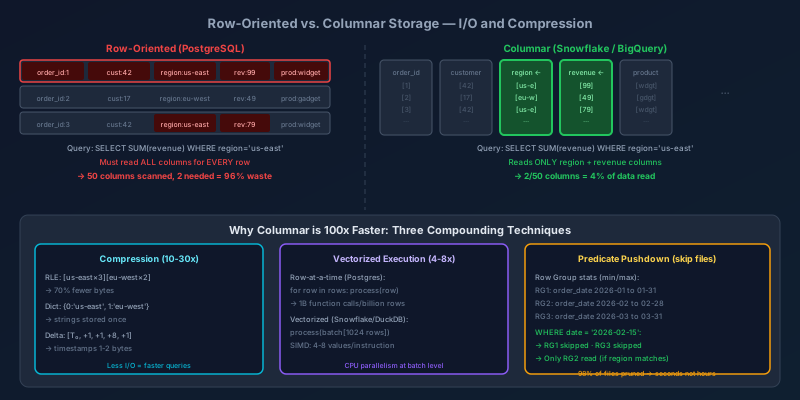
Running SELECT SUM(revenue) FROM orders WHERE region = 'us-east' on a billion-row table takes 2 seconds in Snowflake or BigQuery and 45 minutes in PostgreSQL. The query is identical. The difference is almost entirely in how the data is physically stored on disk — and understanding that difference is what separates someone who uses analytical databases from someone who can reason about them.
Row-Oriented vs. Columnar Storage
In a row-oriented database (PostgreSQL, MySQL, SQLite), every row's columns are stored contiguously on disk. When you read a row, you get all of its columns in a single I/O operation, which is perfect for OLTP: look up a customer by ID, get all their fields.
Row-oriented layout (one page, 3 rows):
┌────────────────────────────────────────────────────────────────────┐
│ [order_id:1][customer_id:42][region:us-east][product:widget][rev:99]│
│ [order_id:2][customer_id:17][region:eu-west][product:gadget][rev:49]│
│ [order_id:3][customer_id:42][region:us-east][product:widget][rev:79]│
└────────────────────────────────────────────────────────────────────┘
To compute SUM(revenue) WHERE region = 'us-east', the database must read every row — including order_id, customer_id, and product — even though the query only needs region and revenue. For a billion rows with 50 columns, you are reading 50x more data than necessary.
In a columnar database, each column is stored separately and contiguously:
Columnar layout (same 3 rows, stored as column files):

order_id file:   [1][2][3]...
customer_id file: [42][17][42]...
region file:     [us-east][eu-west][us-east]...
product file:    [widget][gadget][widget]...
revenue file:    [99][49][79]...
The same query now reads only the region file and the revenue file. On a table with 50 columns and 1 billion rows, you read 2/50 = 4% of the data. That is a 25x reduction in I/O before any other optimization applies.
Compression: The Second Multiplier
Columnar storage enables aggressive compression because a column contains values of the same type and often exhibits repetition or monotonic trends — far easier to compress than a mixed-type row.
Run-Length Encoding (RLE)
When consecutive values are identical, store (value, count) pairs instead of repeating the value:
Uncompressed region column (10 rows):
[us-east][us-east][us-east][eu-west][eu-west][us-east][us-east][us-east][us-east][us-east]

RLE compressed:
[(us-east, 3)(eu-west, 2)(us-east, 5)]
10 values compressed to 3 pairs — 70% compression for this column. In sorted data (which columnar databases often maintain within row groups), run lengths become very long and RLE ratios become extreme.
Dictionary Encoding
Replace repeated string values with integer codes and store a separate dictionary:
Raw values:       [us-east][eu-west][us-east][ap-south][eu-west][us-east]

Dictionary:       {0: 'us-east', 1: 'eu-west', 2: 'ap-south'}
Encoded values:   [0][1][0][2][1][0]
us-east stored once as a string + a dictionary ID per occurrence instead of 7 bytes repeated 6 times. For a billion-row table with 50 possible region values, dictionary encoding reduces the region column from ~7GB to ~1GB plus a trivial dictionary.
The key insight: predicates can be evaluated against the dictionary before reading the encoded data. If you are looking for region = 'us-east', the engine looks up 'us-east' in the dictionary (code = 0), then finds rows where the encoded column = 0, without ever decompressing the strings.
Delta Encoding
For monotonically increasing values (timestamps, sequential IDs), store the first value and then deltas:
Raw timestamps:     [1000000, 1000001, 1000002, 1000010, 1000011]
Delta encoded:      [1000000, +1, +1, +8, +1]
Deltas are small numbers that compress extremely well with Snappy, Zstd, or LZ4. A timestamp column that would take 8 bytes per value can compress to 1-2 bytes per value on typical event data.
Combined Effect
Compression ratios of 10:1 to 30:1 are typical in practice. A table that would occupy 10TB in PostgreSQL often fits in 300GB in Snowflake or BigQuery. The compression is not just a storage cost win — it is a performance win, because reading 300GB instead of 10TB is a 33x reduction in I/O, and I/O is usually the bottleneck.
Vectorized Execution
Once you have compressed columnar data, you need a query engine that can operate on it efficiently. Row-at-a-time execution (the classic Volcano model used by PostgreSQL) processes one row per function call:
# Row-at-a-time (simplified Volcano model)
def sum_revenue(rows):
    total = 0
    for row in rows:  # one function call per row
        if row.region == 'us-east':
            total += row.revenue
    return total
For a billion rows, this is a billion function calls, a billion branch predictions, and almost no opportunity for CPU vectorization.
Vectorized execution processes batches of values at once, typically 1,024 or 4,096 values per batch:
import numpy as np

# Vectorized execution
def sum_revenue_vectorized(region_col, revenue_col, batch_size=1024):
    total = 0
    for i in range(0, len(region_col), batch_size):
        region_batch = region_col[i:i+batch_size]
        revenue_batch = revenue_col[i:i+batch_size]

        # SIMD: compare entire batch with a single CPU instruction
        mask = region_batch == 'us-east'

        # SIMD: sum only the matching revenues
        total += revenue_batch[mask].sum()

    return total
Modern CPUs support SIMD (Single Instruction, Multiple Data) instructions that operate on 256 or 512 bits at once. A 256-bit AVX2 instruction can compare 4 × 64-bit integers simultaneously. Processing batches of 1,024 values allows the CPU to vectorize the tight inner loop, reducing effective cost per row by 4-8x over scalar execution.
Snowflake, DuckDB, and Apache Arrow-based engines are designed around this model. DuckDB is particularly instructive because it is open source and you can observe the vectorized execution directly:
-- DuckDB: EXPLAIN shows vectorized operators
EXPLAIN SELECT sum(revenue)
FROM orders
WHERE region = 'us-east';

-- Physical Plan:
-- HASH_GROUP_BY
--   FILTER region='us-east'  ← evaluated on batches of 1024 rows
--     TABLE_SCAN orders [region, revenue]  ← only 2 of N columns read
Row Groups and Predicate Pushdown
Columnar files are divided into row groups (Parquet's term; Snowflake calls them micro-partitions). Each row group contains ~100,000-1,000,000 rows and stores min/max statistics for every column.
Parquet file: orders.parquet

Row Group 1 (rows 0-999,999):
  - order_date: min=2026-01-01, max=2026-01-31
  - region: values=['us-east', 'us-west']
  - revenue: min=10, max=9999

Row Group 2 (rows 1,000,000-1,999,999):
  - order_date: min=2026-02-01, max=2026-02-28
  - region: values=['eu-west', 'ap-south']
  - revenue: min=5, max=4999

Row Group 3 (rows 2,000,000-2,999,999):
  - order_date: min=2026-03-01, max=2026-03-31
  - region: values=['us-east', 'ap-south']
  - revenue: min=15, max=12000
For the query WHERE order_date = '2026-02-15' AND region = 'us-east':
- Row Group 1: order_date range includes Feb 15? No. Skip.
- Row Group 2: order_date range includes Feb 15? Yes. region includes 'us-east'? No. Skip.
- Row Group 3: order_date range includes Mar 15? No. Skip.
All three row groups are skipped without reading a single data value. This is predicate pushdown to the storage layer — the query engine eliminates irrelevant files before any data reaches the execution engine.
In Snowflake, this mechanism is called micro-partition pruning and is the primary reason queries against trillion-row tables complete in seconds when the WHERE clause is selective.
-- Snowflake: check how many micro-partitions were scanned vs. pruned
SELECT query_id, partitions_scanned, partitions_total,
       partitions_scanned::float / partitions_total as pct_scanned
FROM snowflake.account_usage.query_history
WHERE query_text LIKE '%orders%'
ORDER BY start_time DESC
LIMIT 10;

-- pct_scanned = 0.02 means 98% of partitions were pruned → excellent
-- pct_scanned = 0.95 means almost no pruning → bad predicate, may need clustering
Clustering and Sort Order
Row group statistics only enable effective pruning when data is sorted (or clustered) on the predicate column. If order_date values are randomly distributed across all row groups, the min/max statistics overlap and no pruning happens.
-- Snowflake: define a clustering key to sort data within micro-partitions
ALTER TABLE orders CLUSTER BY (date_trunc('month', order_date), region);

-- Parquet (via Spark or dbt): sort before writing
df.sort('order_date', 'region').write.parquet('s3://bucket/orders/')

-- BigQuery: use a partitioned + clustered table
CREATE TABLE `project.dataset.orders`
PARTITION BY DATE(order_date)
CLUSTER BY region, customer_id
AS SELECT * FROM orders_source;
Clustering is not free — it requires re-sorting as new data arrives. Snowflake does this automatically via background re-clustering (at a cost). In Parquet-based systems, you re-sort the data in your pipeline before writing.
The rule of thumb: cluster or sort on the columns that appear most frequently in WHERE and JOIN conditions in your analytical queries.
When NOT to Use Columnar Storage
Columnar storage is optimized for reads that touch many rows but few columns. It is the wrong tool for:
OLTP point lookups: looking up a single order by ID in a columnar store requires reading and decompressing the relevant value from each column file separately. A row-oriented store reads the entire row in a single sequential disk read.
High-velocity writes: columnar formats are optimized for bulk writes (append entire row groups). Individual row inserts are expensive — they require creating new row groups or opening existing ones. Systems like BigQuery handle this by buffering row-level changes in a streaming buffer before compacting them into columnar storage.
Wide row reads: if your query consistently selects 40 out of 50 columns, columnar provides little I/O advantage over row-oriented storage. The overhead of reading 40 separate column files versus reading rows sequentially may offset the compression benefit.
Small tables: the overhead of metadata management, row group tracking, and dictionary lookups matters more when tables have thousands of rows than millions. Below ~1M rows, the format choice rarely matters for performance.
Practical Query Optimization
Understanding the storage model leads directly to actionable query optimizations:
-- 1. SELECT only the columns you need (enables column pruning)
-- BAD:
SELECT * FROM orders WHERE region = 'us-east';
-- GOOD:
SELECT order_id, revenue, order_date FROM orders WHERE region = 'us-east';

-- 2. Put the most selective filter on the clustering column first
-- (maximizes row group pruning)
SELECT sum(revenue)
FROM orders
WHERE order_date BETWEEN '2026-01-01' AND '2026-03-31'  -- clustering col first
  AND region = 'us-east'
  AND product_category = 'electronics';

-- 3. Avoid functions on clustered columns (breaks pruning statistics)
-- BAD: can't use min/max stats on YEAR(order_date)
SELECT sum(revenue) FROM orders WHERE YEAR(order_date) = 2026;
-- GOOD:
SELECT sum(revenue) FROM orders
WHERE order_date BETWEEN '2026-01-01' AND '2026-12-31';

-- 4. Use approximate functions for exploratory queries (orders of magnitude faster)
-- APPROX_COUNT_DISTINCT uses HyperLogLog: 1-2% error, 10-100x faster
SELECT region, APPROX_COUNT_DISTINCT(customer_id) as approx_unique_customers
FROM orders
GROUP BY region;
Key Takeaways
- Columnar storage reads only the columns your query needs, reducing I/O by
(columns_selected / total_columns)before any other optimization. - Compression ratios of 10:1 to 30:1 are typical, driven by RLE (repeated values), dictionary encoding (string columns), and delta encoding (monotonic sequences).
- Vectorized execution processes batches of 1,024+ values using SIMD instructions, cutting CPU cost per row by 4-8x over row-at-a-time processing.
- Row group statistics (min/max) enable the engine to skip entire row groups without reading data, but only when data is sorted or clustered on the predicate column.
- Cluster or partition on your most common WHERE columns — this is the highest-leverage optimization you control as an engineer.
- Columnar storage is wrong for OLTP point lookups and high-velocity single-row inserts. Analytical and transactional workloads need different storage engines.
The reason Snowflake, BigQuery, Redshift, and DuckDB feel like magic on analytical workloads is not magic — it is the compounding effect of these techniques applied at scale. Once you understand what each layer contributes, you can write queries that work with the storage engine instead of against it.
Keep reading
Write Skew: The Anomaly Snapshot Isolation Does Not Catch
Two transactions each read what the other writes, both commit, and an invariant dies. Snapshot isolation allows write skew — here is how to close the hole.

Designing a Shopping Cart: Price Snapshots, Merge, and No Inventory Hold
A cart is a per-user document, not a reservation. What to store on the line, how to merge an anonymous cart at login, and when the price is allowed to change.

Designing Snowflake-Style IDs: Ordering, Workers, and Clock Rollback
A 64-bit id from a timestamp, a worker number, and a per-millisecond sequence. How many you can issue, why the clock must not step backwards, and why JavaScript cannot hold one.
PostgreSQL 19 on October 29: WAIT for Read-Your-Writes, REPACK Without the Lock, and What Got Pulled
PostgreSQL 19 GA is scheduled for October 29, 2026. The WAIT command gives standbys read-your-writes, REPACK CONCURRENTLY replaces VACUUM FULL and CLUSTER, autovacuum goes parallel, and SQL/PGQ, online checksums, and FOR PORTION OF were reverted in Beta 4.
Idempotency Keys for Write APIs
How to make POST safe to retry: the key, the stored response, the race between two identical requests, and the expiry that forgets too soon.

Read-Your-Writes: The User Just Saved and the Read Replica Does Not Know
Why a write to the primary followed by a read from a replica shows stale data, and the practical ways to pin the next read without sending all traffic to the primary.
Newsletter
New posts, straight to your inbox
One email per post. No spam, no tracking pixels, unsubscribe anytime.
Comments
- No comments yet. Be the first.