Remove Duplicates From Arrays in Power Automate — 3 Approaches
In this series: Power Automate gotchas
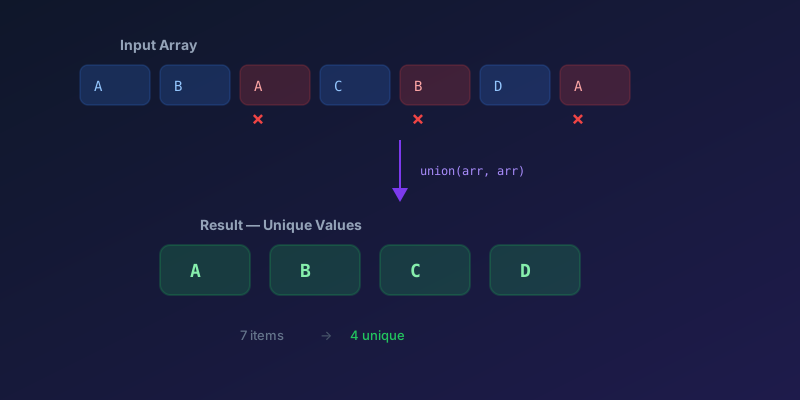
Power Automate still does not have a built-in "Remove Duplicates" action. Here are three reliable approaches, from simplest to most flexible.
Approach 1: Union with Itself
The simplest one-liner. The union() function returns distinct values:
@union(variables('myArray'), variables('myArray'))
This works for arrays of simple values (strings, numbers). It compares values directly and removes duplicates. It does not dedupe objects by a key. Two records with the same email and different names are different JSON values, so union() keeps both. Use Approach 2 for that.
Example:
Input: ["apple", "banana", "apple", "cherry", "banana"]
Expression: @union(variables('myArray'), variables('myArray'))
Output: ["apple", "banana", "cherry"]
Use a Compose action with this expression, and you have your deduplicated array in one step.
Approach 2: Select + Union for Object Arrays
When dealing with arrays of objects and you want to deduplicate based on a specific property:
-
Select — extract the key field into a simple array:
@item()?['email'] -
Compose — deduplicate with union:
@union(body('Select'), body('Select')) -
Filter array — filter the original array to keep only the first occurrence of each key:
@equals(
  indexOf(outputs('Compose_Unique_Keys'), item()?['email']),
  indexOf(outputs('Compose_Unique_Keys'), item()?['email'])
)
Wait — that always returns true. The trick is slightly different. Use a Select on the unique keys and for each key, use first(filter(...)) to grab the first matching object:
@first(filter(variables('myArray'), item()?['email'], items('Apply_to_each')))
Approach 3: XPath for Complex Deduplication
For more complex scenarios, convert to XML and use XPath's distinct-values:
-
Compose — convert array to XML:
@xml(json(concat('{"root":{"item":', string(variables('myArray')), '}}')))` -
Compose — apply XPath:
@xpath(xml(outputs('Compose_XML')), '//item[not(. = preceding-sibling::item)]')
This is more verbose but handles edge cases that union() doesn't cover.
Which Should You Use?
| Scenario | Approach |
|---|---|
| Simple string/number arrays | union() — one expression |
| Object arrays, deduplicate by key | Select + Union + Filter |
| Complex nested deduplication | XPath |
| Performance critical (1000+ items) | union() or move to a child flow with chunking |
Performance Note
For arrays with more than a few hundred items, union() is still the right first tool. Above a few thousand objects, Apply to each plus Filter becomes the bottleneck — not the expression.
In that case:
- Deduplicate in Dataverse or SQL (
distinct, a view, or an alternate key upsert) before the flow sees the array - Process in batches with a child flow if you must stay in Power Automate
- Move heavy transforms to an Azure Function or a Dataverse plugin if the array is a standing integration, not a one-off
Do not add a fourth Apply to each to "make union work on objects." That is how 20-second flows become 20-minute flows.
Key Takeaway
Start with union(array, array) — it solves 80% of deduplication needs in a single expression. Only reach for more complex approaches when you are working with object arrays or need key-based deduplication.
Keep reading

Power Automate Trigger Conditions: The Run That Never Appears
A trigger condition that is false does not start a run and does not leave run history. How the expression differs from a Condition action, and how to see the skipped checks.

Power Platform September 2026 Update: The App-Builder Skill, Agent Plugins, and the Refreshed Model-Driven UI
What matters in Microsoft's September 2026 Power Platform feature update: the model app-builder skill goes GA, the canvas authoring agent plugin goes GA, generative pages embed in forms and reach connectors, model-driven header refresh is GA with display density in preview, and Power Automate gets server-side search.

Dataverse Triggers in Power Automate: Select Columns or the Flow Wakes Up for Nothing
How Select columns and Filter rows on a Dataverse trigger cut wasted runs, and the row-version mistakes that make a flow miss the change it was built for.

Retry Policies in Power Automate: What Actually Happens When an Action Fails
How Power Automate retry policies work, which errors they cover, how to configure them, and how to keep retries from duplicating side effects.

Resilient Power Automate: Retry Policies and Dead-Letter Patterns
Transient failures are normal in any flow that calls an API. The difference between a flow that self-heals and one that pages you at 2 a.m. is how you handle retries and the failures that stick.

15 Power Automate Expressions Every Maker Should Memorize
Memorize these Power Automate expressions to build faster flows, handle nulls, shape arrays, format dates, reduce action count, and debug WDL.
Newsletter
New posts, straight to your inbox
One email per post. No spam, no tracking pixels, unsubscribe anytime.
Comments
- No comments yet. Be the first.