Monolith to Microservices: How to Decompose Without Creating a Distributed Monolith
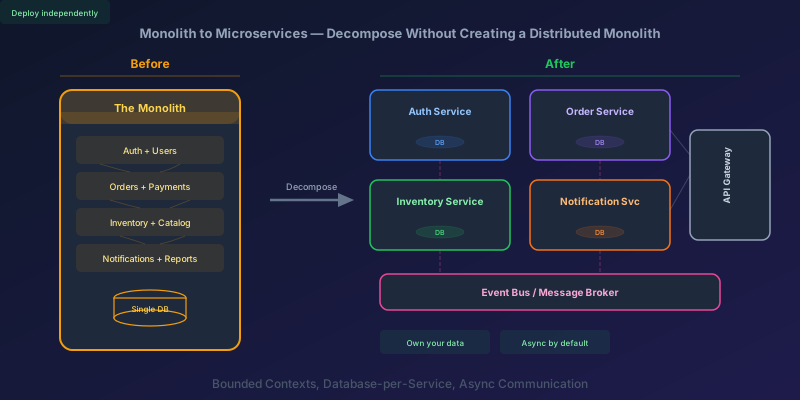
Everyone wants microservices. Few teams understand what they are signing up for. The pitch is compelling — independent deployments, technology diversity, team autonomy, horizontal scaling. The reality is that most monolith-to-microservices migrations produce something worse than either: a distributed monolith. All the operational complexity of microservices with none of the benefits, because the services are still tightly coupled — just over a network instead of in-process.
This guide covers how to decompose a monolith correctly. Not the theory — the decisions and trade-offs you will actually face.
When NOT to Decompose
Before we start: microservices are not a goal. They are a tool for solving specific organizational and scaling problems. You should stay on the monolith if:
- Your team is small (under 8-10 engineers). A monolith is simpler to develop, test, deploy, and debug. Microservices add operational overhead that small teams cannot absorb
- Your deployment cadence is fine. If you can ship features without stepping on each other's code, the monolith is working
- Your scaling bottleneck is not service-level. If the whole app needs more capacity, scale the monolith horizontally behind a load balancer. Microservices help when different parts of the system have different scaling profiles
- You do not understand your domain boundaries yet. Decomposing along the wrong boundaries is worse than not decomposing at all. Wrong boundaries mean constant cross-service changes for every feature
The best time to decompose is when the monolith is actively causing pain: deployment conflicts between teams, scaling constraints on a specific subsystem, or a need to use different technology stacks for different capabilities.
Step 1: Find the Boundaries
The hardest part of decomposition is not the technical work — it is identifying where to cut. Get the boundaries wrong and every feature will require changes to three services, coordinated deployments, and distributed transactions. That is a distributed monolith.
Bounded Contexts from Domain-Driven Design
The most reliable boundary-finding technique comes from Domain-Driven Design (DDD). A bounded context is a part of the system where a specific domain model applies. The same word can mean different things in different contexts:
- "Order" in the Sales context: a customer's purchase with line items, discounts, shipping address
- "Order" in the Warehouse context: a pick list with bin locations, weights, and packing requirements
- "Order" in the Billing context: an amount, a payment method, and an invoice
Each bounded context has its own model of an order, optimized for its concerns. Trying to share a single "Order" model across all three is what creates tight coupling.
Practical Boundary-Finding
If DDD feels abstract, here is a concrete exercise:
- List your deployment pain points. Which parts of the codebase cause merge conflicts? Which teams block each other? These are natural boundary candidates
- Trace your change patterns. Look at your last 50 commits or PRs. Group them by the area of the codebase they touch. Clusters of changes that rarely overlap with other clusters are good service candidates
- Map your data access patterns. Which tables are read and written by which features? Tables that are only accessed by one feature area belong together. Tables accessed by everything (like
Users) indicate a shared concern that needs careful handling - Check organizational structure. Conway's Law is real — your architecture will mirror your team structure. If you have a Payments team and an Inventory team, those are natural service boundaries
Signs You Have the Boundary Wrong
- A single user story requires changes to more than two services
- Two services share a database table
- One service directly queries another service's database
- Services need to be deployed together — if service A's deploy breaks unless service B deploys at the same time, they are not independent
Step 2: The Strangler Fig Pattern
Do not attempt a big-bang rewrite. Extract services one at a time from the monolith using the Strangler Fig pattern.
The idea: new functionality goes into a new service. Existing functionality is gradually extracted. The monolith shrinks over time until it is either gone or reduced to a thin shell.
How It Works
                    ┌──────────────┐
   Requests ──────► │  API Gateway  │
                    │  / Proxy      │
                    └──────┬───────┘
                           │
                    ┌──────┴───────┐
                    │              │
              ┌─────▼─────┐  ┌────▼─────┐
              │ Monolith   │  │ New       │
              │ (shrinking)│  │ Service   │
              └───────────┘  └──────────┘
- Put a routing layer (API gateway, reverse proxy) in front of the monolith
- Identify the first feature to extract
- Build the new service with its own database
- Route traffic for that feature to the new service
- Remove the dead code from the monolith
- Repeat
The routing layer is critical. It lets you switch traffic between the monolith and the new service without the caller knowing. You can even run both in parallel and compare results before cutting over.
What to Extract First
Pick a service that is:
- Low risk — not your core revenue path
- Well-bounded — few dependencies on other parts of the monolith
- High pain — the team working on it is most blocked by the monolith
Notifications, reporting, and user preferences are common first extractions. They have clear boundaries, limited data dependencies, and are forgiving if something goes wrong during migration.
Do not start with your most complex, highest-traffic, most interconnected feature. That is the last one you extract, after you have learned from the easier ones.
Step 3: Split the Database
This is where most migrations stall. The monolith has one database. Microservices need database-per-service — each service owns its data and no other service touches it directly.
Why Database-per-Service Matters
If two services share a database:
- You cannot deploy them independently (schema changes affect both)
- You cannot scale them independently (they compete for database resources)
- You have runtime coupling (one service's slow query affects the other)
- You have no encapsulation (one service can read/write the other's data, bypassing its business logic)
Shared databases are the number one cause of distributed monoliths.
How to Split
Step 3a: Identify ownership. For every table in the monolith database, assign it to one service. If a table is used by multiple features, it belongs to the service that writes to it most. Other services get read access through APIs.
Step 3b: Create views or API layers first. Before physically moving tables, create an abstraction layer. If the Order Service needs customer data, it calls the Customer Service API — it does not join against the Customers table.
Before:
  Order Service ──► [Shared DB: Orders + Customers tables]

After:
  Order Service ──► Order DB (Orders table)
                ──► Customer Service API ──► Customer DB
Step 3c: Handle the transition. During migration, you will have a period where both the monolith and the new service need the same data. Options:
- Dual writes: write to both databases during transition. Fragile and error-prone — only use for short transitions
- Change Data Capture (CDC): stream changes from the old database to the new one. Tools like Debezium make this practical
- Event-driven sync: the monolith publishes events when data changes, the new service subscribes and maintains its own copy
CDC is usually the safest option for the transition period.
Step 4: Communication Between Services
How services talk to each other determines whether you get the benefits of microservices or just the complexity.
Synchronous (Request/Response)
One service calls another and waits for a response. REST or gRPC.
Order Service ──HTTP GET──► Inventory Service
              ◄──200 OK──┘  { "available": true }
When to use: queries where you need an immediate answer. "Is this item in stock?" before confirming an order.
The trap: chains of synchronous calls. If Order Service calls Inventory, which calls Warehouse, which calls Shipping — you have recreated the monolith's tight coupling, but now with network latency, partial failures, and timeout cascades at every hop.
Rule of thumb: if a request touches more than two services synchronously, redesign the interaction.
Asynchronous (Event-Driven)
A service publishes an event. Other services subscribe and react when they are ready. No waiting.
Order Service ──publishes──► [Event Bus]
                                 │
                    ┌────────────┼────────────┐
                    ▼            ▼             ▼
              Inventory    Notification    Billing
              Service      Service         Service
When to use: anything where the caller does not need an immediate response. "An order was placed" — Inventory should decrement stock, Billing should charge the card, Notifications should send a confirmation email. None of these need to happen before the order confirmation returns to the user.
The benefit: loose coupling. The Order Service does not know (or care) who consumes its events. Adding a new consumer (analytics, fraud detection) requires zero changes to the Order Service.
The cost: eventual consistency. The inventory count will be updated eventually, not instantly. If you need strong consistency (the item must be reserved before the order is confirmed), use a synchronous call for that specific check and events for everything else.
The Right Mix
Most systems use both:
- Synchronous for reads and validation ("is this item available?")
- Asynchronous for side effects and downstream processing ("order was placed, update everything else")
Do not go 100% async. Some operations genuinely need immediate consistency. Do not go 100% sync. You will build a distributed monolith with worse latency than the original.
Step 5: Handle Data Consistency
In a monolith, you wrap everything in a database transaction. In microservices, you cannot — the data is in different databases. You need different patterns.
The Saga Pattern
A saga is a sequence of local transactions across services. Each service performs its transaction and publishes an event. If any step fails, preceding steps are compensated (reversed).
1. Order Service:   Create order (status: PENDING)
2. Payment Service: Charge card
   → Success: publish PaymentCompleted
   → Failure: publish PaymentFailed
      → Order Service: Cancel order (compensating action)
3. Inventory Service: Reserve stock
   → Success: publish StockReserved
   → Failure: publish ReservationFailed
      → Payment Service: Refund card (compensating action)
      → Order Service: Cancel order (compensating action)
4. Order Service:   Update order (status: CONFIRMED)
Two flavors:
Choreography: each service listens for events and decides what to do. Simple, but hard to understand the overall flow when you have many steps. Good for 2-3 step sagas.
Orchestration: a central coordinator (the saga orchestrator) tells each service what to do and handles failures. More complex to build, but the flow is explicit and visible. Better for 4+ step sagas.
Eventual Consistency Is Not Optional
Accept it early: microservices mean eventual consistency for cross-service data. The inventory count might lag by a few seconds. The order history might not show the latest payment status immediately.
If your business cannot tolerate this for a specific operation, that operation should stay in one service (or stay in the monolith). Do not fight eventual consistency with distributed transactions — the cure is worse than the disease.
Common Anti-Patterns
The Distributed Monolith
Symptom: every feature requires synchronized deployments across multiple services.
Cause: services share a database, use synchronous call chains, or have circular dependencies.
Fix: re-examine your boundaries. Merge services that always change together — they are not separate bounded contexts.
The Nano-Service
Symptom: you have 40 services for a team of 6 engineers. Each service is 200 lines of code. The infrastructure overhead dominates development time.
Cause: decomposing too aggressively. Every CRUD operation became a service.
Fix: merge related nano-services into cohesive services aligned with bounded contexts. A service should be owned by one team and represent a meaningful business capability — not a single database table.
Shared Library Coupling
Symptom: all services depend on a shared library. Updating the library requires redeploying every service.
Cause: extracting "common" code into a shared library instead of duplicating it.
Fix: duplicate simple code across services. Shared libraries for domain logic are hidden coupling. Shared libraries for truly generic concerns (logging, HTTP clients, serialization) are fine — as long as services can run different versions independently.
The God Service
Symptom: one service handles most of the business logic. Other services are thin wrappers.
Cause: the decomposition moved data to separate databases but left the logic in one place.
Fix: move business logic to the service that owns the relevant data. If the Order Service contains inventory validation logic, that logic should move to the Inventory Service, exposed through an API.
A Realistic Migration Timeline
For a medium-complexity monolith (10-15 engineers, 3-5 years of code):
| Phase | Duration | What Happens |
|---|---|---|
| Boundary identification | 2-4 weeks | Map domains, trace dependencies, identify first extraction target |
| Infrastructure setup | 2-3 weeks | API gateway, event bus, CI/CD per service, observability |
| First service extraction | 4-6 weeks | Extract one bounded context end-to-end including database split |
| Stabilization | 2-3 weeks | Fix issues discovered in production, tune monitoring |
| Subsequent extractions | 3-4 weeks each | Gets faster as patterns are established |
| Monolith retirement | Ongoing | May never fully happen — and that is fine |
Total for full migration: 6-18 months depending on size and complexity. The monolith remains in production the entire time, shrinking gradually.
Key Takeaway
The difference between a successful microservices architecture and a distributed monolith comes down to three things: correct boundaries (aligned with business domains, not technical layers), database-per-service (no shared databases), and async-first communication (events for side effects, synchronous only where immediate consistency is required).
Start with the Strangler Fig pattern. Extract one service at a time. Validate your boundaries by checking whether features can be built within a single service. If every feature requires cross-service changes, your boundaries are wrong — and merging services back together is a legitimate and often correct response.
The goal is not the maximum number of services. The goal is independent deployability, team autonomy, and the ability to scale different parts of the system independently. If you can achieve that with four well-bounded services, that is better than twenty tightly coupled one.
Keep reading
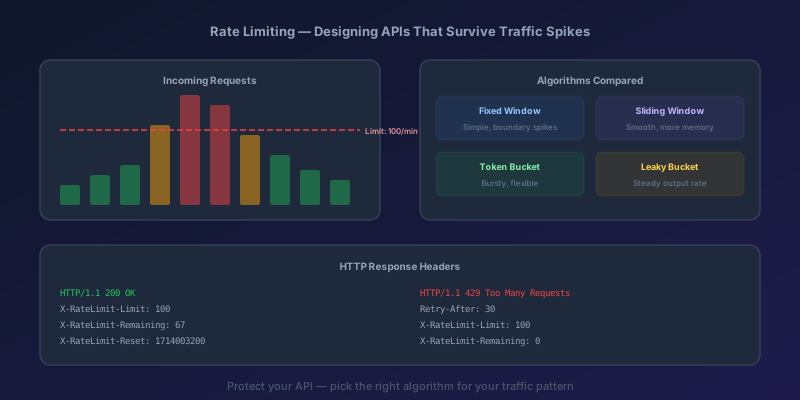
Rate Limiting and Throttling: Designing APIs That Survive Traffic Spikes
Why every public API needs rate limiting, the four main algorithms compared, implementation in Next.js with Redis, proper HTTP headers, and Azure API Management policies.

TypeScript 7 Upgrade: 10x Faster tsc, and the API Gap You Have to Plan Around
TypeScript 7.0 is the native Go compiler, stable since July 2026, with 8 to 12x faster full builds. Deprecations are hard errors, strict and esnext are defaults, and the programmatic API waits for 7.1. A migration order that keeps lint and frameworks working.
IHttpClientFactory: Stop Creating HttpClient Per Request
Why new HttpClient() in a .NET service exhausts sockets under load, and how IHttpClientFactory plus a named client fixes DNS without freezing the handler forever.
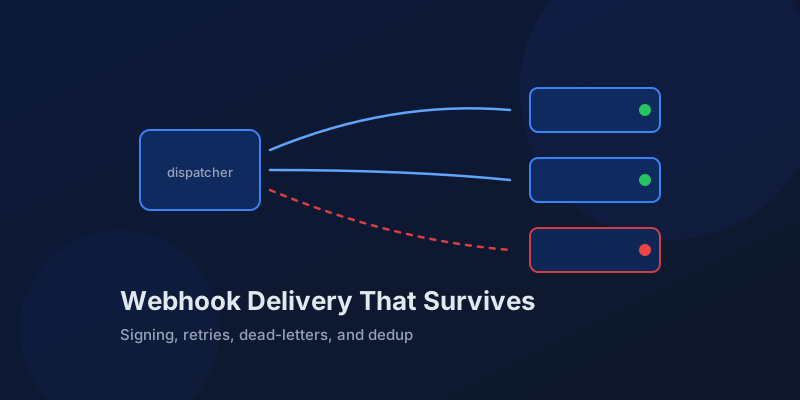
Designing Webhook Delivery That Survives Flaky Consumers
Signing, retries, ordering, and dead-lettering: the design decisions that separate reliable webhook delivery from silent event loss.
Server Components vs. Client Components: A Mental Model That Sticks
The hardest part of React Server Components isn't the syntax — it's knowing which kind of component you're writing and why. Here is the mental model that makes the boundary obvious.

Optimistic UI Updates: Making Apps Feel Instant Without Lying to Users
The like button that responds before the server confirms feels instant. The trick is updating the UI first and reconciling later — and handling the rollback so you never mislead the user.
Newsletter
New posts, straight to your inbox
One email per post. No spam, no tracking pixels, unsubscribe anytime.
Comments
- No comments yet. Be the first.