Server Components vs. Client Components: A Mental Model That Sticks
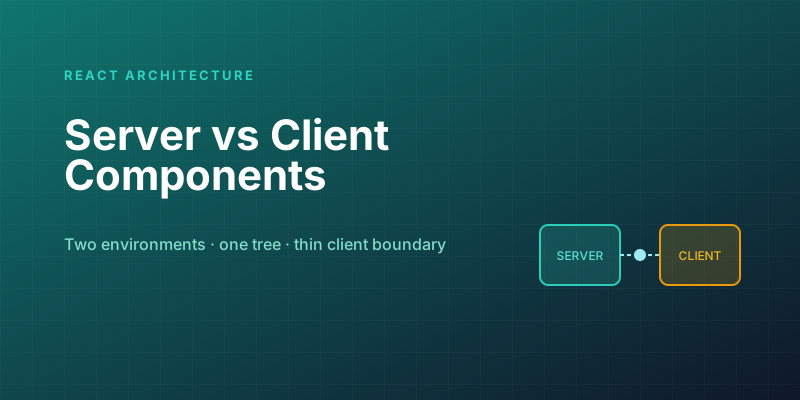
React Server Components confuse people, and it's not because the API is hard. It's because the model asks a question you never had to answer before: where does this component run? For a decade, every React component ran in the browser, full stop. Now some run only on the server, some run on the client, and the boundary between them has rules that feel arbitrary until the underlying model clicks. Once it clicks, the rules stop being arbitrary and start being obvious. This post is about getting you to that click.
The default flipped
The first thing to internalize: components are now Server Components by default. A component is a Server Component unless its file is explicitly marked otherwise with "use client" at the top. That's the inversion that trips up everyone coming from "classic" React, where everything was a client component implicitly.
// app/ProductList.jsx — a Server Component (no directive needed)
async function ProductList() {
  const products = await db.products.findAll();   // runs on the server
  return (
    <ul>
      {products.map((p) => <li key={p.id}>{p.name}</li>)}
    </ul>
  );
}
// app/LikeButton.jsx — a Client Component (opted in)
"use client";
import { useState } from "react";

function LikeButton() {
  const [liked, setLiked] = useState(false);     // needs the browser
  return <button onClick={() => setLiked(!liked)}>{liked ? "♥" : "♡"}</button>;
}
Notice what each can do. The Server Component is async and queries the database directly — no API route, no fetch, no useEffect. The Client Component uses useState and onClick — interactivity that fundamentally requires a browser. The directive isn't decoration; it's a declaration of where the code runs, and that determines what it's allowed to do.
The mental model: two environments, one tree
Here's the model that makes everything fall into place. Think of your component tree as spanning two environments:
- The server has direct access to your backend — databases, the filesystem, secret API keys, private services. It has no access to the browser — no DOM, no
window, no user events, no state that changes over time. - The client (browser) has the opposite: full access to interactivity — state, effects, event handlers, browser APIs — but no direct access to your backend secrets or database.
Each component runs in exactly one of these environments, and that single fact tells you everything about what it can and can't do. A Server Component can await db.query() but can't have an onClick. A Client Component can have an onClick but can't await db.query(). The two lists are mirror images, because the two environments have mirror-image capabilities. You're not memorizing arbitrary restrictions; you're respecting where the code physically executes.
So the question "should this be a Server or Client Component?" reduces to one decision:
Does this component need interactivity or browser-only APIs (state, effects, event handlers,
window,localStorage)? — Yes → Client Component ("use client"). — No → leave it as a Server Component (the default).
That's the whole decision. Everything else is consequence.
Why bother? The payoff
If Server Components are restrictive, why default to them? Because what they buy you is substantial:
- Zero client JavaScript for non-interactive UI. A Server Component's code never ships to the browser. It runs on the server, produces HTML, and that's it. Your
ProductListabove — its rendering logic, and even heavy libraries it imports like a markdown parser or a date formatter — adds nothing to the bundle the user downloads. In classic React, every component and every dependency it touched was shipped to and parsed by the browser. RSC lets you keep non-interactive code, however heavy, entirely server-side. - Direct backend access, no API layer. Server Components can talk to your database or internal services directly. You stop writing the tedious "API route +
fetch+useEffect+ loading state" boilerplate just to get data onto a page. The data fetch is the component. - Secrets stay secret. Code that runs only on the server can safely use private API keys and credentials — they never reach the browser, because the component's code never reaches the browser. This closes a whole category of accidental secret leaks.
- Less waterfall, faster first paint. Data fetching happens on the server, close to the data, often in parallel, and the user gets meaningful HTML sooner.
The mental shift: the server renders the static, data-heavy skeleton of your page for free (no JS cost), and you sprinkle Client Components only where the page actually needs to be interactive. Most of a typical page — layout, text, lists, data display — is non-interactive and belongs on the server. The interactive bits — buttons, forms, menus, anything stateful — are islands of client code within that server-rendered structure.
The composition rules that actually matter
Two rules about how the kinds compose cause most of the real-world confusion. Get these and you've got 90% of the practical knowledge.
1. Client Components can't import Server Components, but they can receive them as children. Once you cross into client-land with "use client", everything that component imports is also client code. But you can still compose a Server Component inside a Client Component by passing it as a prop or as children from a server parent:
// A Client Component (interactive shell)
"use client";
function Tabs({ children }) {
  const [active, setActive] = useState(0);
  return <div onClick={...}>{children}</div>;   // children can be server-rendered
}

// A Server Component composes them
function Page() {
  return (
    <Tabs>
      <ServerRenderedPanel />   {/* stays a Server Component! */}
    </Tabs>
  );
}
This "Server Components as children of Client Components" pattern is how you keep interactive wrappers thin while their content stays server-rendered. It's the single most useful composition trick in the model.
2. Push the "use client" boundary down, toward the leaves. A common mistake is slapping "use client" on a big top-level component because one button inside it needs onClick. That drags the entire subtree — and all its dependencies — into the client bundle, throwing away the benefit. Instead, keep the big component on the server and extract just the interactive part into a small Client Component:
// ❌ Whole page becomes client just for a button
"use client";
function ArticlePage({ article }) { /* huge, mostly static */ }

// ✅ Page stays server; only the button is client
function ArticlePage({ article }) {     // Server Component
  return (
    <article>
      <h1>{article.title}</h1>
      <div>{article.body}</div>
      <LikeButton id={article.id} />     {/* small Client Component */}
    </article>
  );
}
The guiding instinct: be a Server Component until you have a concrete reason not to, and when you do, make the client boundary as small and as low in the tree as possible. Interactivity is an island, not a flood.
The model in one sentence
If you remember nothing else: a component runs on the server unless it needs the browser, server code never ships to the client (so it's free and can touch your backend), and you make interactive parts small Client Components nested inside a server-rendered tree. Hold that picture — two mirror-image environments, one tree, a thin client boundary pushed toward the leaves — and the rules that felt like arbitrary restrictions reveal themselves as the only rules that could exist given where the code runs. That's the click. After it, RSC stops being a thing you fight and becomes a tool that quietly hands you smaller bundles and simpler data fetching.
Keep reading
Next.js 16 and React 19: What Actually Matters in 2026
A practical guide to the features that changed how we build React apps — Server Components, the new compiler, and the patterns that stuck.
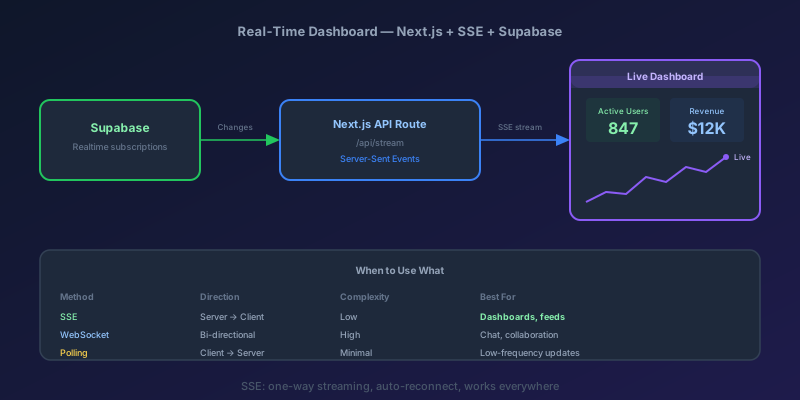
Building a Real-Time Dashboard with Next.js, Server-Sent Events, and Supabase
A step-by-step guide to building a live-updating dashboard using Next.js API routes, Server-Sent Events, and Supabase Realtime — with reconnection handling and smooth UI transitions.
Next.js 16 Cache Components: Replacing revalidate and force-dynamic With 'use cache'
How Cache Components in Next.js 16 replace route segment configs with the use cache directive and cacheLife, what becomes a build error, and the cookies-outside-the-cache rule that trips every migration.
Optimistic UI Updates: Making Apps Feel Instant Without Lying to Users
The like button that responds before the server confirms feels instant. The trick is updating the UI first and reconciling later — and handling the rollback so you never mislead the user.
Debouncing and Throttling in React: Taming Expensive Event Handlers
A search box that fires a request on every keystroke, a scroll handler running 60 times a second — these are debounce and throttle problems. The concepts are simple; React makes them subtly tricky.
TypeScript 7 Upgrade: 10x Faster tsc, and the API Gap You Have to Plan Around
TypeScript 7.0 is the native Go compiler, stable since July 2026, with 8 to 12x faster full builds. Deprecations are hard errors, strict and esnext are defaults, and the programmatic API waits for 7.1. A migration order that keeps lint and frameworks working.
Newsletter
New posts, straight to your inbox
One email per post. No spam, no tracking pixels, unsubscribe anytime.
Comments
- No comments yet. Be the first.