Eliminating Null Reference Errors in Power Automate Flows
In this series: Power Automate gotchas
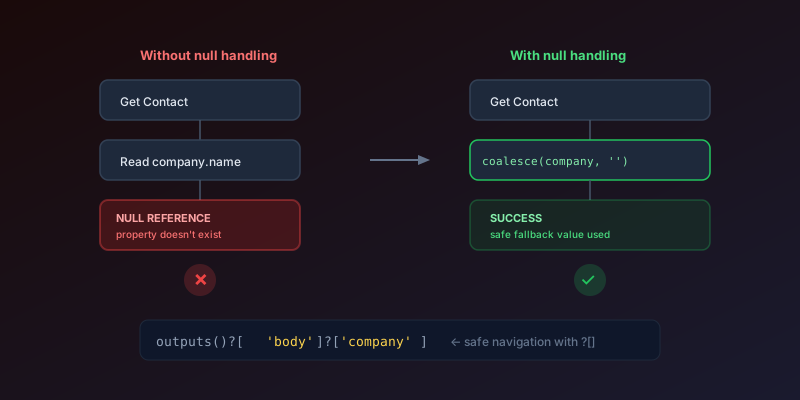
"The template language expression cannot be evaluated because property 'fieldname' doesn't exist."
If you have built more than a handful of Power Automate flows, you have seen that message at 9am on a Monday from a flow that worked fine in testing. It is the single most common runtime failure in the platform, and it almost always means the same thing: a field that was optional on the source record is suddenly missing, and your expression is referencing a JSON property that was never sent.
Why It Happens
When a Dataverse, SharePoint, or API response does not include a field — because it is null, empty, or optional — any expression referencing that field throws an error. The field literally does not exist in the JSON payload.
The Defensive Expressions
coalesce() — Your First Line of Defense
coalesce() returns the first non-null value from a list:
@coalesce(triggerOutputs()?['body/company'], 'No Company')
If company is null, the expression returns 'No Company' instead of crashing.
The Question Mark Operator
The ? in property access paths is critical. Compare:
❌ triggerOutputs()['body']['company']          — crashes if body or company is null
✅ triggerOutputs()?['body']?['company']        — returns null safely
Always use ?['property'] instead of ['property'] or .property notation.
if() for Conditional Logic
@if(
  empty(triggerOutputs()?['body/phone']),
  'N/A',
  triggerOutputs()?['body/phone']
)
Combining for Nested Objects
For deeply nested fields that might not exist at any level:
@coalesce(
  triggerOutputs()?['body']?['primarycontactid']?['fullname'],
  'Unknown Contact'
)
Common Scenarios and Fixes
Lookup Fields
Lookup fields in Dataverse are objects, not simple values. A null lookup means the entire object is missing:
❌ triggerOutputs()?['body/_ownerid_value']
✅ coalesce(triggerOutputs()?['body/_ownerid_value'], '')
Array Access
Accessing an item in an array that might be empty:
❌ first(body('List_rows'))
✅ if(empty(body('List_rows')?['value']), null, first(body('List_rows')?['value']))
Or more concisely:
@first(coalesce(body('List_rows')?['value'], json('[]')))
HTTP Response Bodies
API responses might have different shapes based on status:
@if(
  equals(outputs('HTTP')?['statusCode'], 200),
  body('HTTP')?['data']?['result'],
  'API Error'
)
Defensive Flow Design Patterns
1. Validate Early
Add a condition at the top of your flow that checks all required fields exist before processing:
@and(
  not(empty(triggerOutputs()?['body/name'])),
  not(empty(triggerOutputs()?['body/email'])),
  greater(length(coalesce(triggerOutputs()?['body/items'], json('[]'))), 0)
)
If validation fails, terminate with a clear error message.
2. Use Compose for Intermediate Values
Instead of repeating long null-safe expressions, normalize values early:
- Compose
CustomerName:@coalesce(triggerOutputs()?['body/fullname'], 'Unknown') - Compose
CustomerEmail:@coalesce(triggerOutputs()?['body/emailaddress1'], '')
Then reference outputs('CustomerName') throughout the flow — clean and safe.
3. Schema Validation on HTTP Triggers
For flows triggered by HTTP requests, define a JSON schema on the trigger. Power Automate validates incoming requests against the schema and rejects malformed payloads before your flow logic even runs.
4. Do Not Pull Fields You Will Not Guard
On Dataverse triggers, Select columns is not just a performance tweak. An omitted column is absent from the payload, which is the same shape as a null. If you select emailaddress1 and later add an expression on telephone1, the run fails even when the record has a phone number.
Only select columns the flow reads, and wrap every one of them.
5. Skip the Run Entirely
A trigger condition is cheaper than a Compose + Condition + Terminate:
@not(empty(triggerOutputs()?['body/emailaddress1']))
Use this when missing data means "do nothing," not "do something else."
Key Takeaway
Use ?[] for every property access. Wrap anything that could be null in coalesce(). Validate required fields early. These three habits eliminate 95% of null reference errors and turn fragile flows into production-ready ones.
Keep reading

Power Automate Trigger Conditions: The Run That Never Appears
A trigger condition that is false does not start a run and does not leave run history. How the expression differs from a Condition action, and how to see the skipped checks.

Power Platform September 2026 Update: The App-Builder Skill, Agent Plugins, and the Refreshed Model-Driven UI
What matters in Microsoft's September 2026 Power Platform feature update: the model app-builder skill goes GA, the canvas authoring agent plugin goes GA, generative pages embed in forms and reach connectors, model-driven header refresh is GA with display density in preview, and Power Automate gets server-side search.

Dataverse Triggers in Power Automate: Select Columns or the Flow Wakes Up for Nothing
How Select columns and Filter rows on a Dataverse trigger cut wasted runs, and the row-version mistakes that make a flow miss the change it was built for.
Retry Policies in Power Automate: What Actually Happens When an Action Fails
How Power Automate retry policies work, which errors they cover, how to configure them, and how to keep retries from duplicating side effects.
Resilient Power Automate: Retry Policies and Dead-Letter Patterns
Transient failures are normal in any flow that calls an API. The difference between a flow that self-heals and one that pages you at 2 a.m. is how you handle retries and the failures that stick.

15 Power Automate Expressions Every Maker Should Memorize
Memorize these Power Automate expressions to build faster flows, handle nulls, shape arrays, format dates, reduce action count, and debug WDL.
Newsletter
New posts, straight to your inbox
One email per post. No spam, no tracking pixels, unsubscribe anytime.
Comments
- No comments yet. Be the first.