CI/CD Pipelines for Data Engineers
The same engineer who would never deploy an API change without tests will happily merge a dbt model change and hope the dashboards look right tomorrow morning. Data pipelines are production software. They process revenue data, feed machine learning models, and drive business decisions. When they break silently — and they do — the damage is a stakeholder making a decision on bad numbers, not a 500 error with a stack trace.
CI/CD for data engineering borrows from software engineering but has its own wrinkles: data quality tests, schema change safety, environment promotion across data warehouses, and the challenge of testing transforms against realistic data at reasonable cost.
What Needs to Be Tested
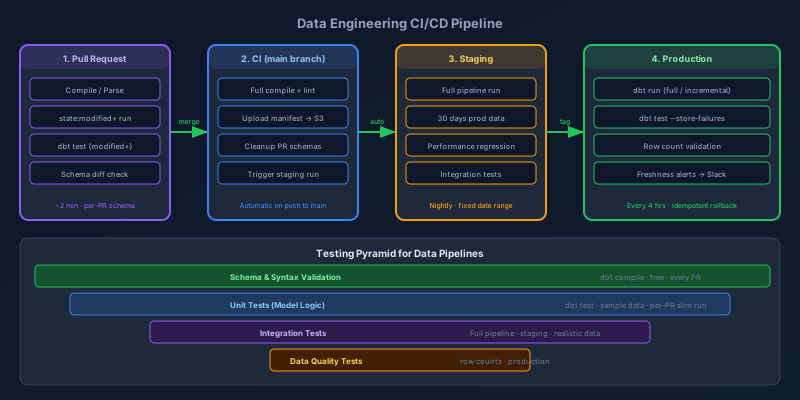
The testing pyramid for data pipelines has four levels, each catching a different class of failure:
                     ┌─────────────────┐
                     │ Data Quality    │  ← Row-level assertions on output
                     │ (prod only)     │
                  ┌──┴─────────────────┴──┐
                  │ Integration Tests      │  ← Full pipeline with real data subset
                  │ (staging)             │
              ┌───┴────────────────────────┴───┐
              │ Unit Tests (model logic)        │  ← SQL transform correctness
              │ (CI, sample data)              │
          ┌───┴─────────────────────────────────┴───┐
          │ Schema / Syntax Validation              │  ← Does it compile? Are types right?
          │ (CI, always)                           │
          └─────────────────────────────────────────┘
Schema validation runs in every PR, costs nothing (no data required), and catches 40% of issues. Unit tests validate that transforms produce correct output for known inputs. Integration tests run the actual pipeline against a recent slice of production data in a staging environment. Data quality tests run in production after every pipeline execution.
Slim CI with dbt
The most expensive CI mistake is running the full dbt project on every PR. On a project with 200 models, a full run against a warehouse takes 20-30 minutes. Nobody waits 30 minutes to review a SQL change.
dbt's state:modified+ selector runs only the models changed in the PR plus everything downstream of them, and --defer resolves unmodified refs against production artifacts so you do not need to rebuild the entire dependency graph:
# .github/workflows/dbt-ci.yml
name: dbt CI

on:
  pull_request:
    paths:
      - 'models/**'
      - 'macros/**'
      - 'tests/**'
      - 'seeds/**'

env:
  DBT_TARGET: ci
  DBT_PROFILES_DIR: ./profiles

jobs:
  dbt-slim-ci:
    runs-on: ubuntu-latest
    steps:
      - uses: actions/checkout@v4

      - name: Setup Python
        uses: actions/setup-python@v5
        with:
          python-version: '3.12'
          cache: 'pip'

      - name: Install dbt
        run: pip install dbt-snowflake==1.8.0

      - name: Download production manifest
        env:
          AWS_ACCESS_KEY_ID: ${{ secrets.CI_AWS_KEY_ID }}
          AWS_SECRET_ACCESS_KEY: ${{ secrets.CI_AWS_SECRET }}
        run: |
          mkdir -p ./prod-manifest
          aws s3 cp s3://data-artifacts/dbt/manifest.json ./prod-manifest/manifest.json

      - name: Compile (generates manifest for this PR)
        run: dbt compile --target $DBT_TARGET

      - name: Run modified models + downstream
        run: |
          dbt run \
            --target $DBT_TARGET \
            --select state:modified+ \
            --state ./prod-manifest \
            --defer \
            --state ./prod-manifest \
            --full-refresh  # Always full-refresh in CI; no incremental state to manage

      - name: Test modified models + downstream
        run: |
          dbt test \
            --target $DBT_TARGET \
            --select state:modified+ \
            --state ./prod-manifest \
            --defer \
            --state ./prod-manifest

      - name: Upload PR manifest as artifact
        uses: actions/upload-artifact@v4
        with:
          name: dbt-manifest-${{ github.sha }}
          path: target/manifest.json
For a 200-model project, a PR touching 3 models typically runs in under 3 minutes. The key is keeping the CI warehouse schema isolated per PR branch so concurrent runs do not interfere.
Per-Branch CI Schemas
Each CI run should create its own schema in the warehouse, isolated from other PRs:
# profiles/profiles.yml
ci:
  target: ci
  outputs:
    ci:
      type: snowflake
      account: "{{ env_var('SNOWFLAKE_ACCOUNT') }}"
      user: "{{ env_var('SNOWFLAKE_CI_USER') }}"
      password: "{{ env_var('SNOWFLAKE_CI_PASSWORD') }}"
      role: CI_ROLE
      warehouse: CI_WH
      database: CI_DB
      # Branch-specific schema: ci_pr_123, ci_pr_456, etc.
      schema: "ci_{{ env_var('GITHUB_PR_NUMBER', 'local') }}"
Add a cleanup step that drops the branch schema after the PR merges:
- name: Cleanup CI schema on merge
  if: github.event_name == 'push' && github.ref == 'refs/heads/main'
  run: |
    dbt run-operation drop_schema --args \
      "{schema: ci_${{ env.PR_NUMBER }}}"
Data Quality Tests in Production
CI tests verify that transforms produce correct output. Data quality tests verify that the data arriving from upstream is what you expect. These are different problems.
Run data quality tests as part of your pipeline, after every execution:
# Airflow DAG: dbt run → dbt test → alert on failure
from airflow import DAG
from airflow.operators.bash import BashOperator
from airflow.operators.python import PythonOperator
from datetime import datetime, timedelta

default_args = {
    'owner': 'data-engineering',
    'retries': 1,
    'retry_delay': timedelta(minutes=5),
    'on_failure_callback': alert_slack,
}

with DAG(
    'dbt_production',
    default_args=default_args,
    schedule_interval='0 */4 * * *',
    start_date=datetime(2026, 1, 1),
    catchup=False,
) as dag:

    run_models = BashOperator(
        task_id='dbt_run',
        bash_command='dbt run --target prod --select tag:hourly',
    )

    test_models = BashOperator(
        task_id='dbt_test',
        bash_command='''
            dbt test \
              --target prod \
              --select tag:hourly \
              --store-failures  # Write test failures to a table for investigation
        ''',
    )

    # Separate step: check row counts against expected ranges
    validate_counts = BashOperator(
        task_id='validate_counts',
        bash_command='dbt run-operation validate_row_counts',
    )

    run_models >> test_models >> validate_counts
Writing Data Quality Assertions as dbt Tests
Threshold-based tests catch the class of failures that schema tests miss — a pipeline that runs successfully but produces 10% fewer rows than expected:
# models/marts/_fct_orders.yml
models:
  - name: fct_orders
    tests:
      # Row count should be within 30% of yesterday's count
      - dbt_utils.recency:
          datepart: hour
          field: order_placed_at
          interval: 4
          # Alert if no orders in the last 4 hours (pipeline may have stalled)

      # Custom macro test: row count within expected range
      - row_count_in_range:
          min_pct_of_yesterday: 0.7
          max_pct_of_yesterday: 1.5
-- macros/tests/row_count_in_range.sql
{% test row_count_in_range(model, min_pct_of_yesterday, max_pct_of_yesterday) %}

with today_count as (
    select count(*) as cnt
    from {{ model }}
    where date_trunc('day', order_placed_at) = current_date
),

yesterday_count as (
    select count(*) as cnt
    from {{ model }}
    where date_trunc('day', order_placed_at) = current_date - 1
),

comparison as (
    select
        t.cnt as today_cnt,
        y.cnt as yesterday_cnt,
        t.cnt::float / nullif(y.cnt, 0) as ratio
    from today_count t, yesterday_count y
)

-- Test fails (returns rows) when ratio is outside expected range
select today_cnt, yesterday_cnt, ratio
from comparison
where ratio < {{ min_pct_of_yesterday }}
   or ratio > {{ max_pct_of_yesterday }}

{% endtest %}
Environment Promotion Strategy
The environment chain for data pipelines should mirror software engineering: dev → staging → production. The difference is that "staging" for data pipelines means a warehouse schema that mirrors production structure with a representative data subset.
Developer → dev schema (full refresh, personal)
              ↓
GitHub PR  → CI schema (ephemeral, PR-isolated, slim run)
              ↓
Merge to main → staging (full pipeline, last 30 days of prod data)
              ↓
Tag/Release → production (full pipeline, full data)
Staging should run the full pipeline — not just modified models — against a realistic data volume. This is where you catch performance regressions: a model that takes 30 seconds in CI against 10K rows might take 45 minutes in production against 500M rows.
# Staging pipeline: runs nightly, full run, 30-day data slice
dbt run \
  --target staging \
  --full-refresh \
  --vars '{"start_date": "2026-06-01", "end_date": "2026-07-01"}'
Keep staging's data range fixed (not a rolling window) so you have a stable baseline to compare run times against. If a PR makes staging 2x slower, you want to know before it hits production.
Schema Change Safety
The most dangerous class of data pipeline change is a breaking schema change — removing a column that a downstream BI report or API is reading. Catching these before production requires tracking schema snapshots and diffing them on every deployment.
# scripts/check_schema_changes.py
import snowflake.connector
import json
import sys

def get_schema_snapshot(conn, schema):
    cursor = conn.cursor()
    cursor.execute(f"""
        SELECT table_name, column_name, data_type, is_nullable
        FROM information_schema.columns
        WHERE table_schema = '{schema}'
        ORDER BY table_name, ordinal_position
    """)
    return {(row[0], row[1]): {"type": row[2], "nullable": row[3]}
            for row in cursor.fetchall()}

def compare_schemas(baseline, current):
    breaking_changes = []

    # Detect removed columns
    for (table, col), meta in baseline.items():
        if (table, col) not in current:
            breaking_changes.append(f"REMOVED: {table}.{col} ({meta['type']})")

    # Detect type changes
    for (table, col), meta in current.items():
        if (table, col) in baseline:
            old_type = baseline[(table, col)]["type"]
            new_type = meta["type"]
            if old_type != new_type:
                breaking_changes.append(
                    f"TYPE CHANGE: {table}.{col} {old_type} → {new_type}"
                )

    return breaking_changes

# Run in CI: compare CI schema output against production schema
baseline = get_schema_snapshot(conn, 'PRODUCTION')
current = get_schema_snapshot(conn, f'CI_{pr_number}')
changes = compare_schemas(baseline, current)

if changes:
    print("⚠️  Breaking schema changes detected:")
    for change in changes:
        print(f"  {change}")
    sys.exit(1)
Add this as a CI step after dbt runs. It blocks merges that would silently remove columns that downstream consumers depend on.
Rollback Strategy
Rolling back a data pipeline is harder than rolling back code because the data has already been mutated. The three practical rollback strategies, in order of preference:
1. Idempotent Full Refresh (Best)
For models where a full refresh is cheap, build idempotency into the pipeline: running the same pipeline twice produces the same result. Rollback = re-run the previous version.
-- This model is always correct because it reads from source and rebuilds completely
-- Rollback: deploy previous dbt version, run dbt run --full-refresh --select this_model
create or replace table fct_orders as
select * from int_orders_with_customer
2. Incremental with Reprocess Window
For large incremental models, design them with a reprocess window that can be replayed:
# Reprocess the last 7 days if something went wrong
dbt run \
  --select fct_orders \
  --vars '{"reprocess_start": "2026-06-28", "reprocess_end": "2026-07-05"}'
3. Pre-Deployment Snapshots
Before a risky migration, snapshot the affected tables:
-- Before deployment
CREATE TABLE fct_orders_backup_20260705 AS SELECT * FROM fct_orders;

-- If deployment goes wrong
CREATE OR REPLACE TABLE fct_orders AS SELECT * FROM fct_orders_backup_20260705;
This is the most expensive and manual approach but provides a clean recovery path for schema migrations that cannot be replayed.
Alerting vs. Monitoring
Alerting wakes you up. Monitoring tells you why. Both are necessary, but the failure mode I see most often is teams with too much alerting and not enough monitoring — every test failure pages the on-call engineer, but there are no dashboards to distinguish "1,000 failed unique tests on a logging table" from "fct_orders has duplicates."
For alerting: page on data freshness failures and primary key violations on tier-1 tables. These are always production incidents.
For monitoring: track test failure counts by model, row counts by table over time, and pipeline run duration. Surface these in a dashboard that the on-call engineer checks before investigating any alert.
-- Store test results for trend analysis
-- dbt test --store-failures writes to a failures table
SELECT
    model_name,
    test_name,
    date_trunc('day', generated_at) as failure_date,
    count(*) as failure_count
FROM dbt_test_audit.failures
WHERE generated_at >= current_date - 30
GROUP BY 1, 2, 3
ORDER BY failure_date DESC, failure_count DESC
Key Takeaways
- Slim CI is non-negotiable. Full runs on every PR kill adoption. Use
state:modified+with--deferto run only what changed. - Per-branch CI schemas prevent concurrent PR runs from corrupting each other's results.
- Data quality tests in production catch a different class of failures than CI unit tests. Run both.
- Threshold-based tests (row count within X% of yesterday) catch silent failures that schema tests miss.
- Schema change diffing blocks column removals before they silently break downstream consumers.
- Design for idempotent reprocessing from day one. If you cannot replay a pipeline window cleanly, rollback becomes a manual nightmare.
- Alert on tier-1 table freshness and PK violations. Monitor everything else with dashboards.
Data engineering CI/CD is not about applying software engineering practices wholesale — it is about understanding which failure modes matter for data and building the specific tooling that catches them before they become stakeholder problems.
Keep reading
Kubernetes Liveness Probes That Restart a Process That Was Fine
Liveness restarts the container. Readiness pulls it out of the Service. A startup probe holds both off until the process has booted. Most outages come from using the wrong one.
GitHub Rewrote the Copilot Runtime in Rust With Agents. The Playbook Is the Story.
832,378 lines of production Rust, 128 pull requests, 135 releases in fourteen and a half weeks, about $120,000 in tokens. What GitHub's TypeScript-to-Rust port of the Copilot agent runtime teaches about shipping a rewrite without a cutover.

The Pipeline Was Green Because the Test Stage Never Ran
How an Azure DevOps condition and a skipped stage produce a green build that did not test anything, and the check to add so that cannot ship.
GitHub Merge Queues: Serializing main Without Parking Every PR
How merge queues absorb the rebase race on protected branches, what CI has to guarantee, and when a queue is worse than Require branches to be up to date.
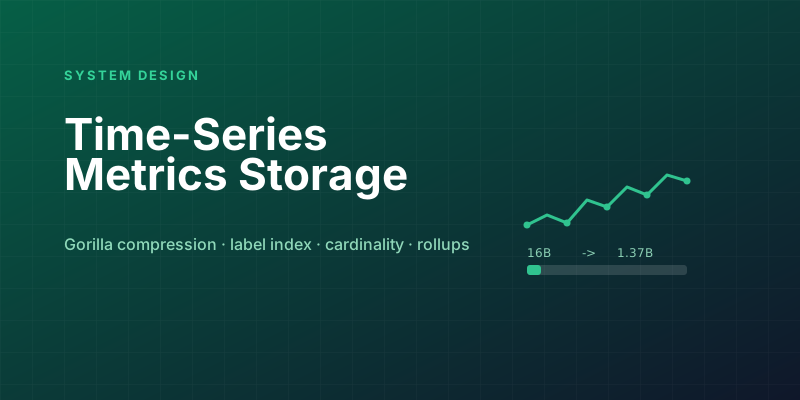
Designing a Metrics System: Time-Series Storage from Gorilla to Downsampling
Ten million series, one datapoint each per 10 seconds, queried by tags: delta-of-delta compression, the inverted index over labels, and why high cardinality kills TSDBs.
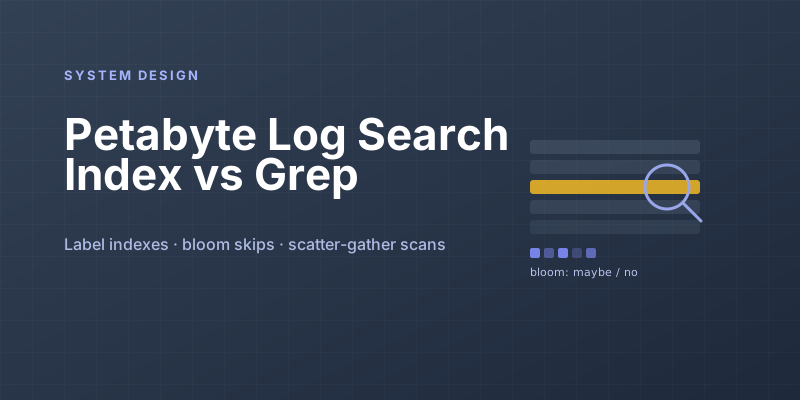
Designing Petabyte Log Search: Index Everything vs Grep Smarter
Logs are 100x your metrics volume and queried 0.001% as often. The Splunk-style full index, the Loki-style label-only bet, and bloom-filtered brute force in between.
Newsletter
New posts, straight to your inbox
One email per post. No spam, no tracking pixels, unsubscribe anytime.
Comments
- No comments yet. Be the first.