dbt Best Practices for Production Data Modeling
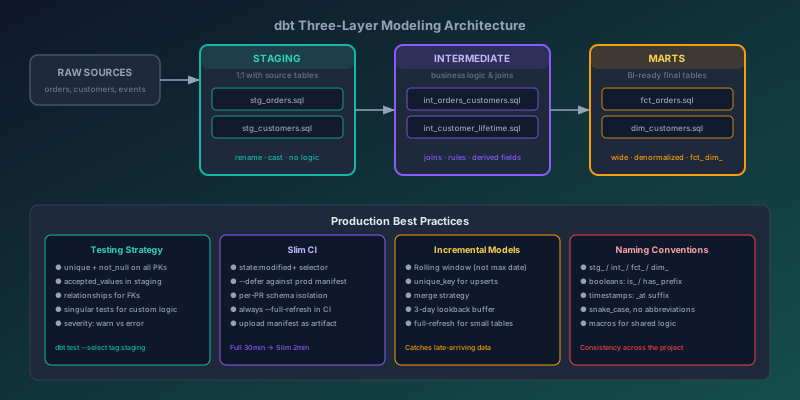
Every dbt project starts clean. Then six engineers and four months later, you have stg_orders_v2_final_FIXED.sql sitting next to marts_rev_new.sql and nobody knows which one the dashboard actually reads. The layer conventions and testing practices that seem like overkill on day one are the difference between a data model you can confidently ship and one where every change is a silent gamble.
This post covers the patterns that hold up in production: project structure, naming discipline, testing at the right granularity, incremental models, slim CI, and documentation that stays accurate after the initial PR.
The Three-Layer Architecture
The most durable dbt project structure is a strict three-layer DAG: staging, intermediate, and marts. Each layer has a single job, and models should never skip a layer.
sources (raw)
    │
    ▼
staging/          ← 1:1 with source tables, light cleaning only
    │
    ▼
intermediate/     ← business logic, joins, aggregations
    │
    ▼
marts/            ← final dimensional tables exposed to BI tools
Staging Layer
Staging models do exactly three things: rename columns to your naming convention, cast types, and nothing else. No joins. No business logic. One staging model per source table.
-- models/staging/stg_orders.sql
with source as (
    select * from {{ source('ecommerce', 'orders') }}
),

renamed as (
    select
        order_id,
        customer_id,
        -- standardize naming: snake_case, no abbreviations
        created_at as order_placed_at,
        updated_at as order_updated_at,
        -- explicit casts right here, not buried in downstream models
        cast(status as varchar) as order_status,
        cast(total_amount as numeric(18, 2)) as order_total_amount,
        cast(is_deleted as boolean) as is_deleted
    from source
)

select * from renamed
If you find yourself writing a WHERE clause in a staging model, stop. Filters belong downstream. Staging models are the one place in your project where someone new should be able to understand exactly what data exists without any domain knowledge.
Intermediate Layer
Intermediate models hold the business logic that would otherwise get duplicated across marts. This is where you join staging models, apply business rules, and compute derived fields.
-- models/intermediate/int_orders_with_customer.sql
with orders as (
    select * from {{ ref('stg_orders') }}
    where not is_deleted
),

customers as (
    select * from {{ ref('stg_customers') }}
),

-- business rule: an order is "at-risk" if pending for > 48 hours
orders_enriched as (
    select
        o.*,
        c.customer_name,
        c.customer_segment,
        c.customer_region,
        datediff('hour', o.order_placed_at, current_timestamp) as hours_since_order,
        case
            when o.order_status = 'pending'
             and datediff('hour', o.order_placed_at, current_timestamp) > 48
            then true
            else false
        end as is_at_risk
    from orders o
    left join customers c using (customer_id)
)

select * from orders_enriched
The rule of thumb: if you write the same business logic twice, it belongs in an intermediate model. Marts should read from intermediates, not re-implement the same rules in parallel.
Marts Layer
Marts are the final output — the tables your BI tools, dashboards, and analysts query. They should be wide, denormalized, and named for the business domain they serve.
-- models/marts/fct_orders.sql
{{
    config(
        materialized='incremental',
        unique_key='order_id',
        on_schema_change='sync_all_columns'
    )
}}

with orders as (
    select * from {{ ref('int_orders_with_customer') }}
    {% if is_incremental() %}
    -- only process orders modified in the last 3 days + a buffer for late-arriving updates
    where order_updated_at >= dateadd('day', -3, current_date)
    {% endif %}
),

final as (
    select
        order_id,
        customer_id,
        customer_name,
        customer_segment,
        customer_region,
        order_status,
        order_total_amount,
        hours_since_order,
        is_at_risk,
        order_placed_at,
        order_updated_at,
        -- mart-level derived metrics are acceptable
        case order_status
            when 'completed' then order_total_amount
            else 0
        end as completed_order_amount
    from orders
)

select * from final
Naming Conventions That Scale
Inconsistent naming is one of the fastest ways to make a dbt project unmaintainable. These conventions work across teams:
| Prefix | Layer | Example |
|---|---|---|
stg_ | Staging | stg_orders, stg_customers |
int_ | Intermediate | int_orders_with_customer |
fct_ | Fact table | fct_orders, fct_page_views |
dim_ | Dimension table | dim_customers, dim_products |
rpt_ | Report (one-off) | rpt_monthly_revenue_by_region |
For column names, the most important rule is: boolean columns get an is_ or has_ prefix, and timestamp columns get an _at suffix. This means is_deleted, not deleted. And order_placed_at, not order_placed_date or created.
# models/staging/_stg_orders.yml
version: 2

models:
  - name: stg_orders
    description: >
      One row per order from the ecommerce platform. Includes all orders
      regardless of status. Deleted orders are included with is_deleted = true.
    columns:
      - name: order_id
        description: Primary key. Unique identifier from the source system.
        tests:
          - unique
          - not_null
      - name: order_status
        description: Current status of the order.
        tests:
          - not_null
          - accepted_values:
              values: ['pending', 'processing', 'shipped', 'completed', 'cancelled']
      - name: order_total_amount
        description: Total value of the order in USD, before tax.
        tests:
          - not_null
          - dbt_utils.expression_is_true:
              expression: ">= 0"
Testing at the Right Granularity
Generic tests (unique, not_null, accepted_values, relationships) belong on staging models. Custom business logic tests belong on intermediate and mart models. Never write the same test twice.
# models/marts/_fct_orders.yml
version: 2

models:
  - name: fct_orders
    description: One row per order. Source of truth for order analytics.
    tests:
      # Table-level test: every completed order must have a non-zero amount
      - dbt_utils.expression_is_true:
          expression: "order_status != 'completed' or completed_order_amount > 0"
          name: completed_orders_must_have_amount
    columns:
      - name: order_id
        tests:
          - unique
          - not_null
      - name: customer_id
        tests:
          - not_null
          - relationships:
              to: ref('dim_customers')
              field: customer_id
For tests that cannot be expressed in YAML, write singular tests as SQL files:
-- tests/assert_no_orphaned_order_items.sql
-- This test passes when the query returns zero rows.
select oi.order_item_id
from {{ ref('fct_order_items') }} oi
left join {{ ref('fct_orders') }} o using (order_id)
where o.order_id is null
Severity Levels
Not all test failures should block your pipeline. Use warn for data quality issues that are worth flagging but should not stop a run, and error for integrity violations that render downstream data unreliable.
columns:
  - name: customer_email
    tests:
      - not_null:
          severity: warn       # missing emails are bad, but not pipeline-breaking
      - dbt_utils.expression_is_true:
          expression: "like '%@%'"
          severity: warn
  - name: order_id
    tests:
      - unique:
          severity: error      # duplicate PKs are always fatal
      - not_null:
          severity: error
Slim CI: Running Only What Changed
Running the full dbt project in CI on every PR is slow and wasteful. dbt's --select flag combined with state comparison lets you run only the models affected by a PR.
# .github/workflows/dbt-ci.yml
name: dbt CI

on:
  pull_request:
    paths:
      - 'models/**'
      - 'tests/**'
      - 'macros/**'

jobs:
  dbt-check:
    runs-on: ubuntu-latest
    steps:
      - uses: actions/checkout@v4

      - name: Download production manifest
        run: |
          # Pull the last successful production manifest for state comparison
          aws s3 cp s3://your-dbt-artifacts/manifest.json ./prod-manifest/manifest.json

      - name: Install dbt
        run: pip install dbt-snowflake

      - name: dbt compile (generates current manifest)
        run: dbt compile --profiles-dir ./profiles --target ci

      - name: Run modified models + downstream
        run: |
          dbt run \
            --profiles-dir ./profiles \
            --target ci \
            --select state:modified+ \
            --state ./prod-manifest \
            --defer \
            --state ./prod-manifest

      - name: Test modified models + downstream
        run: |
          dbt test \
            --profiles-dir ./profiles \
            --target ci \
            --select state:modified+ \
            --state ./prod-manifest \
            --defer \
            --state ./prod-manifest
The --defer flag is the key: when a model is not selected (because it wasn't modified), dbt resolves its ref() calls against the production environment instead of requiring a CI rebuild. This means CI runs are fast even on a large project.
For a project with 300 models, a full run might take 45 minutes. A slim CI run on a 3-model PR takes under 2 minutes.
Incremental Models Done Right
Incremental models are the most common source of subtle data correctness bugs in dbt. The default pattern of "only process new rows by insert date" breaks the moment your source data has late-arriving records or updates to existing rows.
The Late-Arriving Data Problem
-- DANGEROUS: this misses updates to existing rows
-- and fails if source data arrives late
{% if is_incremental() %}
where created_at > (select max(created_at) from {{ this }})
{% endif %}
A better pattern processes a rolling window and uses a unique_key to merge updates:
{{
    config(
        materialized='incremental',
        unique_key='order_id',
        incremental_strategy='merge'
    )
}}

select * from {{ ref('stg_orders') }}

{% if is_incremental() %}
-- Process the last 3 days. This catches:
-- 1. New rows
-- 2. Updates to existing rows within the window
-- 3. Late-arriving data up to 3 days old
-- The merge strategy handles upserts based on unique_key
where order_updated_at >= dateadd('day', -3, current_date)
{% endif %}
When to Use Full Refresh
Not every model benefits from incremental loading. Use materialized='table' (full refresh) for:
- Models that take under 60 seconds to build
- Models with complex business logic that is hard to reason about incrementally
- Dimension tables that are small and change unpredictably
Incremental makes sense when: the table is large (> 100M rows), the source data clearly partitions by time, and you can tolerate the complexity of managing a rolling window.
Documentation That Doesn't Rot
dbt generates a documentation site from your YAML descriptions. The problem is that descriptions get written once and never updated. These two practices keep docs accurate:
Write descriptions as contracts, not summaries. Instead of "The order table," write "One row per order. Includes cancelled and deleted orders. Does not include test orders (is_test = true is filtered out in stg_orders)." The second version is actually useful to a new analyst six months later.
Use doc blocks for long descriptions that get reused:
# models/marts/_fct_orders.yml
models:
  - name: fct_orders
    description: "{{ doc('fct_orders') }}"
{% docs fct_orders %}
One row per order. Source of truth for all order analytics.

**Grain**: Order ID

**Includes**: All orders where is_deleted = false and is_test = false.

**Does not include**: Orders from internal test accounts (customer_segment = 'internal').
Orders placed before 2023-01-01 (pre-migration data lives in the legacy_orders mart).

**Refresh cadence**: Runs every 30 minutes during business hours, hourly overnight.

**Known quirks**: Orders can move backwards from 'shipped' to 'processing' if a
carrier reports a failed delivery. The order_status field reflects the current state.
{% enddocs %}
Macros for Cross-Cutting Logic
Macros let you define reusable SQL logic that works across models. The most useful ones encode business rules that would otherwise be copy-pasted:
-- macros/classify_customer_tier.sql
{% macro classify_customer_tier(lifetime_value_col) %}
    case
        when {{ lifetime_value_col }} >= 10000 then 'enterprise'
        when {{ lifetime_value_col }} >= 1000 then 'growth'
        when {{ lifetime_value_col }} >= 100 then 'starter'
        else 'free'
    end
{% endmacro %}
-- Usage in a mart model
select
    customer_id,
    lifetime_value,
    {{ classify_customer_tier('lifetime_value') }} as customer_tier
from {{ ref('int_customer_lifetime_value') }}
When the business changes the tier thresholds, you change one macro and every model that uses it is automatically correct.
Key Takeaways
The practices that matter most in production dbt projects:
- Three layers: staging (rename + cast), intermediate (business logic), marts (final output). Never skip a layer.
- Name everything consistently:
stg_,int_,fct_,dim_, boolean columns withis_/has_, timestamps with_at. - Test at staging: generic tests (
unique,not_null) belong on every staging model, every time. - Slim CI with
--defer: run only modified models + their dependents in PRs. A full run in CI is almost never worth it. - Incremental models use a rolling window +
unique_key: the "only new rows" pattern breaks on late-arriving data. - Write descriptions as contracts: "one row per X, includes Y, excludes Z, known quirk: W" is the format that stays useful.
A dbt project that follows these conventions is one where any engineer can open a model they have never seen, understand what it does, trust that the tests will catch breaking changes, and ship without a side-channel conversation to verify "which orders table is the right one."
Keep reading
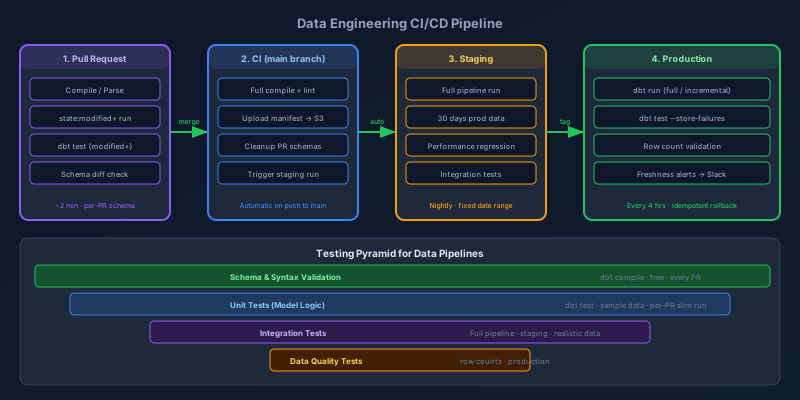
CI/CD Pipelines for Data Engineers
Data pipelines are production software. Here's how to build CI/CD that catches bad transforms before they corrupt dashboards: testing strategy, environment promotion, slim runs, and rollback patterns.
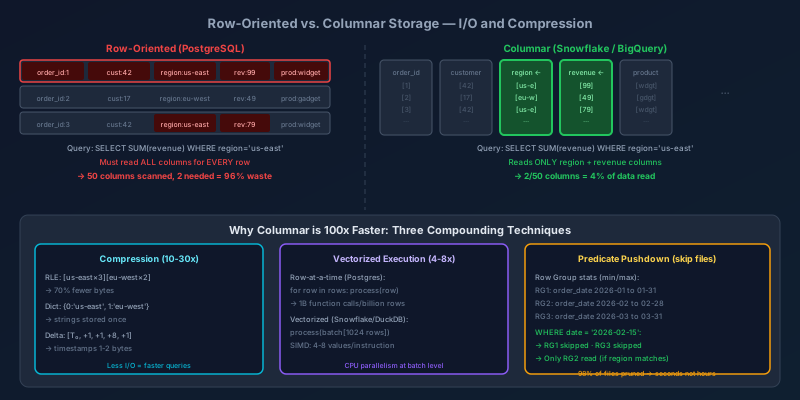
Columnar Storage: How Analytical Databases Work Under the Hood
Why column-oriented databases run analytical queries 100x faster than row-oriented ones — covering physical layout, compression algorithms, vectorized execution, and predicate pushdown with concrete examples.
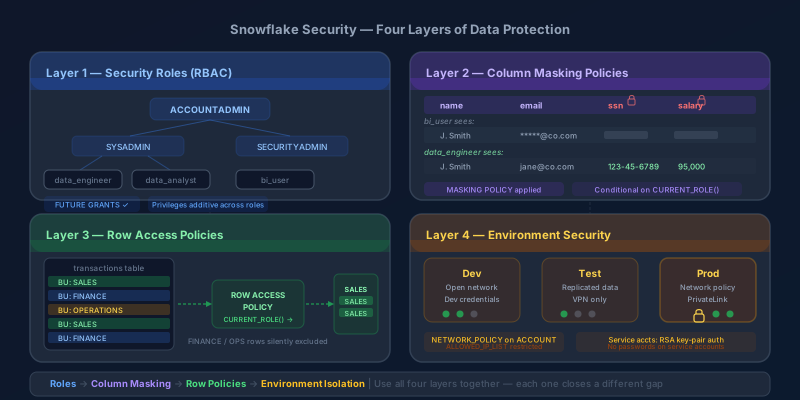
Snowflake Security in Layers: Roles, Column Masking, Row Policies, and Environment Controls
A practical walkthrough of Snowflake's four security layers — role hierarchy, column-level masking policies, row access policies, and environment isolation — with real SQL examples.
Newsletter
New posts, straight to your inbox
One email per post. No spam, no tracking pixels, unsubscribe anytime.
Comments
- No comments yet. Be the first.