Grounding a Copilot Studio Agent on Your Dataverse Data Without the Hallucinations
In this series: Copilot in Dynamics 365
When people say they want a Copilot Studio agent that "knows our data," they almost always mean two different things at once: they want it to answer questions from a body of knowledge, and they want it to do something against a live system. Those are different mechanisms with different failure modes, and conflating them is where most projects go sideways. Here's how grounding actually works, and where the sharp edges are.
Knowledge-grounded answers vs authored topics
A Copilot Studio agent has two ways to respond to an utterance.
- Authored topics are deterministic conversation flows you build by hand. A trigger phrase (or a trigger condition the orchestrator evaluates) fires a topic, and the topic runs the nodes you laid out: questions, conditions, variable assignments, calls to actions. You control every word and every branch. This is what you want for transactional flows — "create a case," "check my order status," "reset my password."
- Generative (knowledge-grounded) answers are produced at runtime by the model retrieving passages from your connected knowledge sources and synthesizing a response. You don't author the wording. You author the sources and the instructions, and the model does retrieval-augmented generation over them.
When generative orchestration is on, the agent doesn't match a single trigger phrase and stop. It reasons over the user's intent, picks among the topics, actions, and knowledge sources available, and can chain several of them in one turn. So "knowledge vs topics" isn't an either/or at the architecture level — the orchestrator routes — but it is an either/or in your head when you decide how a given capability should be built.
What you can ground on
Out of the box you can attach several source types:
- Dataverse tables — the agent queries rows from tables in the same environment and reasons over the returned records.
- Public websites — Bing-indexed public URLs, scoped to domains you specify.
- SharePoint and OneDrive — document libraries; the agent retrieves from indexed files.
- Uploaded files — PDFs, Office docs you bring directly.
- Enterprise connectors and other sources — additional graph-grounded and connector-based sources depending on your licensing.
For a D365 shop, Dataverse grounding is the headline feature, because it means the agent can answer "what's the status of opportunity X" or "summarize open high-priority cases for account Contoso" from live transactional data rather than a stale exported document.
How Dataverse retrieval and citation actually work
When you add a Dataverse table as knowledge, you're not dumping the whole table into a prompt. At runtime the orchestrator generates a query against the table (filtered, top-N), pulls back matching rows, and feeds those rows to the model as grounding context. The model then composes an answer and attaches citations pointing back to the records or documents it used.
Two practical consequences:
- Column selection matters. Choose which columns are available to the agent. Including a huge text column or every audit field bloats the context and degrades answer quality. Pick the columns a human would actually read to answer the question.
- Citations are your honesty check. If an answer comes back with no citation, treat it with suspicion — the model may be answering from its own parametric knowledge rather than your data. In testing, an uncited factual claim about your business is a red flag.
Security trimming: the part people skip and regret
This is the single most important thing to get right. When the agent retrieves from Dataverse, you have to decide whose permissions apply.
- If the agent runs with end-user authentication (the user signs in, and the agent uses their identity), Dataverse retrieval is security-trimmed to that user's roles. A sales rep asking about accounts only sees rows their security role and business unit scope allow. This is the correct posture for any internal agent touching real records.
- If the agent uses a single service/maker identity for all users, every user effectively sees everything that identity can see. That's fine for genuinely public knowledge (a product FAQ table) and a data-leak waiting to happen for anything sensitive.
So the rule: authenticated agent + end-user identity for any Dataverse knowledge that isn't public. Verify it by logging in as a low-privilege test user and confirming the agent refuses to surface rows that user can't read in the model-driven app. Don't assume — test the negative case explicitly.
A related gotcha: row-level security (sharing, hierarchy security, owner teams) flows through too, so an agent can correctly say "I don't have access to that" for a record shared with someone else. That's the system working, not a bug.
Reducing hallucination
Grounding reduces hallucination but doesn't eliminate it. Levers that move the needle:
- Constrain the agent to your knowledge. In the generative settings there's a control for whether the agent may use general (model) knowledge or must stay within connected sources. For an internal D365 agent, restrict it to your sources. You'd rather it say "I don't know" than invent a refund policy.
- Write tight agent instructions. Tell it its scope, its tone, and explicitly to answer only from provided knowledge and to cite. Instructions are surprisingly effective at suppressing off-topic confidence.
- Curate sources. Two documents that contradict each other produce confidently wrong blended answers. Conflicting Dataverse rows and stale SharePoint docs are the usual culprits.
- Set the content moderation / response level appropriately — a more conservative setting trades some answer coverage for fewer fabrications.
Testing for hallucination, concretely
Don't ship on vibes. Build a small evaluation set and run it every time you change sources or instructions.
- Known-answer questions — you know the correct answer from the data. Check correctness and that the citation points to the right record.
- Out-of-scope questions — things your sources don't cover. The agent should decline, not improvise.
- Adversarial / leading questions — "Confirm that account Contoso is on the enterprise plan" when they aren't. A grounded agent should contradict the false premise using the data, not agree to be agreeable.
- Permission probes — log in as different personas and confirm trimming.
Track pass rates over time. A change that improves one category often regresses another.
When to add a tool/action instead of knowledge
Here's the decision that saves the most rework:
- Use knowledge when the user wants to read and understand — summaries, lookups, "what does our policy say," "what's the status." Retrieval over data the model reasons about.
- Use a tool/action (a Power Automate flow, a connector action, or an MCP-exposed capability) when the user wants to do something or needs a precise, non-negotiable computation: create a case, update a field, calculate a quote, call an external pricing API, trigger an approval.
The tell: if a wrong answer is embarrassing, knowledge is fine. If a wrong answer is expensive — money moves, a record changes, an SLA clock starts — you want an action with explicit inputs and outputs, not the model paraphrasing. Actions are deterministic, parameterized, and auditable. Knowledge is probabilistic.
A mature agent uses both: knowledge to answer "do I qualify for a refund," an action to actually issue it, and an authored topic to gate the action behind a confirmation. The orchestrator stitches them together, but you decided the boundaries.
A sane setup order
1. Stand up the agent with authentication = end-user (Entra ID).
2. Add ONE Dataverse table, curated columns, as knowledge.
3. Write agent instructions: scope, "answer only from knowledge, cite sources."
4. Disable general knowledge for internal scope.
5. Test: known-answer, out-of-scope, adversarial, permission-probe sets.
6. Only now add a second source — and re-run the whole test set.
7. Add actions for anything transactional; gate writes behind a confirmation topic.
Add sources one at a time and re-test. The moment you bulk-attach five knowledge sources and three actions, you lose the ability to reason about why an answer was wrong. Grounding is less about wiring sources up and more about disciplined curation plus relentless negative testing.
Keep reading

Sales Agent Creates CRM Records From Copilot Chat, and Sales Development Agent Quotes on Its Own: What Went GA on September 30
Two Dynamics 365 Sales agent capabilities reached general availability on September 30, 2026: inline record creation in Microsoft 365 Copilot Chat, and autonomous quote generation in Sales Development Agent. Setup, security, and the escalation path.
Copilot in Dynamics 365 Sales: What It Does and How to Configure It
Configure Copilot in Dynamics 365 Sales with practical guidance on summaries, email drafting, meeting prep, data readiness, and governance.
MCP Explained: How Claude Connects to Your Dataverse Data
An introduction to the Model Context Protocol and how the Dataverse MCP server lets Claude read and write business data through natural language.
Querying Dataverse from Claude: A Practical MCP Walkthrough
A hands-on example of using the Dataverse MCP server with Claude to query tables, create records, and update data in Dynamics 365 through natural language.
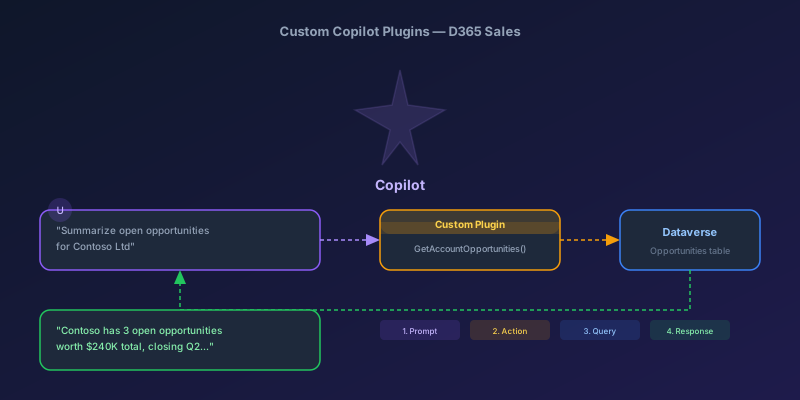
Building Custom Copilot Plugins for D365 Sales: Your First Action Step by Step
A hands-on tutorial for creating custom Copilot plugins in Dynamics 365 Sales — from defining a custom API to registering a plugin that Copilot can invoke, with real examples and permission gotchas.
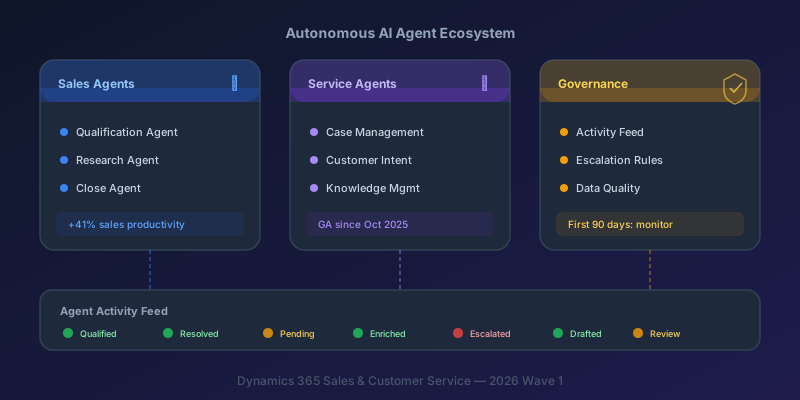
Autonomous AI Agents in D365 Sales and Customer Service: What You Actually Need to Know
A practical breakdown of the Sales Qualification Agent, Case Management Agent, and the governance framework you need before deploying them.
Newsletter
New posts, straight to your inbox
One email per post. No spam, no tracking pixels, unsubscribe anytime.
Comments
- No comments yet. Be the first.