Scaling Batch Processing in D365 Finance & Operations: Groups, Threads, and Parallel Tasks
In this series: X++ performance
When a nightly process that used to finish by 2am starts spilling into business hours, the instinct is to "make the server bigger." Usually the real problem is that the work is running single-threaded through a framework built for parallelism. Here's how the F&O batch framework actually distributes work, and how to make it use the capacity you're paying for.
The batch framework, briefly
A batch job is a container. Inside it are one or more batch tasks, and each task runs a class (historically a RunBaseBatch, today usually a SysOperation service). The batch infrastructure on each AOS instance picks up tasks whose dependencies are satisfied and executes them on a worker thread. The unit of scheduling and parallelism is the task, not the job. A job with one task is single-threaded no matter how much hardware you have.
So the central lever for scaling is: decompose the job into multiple tasks that can run concurrently.
Batch groups and binding work to servers
A batch group is a label you attach to a batch task. By itself it does nothing — its power comes from the server configuration, where you map batch groups to specific batch server instances (AOS).
This gives you workload isolation:
- Create a batch group like
Integrationfor heavy data-import jobs and bind it to one or two AOS instances reserved for that work. - Create
ReportingorMRPgroups and bind them elsewhere. - Leave latency-sensitive interactive AOS instances out of the heavy groups so user requests aren't starved.
A batch task with no group runs on any batch-enabled server. Once you assign groups and bind them, you control which servers pick up which work. In cloud-hosted F&O you have less direct control over individual machines than on-prem, but batch groups remain the mechanism for steering and isolating workloads, and they matter especially when you scale out batch capacity.
Max batch threads per AOS
Each AOS instance has a configured maximum number of batch threads it will run concurrently. This is the throttle. If an instance is set to 8 threads, it runs at most 8 batch tasks at once; additional ready tasks wait.
Tuning notes:
- More threads is not automatically better. Each thread consumes memory and database connections. Over-provisioning threads turns CPU contention and SQL blocking into your bottleneck.
- Size threads against what the database can absorb. Many batch tasks are SQL-bound; flooding SQL with 32 parallel set-based operations can make everything slower than 8 well-behaved ones.
- Balance across instances. If you have three batch AOS instances at 8 threads each, you have 24 concurrent task slots — but only if your batch groups are bound so the work can actually spread across all three.
Splitting work into tasks for parallelism
The art is in the decomposition. The classic pattern: a controller task queries the set of work, partitions it, and creates child tasks — one per partition — that the framework then runs in parallel across available threads.
Partition by a natural key that distributes evenly: by company, by warehouse, by customer group, by a hash/modulo of a record id. Avoid skew — if one partition holds 80% of the rows, you've gained nothing.
The SysOperation framework supports this directly. A service operation can, at runtime, create additional batch tasks and add them to the executing batch, optionally with dependencies between them. Conceptually:
// Controller running inside a batch: fan out one task per company
public void run()
{
    BatchHeader      batchHeader = this.getCurrentBatchHeader();
    container        companies   = this.companiesToProcess();

    BatchInfo        prevTask;
    for (int i = 1; i <= conLen(companies); i++)
    {
        DataAreaId dataArea = conPeek(companies, i);

        // Build a SysOperation service call for this slice of work
        MyWorkerController worker = new MyWorkerController();
        worker.parmDataAreaId(dataArea);

        BatchInfo batchInfo = worker.batchInfo();
        batchInfo.parmCaption(strFmt("Process %1", dataArea));
        batchInfo.parmGroupId('Integration');   // bind to the Integration batch group

        batchHeader.addTask(batchInfo);          // queued; runs when a thread is free
    }

    batchHeader.save();
}
The framework now has N independent tasks tagged with the Integration group. As batch threads free up on servers bound to that group, they pick the tasks up and run them concurrently. You went from one long-running task to N short ones, and total wall-clock time drops toward total_work / available_threads (minus skew and coordination overhead).
Task dependencies
Tasks aren't always independent. The framework lets you declare dependencies: task B runs only after task A reaches a given condition (success, error, or finished). This expresses real workflows — stage data, then validate, then post, then notify.
// B depends on A finishing successfully
batchHeader.addTask(taskA);
batchHeader.addTask(taskB);
batchHeader.addDependency(taskB, taskA, BatchDependencyStatus::Finished);
Dependencies let you build a small DAG inside one job: a fan-out stage of parallel workers, then a single consolidation task that depends on all of them. The consolidation waits; the workers run wide. This is the canonical "scatter-gather" shape and it's where most of the real throughput gains live.
Priority-based scheduling
Batch supports priority so that when more tasks are ready than threads available, higher-priority work jumps the queue. Priority-based scheduling (set per job/task) ensures, for example, that a time-critical posting job isn't stuck behind a low-priority data cleanup. Use it deliberately: give genuinely urgent jobs higher priority and leave bulk maintenance lower, so the scheduler makes the right choice under contention. Don't set everything to high — then nothing is.
Monitoring and troubleshooting stuck jobs
Things that go wrong and how to read them:
- Stuck in Executing. A task shows Executing but isn't progressing. Often a long-running SQL statement, a deadlock victim that didn't surface, or a thread that died with the server. Check the batch task's history/log, the SQL side for blocking, and whether the owning AOS recycled mid-run.
- Stuck in Waiting / never picks up. Almost always a batch group binding problem: the task's group isn't mapped to any running batch server, or the bound servers are saturated. Verify the group-to-server mapping and that those servers are batch-enabled and healthy.
- All threads busy on one server, others idle. Your groups aren't spreading work. Re-balance group bindings so parallel tasks can land on multiple instances.
- Recurring failures. Look at the batch job's tasks individually — one poisoned partition (bad data in one company) can fail repeatedly while others succeed. Per-task logging is why fan-out beats one monolithic task for diagnosis, too.
Operationally, watch the batch job list filtered by status, keep an eye on the ratio of Executing-to-Waiting against your total thread capacity, and alert on jobs that exceed their expected runtime. A job sitting in Waiting while servers are idle is a configuration smell, not a capacity problem.
The throughline: parallelism in F&O batch is something you design in by splitting work into tasks, then enable by binding batch groups to enough thread capacity across servers. Bigger hardware without that decomposition just gives you one slow task on a faster CPU.
Keep reading
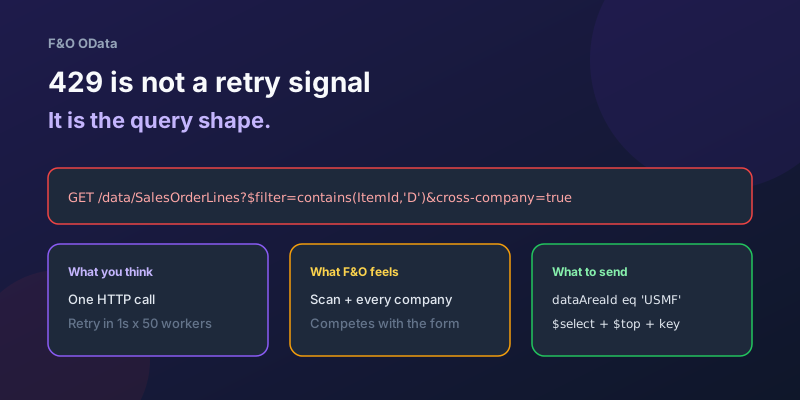
OData 429s from F&O: What Actually Throttles You
HTTP 429 from Dynamics 365 Finance & Operations is usually the query shape, not the request count — cross-company scans, $filter that cannot seek, $batch that still burns SQL, and why retrying harder makes month-end worse.
Surviving OData Throttling in D365 Finance & Operations Integrations
Design resilient D365 Finance and Operations OData integrations with 429 handling, Retry-After, batching, backoff, jitter, and DMF fallbacks.
TempDB vs InMemory Temporary Tables in X++: When to Use Which
Clear X++ guide to TempDB vs InMemory temporary tables in D365 F&O, with joins, indexes, set-based operations, and performance tradeoffs.
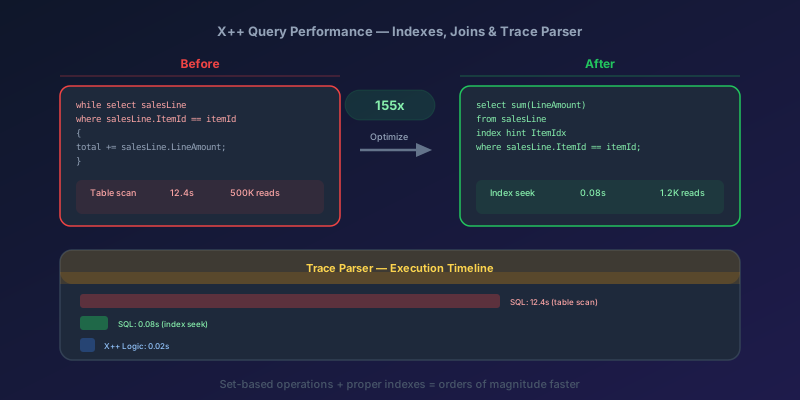
X++ Query Performance in D365 F&O: Indexes, Joins, and the Trace Parser
How to diagnose and fix slow X++ queries in D365 Finance & Operations using Trace Parser, LCS SQL insights, execution plans, proper index design, join selection, and set-based operations.
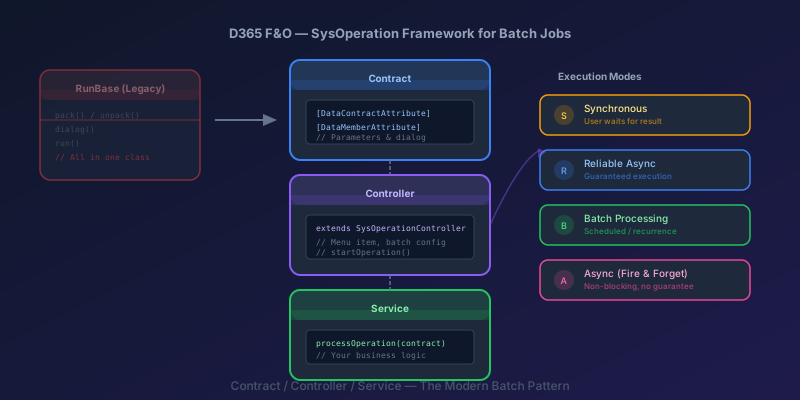
SysOperation Framework in D365 F&O: Building Batch Jobs the Right Way
How to build batch jobs using the SysOperation framework in D365 Finance & Operations — contract, controller, and service classes with X++ code samples.

crossCompany in X++: The Query That Mixes Legal Entities
A normal select stays in the current company. crossCompany returns every legal entity the user may read. How the company container, changeCompany, and OData differ.
Newsletter
New posts, straight to your inbox
One email per post. No spam, no tracking pixels, unsubscribe anytime.
Comments
- No comments yet. Be the first.