Dual-Write Between D365 F&O and Dataverse: Pitfalls and Patterns That Actually Work
In this series: F&O and Dataverse integration
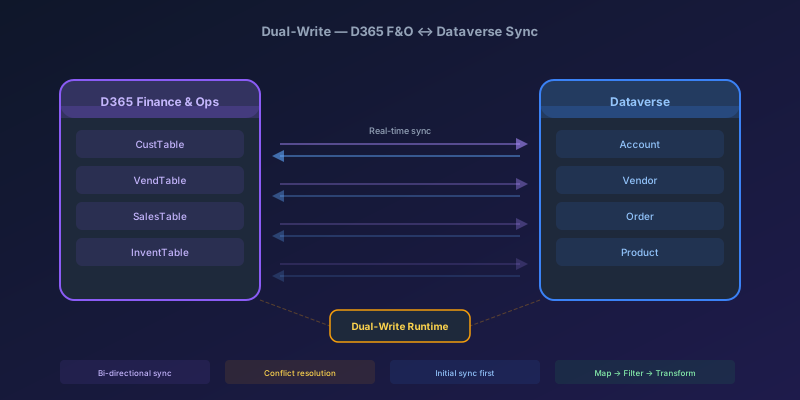
You have just enabled dual-write between your D365 Finance & Operations environment and Dataverse. The initial sync kicks off, runs for forty minutes, then fails on row 84,000 of 200,000 with a cryptic error about a missing mapping. You fix it, restart, and it fails again — different row, different error. Three days later you are still debugging, and the project sponsor is asking why "turning on the integration" is taking a week.
This is not unusual. Dual-write is powerful, but it is also one of the most configuration-sensitive features in the Dynamics 365 stack. This guide covers what actually works — and what will burn you.
What Dual-Write Is (and Is Not)
Dual-write provides near-real-time, bidirectional synchronization between F&O tables and Dataverse tables. When a record changes in F&O, it pushes to Dataverse within seconds. When a record changes in Dataverse (via a model-driven app, for example), it pushes back to F&O.
What it is not:
- It is not a batch integration. It is event-driven, record-by-record
- It is not ETL. There is no transformation layer — field mappings are direct
- It is not a replacement for the Data Management Framework for bulk migrations
- It is not magic. Both sides need clean, compatible data before you flip the switch
The Three Integration Options — When to Use Each
Before you default to dual-write, make sure it is the right tool.
| Scenario | Use This | Why |
|---|---|---|
| Real-time bidirectional sync (customers, products, vendors) | Dual-write | Sub-second sync, both directions |
| Read-only access to F&O data from model-driven apps | Virtual entities | No data copy, no sync lag, no storage cost |
| Large-volume analytical export to Data Lake | Data Export Service / Synapse Link | Optimized for bulk, no per-record overhead |
| One-time or periodic bulk data migration | Data Management Framework | Staging tables, transformations, error handling |
| Real-time, one-direction push from F&O | Business events + custom integration | When you need transformation or routing logic |
Rule of thumb: If you only need to read F&O data from the CRM side, virtual entities are almost always simpler. Dual-write is for scenarios where both sides create and update records.
Setting Up Dual-Write: The Sequence That Works
Order matters. Here is the sequence I follow on every engagement:
- Ensure prerequisites are met — both environments must be in the same Microsoft Entra (Azure AD) tenant, the F&O environment must be on a currently supported platform release (F&O is on continuous service updates — anything reasonably recent works), and the Dataverse environment needs the dual-write core solution installed
- Link the environments in the Power Platform admin center
- Apply the solution maps — start with Microsoft's out-of-box maps (Customers V3, Vendors V3, Products, etc.) before creating custom ones
- Run the initial sync in the correct order — this is where most people fail
The Initial Sync Order Problem
Dual-write maps have dependencies. If you sync Sales Orders before Customers, every order will fail because the customer reference does not exist yet in Dataverse.
Here is a reliable dependency order for common entities:
1. Companies (cdm_companies)
2. Currencies, Exchange rates
3. Customers V3, Vendors V3
4. Products, Released products
5. Warehouses, Sites
6. Sales order headers → Sales order lines
7. Purchase order headers → Purchase order lines
Do not run all maps in parallel during initial sync. I have seen teams enable 30 maps simultaneously and wonder why everything deadlocks. Run them in waves, validating each wave before starting the next.
The Five Pitfalls That Get Everyone
1. Missing or Mismatched Company Context
Dual-write maps that involve company-specific data (almost everything in F&O) require the company field to be mapped correctly. If your Dataverse table does not have the cdm_companyid field populated, records will either fail or land in the wrong legal entity.
Fix: Always verify that the Company map (cdm_companies) has synced successfully before syncing any company-specific entities. Check that the cdm_companyid lookup on target tables is correctly mapped.
2. Initial Sync Fails Mid-Way, and You Restart from Scratch
When an initial sync fails at row 84,000, your instinct is to fix the error and restart. But now the first 84,000 rows exist in the target — and the restart will try to insert them again, causing duplicate errors.
Fix: Use the Resume option, not Restart. If Resume is not available, you need to delete the already-synced records from the target before restarting. For large datasets, consider using the DMF to do the initial load and then enabling dual-write for ongoing sync only.
3. Enum / Option Set Mismatches
F&O uses integer enums. Dataverse uses option sets. The mapping between them is not always automatic, especially for custom fields. A SalesStatus enum value of 3 in F&O might map to a completely different option set value in Dataverse.
Fix: Explicitly define value mappings in the dual-write map for every enum/option set field. Do not assume the values align.
F&O Enum: SalesStatus
  0 = None          → Dataverse: 192350000
  1 = Backorder     → Dataverse: 192350001
  2 = Delivered     → Dataverse: 192350002
  3 = Invoiced      → Dataverse: 192350003
4. Lookup Resolution Failures
When a dual-write record references another entity (e.g., a sales order references a customer), the target system needs to resolve that lookup. If the referenced record does not exist yet, the sync fails.
Fix: This goes back to sync order. But also watch for records that reference entities you have not mapped at all. A sales order line might reference a DeliveryMode — if you have not synced delivery modes, every line will fail.
5. Plugin / Workflow Interference on the Dataverse Side
When dual-write pushes a record into Dataverse, it triggers any active plugins, workflows, or Power Automate flows on that table. If a plugin throws an exception, the dual-write sync fails for that record.
Fix: Detect dual-write origin in the plugin context and short-circuit. The dual-write runtime sets shared variables on inbound calls — inspect the context for those origin markers (the exact key names have changed across releases, so verify against the dual-write trace logs in your environment), and return early when the operation came from dual-write rather than a real user. The pattern is the same shape as detecting a parent plugin call:
// In your Dataverse plugin — check for dual-write origin markers in the
// shared variables and skip custom logic when the change originated there.
if (IsDualWriteOriginated(context))
{
    return;
}
Encapsulate the detection in a helper so the actual key names live in one place and can be updated when the platform evolves.
Conflict Resolution: Who Wins?
When both sides update the same record within the sync interval, you have a conflict. Dual-write handles this with a last-writer-wins strategy based on the modifiedon timestamp.
This means:
- If a user in F&O updates a customer name at 10:00:01 and a user in Dataverse updates the same customer's phone at 10:00:02, the Dataverse version wins entirely — including overwriting the F&O name change
- Dual-write does not do field-level merge. It is record-level
Practical pattern: Designate a "master" system for each entity. Customers might be mastered in CRM (Dataverse), while products are mastered in F&O. Restrict editing of mastered fields on the non-master side. This avoids conflicts entirely instead of trying to resolve them after the fact.
Performance Considerations
Dual-write processes records individually, not in batches. This has implications:
- Throughput ceiling: Expect roughly 5-10 records per second per map under normal conditions. For a 500,000 record initial sync, that is 14-28 hours
- Do not use dual-write for initial data migration. Use DMF to bulk-load both sides, then enable dual-write for ongoing sync
- Throttling: Both F&O and Dataverse have API throttling limits. Large bursts of changes (e.g., a batch job updating 50,000 records) will hit these limits and cause sync delays or failures
- Monitor the dual-write health dashboard in the F&O environment. It shows sync lag, error counts, and throughput metrics
Pattern for Batch Updates
If you have a batch job in F&O that updates thousands of records:
- Pause the dual-write map before the batch job runs
- Run the batch job in F&O
- Use DMF to export the changed records and import them into Dataverse
- Resume the dual-write map
This avoids flooding the sync pipeline and gives you explicit control over the bulk update.
Custom Maps: Keep Them Minimal
When you create custom dual-write maps, follow these rules:
- Map only the fields you need. Every additional field is a potential failure point. An unmapped custom column will not error — it will just never move. That failure mode is dual-write dropped my field and reported success.
- Avoid calculated or computed fields on either side — they cause circular update loops
- Test with dirty data. Your dev environment has clean data. Production has nulls, special characters, and records from 2003 that violate every validation rule you have added since
- Version your maps. Export the map configuration and store it in source control. When a map breaks in production, you want to diff it against the last known good version
The Honest Assessment
Dual-write works well for a specific set of scenarios: real-time bidirectional sync of master data between F&O and Dataverse-based apps. For those scenarios, it is the best option available.
But it is not a general-purpose integration tool. If you find yourself fighting it — building complex error handling around it, pausing and resuming it around batch jobs, or mapping entities with fundamentally different data models on each side — step back and ask whether virtual entities, Synapse Link, or a custom integration with business events would be simpler.
The best dual-write implementations I have seen share one trait: they sync fewer entities than the team originally planned, and the ones they do sync have clean, well-understood data on both sides before dual-write was ever enabled.
Keep reading
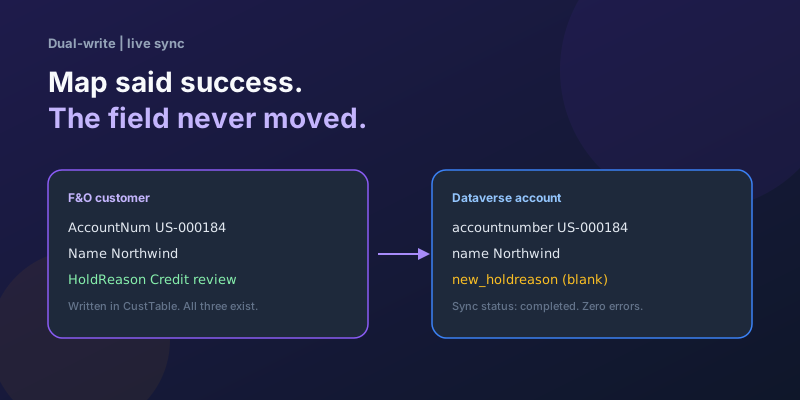
Dual-Write Dropped My Field and Reported Success
Why a dual-write map can complete with zero errors while a custom F&O field never lands in Dataverse — staging tables, unpublished maps, and change tracking after a schema change.
Dual-Write vs Virtual Entities vs OData: Choosing the Right F&O–Dataverse Pattern
Compare dual-write, virtual entities, OData, and DMF for Finance and Operations to Dataverse integration with latency and failure tradeoffs.
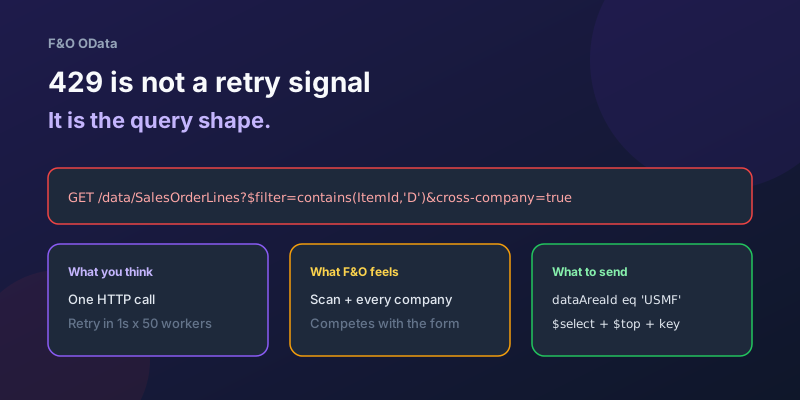
OData 429s from F&O: What Actually Throttles You
HTTP 429 from Dynamics 365 Finance & Operations is usually the query shape, not the request count — cross-company scans, $filter that cannot seek, $batch that still burns SQL, and why retrying harder makes month-end worse.
D365 F&O Data Entities: Composite, Computed, and Virtual Fields Explained
Data entities look like simple tables until you need a nested import, a derived column, or a field with no storage. Knowing the three advanced shapes is what makes integrations actually work.
Extending Data Entities in D365 Finance & Operations Without Breaking Upgrades
Add fields, computed columns, and validation to standard D365 Finance & Operations data entities the upgrade-safe way — with X++ examples and the staging-table traps to avoid.
Recurring Integrations and the REST API in D365 Finance & Operations
Move files in and out of D365 Finance & Operations reliably using the recurring integrations REST API — enqueue, dequeue, acknowledge, and the status polling patterns that keep data flowing.
Newsletter
New posts, straight to your inbox
One email per post. No spam, no tracking pixels, unsubscribe anytime.
Comments
- No comments yet. Be the first.