EF Core ExecuteUpdate: SaveChanges Never Ran, and Neither Did Your Interceptor
The expiry job used to load pending orders, set Status, and call SaveChangesAsync. A SaveChangesInterceptor stamped UpdatedAt and wrote an audit row. Someone rewrote the job with ExecuteUpdateAsync because the set had grown. The run was green. Status flipped. UpdatedAt did not. The audit table was empty. The interceptor never ran because ExecuteUpdate is not SaveChanges.
That is the whole property. ExecuteUpdate and ExecuteDelete send UPDATE / DELETE immediately. They do not queue changes on the DbContext. They do not visit the change tracker. They do not call SavingChanges or SavedChanges. If your correctness lives in those hooks, a bulk rewrite silently drops it.
The SQL leaves before you ask
var now = DateTime.UtcNow;
var cutoff = now.AddDays(-7);

var rows = await db.Orders
    .Where(o => o.Status == OrderStatus.Pending && o.CreatedAt < cutoff)
    .ExecuteUpdateAsync(
        s => s
            .SetProperty(o => o.Status, OrderStatus.Expired)
            .SetProperty(o => o.UpdatedAt, now),
        cancellationToken);
rows is the number of rows the database reported. There is no second step. A later SaveChangesAsync in the same request does not "flush" this update. It only saves entities the tracker already knows about.
Pass the request token. ExecuteUpdateAsync takes it last, the same way ToListAsync and SaveChangesAsync do. A job that ignores it keeps a pooled connection after the caller left, which is the cancellation failure mode on a longer WHERE.
SetProperty is the SET clause. The constant overload sends a parameter. The expression overload can read another column on the same row:
.SetProperty(o => o.AttemptCount, o => o.AttemptCount + 1)
That increment happens in SQL. It does not read the entity first, so it does not race a concurrent increment the way "load, add one, SaveChanges" does.
The interceptor you wrote is a SaveChanges interceptor
public sealed class AuditInterceptor : SaveChangesInterceptor
{
    public override ValueTask<InterceptionResult<int>> SavingChangesAsync(
        DbContextEventData eventData,
        InterceptionResult<int> result,
        CancellationToken cancellationToken = default)
    {
        foreach (var entry in eventData.Context!.ChangeTracker.Entries<IAudited>())
        {
            if (entry.State is EntityState.Added or EntityState.Modified)
            {
                entry.Entity.UpdatedAt = DateTime.UtcNow;
            }
        }

        return base.SavingChangesAsync(eventData, result, cancellationToken);
    }
}
This is correct for SaveChangesAsync. It is a no-op for ExecuteUpdateAsync. The bulk path never constructs EntityEntry objects, so there is nothing to walk. SavedChanges that inserts into AuditLog has the same hole.
IDbCommandInterceptor does see the command, because a command still goes to the server. That is the wrong layer for "stamp UpdatedAt on Order." Put the stamp in SetProperty. If you also need an audit row, insert it yourself in the same transaction:
await using var tx = await db.Database.BeginTransactionAsync(cancellationToken);

await db.Orders
    .Where(o => o.Status == OrderStatus.Pending && o.CreatedAt < cutoff)
    .ExecuteUpdateAsync(
        s => s
            .SetProperty(o => o.Status, OrderStatus.Expired)
            .SetProperty(o => o.UpdatedAt, now),
        cancellationToken);

db.AuditLogs.Add(new AuditLog
{
    Action = "expire-pending",
    At = now,
});
await db.SaveChangesAsync(cancellationToken);
await tx.CommitAsync(cancellationToken);
The Add does go through SaveChanges, so the interceptor runs for the audit row. The orders were already updated by the first statement. One transaction keeps them together. Two statements without a transaction is a crash that leaves expired orders and no audit.
The tracked instance is now a lie
Default tracking means a FirstAsync earlier in the request still holds the old values after a bulk update of that primary key.
var order = await db.Orders.FirstAsync(o => o.Id == id, cancellationToken);

await db.Orders
    .Where(o => o.Id == id)
    .ExecuteUpdateAsync(
        s => s.SetProperty(o => o.Status, OrderStatus.Paid),
        cancellationToken);

return order; // Status is still whatever it was at FirstAsync
EF does not merge the SQL result back into the identity map. The next SaveChangesAsync can even write the stale Status back.
Pick one:
- Do not track.
AsNoTracking()on the read, orChangeTracker.QueryTrackingBehavior = QueryTrackingBehavior.NoTrackingfor that context. - Reload after the bulk write:
await db.Entry(order).ReloadAsync(cancellationToken). db.ChangeTracker.Clear()if you are done with every tracked graph in this context.- Return a projection you query after the update, not the instance you had before.
Do not mix "I bulk-updated this key" with "I will now mutate the tracked copy."
Query filters and concurrency tokens still apply — differently
Global query filters are part of the UPDATE/DELETE. Soft-delete as HasQueryFilter(o => !o.IsDeleted) means ExecuteDelete never sees rows that are already flagged. IgnoreQueryFilters() is the opt-out, and it is easy to forget on a cleanup job.
IsDeleted = true through ExecuteUpdate does match rows the filter currently includes. The filter is a WHERE on the command, not a veto on SET.
A RowVersion / IsConcurrencyToken property is not added to the WHERE of ExecuteUpdate the way SaveChanges adds it. SaveChanges fails with DbUpdateConcurrencyException when the token moved. ExecuteUpdate updates every row the LINQ WHERE matches. If two jobs expire the same order, both succeed. Put the token in the LINQ yourself if that race is a bug:
.Where(o => o.Id == id && o.RowVersion == expected)
Zero rows returned is the conflict. That is closer to an explicit compare-and-swap than to EF's graph concurrency. Snapshot anomalies on a read-then-write path are a different class of bug; they are the ones in write skew. Here there is no read of the entity at all.
ExecuteDelete does not apply EF's in-memory cascade rules. Related rows survive unless the database foreign key is ON DELETE CASCADE (or you delete them in SQL too). A Restrict / NoAction FK fails the DELETE. The interceptor that used to delete children on SaveChanges will not help.
| Mechanism | SaveChangesAsync | ExecuteUpdate / ExecuteDelete |
|---|---|---|
| When SQL is sent | When you call SaveChanges | Immediately |
| Change tracker | Source of the command | Ignored; tracked copies go stale |
SaveChangesInterceptor | Runs | Does not run |
IDbCommandInterceptor | Runs | Runs |
| Query filters | Apply to the query that loaded rows | Apply to the bulk WHERE |
| Concurrency token | Automatic WHERE RowVersion = @old | Only if you write it |
| EF cascade conventions | Applied | Not applied; database FK wins |
What this is not for
A substitute for Update(entity) on a detached graph. DbSet.Update marks every property modified and waits for SaveChanges. That does run interceptors, and it writes columns you did not change. The bulk APIs are the opposite: they write only what you SetProperty, and they do not wait.
A way to skip query filters by default. They are still there. If the job must hard-delete soft-deleted rows, call IgnoreQueryFilters() on purpose.
A reason to stop using SaveChanges for a single row with domain events. If the write is one aggregate and the interceptor, the domain event, and the token check are the product, keep SaveChanges. ExecuteUpdate is for a set you do not want in memory.
An implicit transaction around "update then return the entity." The update committed when the method returned. The object in your hand is not that row.
The expiry job in the first paragraph did what the method name says: it executed an update. Put UpdatedAt in the SET. Put the audit insert in the same transaction. Do not return a tracked Order you loaded before the call. Then the interceptor's absence is a design choice, not a silent miss.
Keep reading
Pass the CancellationToken or the Work Continues After the Client Left
ASP.NET Core binds CancellationToken to the aborted request. Forward it to EF Core and HttpClient, and do not turn a client disconnect into a 500.

IHttpClientFactory: Stop Creating HttpClient Per Request
Why new HttpClient() in a .NET service exhausts sockets under load, and how IHttpClientFactory plus a named client fixes DNS without freezing the handler forever.
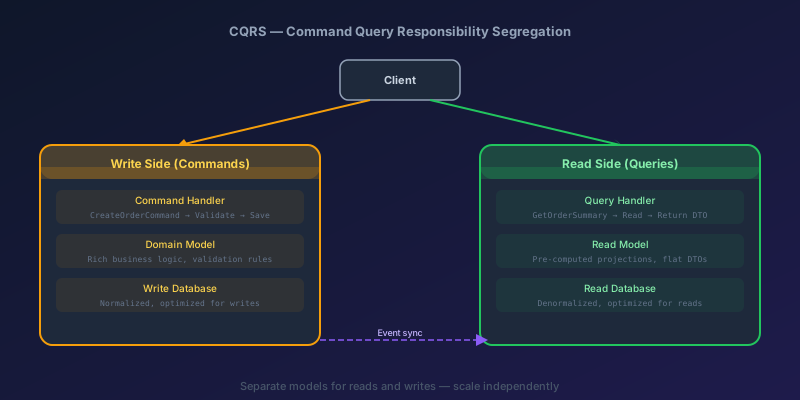
CQRS in Practice: When It's Worth the Complexity and When It Isn't
A clear-eyed look at Command Query Responsibility Segregation — what it actually is, how to implement it in .NET, when it pays off, and when it's unnecessary complexity.

Fixing NuGet Error: Unable to Load the Service Index for Source
A step-by-step guide to diagnosing and resolving NuGet package source errors in Visual Studio and dotnet CLI.
Dataverse Plug-in Performance: Avoiding the Slow Plug-in That Times Out
A synchronous plug-in runs inside the user's transaction with a hard time limit. One slow query or external call can break saves for everyone. Here is how to keep plug-ins fast and safe.
Next.js after(): The Side Effect That Ran at Build, Not on the Request
after() is not a request API. On a static page the callback runs at build or revalidate. Read cookies before the callback, and do not treat it as a job queue.
Newsletter
New posts, straight to your inbox
One email when a new post goes up. Double opt-in, unsubscribe anytime. Not a daily digest.
Comments
- No comments yet. Be the first.