Next.js after(): The Side Effect That Ran at Build, Not on the Request
The marketing page is static. You added after(() => track("page_view")) so the pixel would not block HTML. The deploy was green. The warehouse got a burst of page_view rows during next build on Friday, then nothing over the weekend while people actually opened the URL. after is not a request hook. Calling it does not make the route dynamic. On a static page the callback runs when the page is prerendered — at build, or when that prerender is revalidated — not when a browser hits the CDN.
That is the property. The rest of this post is where the callback is allowed to run, which APIs you can touch inside it, and why void fetch(...) is a worse substitute.
What after actually schedules
after comes from next/server. You pass a function (sync or async). Next.js runs that function after the current response — or the current prerender — has finished. It is valid in Server Components (pages, layouts, generateMetadata), Server Functions, Route Handlers, and proxy.ts. It is not valid in a Client Component.
import { after } from "next/server";
import { log } from "@/app/utils";

export default function Layout({ children }: { children: React.ReactNode }) {
  after(() => {
    log({ event: "layout_rendered" });
  });
  return <>{children}</>;
}
The render returns. The body streams. Then the callback starts. The user is not waiting on log. That is the point.
after does not opt the route into dynamic rendering. cookies() and headers() do. after is a timer on work that already happened. If that work was a build-time prerender, the timer fires at build time. Helpers may nest after inside after; Next.js still waits for the inner Promise. That is also how a "small" log wrapper quietly schedules a second network call.
The static page is a prerender
A page with no request-time APIs can be prerendered. after on that page runs during the prerender. In production the HTML is a file (or an edge object) that next start or the CDN serves without executing your module again. The callback already ran. It will not run per visitor.
// app/pricing/page.tsx — no cookies, no headers, no searchParams
import { after } from "next/server";

export default function PricingPage() {
  after(async () => {
    await fetch("https://analytics.example.com/collect", {
      method: "POST",
      body: JSON.stringify({ path: "/pricing" }),
    });
  });
  return <h1>Pricing</h1>;
}
next build executes the page, writes HTML, then runs the callback. One collect request, from the build machine, with whatever egress the CI runner has. A later GET /pricing from a customer does not enter this function.
The same rule applies on revalidate. If you later wrap the data fetch in 'use cache' and that cache expires, the prerender runs again and after runs again. That is still not "every request." It is "every time this snapshot is rebuilt."
If you need a side effect on a real request, the surrounding tree has to be request-scoped. Read cookies(), headers(), or connection() in a Server Component that actually participates in the request, or put after inside a Route Handler or a Server Function that the browser invoked. Those paths execute per call. The static marketing page does not.
Static export (output: 'export') has no Node server left to wait on. after is not supported there. The callback has nowhere to run after HTML is already a folder of files.
Request APIs: two call sites, two rules
Whether you may call cookies() or headers() inside the callback depends on who called after.
Route Handlers and Server Functions. The request is already live. You can read cookies and headers inside the callback. That is the right place to log "who just submitted this action" without delaying the JSON the client is waiting for:
import { after } from "next/server";
import { cookies, headers } from "next/headers";
import { logUserAction } from "@/app/utils";

export async function POST() {
  // ...mutation that must finish before you return...

  after(async () => {
    const userAgent = (await headers()).get("user-agent") ?? "unknown";
    const session = (await cookies()).get("session-id")?.value ?? "anonymous";
    await logUserAction({ session, userAgent, op: "order.create" });
  });

  return Response.json({ status: "ok" });
}
Server Components — pages, layouts, generateMetadata. Next.js has to know, during React's render, which part of the tree touched request data. That is how Partial Prerendering and Cache Components decide the static shell versus the hole. after runs after that lifecycle. A cookies() call inside the callback is invisible to the prerender planner, so Next.js refuses it. You get a runtime error.
Read first, close over the values, then schedule:
import { after } from "next/server";
import { cookies, headers } from "next/headers";
import { logUserAction } from "@/app/utils";

export default async function Page() {
  const userAgent = (await headers()).get("user-agent") ?? "unknown";
  const session = (await cookies()).get("session-id")?.value ?? "anonymous";

  after(() => {
    logUserAction({ session, userAgent, path: "/orders" });
  });

  return <h1>Orders</h1>;
}
Those await cookies() / await headers() calls do make this page dynamic. That is the trade. You cannot have a fully static shell and a per-request after that needs the session, unless you isolate the dynamic read.
Keep the shell static, dynamize the hole
With Cache Components, the pattern is the same one the PPR migration already uses: a static parent, a <Suspense> boundary, a child that reads the request.
import { Suspense } from "react";
import { after } from "next/server";
import { cookies } from "next/headers";
import { logUserAction } from "@/app/utils";

export default function Page() {
  return (
    <>
      <h1>Orders</h1>
      <Suspense fallback={<p>Loading session…</p>}>
        <VisitBeacon />
      </Suspense>
    </>
  );
}

async function VisitBeacon() {
  const session = (await cookies()).get("session-id")?.value ?? "anonymous";
  after(() => {
    logUserAction({ session, path: "/orders" });
  });
  return null;
}
cookies() runs during VisitBeacon's render, so Cache Components can put that subtree behind the fallback. The heading stays in the static shell. after closes over session. The callback does not call cookies() itself. Skip the <Suspense> wrapper and the whole page waits on the cookie: the side effect still works, the shell does not.
React.cache still dedupes inside the callback. If render already called cache(getUser)(id), the same call in after reuses that result. You do not pay a second database round trip to log the same user.
void fetch is not after
The other failure I keep seeing is the opposite of the static-page trap: a dynamic Route Handler that "doesn't block" by discarding the Promise.
export async function POST(request: Request) {
  const order = await createOrder(await request.json());
  void fetch("https://analytics.example.com/collect", {
    method: "POST",
    body: JSON.stringify({ orderId: order.id }),
  });
  return Response.json({ id: order.id });
}
On a long-lived Node process that discarded Promise might finish. On a serverless isolate, returning the response is the signal that this invocation is done. The runtime is allowed to freeze the worker. The collect request is in flight with nobody waiting on it. Sometimes it lands. Sometimes it does not. You will not see an error on the order response. The order already succeeded.
after exists because platforms expose waitUntil(promise): keep this isolate alive until these Promises settle, after the body has been sent. Next.js calls that for you. On a long-lived Node or Docker process the worker is already alive, so the same API just means "run this before we consider the request finished." waitUntil is not infinite. after is bounded by the route's maxDuration (or the platform default). A callback that fans out to five slow webhooks can still be killed mid-flight. The user already got 200 { id }. The leftover work is gone.
That bound is the trade against a real queue. Put the order insert in the request. Put "email the warehouse, call the ERP, write the audit row finance will replay" on a bus or a durable outbox. after is for work you can afford to lose on a killed isolate: a log line, a metric, a best-effort analytics ping. It is not a job runner.
You also cannot change the response from inside the callback. The body has left. cookies().set(...) in after cannot attach Set-Cookie to the thing the browser already received. If the mutation needs to write a session cookie, do it before you return.
The callback still runs when the response failed
after is queued when you call it. It still runs if the rest of the handler throws, if you call notFound(), or if you redirect(). The user may see a 404 or a 302. The log still fires.
import { after } from "next/server";
import { notFound } from "next/navigation";
import { logUserAction } from "@/app/utils";

export default async function Page({
  params,
}: {
  params: Promise<{ id: string }>;
}) {
  const { id } = await params;
  const order = await getOrder(id);

  after(() => {
    logUserAction({ op: "order.view", id, found: Boolean(order) });
  });

  if (!order) notFound();
  return <OrderDetail order={order} />;
}
Useful for "we looked, it was missing." A footgun if the callback increments orders_completed on a path that then redirects to /login. Schedule after once you know the outcome, or pass that outcome into the closure the way found is passed above.
An exception inside the callback does not rewrite the status the client already got. The order response stays 200. If you need the user to see that the side effect failed, it was not a side effect. Await it in the handler.
Pick the mechanism that matches the loss
| Work | Put it |
|---|---|
| HTML the user is staring at | The handler or Server Component, awaited |
| Cookie or header on this response | Before you return |
| Per-request log or metric you can drop | after, on a path that actually runs per request |
| Analytics on a prerendered marketing page | The client, or a Route Handler the page beacons to |
| Email, ERP, anything you will replay | A queue or a transactional outbox |
after is for a cheap observation of a write the request already made. It is the wrong tool when the observation is the write, or when the page never ran in a request. The empty weekend dashboard was not an analytics outage. The page was static, after ran in CI, and production served HTML that no longer contained your function.
Keep reading
Next.js 16 proxy.ts: Rename the Function, Drop Edge, and Do Not Trust the Matcher for Auth
middleware.ts is deprecated. The export must be named proxy, the runtime is Node and cannot be set, and a matcher that skips a page also skips its Server Actions.

Next.js 16 Cache Components: Replacing revalidate and force-dynamic With 'use cache'
How Cache Components in Next.js 16 replace route segment configs with the use cache directive and cacheLife, what becomes a build error, and the cookies-outside-the-cache rule that trips every migration.
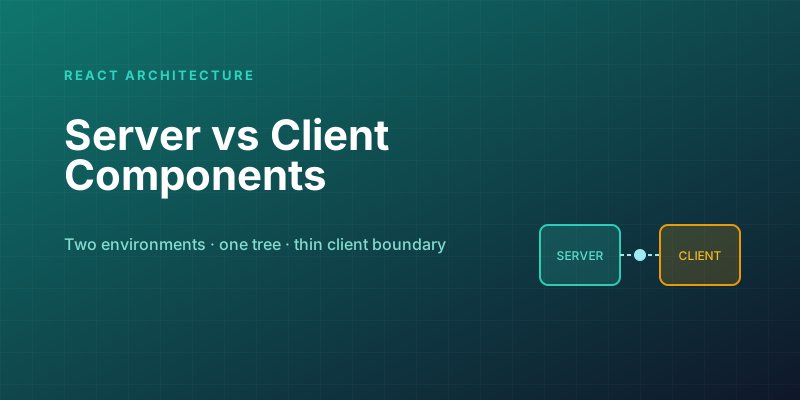
Server Components vs. Client Components: A Mental Model That Sticks
The hardest part of React Server Components isn't the syntax — it's knowing which kind of component you're writing and why. Here is the mental model that makes the boundary obvious.

Next.js Partial Prerendering: The Production Migration Guide
PPR was the experimental flag in Next.js 15; in 16 it's been folded into Cache Components. Learn how static shells and dynamic holes work, how to migrate incrementally, and how to measure the LCP gains.

Next.js 16 and React 19: What Actually Matters in 2026
A practical guide to the features that changed how we build React apps — Server Components, the new compiler, and the patterns that stuck.
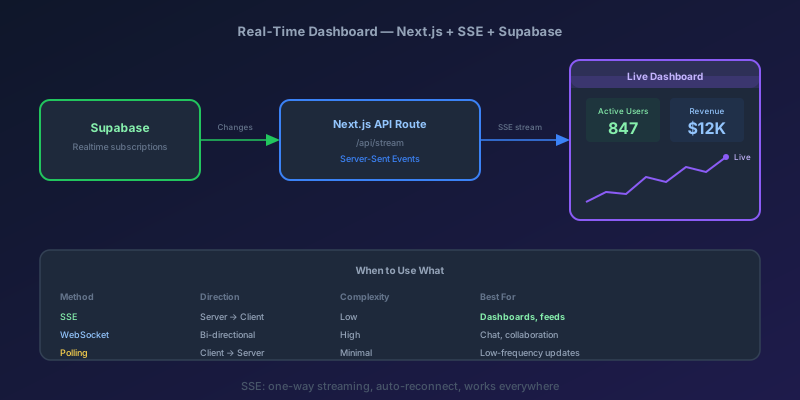
Building a Real-Time Dashboard with Next.js, Server-Sent Events, and Supabase
A step-by-step guide to building a live-updating dashboard using Next.js API routes, Server-Sent Events, and Supabase Realtime — with reconnection handling and smooth UI transitions.
Newsletter
New posts, straight to your inbox
One email when a new post goes up. Double opt-in, unsubscribe anytime. Not a daily digest.
Comments
- No comments yet. Be the first.