X++ Query Performance in D365 F&O: Indexes, Joins, and the Trace Parser
In this series: X++ performance
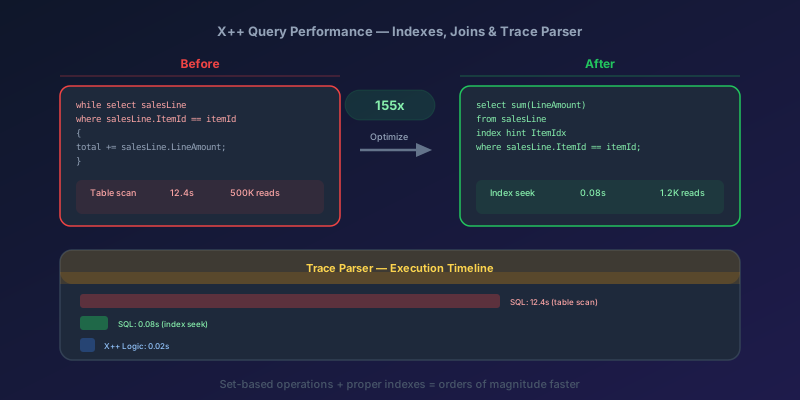
A batch job that ran in 8 minutes in test takes 4 hours in production. The user base grew, the data volume tripled, and that while select loop with a nested lookup inside it went from "fine" to "catastrophic." This is not a hypothetical — it is the most common performance call I get from D365 F&O teams.
X++ query performance is not mysterious. Slow queries follow predictable patterns, and the fixes are well-understood. This guide covers the patterns that cause 90% of performance problems and the tools to find them.
Why Queries Go Slow: The Three Root Causes
Almost every slow query in F&O traces back to one of three problems:
- Missing or wrong indexes — the database scans millions of rows instead of seeking directly to the result
- Row-by-row processing — a
while selectloop that does 50,000 individual operations instead of one set-based operation - Unnecessary joins or bad join types — pulling in tables you do not need, or using a join strategy that creates a Cartesian product
Fix these three, and you fix most performance problems without touching infrastructure.
Tool #1: The Trace Parser
The Trace Parser is your primary diagnostic tool. It captures every SQL statement, its duration, row count, and call stack during a user session or batch job.
How to Capture a Trace
- In F&O, go to System administration > Setup > SQL tracing (or use the Trace button in the D365 toolbar)
- Enable tracing for your session
- Run the slow operation
- Stop tracing
- Open the trace file in the Trace Parser desktop tool
What to Look For
Sort by Duration (ms) descending. The top entries are your bottlenecks. For each slow statement, check:
| Metric | What It Tells You |
|---|---|
| Duration | How long the statement took |
| Row count | How many rows were returned or affected |
| Execution count | How many times this exact statement ran (high count = loop problem) |
| Call stack | Which X++ method generated this SQL |
The killer pattern: A statement that runs in 5ms but executes 40,000 times. Total cost: 200 seconds. The individual query is fast — the problem is calling it 40,000 times in a loop.
Tool #2: LCS SQL Insights
Trace Parser is a session tool. For "this environment has been slow all week," use LCS > Environment monitoring > SQL insights (and the related Query store views on the SQL database).
Look for:
- Queries with high total duration but low average duration — almost always a loop
- Queries whose execution plan flipped from seek to scan after a data-volume change
LCK_*waits / blocking on number sequence and inventory dimension tables during period close
Do not add forceNestedLoop or forceSelectOrder hints because a plan looked ugly once. Hints freeze a plan that was right for last month's statistics. Fix the index and the set-based shape first; hints are a last resort you document and revisit after the next One Version update.
Reading Execution Plans
When you find a slow query in Trace Parser, copy the SQL and run it in SQL Server Management Studio with SET STATISTICS IO ON and include the actual execution plan.
SET STATISTICS IO ON;
-- Paste the SQL from Trace Parser here
SELECT * FROM SALESLINE
WHERE DATAAREAID = 'USMF'
  AND SALESID = 'SO-001234'
  AND ITEMID LIKE 'D%';
What the Execution Plan Reveals
| Operator | Meaning | Action |
|---|---|---|
| Clustered Index Scan | Scanning the entire table | You need a better index |
| Index Seek | Using an index to go directly to the data | Good — this is what you want |
| Key Lookup | Found the row via a non-clustered index but needs to go back to the clustered index for additional columns | Consider adding included columns to the index |
| Nested Loop Join | For each row in the outer table, looks up in the inner table | Fine for small outer sets, deadly for large ones |
| Hash Match | Builds a hash table from one side, probes with the other | Good for large-to-large joins |
| Sort (with spill to tempdb) | Ran out of memory during sort, using disk | Missing index on the ORDER BY columns |
The red flag: Any operation with a thick arrow (high estimated row count) feeding into a Nested Loop. This means the optimizer expected few rows but got many, and it is doing a lookup for each one.
Index Design: The 80/20 Rules
You do not need to be a DBA to design effective indexes. Follow these rules:
Rule 1: Lead with Equality Predicates
If your WHERE clause filters on DataAreaId, SalesId, and ItemId, the index should lead with those columns — in order of selectivity.
-- Query pattern:
WHERE DataAreaId = 'USMF'
  AND SalesId = 'SO-001234'
  AND ItemId = 'D-0001'

-- Index:
(DataAreaId, SalesId, ItemId)
Rule 2: Range Predicates Go Last
If one filter is a range (LIKE, >, <, BETWEEN), put it after the equality columns:
-- Query pattern:
WHERE DataAreaId = 'USMF'
  AND SalesId = 'SO-001234'
  AND ItemId LIKE 'D%'

-- Index: (DataAreaId, SalesId, ItemId)
-- The seek uses DataAreaId and SalesId,
-- then scans the range on ItemId
Rule 3: Cover the Query
If your query selects only Qty and LineAmount, add those columns to a covering index to avoid the Key Lookup. In F&O you don't author this in X++ source — you create the index in the Visual Studio metadata designer:
- Right-click the table → New → Index
- Add
DataAreaId,SalesId,ItemIdto the index fields - Add
QtyandLineAmountas Included Columns in the index properties - Build and synchronize
The compiled output is a SQL Server non-clustered index with INCLUDE (Qty, LineAmount). There is no indexDef X++ syntax for this — index design lives in metadata, not code.
Rule 4: Do Not Over-Index
Every index slows down inserts and updates. A table with 15 indexes will have slow write operations. Target 3-5 well-designed indexes per table rather than one index per query pattern.
Join Types: When Each Matters
X++ supports several join types, and choosing the wrong one has real consequences.
join (Inner Join)
while select salesLine
    join salesTable
    where salesTable.SalesId == salesLine.SalesId
{
    // Only rows where both sides match
}
Standard inner join. The optimizer chooses the best physical join strategy (nested loop, hash, merge) based on statistics. This is your default choice.
exists join
while select salesTable
    exists join salesLine
    where salesLine.SalesId == salesTable.SalesId
{
    // SalesTable rows that HAVE at least one SalesLine
    // SalesLine columns are NOT available in the loop body
}
This is faster than a regular join when you only need the parent table's data. The optimizer can use a semi-join, which stops scanning the child table after finding the first match. If you are joining SalesLine just to filter SalesTable, use exists join.
notexists join
while select salesTable
    notexists join salesLine
    where salesLine.SalesId == salesTable.SalesId
{
    // SalesTable rows with NO SalesLine records
}
Anti-semi-join. Use it to find orphaned records or unprocessed parents.
outer join
while select salesTable
    outer join salesLine
    where salesLine.SalesId == salesTable.SalesId
{
    // ALL SalesTable rows, with SalesLine data where it exists
    // SalesLine fields are null/zero when no match
}
Use sparingly. Outer joins prevent certain optimizer optimizations and return larger result sets.
The Performance Hierarchy
From fastest to slowest for typical patterns:
- exists join / notexists join — semi-joins, minimal data movement
- inner join — only matching rows
- outer join — all rows from one side plus matches
Set-Based Operations: The Biggest Win
The single most impactful performance optimization in X++ is replacing row-by-row loops with set-based operations.
Before: Row-by-Row (Slow)
// Processing 50,000 sales lines: ~45 minutes
while select forupdate salesLine
    where salesLine.SalesStatus == SalesStatus::Backorder
       && salesLine.ShipDate < today()
{
    ttsbegin;
    salesLine.OverdueFlag = NoYes::Yes;
    salesLine.OverdueDate = today();
    salesLine.update();
    ttscommit;
}
This generates 50,000 individual UPDATE statements. Each one has network round-trip overhead, lock acquisition, transaction log writes, and trigger execution.
After: Set-Based (Fast)
// Processing 50,000 sales lines: ~3 seconds
SalesLine salesLine;
ttsbegin;
update_recordset salesLine
    setting OverdueFlag = NoYes::Yes,
            OverdueDate = today()
    where salesLine.SalesStatus == SalesStatus::Backorder
       && salesLine.ShipDate < today();
ttscommit;
This generates a single UPDATE ... SET ... WHERE statement. One round trip. One lock acquisition. One transaction log entry. The improvement is typically 100x-1000x for large datasets.
The Set-Based Family
| Operation | Row-by-Row Equivalent | Typical Speedup |
|---|---|---|
update_recordset | while select forupdate + .update() | 100x-1000x |
delete_from | while select forupdate + .delete() | 100x-1000x |
insert_recordset | while select + .insert() | 50x-500x |
When You Cannot Use Set-Based
Set-based operations skip the insert(), update(), and delete() methods on the table. If those methods contain critical business logic (posting, validation, number sequence allocation), you cannot bypass them.
Workaround: Extract the business logic and run it before or after the set-based operation where possible. For example, validate all records first with a select query, then update the valid ones with update_recordset.
Real Example: 10x Improvement
The Problem
A custom batch job calculates rebate amounts for customer invoices. It processes 200,000 invoice lines per run and takes 6 hours.
The Trace Parser Findings
Statement: SELECT * FROM CUSTINVOICETRANS WHERE ...
Duration: 2ms
Execution count: 200,000
Total: 400,000ms (6.7 minutes — not the main problem)

Statement: SELECT * FROM REBATEAGREEMENT WHERE ...
Duration: 45ms
Execution count: 200,000
Total: 9,000,000ms (150 minutes — THIS is the problem)

Statement: UPDATE CUSTINVOICETRANS SET REBATEAMOUNT = ...
Duration: 3ms
Execution count: 200,000
Total: 600,000ms (10 minutes)
The Fix
The rebate agreement lookup was doing a table scan (missing index). Adding an index on (ItemGroup, CustGroup, FromDate, ToDate) dropped the per-query time from 45ms to 0.5ms.
Then, replacing the row-by-row update with update_recordset (using a computed rebate table populated in a temp table) eliminated the 200,000 individual updates.
Result
| Metric | Before | After |
|---|---|---|
| Rebate lookup per row | 45ms | 0.5ms |
| Total lookup time | 150 min | 1.7 min |
| Update strategy | Row-by-row | Set-based |
| Total update time | 10 min | 0.1 min |
| Total batch time | ~6 hours | ~35 minutes |
A 10x improvement from two changes: one index and one set-based refactor.
The Performance Tuning Checklist
Before you ship any X++ code that touches data at scale:
- Run Trace Parser on a dataset that matches production volume
- Check execution counts — is any statement running more than 1,000 times? Can you replace it with a set-based operation or a temp table join?
- Check for table scans — run the top 5 slowest queries against an execution plan. Are they using Index Seeks or Scans?
- Use exists join where you only need to filter, not retrieve child data
- Use set-based operations for bulk updates, deletes, and inserts
- Test with production-scale data — a query that works on 100 rows may fail on 100,000
Performance is not something you optimize later. It is a design decision you make when you write the query.
Keep reading
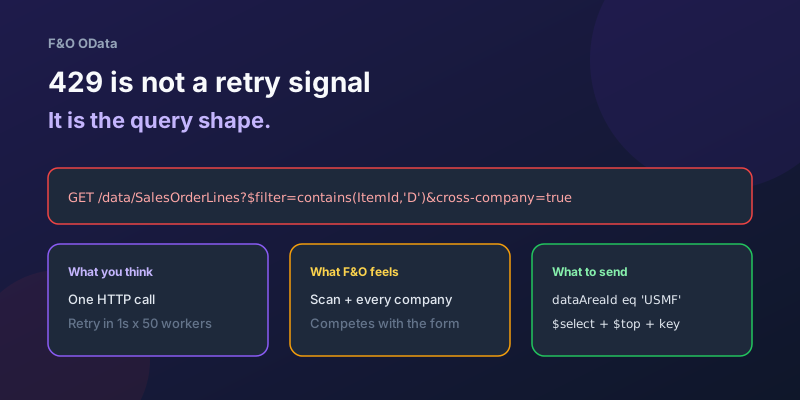
OData 429s from F&O: What Actually Throttles You
HTTP 429 from Dynamics 365 Finance & Operations is usually the query shape, not the request count — cross-company scans, $filter that cannot seek, $batch that still burns SQL, and why retrying harder makes month-end worse.
Surviving OData Throttling in D365 Finance & Operations Integrations
Design resilient D365 Finance and Operations OData integrations with 429 handling, Retry-After, batching, backoff, jitter, and DMF fallbacks.
Scaling Batch Processing in D365 Finance & Operations: Groups, Threads, and Parallel Tasks
How to scale D365 F&O batch: batch groups bound to servers, max threads per AOS, splitting work into parallel tasks with SysOperation, task dependencies, and troubleshooting.
TempDB vs InMemory Temporary Tables in X++: When to Use Which
Clear X++ guide to TempDB vs InMemory temporary tables in D365 F&O, with joins, indexes, set-based operations, and performance tradeoffs.
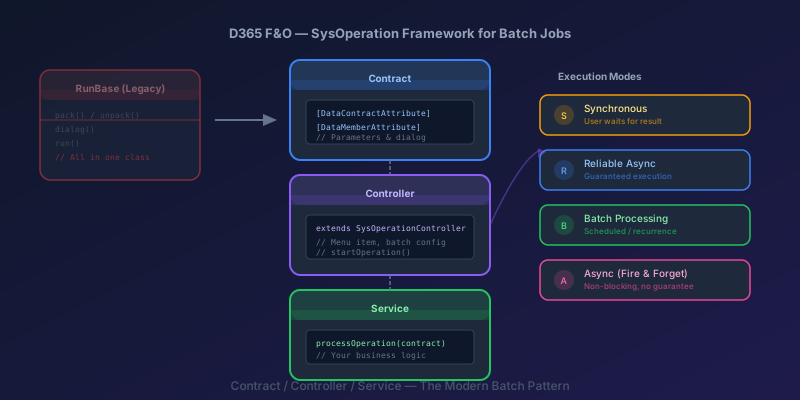
SysOperation Framework in D365 F&O: Building Batch Jobs the Right Way
How to build batch jobs using the SysOperation framework in D365 Finance & Operations — contract, controller, and service classes with X++ code samples.
crossCompany in X++: The Query That Mixes Legal Entities
A normal select stays in the current company. crossCompany returns every legal entity the user may read. How the company container, changeCompany, and OData differ.
Newsletter
New posts, straight to your inbox
One email per post. No spam, no tracking pixels, unsubscribe anytime.
Comments
- No comments yet. Be the first.