Virtual Entities in D365 F&O: Exposing External Data Without the ETL Tax
In this series: F&O and Dataverse integration
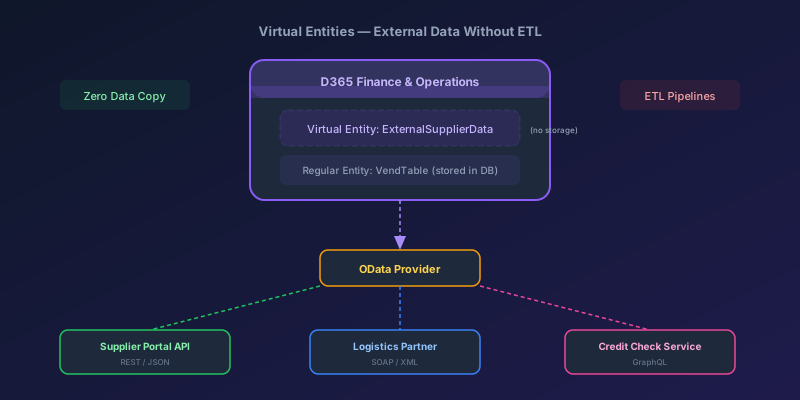
Consider a small procurement workflow: supplier quality ratings live in a third-party system, and the business wants to see them on the vendor form in D365 F&O. The instinct, trained by a decade of integration work, is to schedule an import — custom table, field mappings, nightly batch job, error queue, and data that is always at least a day stale.
There is a less-celebrated alternative: a virtual entity. The supplier data shows up in F&O as if it were a native table — forms, filters, joins, all working — but F&O never stores a row. Every read goes through a data provider that calls the source API in real time. No import. No staging. No freshness gap.
Virtual entities are one of the most underused features in D365 F&O. Here is how to build one.
What Virtual Entities Are
A virtual entity is an X++ data entity that does not have a physical backing table in F&O. Instead, it implements a data provider class that fetches data from an external source at query time. To the rest of the system — forms, queries, reports, other code — it looks like a normal table. But there is no data at rest in F&O.
What they support:
- Read operations (select, filtering, sorting, paging)
- Display on forms and workspaces
- Joining with physical tables in queries (with caveats)
- OData exposure for external consumption
What they do not support:
- Write operations (insert, update, delete) — they are read-only
- Full-text search
- Being a target for data management framework import/export
- Complex aggregations at the database level
When to Use Virtual Entities vs. Alternatives
| Scenario | Virtual Entity | Data Import | Dual-Write |
|---|---|---|---|
| Data freshness | Real-time | As stale as your schedule | Near-real-time |
| Data volume for reads | Low-moderate (< 10K rows typical) | Any volume | Any volume |
| Write-back needed | No | No (one direction) | Yes |
| Storage cost in F&O | Zero | Proportional to data | Proportional to data |
| Query performance | Depends on external API | Fast (local DB) | Fast (local DB) |
| Offline resilience | Fails if API is down | Data is local | Data is local |
The decision point is simple: If you need to display external data in F&O and the volume is manageable (hundreds to low thousands of records per query), virtual entities eliminate an entire integration layer. If you need to do heavy processing, reporting, or joins across millions of rows, import the data.
Real Use Case: Supplier Quality Ratings
We will build a virtual entity that exposes supplier quality ratings from an external API. The API returns data like this:
GET https://supplier-api.example.com/api/ratings?vendorCode=V-1001

{
  "ratings": [
    {
      "vendorCode": "V-1001",
      "category": "On-Time Delivery",
      "score": 94.2,
      "evaluationDate": "2026-03-15",
      "status": "Approved"
    },
    {
      "vendorCode": "V-1001",
      "category": "Quality Compliance",
      "score": 88.7,
      "evaluationDate": "2026-03-15",
      "status": "Conditional"
    }
  ]
}
Step 1: Create the Data Entity
First, define the virtual entity in X++. This is a data entity without a physical data source.
[DataEntityViewAttribute]
public class SupplierQualityRatingEntity extends common
{
    // Fields matching the external data structure
    public str 20  VendorCode;
    public str 50  Category;
    public real    Score;
    public date    EvaluationDate;
    public str 20  Status;
}
In the entity's metadata properties:
| Property | Value |
|---|---|
| Is Virtual | Yes |
| Data Provider Class | SupplierQualityRatingProvider |
| Primary Key | VendorCode, Category |
| Public Entity Name | SupplierQualityRatings |
Setting Is Virtual = Yes tells the runtime that this entity has no physical storage. All data access is routed to the data provider class.
Step 2: Decide Which Kind of Virtual Entity You Actually Need
A clarification matters before any code is written, because the term "virtual entity" means two related-but-different things in this stack and most blog posts blur them:
-
F&O virtual entities exposed to Dataverse. You mark a regular F&O data entity as virtual / Dataverse-visible, and external apps (model-driven, Power Automate, Copilot Studio) query it through Dataverse while the data lives only in F&O. This is the path documented in Microsoft's F&O virtual entities overview. The implementation work here is on the F&O side: build the data entity, mark it visible to Dataverse, and let the platform mediate.
-
Dataverse virtual tables backed by an external API. You create a virtual table in Dataverse and write a Virtual Table Data Provider plug-in — a C# class implementing
IPlugin— that handlesRetrieve,RetrieveMultiple,Create,Update,Delete. The data lives in your external system; Dataverse never stores rows. This is the path you want when the external API has nothing to do with F&O and you just want it visible to model-driven apps.
For our supplier-rating example, where we want the data visible inside the F&O vendor form, the cleanest pattern is actually neither of the above pure forms — it's a hybrid:
- A small F&O data entity that wraps the API call (or a thin staging table populated on demand), exposed via OData.
- All HTTP / auth / parsing logic in a regular X++ class invoked by the entity's
read*methods or by an entity-action[SysODataActionAttribute]. - Secrets retrieved from Azure Key Vault via Microsoft's Key Vault parameter store, not hardcoded.
There is no VirtualEntityDataProvider interface in F&O X++ that you implement with an executeQuery method — that pattern belongs to the C# Dataverse virtual-table provider plug-in model. If you copy a code snippet from somewhere that names that interface in X++, the build will not find it.
The shape your X++ class ends up with is just a regular service class:
public class SupplierQualityRatingService
{
    public List getRatings(VendAccount _vendorCode)
    {
        var apiKey = SupplierApiSecretStore::getApiKey();
        var jsonResponse = this.callSupplierApi(_vendorCode, apiKey);
        return this.parseRatings(jsonResponse);
    }

    // callSupplierApi(...) — uses System.Net.Http.HttpClient
    // parseRatings(...)    — Newtonsoft.Json.Linq parsing, returns a List of records
}
…and the data entity calls into it. That's the build you'd actually ship.
Critical Design Decisions
- Require a filter. Without a vendor code filter, return empty. Don't let a user accidentally fetch every rating in the source system through an unbounded
RetrieveMultiple - Key Vault for credentials. Secrets via the supported Azure Key Vault parameter store, never hardcoded
- Error handling. A failed API call throws an error that surfaces in the UI, not a silent empty result
Step 3: Add It to a Form
Create a form part or add a grid to an existing vendor form:
// On the VendTable form, add a data source
// linked to SupplierQualityRatingEntity
// with a link to VendTable on VendorCode = VendAccount

// The form grid columns:
//   Category | Score | Status | EvaluationDate
When a user opens a vendor record, the form loads the virtual entity data source, which calls the provider, which calls the external API, which returns the ratings. To the user, it looks exactly like a related table.
Performance: The Make-or-Break Factor
Virtual entities live and die on performance. The data is fetched on every query — there is no caching by default. Here is how to keep them fast:
Caching Strategy
Implement a response cache to avoid hitting the API on every form refresh:
// Use SysGlobalObjectCache for in-memory caching
SysGlobalObjectCache cache = new SysGlobalObjectCache();
str cacheKey = strFmt('SupplierRating_%1', vendorCode);
container cachedData = cache.find(cacheKey);

if (cachedData != conNull())
{
    // Return cached data if less than 5 minutes old
    utcDateTime cacheTime = conPeek(cachedData, 1);
    if (DateTimeUtil::getDifference(
        DateTimeUtil::utcNow(), cacheTime) < 300)
    {
        return this.deserializeFromCache(cachedData);
    }
}

// Cache miss — call the API
str jsonResponse = this.callSupplierApi(vendorCode);
cache.insert(cacheKey, [DateTimeUtil::utcNow(), jsonResponse]);
Performance Rules
| Rule | Why |
|---|---|
| Always require a filter on the primary key | Prevents full-table scans against the API |
| Cache aggressively (1-5 min TTL) | Reduces API calls during form navigation |
| Limit result sets | Page results if the API supports it |
| Set timeouts on HTTP calls | A 30-second API timeout freezes the F&O form |
| Do not join virtual entities with large physical tables | The join happens in memory, not in SQL |
The Join Caveat
You can join a virtual entity with a physical table, but the runtime cannot push the join to SQL Server. It fetches the virtual entity results first, then joins in memory. If the physical table returns 50,000 rows and the virtual entity returns 100 rows, the join works fine. If both sides are large, performance degrades severely.
Pattern: Use virtual entities as lookup tables (small result sets), not as transaction tables (large result sets).
Error Handling and Resilience
When the external API is down, your virtual entity returns nothing — or throws an error. Plan for this:
- Circuit breaker pattern — after N consecutive failures, stop calling the API for M seconds. Return a cached result or an empty set with a warning
- Timeout configuration — set HTTP client timeouts to 5-10 seconds maximum. Users will not wait for a form to load for 30 seconds
- Graceful degradation — if the virtual entity fails, the rest of the form should still work. Do not make critical form logic depend on virtual entity data loading successfully
When Virtual Entities Are the Wrong Choice
Do not use virtual entities when:
- You need to write back to the external system — virtual entities are read-only
- You need to run batch processes against the data — batch jobs should not depend on external API availability
- The external API has rate limits that your user base will exceed — 50 users opening vendor records simultaneously could hammer the API
- You need the data for reporting or analytics — use Synapse Link or a proper data warehouse instead
- The data volume per query exceeds 5,000 rows regularly — performance will suffer
The Takeaway
Virtual entities remove an entire layer of integration complexity for the right use cases. No staging tables, no batch jobs, no stale data, no storage costs. But they trade those benefits for a runtime dependency on an external system and the performance characteristics of that system.
Build them for lookup-style data that users need to see in context. Cache aggressively. Require filters. And always have a plan for when the external API is not available.
Keep reading
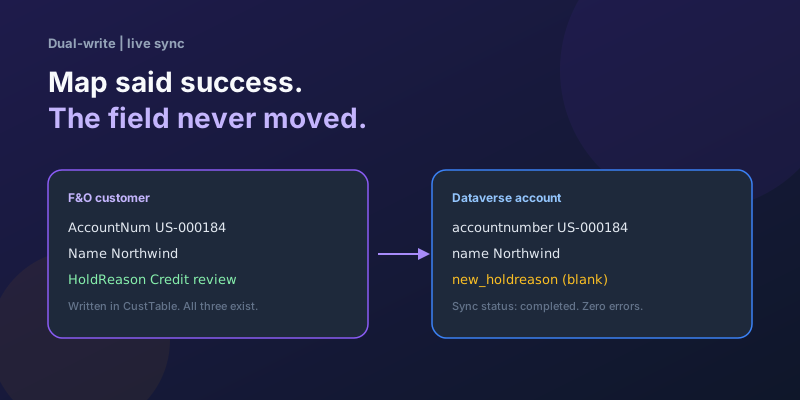
Dual-Write Dropped My Field and Reported Success
Why a dual-write map can complete with zero errors while a custom F&O field never lands in Dataverse — staging tables, unpublished maps, and change tracking after a schema change.
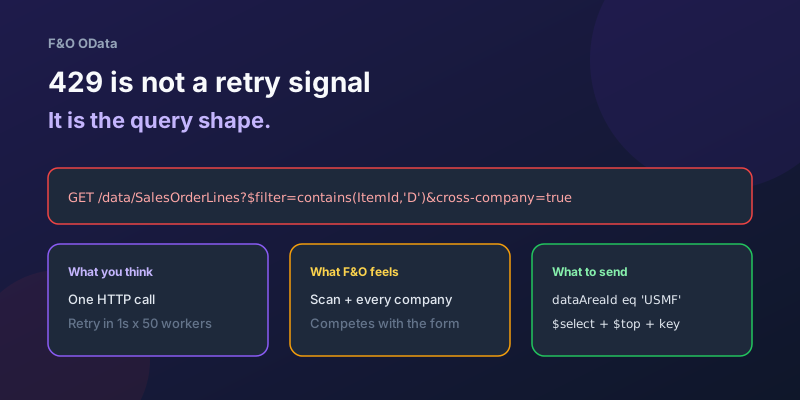
OData 429s from F&O: What Actually Throttles You
HTTP 429 from Dynamics 365 Finance & Operations is usually the query shape, not the request count — cross-company scans, $filter that cannot seek, $batch that still burns SQL, and why retrying harder makes month-end worse.
D365 F&O Data Entities: Composite, Computed, and Virtual Fields Explained
Data entities look like simple tables until you need a nested import, a derived column, or a field with no storage. Knowing the three advanced shapes is what makes integrations actually work.
Extending Data Entities in D365 Finance & Operations Without Breaking Upgrades
Add fields, computed columns, and validation to standard D365 Finance & Operations data entities the upgrade-safe way — with X++ examples and the staging-table traps to avoid.
Recurring Integrations and the REST API in D365 Finance & Operations
Move files in and out of D365 Finance & Operations reliably using the recurring integrations REST API — enqueue, dequeue, acknowledge, and the status polling patterns that keep data flowing.
Dual-Write vs Virtual Entities vs OData: Choosing the Right F&O–Dataverse Pattern
Compare dual-write, virtual entities, OData, and DMF for Finance and Operations to Dataverse integration with latency and failure tradeoffs.
Newsletter
New posts, straight to your inbox
One email per post. No spam, no tracking pixels, unsubscribe anytime.
Comments
- No comments yet. Be the first.