Dataverse Solution Components: A 2026 Quick Reference
When working with unmanaged solutions in Dynamics 365 and Power Platform, understanding solution component types is essential for troubleshooting import errors, managing dependencies, and scripting deployments.
Common Component Type Codes
Here are the component types you will encounter most often in solution.xml and the Solution API:
| Code | Component Type | Example |
|---|---|---|
| 1 | Entity (Table) | Account, Contact, custom tables |
| 2 | Attribute (Column) | firstname, custom_field |
| 3 | Relationship | Many-to-one, many-to-many |
| 9 | Option Set (Choice) | Global choice columns |
| 10 | Entity Relationship | Lookup relationships |
| 24 | Security Role | Sales Manager, System Admin |
| 25 | Privilege | prvReadAccount |
| 26 | Role Privilege | Links role to privilege |
| 29 | Workflow (Classic) | Classic workflows |
| 60 | System Form | Main form, quick create |
| 61 | Web Resource | JavaScript, HTML, images |
| 62 | Site Map | App navigation |
| 63 | Connection Role | Stakeholder, Team Member |
| 65 | Assembly (Plugin) | Plugin DLL registrations |
| 66 | Plugin Step | SDK message processing step |
| 70 | Field Security Profile | Column-level security |
| 91 | Plugin Type | Individual plugin classes |
| 300 | Canvas App | Power Apps canvas apps |
| 371 | Connector | Custom connectors |
| 372 | Environment Variable Definition | Config variables |
| 380 | AI Model | AI Builder models |
| 10076 | Cloud Flow | Power Automate cloud flows |
Reading solution.xml
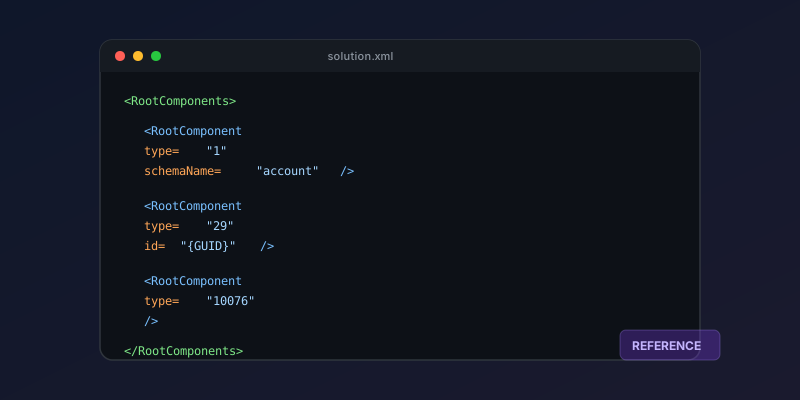
Root components appear in the <RootComponents> section:
<RootComponents>
  <RootComponent type="1" schemaName="account" />
  <RootComponent type="60" id="{GUID}" />
  <RootComponent type="29" id="{GUID}" />
</RootComponents>
The type attribute maps to the table above. The id is the component's unique identifier in Dataverse. For entities, the schemaName is used instead.
Using the Solution API
Query components programmatically:
GET /api/data/v9.2/solutioncomponents?$filter=_solutionid_value eq '{solution-id}'&$select=componenttype,objectid
Or with PowerShell:
$components = Get-CrmRecords -EntityLogicalName solutioncomponent `
  -FilterAttribute solutionid -FilterOperator eq -FilterValue $solutionId `
  -Fields componenttype, objectid

$components.CrmRecords | Group-Object componenttype |
  Select-Object @{N='Type';E={$_.Name}}, Count |
  Sort-Object Count -Descending
Troubleshooting Import Errors
When a solution import fails with a missing dependency:
- Check the
MissingDependenciessection in the import log - Note the
typeandidof the missing component - Look up the type in the table above to understand what is missing
- Find which solution contains that component and import it first
Common causes:
- Missing base table that a flow references
- Security role referencing a privilege from an uninstalled solution
- Plugin step registered against a message that does not exist in the target
Key Takeaway
Bookmark this table. You will reach for it every time you debug a solution import error or script a deployment. The component type codes haven't changed in years — this reference stays valid.
Keep reading
Elastic Tables in Dataverse: When Cosmos-Backed Storage Beats Standard Tables
What Dataverse elastic tables are, how TTL, partitioning, and JSON columns work, and how to decide between elastic and standard tables.
Dataverse Many-to-Many Relationships: Native, Manual, and When to Use Each
Native N:N relationships are quick to set up and impossible to extend. A manual junction table is more work and far more flexible. Choosing wrong means a painful migration later.
Securing Power Pages with Dataverse Table Permissions and Web Roles
Secure Power Pages data with Dataverse table permissions, access scopes, web roles, column profiles, and testing practices that prevent data leaks.
What's New in Dynamics 365 and Power Platform — 2026 Release Wave 1
The standout features from Microsoft's 2026 Release Wave 1 for Dynamics 365 and Power Platform, and what they mean for your projects.
Dataverse Security Roles: A Practical Guide to Getting Them Right
How Dataverse security roles actually work, common mistakes that leave data exposed, and the layered model you should be using in 2026.
Dataverse Cascade Delete: Parental, Restrict, and the Children You Lose
What Parental, Referential Restrict, and Remove Link actually do on delete, assign, and merge, and which preset to pick before a parent row takes its children with it.
Newsletter
New posts, straight to your inbox
One email per post. No spam, no tracking pixels, unsubscribe anytime.
Comments
- No comments yet. Be the first.