What's New in Dynamics 365 and Power Platform — 2026 Release Wave 1
In this series: Power Automate gotchas
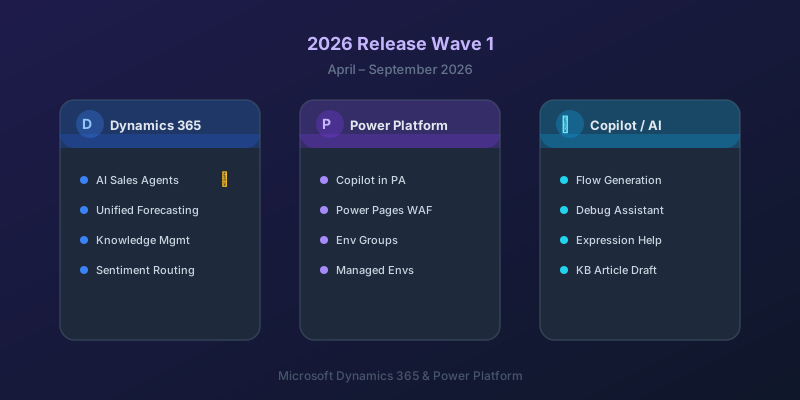
Microsoft's 2026 Release Wave 1 (April–September 2026) continues the aggressive push toward Copilot-driven experiences across the entire Power Platform and Dynamics 365 ecosystem. Here are the features that actually matter for practitioners.
Power Platform
Copilot in Power Automate Is Now Useful.
Previous iterations of Copilot in Power Automate were more demo than tool. The 2026 Wave 1 version can:
- Generate complete flows from natural language descriptions
- Debug failing flows by analyzing run history and suggesting fixes
- Refactor existing flows — splitting monolithic flows into parent-child patterns
- Generate expressions from plain English ("convert this date to UTC format")
It still makes mistakes, but it has crossed the threshold from "interesting experiment" to "saves me 20 minutes per flow." Always review what it generates.
Power Pages Security: Where Things Stand in 2026
Power Pages (formerly Power Apps Portals) accumulated most of its security story across earlier waves rather than 2026 Wave 1:
- Web Application Firewall (WAF) went GA back in 2024 Wave 1 — it's been available for two years now, but adoption is lower than it should be
- Content Security Policy headers have configurable defaults from the admin centre
- DDoS protection is provided at the platform level
- Table permissions with column-level security exist for portal users via Dataverse's standard column security profiles
If you previously avoided Power Pages for security-sensitive external apps and skipped past it the first time these landed, the 2026 Wave 1 update is a good prompt to re-evaluate the current capability set.
Environment Groups and Managed Environments
Environment management is finally getting the governance tools enterprises need:
- Environment groups — apply policies (DLP, sharing rules, backup schedules) to groups of environments at once
- Managed Environments — now the default recommendation for production, with usage analytics, IP restrictions, and solution checker enforcement built in
Dynamics 365 Sales
Autonomous Sales Agents
The headline feature: Dynamics 365 Sales now includes AI agents that can autonomously:
- Research prospects using web data and internal CRM records
- Draft personalized outreach emails
- Suggest next best actions based on deal stage and historical patterns
- Update CRM records after meetings (if connected to Teams)
These are not just suggestions in a sidebar — they are background agents that work on your pipeline while you are focused elsewhere. Early access customers are reporting meaningful time savings on admin tasks.
Unified Forecasting
Sales forecasting now combines:
- Pipeline data from Dynamics 365
- Conversation signals from Teams and Outlook
- Historical close rates per rep, segment, and product line
The result is a forecast that adjusts in real time as deals progress, rather than the static spreadsheet-based approach most teams still use.
Dynamics 365 Customer Service
Knowledge Management Overhaul
The knowledge article system has been rebuilt:
- Copilot can draft articles from resolved case data
- Articles are now version-controlled with approval workflows
- Search uses semantic matching — not just keyword matching
- Agents see relevant articles surfaced automatically during case handling
Sentiment-Based Routing
Cases can now be routed based on detected customer sentiment from email and chat content. High-frustration cases automatically escalate to senior agents with relevant expertise.
What This Means for You
If you are building on Power Platform:
- Start using Copilot in Power Automate for expression generation and flow scaffolding — it is genuinely useful now
- Move production environments to Managed Environments if you haven't already
- Re-evaluate Power Pages for external-facing apps — the security story is much stronger
- Watch the autonomous agents space — this is where Microsoft is investing heavily, and the capabilities will expand rapidly
The platform is moving fast. The biggest risk is not adopting too early — it is building new projects on patterns that are about to be superseded.
Keep reading
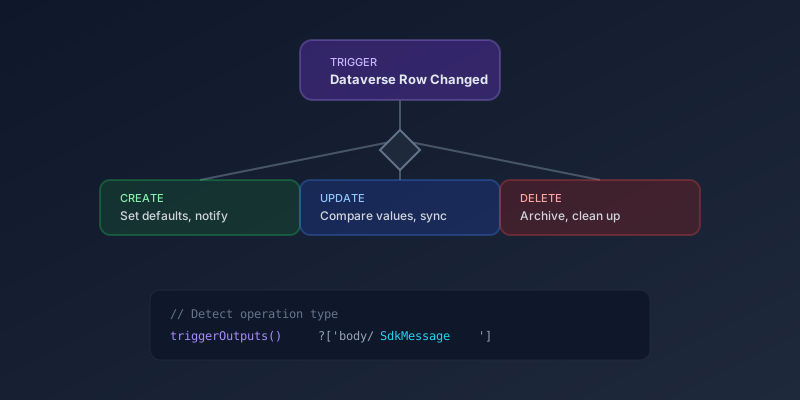
Detecting Create vs Update Triggers in Dataverse Power Automate Flows
How to distinguish between create and update operations in Dataverse-triggered flows, filter Change type at the trigger, and handle the missing pre-image problem.

Power Platform September 2026 Update: The App-Builder Skill, Agent Plugins, and the Refreshed Model-Driven UI
What matters in Microsoft's September 2026 Power Platform feature update: the model app-builder skill goes GA, the canvas authoring agent plugin goes GA, generative pages embed in forms and reach connectors, model-driven header refresh is GA with display density in preview, and Power Automate gets server-side search.
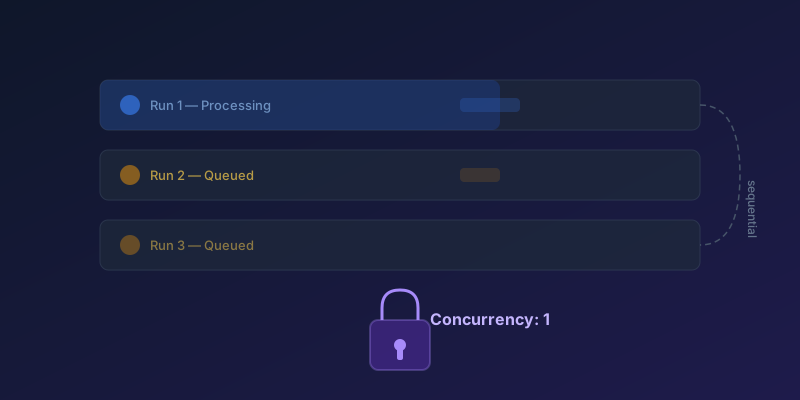
Concurrency Control in Power Automate: Preventing Duplicate Runs
How to configure concurrency limits on scheduled and trigger-based flows to prevent data corruption and race conditions — including split-on, Apply to each, and queued-run limits.
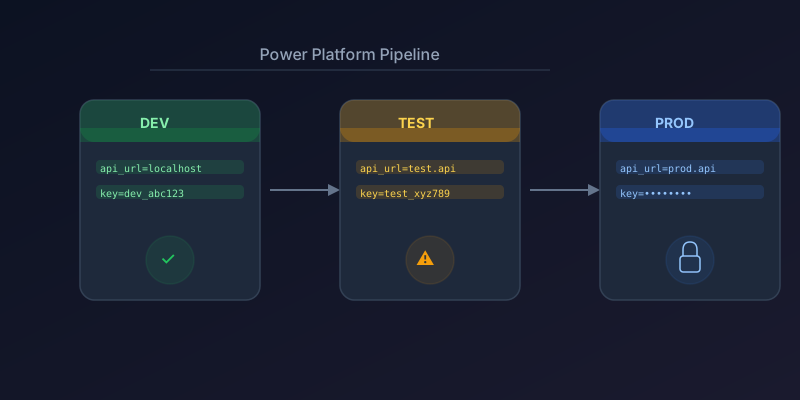
Managing Environment Variables Across Dev, Test, and Prod in Power Platform
How to use environment variables, connection references, and solution-aware configuration for clean ALM in Power Platform.
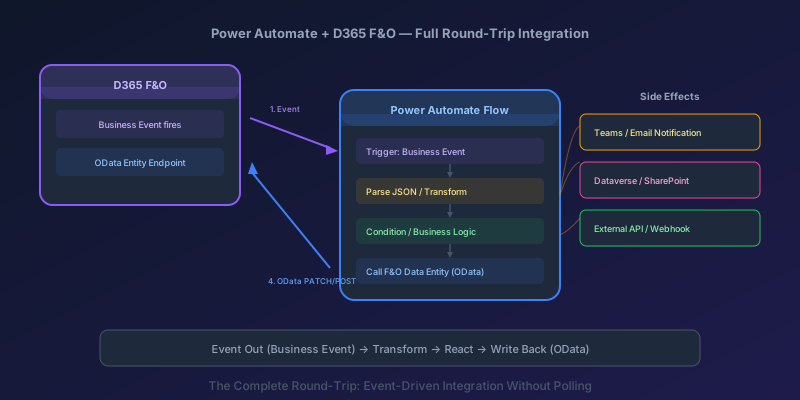
Power Automate + D365 F&O End-to-End: Consuming Business Events and Calling Data Entities
Build a full round-trip integration between Power Automate and D365 Finance & Operations — trigger on business events, transform data, and write back via OData.
Elastic Tables in Dataverse: When Cosmos-Backed Storage Beats Standard Tables
What Dataverse elastic tables are, how TTL, partitioning, and JSON columns work, and how to decide between elastic and standard tables.
Newsletter
New posts, straight to your inbox
One email per post. No spam, no tracking pixels, unsubscribe anytime.
Comments
- No comments yet. Be the first.