Surviving OData Throttling in D365 Finance & Operations Integrations
In this series: X++ performance
OData integrations fail in production when they are written like the service has infinite patience. Dynamics 365 Finance and Operations protects itself with throttling, and the first symptom is usually an HTTP 429 during month-end, a bulk sync, or a badly timed retry storm. The solution is not to retry faster; it is to design clients that respect priority, backoff, and workload shape.
Throttling is a platform signal, not a random outage
Finance and Operations uses throttling to preserve service health across interactive users, batch processing, integrations, and background workloads. OData is convenient for entity-based operations, but it is still an online service endpoint. If a client floods it with requests, the platform can slow or reject that workload.
An HTTP 429 response means the request was understood but temporarily rejected because the caller exceeded an allowed rate or priority budget. Many responses include a Retry-After header. That header is the platform telling your client when it is reasonable to try again.
| Workload priority | Typical caller | Expected behavior | Integration design |
|---|---|---|---|
| High | Interactive user action | Must remain responsive | Keep integrations from competing |
| Normal | Business service call | Should complete soon | Use bounded retries |
| Low | Bulk synchronization | Can wait | Use queues and backoff |
| Background | Recurring data movement | Scheduled throughput | Prefer DMF for volume |
The key mindset: throttling is backpressure. Treat it like a first-class response, not an exception path nobody tests.
Retry-After should beat your local retry schedule
If the server returns Retry-After, use it. Your exponential backoff policy should fill the gaps when the header is missing, not override a clear server instruction. Add jitter so hundreds of messages do not wake up and retry at the same millisecond.
public async Task<HttpResponseMessage> SendWithThrottleHandlingAsync(
    HttpClient client,
    HttpRequestMessage request,
    CancellationToken cancellationToken)
{
    const int maxAttempts = 6;
    Random jitter = new Random();

    for (int attempt = 1; attempt <= maxAttempts; attempt++)
    {
        HttpRequestMessage retryableRequest = await CloneRequestAsync(request);
        HttpResponseMessage response = await client.SendAsync(retryableRequest, cancellationToken);

        if ((int)response.StatusCode != 429)
        {
            return response;
        }

        if (attempt == maxAttempts)
        {
            return response;
        }

        TimeSpan delay = response.Headers.RetryAfter?.Delta
            ?? TimeSpan.FromSeconds(Math.Pow(2, attempt));

        delay = delay + TimeSpan.FromMilliseconds(jitter.Next(250, 1500));
        await Task.Delay(delay, cancellationToken);
    }

    throw new InvalidOperationException("Retry loop exited unexpectedly.");
}
The clone helper matters because HttpRequestMessage is single-use after sending. In production code, also log the entity name, company, correlation id, attempt number, and delay. Those values are what let you distinguish a short throttle event from a flawed integration design.
Batching reduces chattiness, but it does not remove limits
OData supports $batch requests, which can reduce HTTP round trips by grouping multiple operations into one request. That helps when the integration is chatty because it posts one record per call with excessive connection setup overhead. It does not give you unlimited throughput.
Use batching when records are naturally small, independent, and part of the same logical sync window. Avoid giant batches that are hard to diagnose and expensive to retry. If one operation in a batch fails, your client still needs a strategy for partial success, compensation, or replay.
POST /data/$batch HTTP/1.1
Content-Type: multipart/mixed; boundary=batch_123

--batch_123
Content-Type: application/http
Content-Transfer-Encoding: binary

POST CustomersV3 HTTP/1.1
Content-Type: application/json

{"CustomerAccount":"C-1001","OrganizationName":"Contoso Retail"}
--batch_123--
Keep batch sizes conservative and measurable. Start with a size that behaves well during business hours, then tune based on telemetry. The right batch size is not the largest one that passes once; it is the largest one that remains boring during peak load.
Queues make retries survivable
The worst OData client is a synchronous loop reading ten thousand records and posting as fast as possible. When throttling begins, every failed call retries immediately, the source process stays blocked, and operators have no safe way to pause or resume.
Put a queue between data production and OData delivery. Each message should carry an idempotency key or natural business key, target entity, company, payload version, and attempt count. Workers can then process with concurrency limits and backoff while the source system continues safely.
{
  "messageId": "cust-1001-20260602",
  "entity": "CustomersV3",
  "company": "USMF",
  "operation": "upsert",
  "attempt": 2,
  "notBeforeUtc": "2026-06-02T10:15:00Z"
}
Design for replay: if a message is retried after a timeout, the second attempt should not create a duplicate customer, duplicate invoice, or duplicate journal. Use upsert patterns where supported and store external correlation keys where the business process allows it.
Bulk belongs in recurring integrations or DMF
OData is excellent for targeted entity operations, near-real-time updates, and moderate volumes. It is not the right hammer for every migration, nightly full sync, or million-row catch-up. When the work is bulk data movement, recurring integrations and the Data Management Framework usually fit better.
| Scenario | Better choice | Reason |
|---|---|---|
| Create one customer from a portal | OData | Low volume and immediate feedback |
| Sync changed vendors every few minutes | OData with queue | Incremental and resilient |
| Import opening balances | DMF package | Bulk, validated, operationally visible |
| Nightly product catalog load | Recurring integration | Scheduled throughput |
| Backfill years of invoices | DMF or data project | OData would be too chatty |
This decision is architectural, not cosmetic. Moving bulk into DMF reduces pressure on online endpoints and gives operations better visibility into data projects, staging, validation errors, and reruns.
Telemetry is the difference between tuning and guessing
Log every 429 with enough context to make a decision. At minimum, capture endpoint, entity, company, response time, Retry-After, attempt count, batch size, worker id, and correlation id. Trend that data by time of day and release. If throttling starts after a deployment, you want to know whether volume changed, concurrency changed, or payload shape changed.
The durable pattern is simple: limit concurrency, honor Retry-After, add exponential backoff with jitter, batch carefully, queue work, and move bulk to DMF. Do that, and throttling becomes a normal operating signal instead of a production fire drill.
If the 429s started because the query is a cross-company scan or a $filter SQL cannot seek, retries will only amplify it. That side is what actually throttles you.
Keep reading

OData 429s from F&O: What Actually Throttles You
HTTP 429 from Dynamics 365 Finance & Operations is usually the query shape, not the request count — cross-company scans, $filter that cannot seek, $batch that still burns SQL, and why retrying harder makes month-end worse.
Scaling Batch Processing in D365 Finance & Operations: Groups, Threads, and Parallel Tasks
How to scale D365 F&O batch: batch groups bound to servers, max threads per AOS, splitting work into parallel tasks with SysOperation, task dependencies, and troubleshooting.
TempDB vs InMemory Temporary Tables in X++: When to Use Which
Clear X++ guide to TempDB vs InMemory temporary tables in D365 F&O, with joins, indexes, set-based operations, and performance tradeoffs.
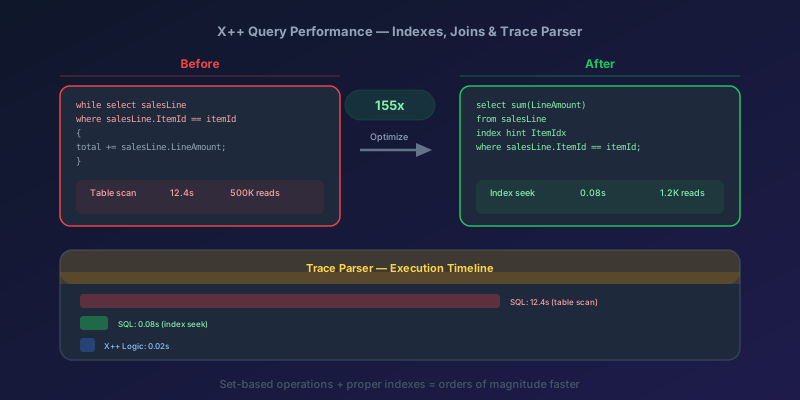
X++ Query Performance in D365 F&O: Indexes, Joins, and the Trace Parser
How to diagnose and fix slow X++ queries in D365 Finance & Operations using Trace Parser, LCS SQL insights, execution plans, proper index design, join selection, and set-based operations.
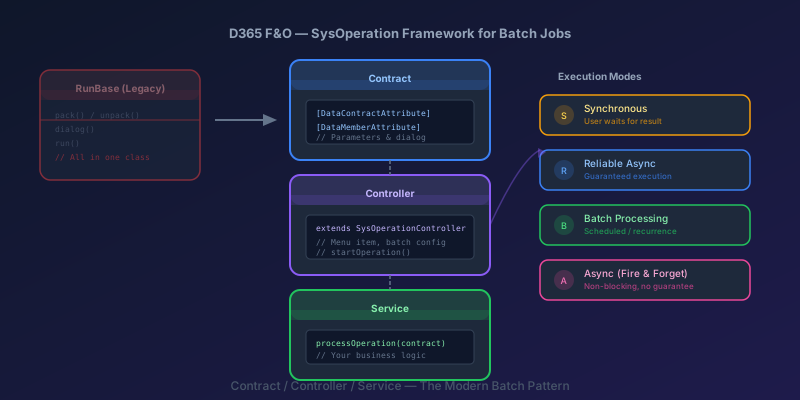
SysOperation Framework in D365 F&O: Building Batch Jobs the Right Way
How to build batch jobs using the SysOperation framework in D365 Finance & Operations — contract, controller, and service classes with X++ code samples.

Dual-Write Dropped My Field and Reported Success
Why a dual-write map can complete with zero errors while a custom F&O field never lands in Dataverse — staging tables, unpublished maps, and change tracking after a schema change.
Newsletter
New posts, straight to your inbox
One email per post. No spam, no tracking pixels, unsubscribe anytime.
Comments
- No comments yet. Be the first.