Building a Zero-Downtime Deployment Pipeline with Azure DevOps and Slot Swaps
There is a specific flavor of deployment ritual I want to see go extinct: the Friday 11pm maintenance window. Team on a call, one engineer on the button, ninety seconds of public 503s, and a shared held breath while everyone hopes the rollback script still works. This was standard operating procedure circa 2015. It has no business being the norm in 2026.
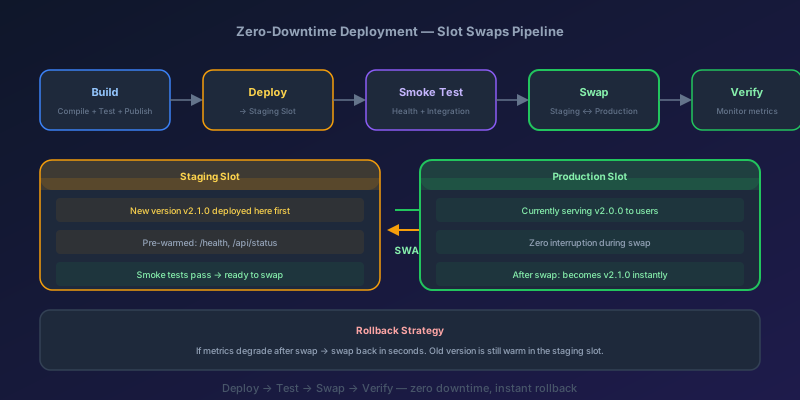
Zero-downtime deployment is a baseline, not a luxury. Customers do not schedule their sessions around your release notes. The cleanest mechanism on Azure App Service is the deployment slot swap — deploy, validate, then flip traffic atomically. Here is the full pipeline, smoke tests and rollback included.
What Are Deployment Slots?
An Azure App Service deployment slot is a live instance of your app with its own hostname, configuration, and content. The production slot is what your users hit. A staging slot is an identical environment where you deploy and validate before promoting.
The key operation is the swap. When you swap staging and production, Azure routes traffic to the staging slot's content and configuration (with some exceptions). This swap is a routing change, not a redeployment — it happens in seconds with no cold start.
| Aspect | Traditional Deploy | Slot Swap |
|---|---|---|
| Downtime | 30-120 seconds | Zero |
| Rollback | Redeploy previous version | Swap back (seconds) |
| Validation | Post-deploy prayer | Pre-swap smoke tests |
| Risk | High — users hit broken code | Low — validated before swap |
The Pipeline Architecture
Here is the flow we are building:
- Build the application and publish artifacts
- Deploy to the staging slot
- Warm up the staging slot
- Run smoke tests against the staging URL
- Swap staging to production
- Verify production health
- Rollback (swap back) if verification fails
Each step has a purpose. Skip one and you introduce risk.
The YAML Pipeline
Here is a real Azure DevOps pipeline. This is for a .NET web app, but the slot swap pattern works for any App Service workload.
trigger:
  branches:
    include:
      - main

variables:
  azureSubscription: 'Production-ServiceConnection'
  appName: 'myapp-prod'
  resourceGroup: 'rg-myapp-prod'
  slotName: 'staging'

stages:
  - stage: Build
    jobs:
      - job: BuildApp
        pool:
          vmImage: 'ubuntu-latest'
        steps:
          - task: DotNetCoreCLI@2
            displayName: 'Restore & Build'
            inputs:
              command: 'publish'
              publishWebProjects: true
              arguments: '--configuration Release --output $(Build.ArtifactStagingDirectory)'
          - publish: $(Build.ArtifactStagingDirectory)
            artifact: 'webapp'

  - stage: DeployStaging
    dependsOn: Build
    jobs:
      - deployment: DeployToSlot
        environment: 'staging'
        pool:
          vmImage: 'ubuntu-latest'
        strategy:
          runOnce:
            deploy:
              steps:
                - task: AzureWebApp@1
                  displayName: 'Deploy to Staging Slot'
                  inputs:
                    azureSubscription: $(azureSubscription)
                    appType: 'webApp'
                    appName: $(appName)
                    deployToSlotOrASE: true
                    slotName: $(slotName)
                    package: '$(Pipeline.Workspace)/webapp/**/*.zip'

  - stage: ValidateAndSwap
    dependsOn: DeployStaging
    jobs:
      - job: SmokeTest
        pool:
          vmImage: 'ubuntu-latest'
        steps:
          - script: |
              echo "Waiting for warm-up..."
              sleep 30
              STATUS=$(curl -s -o /dev/null -w "%{http_code}" \
                https://$(appName)-$(slotName).azurewebsites.net/health)
              if [ "$STATUS" != "200" ]; then
                echo "##vso[task.logissue type=error]Health check failed with status $STATUS"
                exit 1
              fi
              echo "Health check passed"
            displayName: 'Run Smoke Tests'

      - job: SwapSlots
        dependsOn: SmokeTest
        pool:
          vmImage: 'ubuntu-latest'
        steps:
          - task: AzureAppServiceManage@0
            displayName: 'Swap Staging to Production'
            inputs:
              azureSubscription: $(azureSubscription)
              action: 'Swap Slots'
              webAppName: $(appName)
              resourceGroupName: $(resourceGroup)
              sourceSlot: $(slotName)
              targetSlot: 'production'

  - stage: PostSwapVerify
    dependsOn: ValidateAndSwap
    jobs:
      - job: VerifyProduction
        pool:
          vmImage: 'ubuntu-latest'
        steps:
          - script: |
              STATUS=$(curl -s -o /dev/null -w "%{http_code}" \
                https://$(appName).azurewebsites.net/health)
              if [ "$STATUS" != "200" ]; then
                echo "##vso[task.logissue type=warning]Production health check failed — initiating rollback"
                echo "##vso[task.setvariable variable=rollbackNeeded;isOutput=true]true"
              fi
            displayName: 'Verify Production Health'
            name: healthCheck

      - job: Rollback
        dependsOn: VerifyProduction
        condition: eq(dependencies.VerifyProduction.outputs['healthCheck.rollbackNeeded'], 'true')
        pool:
          vmImage: 'ubuntu-latest'
        steps:
          - task: AzureAppServiceManage@0
            displayName: 'Rollback — Swap Back'
            inputs:
              azureSubscription: $(azureSubscription)
              action: 'Swap Slots'
              webAppName: $(appName)
              resourceGroupName: $(resourceGroup)
              sourceSlot: $(slotName)
              targetSlot: 'production'
The rollback is just another swap. Your previous production code is now sitting in the staging slot — swap it back and you are restored in seconds.
Warm-Up Configuration
Slot swaps can still cause a momentary latency spike if your app has a cold start. Azure supports auto-swap warm-up through your web.config or App Service configuration.
Add an applicationInitialization section to your web.config:
<system.webServer>
  <applicationInitialization>
    <add initializationPage="/health" />
    <add initializationPage="/api/warmup" />
  </applicationInitialization>
</system.webServer>
Azure will hit these endpoints on the staging slot before completing the swap. The swap only finishes when these endpoints return 200. This means your app is fully warmed — caches loaded, connections established, JIT compiled — before a single user request touches it.
For App Service configuration, you can also set these application settings:
WEBSITE_SWAP_WARMUP_PING_PATH = /health
WEBSITE_SWAP_WARMUP_PING_STATUSES = 200
Handling Database Migrations
Here is where zero-downtime gets tricky. Your code deploys atomically via slot swap, but your database does not live in a slot. Both the old and new versions of your app will hit the same database during and after the swap.
The rule: every database migration must be backward-compatible with the previous version of the application.
This means:
- Adding a column? Make it nullable or give it a default. The old code will ignore it
- Renaming a column? Do it in two releases. First release: add new column, write to both. Second release: drop old column
- Dropping a table? Only after the old code no longer references it — meaning at least one full release cycle after removing the code dependency
Here is the expand-and-contract pattern:
Release N:   Add new_column (nullable), code writes to both old_column and new_column
Release N+1: Code reads from new_column only, backfill any missing data
Release N+2: Drop old_column
Yes, it takes three releases. That is the cost of zero downtime with schema changes. It is worth it.
Slot-Sticky Settings
Not every configuration should swap with the code. Database connection strings, feature flags, and environment-specific settings should stay pinned to their slot.
Mark settings as slot-sticky in the Azure portal or via CLI:
az webapp config appsettings set \
  --name myapp-prod \
  --resource-group rg-myapp-prod \
  --slot-setting APPINSIGHTS_INSTRUMENTATIONKEY=staging-key \
  --slot staging
Settings marked as slot-sticky stay with the slot during a swap. This prevents your staging Application Insights key from accidentally shipping to production.
Monitoring the Swap
After a swap, you need visibility. Set up an Azure Monitor alert on these signals:
- HTTP 5xx rate — spike after swap means something is broken
- Response time P95 — degradation suggests warm-up issues
- Dependency failure rate — new code might hit a different endpoint or connection string
- Exception rate in Application Insights — the most granular signal
Create a dashboard that shows these metrics with a vertical annotation at the swap timestamp. When something goes wrong, you want to correlate it to the exact moment of the swap.
The Takeaway
Zero-downtime deployment is not just about the swap — it is about the pipeline around it. Deploy to staging, warm up, smoke test, swap, verify, auto-rollback. Every step reduces risk. The slot swap itself takes seconds. The confidence it gives you is worth days of setup.
If your team is still scheduling deployment windows and crossing fingers, build this pipeline. You will ship more often, with less stress, and your customers will never notice.
Keep reading
Kubernetes Liveness Probes That Restart a Process That Was Fine
Liveness restarts the container. Readiness pulls it out of the Service. A startup probe holds both off until the process has booted. Most outages come from using the wrong one.
GitHub Rewrote the Copilot Runtime in Rust With Agents. The Playbook Is the Story.
832,378 lines of production Rust, 128 pull requests, 135 releases in fourteen and a half weeks, about $120,000 in tokens. What GitHub's TypeScript-to-Rust port of the Copilot agent runtime teaches about shipping a rewrite without a cutover.
The Pipeline Was Green Because the Test Stage Never Ran
How an Azure DevOps condition and a skipped stage produce a green build that did not test anything, and the check to add so that cannot ship.
GitHub Merge Queues: Serializing main Without Parking Every PR
How merge queues absorb the rebase race on protected branches, what CI has to guarantee, and when a queue is worse than Require branches to be up to date.
Designing a Metrics System: Time-Series Storage from Gorilla to Downsampling
Ten million series, one datapoint each per 10 seconds, queried by tags: delta-of-delta compression, the inverted index over labels, and why high cardinality kills TSDBs.
Designing Petabyte Log Search: Index Everything vs Grep Smarter
Logs are 100x your metrics volume and queried 0.001% as often. The Splunk-style full index, the Loki-style label-only bet, and bloom-filtered brute force in between.
Newsletter
New posts, straight to your inbox
One email per post. No spam, no tracking pixels, unsubscribe anytime.
Comments
- No comments yet. Be the first.