Data Protection Keys: The Cookie the Other Instance Could Not Read
The login POST returned 302 and set .AspNetCore.Identity.Application. The next request hit the other instance and came back as the login page. No exception. No 500. The ticket was in the cookie; that process did not have the key that wrote it. Antiforgery failed the same way on the first form POST that landed on a different replica: HTTP 400, a correlation id in the log, nothing a user can act on. ASP.NET Core Data Protection is not a cookie setting. It is a key ring. If two processes do not share that ring, they cannot read each other's payloads.
Cookie authentication, the Identity application cookie, antiforgery, session, TempData, and every IDataProtector you create in application code all use that ring. Password-reset tokens you Protect yourself are in the set. JWT signature keys are not. A Bearer token can survive a ring mismatch. A cookie cannot.
What Protect actually writes
IDataProtectionProvider.CreateProtector("purpose") returns an IDataProtector. Protect produces a payload that Unprotect will accept only from a protector with the same purpose whose ring still contains the key id embedded in that payload. The purpose is not a password. It is a partition: Identity's cookie protector will not unprotect an antiforgery token even when they share keys. That is what stops a stolen cookie blob being replayed into a different API in the same process.
Expiry does not delete a key. Keys get an activation date and a 90-day lifetime by default. After that window the ring stops using the key for new Protect calls and keeps it so old cookies still Unprotect. Deleting the XML because it looks expired logs everyone out. Rotation is additive. Removal is a logout.
Unprotect failure is not a status you can tell from "this person is anonymous." Cookie auth catches the exception, treats the ticket as missing, and challenges. You will not see CryptographicException in Application Insights unless you log the cookie events. Antiforgery is louder: the filter throws and the pipeline turns it into 400.
The default ring is a directory
With no extra configuration, Data Protection writes XML key files to a directory the host picked:
- A developer machine: a folder under the user profile.
- Azure App Service Windows:
%HOME%\ASP.NET\DataProtection-Keys.%HOME%is the site's persistent share, so instances of the same slot share that folder. Scale-out of one Windows app often works by accident. - Azure App Service Linux:
/homeis persistent for that app, with the same slot caveat. - A container, Container Apps, Kubernetes, Functions consumption: the file system is not a farm. A recycle is a new ring. A second replica is a second ring.
Do not take the App Service happy path as the platform rule. Slot swaps give each slot its own %HOME%. The swap moves site content and routing. It does not merge two key rings. Users who authenticated against staging keys, or against the ring production had before the swap, present cookies the newly-live process cannot read. They look logged out. They are not. The protector is.
Two App Services on one custom domain, a web and an API that both must unprotect a cookie, a slot and its production sibling: separate rings until you point them at the same repository.
Persist the ring, then wrap it
The packages are Azure.Extensions.AspNetCore.DataProtection.Blobs and Azure.Extensions.AspNetCore.DataProtection.Keys. The blob is the ring. Key Vault wraps the key material inside it. Without the wrap, the XML in storage is the master keys in plaintext.
builder.Services.AddDataProtection()
    .SetApplicationName("orders-web")
    .PersistKeysToAzureBlobStorage(
        new Uri(builder.Configuration["DataProtection:BlobUri"]!),
        new DefaultAzureCredential())
    .ProtectKeysWithAzureKeyVault(
        new Uri(builder.Configuration["DataProtection:KeyIdentifier"]!),
        new DefaultAzureCredential());
BlobUri is a blob, not a container: https://acct.blob.core.windows.net/dpkeys/orders-web.xml. The container must already exist. The blob is created on first run if the identity can write. KeyIdentifier is the Key Vault key URI — a key, not a secret. Wrap and unwrap are cryptographic operations. Get Secret will not do.
The app's managed identity needs Storage Blob Data Contributor on that container (or a narrower role that can read, write, and create the blob) and Key Vault Crypto User on the key. Grant both the slot identity and the production identity. A slot that cannot unwrap fails at startup, not on the first login. DefaultAzureCredential is the same chain you already use for SQL. Do not put a storage account key in app settings to "make Data Protection work." That key then sits next to the blob it is supposed to protect.
SetApplicationName is the discriminator
The ring is not only the XML. Each protector purpose is prefixed with an application discriminator. The default is IHostEnvironment.ContentRootPath. That path changes between a local bin folder, a slot, a Linux container, and D:\home\site\wwwroot. Two processes can share the blob and still refuse each other's payloads because they think they are different applications.
SetApplicationName("orders-web") pins it. One name per logical app. If the public site and the admin site must not unprotect each other's cookies, they need different names even when they share a Key Vault. Sharing a blob across apps without distinct names is how a purpose collision becomes a cross-app decrypt.
A preview environment that must not accept production cookies needs a different blob, a different application name, or both. Reusing production's blob in a slot means a staging deploy can mint keys production will then use, and a stolen staging cookie is a production session.
Failures that look like auth is broken
Startup hang or crash. The blob client cannot reach storage, the container is missing, or wrap fails because the Key Vault firewall has no allow for this outbound IP. Data Protection talks to those services while the host is building the ring. A Key Vault deny looks like the site never started, not like a 401.
Everyone logged out after a deploy, and you already persist to blob. You changed SetApplicationName, pointed at a new blob path, or someone deleted orders-web.xml because a scanner called the file a secret. The new ring cannot Unprotect the old tickets. That is expected. Warn before you rename.
One Kubernetes replica works, one does not. The pod that created the blob has Contributor. The others have Reader. Automatic key generation on a replica that cannot write throws. A replica that can read an empty blob and cannot write has no active key. Either every replica can write, or one writer generates keys and the rest call DisableAutomaticKeyGeneration() and only Unprotect. Forgetting the disable flag is how a rolling update 500s.
Antiforgery 400 after you shared the ring. The cookie decrypts now. The token still fails because the form field was issued on the old ring. Users need a fresh GET of the form. The old hidden field is not salvageable.
You emailed CreateProtector("ResetLink").Protect(...). That token is a Data Protection payload. It dies with the ring the same way a cookie does. If the email has to survive a key-ring rebuild, store a random identifier and look it up, or sign with a key you manage explicitly. Do not email Protect output and also delete blobs.
When blob-plus-vault is the wrong store
A single-instance Windows service that never clones: the default directory is fine.
A farm that already has Redis for session or a distributed cache: PersistKeysToStackExchangeRedis is a valid ring. Still wrap the keys. Redis without wrap is the same plaintext problem as a public blob. Redis without persistence is a logout on flush.
App Service same slot, Windows, no containers, no second app: %HOME% already shares the files. That exception does not cover the slot swap you will add later, or the Linux container after that. Persist when the topology can fork, not after the first 400. Sticky sessions hide a split ring until a recycle moves the user. They are not a key-distribution strategy.
The login cookie was valid. The instance that saw it did not have the XML that contained that payload's key id. Point every replica at one blob, wrap it with Key Vault, pin SetApplicationName, and Unprotect starts succeeding on whichever process the balancer chose. Until those three agree, "logged out at random" is the ring, not Identity.
Keep reading
IHttpClientFactory: Stop Creating HttpClient Per Request
Why new HttpClient() in a .NET service exhausts sockets under load, and how IHttpClientFactory plus a named client fixes DNS without freezing the handler forever.
Fixing NuGet Error: Unable to Load the Service Index for Source
A step-by-step guide to diagnosing and resolving NuGet package source errors in Visual Studio and dotnet CLI.

IOptionsSnapshot: The Snapshot Your Singleton Froze
IOptionsSnapshot is scoped. Inject it into a singleton and Production will not throw. You get one snapshot, minted at first resolve, that ignores every reload.
EF Core ExecuteUpdate: SaveChanges Never Ran, and Neither Did Your Interceptor
ExecuteUpdate sends SQL now. It skips SaveChanges, the tracker, and your audit interceptor. Stamp columns in the SET, or the tracked entity lies.
Pass the CancellationToken or the Work Continues After the Client Left
ASP.NET Core binds CancellationToken to the aborted request. Forward it to EF Core and HttpClient, and do not turn a client disconnect into a 500.
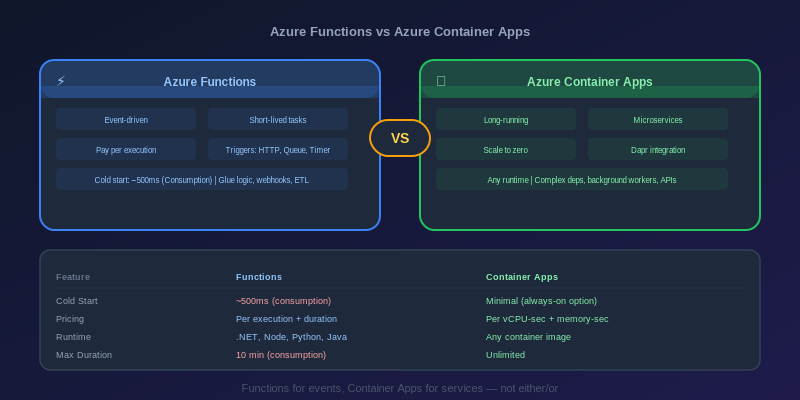
Azure Functions vs Azure Container Apps: Choosing the Right Serverless Model
A detailed comparison of Azure Functions and Azure Container Apps — pricing, cold starts, scaling, runtime support, and a decision flowchart for picking the right one.
Newsletter
New posts, straight to your inbox
One email when a new post goes up. Double opt-in, unsubscribe anytime. Not a daily digest.
Comments
- No comments yet. Be the first.