Dataverse Auditing and Column Security: Governance for Sensitive Data
Two features cover most of the "who can see this and who changed it" requirements in Dataverse: auditing and column-level security. They solve different problems — auditing is forensic, column security is preventive — and they are configured independently. Knowing where each one's coverage stops is what keeps you out of trouble during a compliance review.
Auditing: the three switches
Auditing is hierarchical, and a change is only recorded when all three levels above it are enabled:
- Organization level. In Audit Settings, "Start Auditing" must be on. This is the master switch; turn it off and nothing is captured regardless of lower settings.
- Table level. Each table has an "Auditing" checkbox. Enable it per table.
- Column level. Each column has its own audit flag. By default, when you enable a table for audit, its columns are enabled too, but you can turn auditing off for specific columns you do not want tracked.
There are also org-level toggles for auditing user access (logging logins) and for read auditing, which is a separate, heavier capability used mainly for regulated workloads.
The hierarchy means a common support ticket — "auditing is on but nothing shows" — usually traces to one level being off: the org switch, the table flag, or the specific column.
Reading the history
Audit data surfaces in a few places:
- Record level. The "Audit history" related grid on a record (Related tab) shows the change log for that row: who changed which field, the old and new values, and when.
- Per-attribute history. Some controls expose the change history for a single field.
- Audit Summary View. An org-wide log under audit settings, filterable, useful for "what happened across the system in this window."
Programmatically, the data lives in the audit table. You read it with the RetrieveRecordChangeHistory and RetrieveAttributeChangeHistory messages rather than ordinary queries, because the platform formats the change detail for you. A simplified SDK call:
var request = new RetrieveRecordChangeHistoryRequest
{
    Target = new EntityReference("account", accountId)
};
var response = (RetrieveRecordChangeHistoryResponse)service.Execute(request);
foreach (var detail in response.AuditDetailCollection.AuditDetails)
{
    if (detail is AttributeAuditDetail a)
    {
        // a.OldValue and a.NewValue hold the changed attributes
    }
}
Retention, storage, and cost
Audit logs are not free. They consume your Log storage capacity (a separate bucket from Database and File storage in the modern capacity model), and on a busy org they grow fast — every tracked update on a high-volume table writes audit rows.
Retention is configurable. You can set a retention period (for example 30, 90, 180 days, or a custom number) so the platform automatically deletes audit records older than that, which is the main lever for controlling log storage. You can also delete audit logs manually by date partition or by table. Be aware:
- Retention applies going forward and to the cleanup job; once logs age past the window they are gone.
- Aggressive auditing on hot tables is the usual cause of a log-storage surprise. Audit only the columns you actually need for compliance, not every column "just in case."
What auditing does and does not capture
This is where teams get burned in an audit review:
- It captures create, update, and delete of audited columns, plus optionally access (logins) and reads where enabled.
- It does not reliably capture changes made by certain bulk or system operations, plugin-driven changes that bypass normal flows are still logged but can be hard to attribute, and changes to columns with auditing turned off.
- No old value on create, no new value on delete — by nature.
- Retention deletion is irreversible, so if legal requires seven years, your retention setting and storage plan must reflect that.
A subtle one: enabling or disabling audit on a column is itself a metadata change. If someone turns off auditing for a sensitive field, the gap in the trail can be the very thing an investigation needs — track your audit configuration in source control / solutions.
Column-level (field) security
Auditing tells you what happened. Column security stops it from happening. It restricts who can read, update, or create a value in a specific column, independently of the table's security roles. A user can have full read on the Account table through their role yet still see a masked or blank value in a column-secured field.
How it works:
- Enable column security on the column. Set the column's "Enable column security" (field security) flag to Yes. Once enabled, by default no one can see the actual value except System Administrator — the field becomes restricted globally until you grant access.
- Create a column security profile. A Field Security Profile groups columns and grants permissions: Read, Update, and Create, each as Allowed or Not allowed.
- Assign users/teams to the profile. Membership grants the configured access to the secured columns in that profile.
So the model is additive over roles: the security role gets you to the table; the column security profile gets you to the protected column within it.
Users without read access see a masked placeholder rather than the data, and the field is read-only or hidden depending on the granted permissions.
Governance patterns
- Separate profiles by sensitivity tier. One profile for "PII read," another for "financials read/update," rather than one mega-profile. Assign via teams so membership is managed with team membership.
- Pair column security with auditing on the same columns. Restrict who can change a sensitive field, and audit the changes that do happen. Defense plus forensics.
- Document the System Administrator exception. Admins bypass column security. If your compliance posture requires that even admins not see a value, column security alone is insufficient — that is an architectural conversation, not a config toggle.
- Use teams, not individual user assignments, so onboarding/offboarding flows through existing team membership.
Gotchas that cost you a day
- Calculated and rollup columns. A calculated column that references a secured source column can leak the protected value into an unsecured output. Securing the source does not automatically secure derived columns — review formula columns that consume secured fields.
- Search and views. Secured columns behave differently in advanced find, quick find, and exported views for users without access; do not assume a secured value is fully invisible everywhere until you test those surfaces.
- Integrations and service accounts. App users and integration accounts need explicit profile membership too, or your integration silently reads blanks. This breaks data syncs in ways that are hard to diagnose because there is no error — just empty values.
- Plugins run in the calling user's context (unless impersonating or running as SYSTEM); a plugin executing as a restricted user may not see a secured column. Watch this when business logic depends on a protected field.
- Performance. Heavy column-security checks across very wide secured tables add overhead. Secure the columns that need it, not entire tables' worth of fields reflexively.
The combined pattern I recommend: turn on org auditing, audit only compliance-relevant columns with a sane retention period, and layer column security profiles (assigned via teams) over the genuinely sensitive fields. That gives you both the lock on the door and the camera in the hallway, without ballooning your log storage or hiding data from the integrations that need it.
Keep reading
Dataverse Cascade Delete: Parental, Restrict, and the Children You Lose
What Parental, Referential Restrict, and Remove Link actually do on delete, assign, and merge, and which preset to pick before a parent row takes its children with it.

Sales Agent Creates CRM Records From Copilot Chat, and Sales Development Agent Quotes on Its Own: What Went GA on September 30
Two Dynamics 365 Sales agent capabilities reached general availability on September 30, 2026: inline record creation in Microsoft 365 Copilot Chat, and autonomous quote generation in Sales Development Agent. Setup, security, and the escalation path.
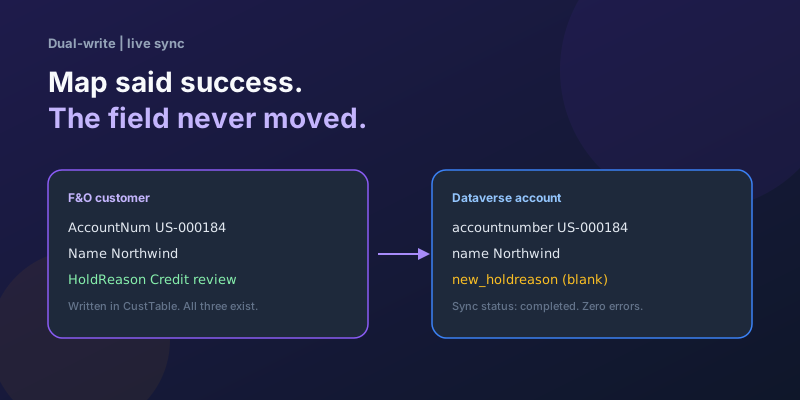
Dual-Write Dropped My Field and Reported Success
Why a dual-write map can complete with zero errors while a custom F&O field never lands in Dataverse — staging tables, unpublished maps, and change tracking after a schema change.
Elastic Tables in Dataverse: When Cosmos-Backed Storage Beats Standard Tables
What Dataverse elastic tables are, how TTL, partitioning, and JSON columns work, and how to decide between elastic and standard tables.
Business Process Flows in Dynamics 365: Branching, Stage-Gating, and the Limits Nobody Warns You About
A practical guide to designing branching Business Process Flows in model-driven Dynamics 365 apps, with stage-gating, automation hooks, the storage model, and hard limits.
The Dataverse Plugin Execution Pipeline: Stages, Transactions, and Images Explained
How the Dataverse event pipeline actually works: pre-validation, pre-operation, post-operation stages, the transaction boundary, entity images, depth, and registration guidance.
Newsletter
New posts, straight to your inbox
One email per post. No spam, no tracking pixels, unsubscribe anytime.
Comments
- No comments yet. Be the first.