The Dataverse Plugin Execution Pipeline: Stages, Transactions, and Images Explained
If you write plugins for Dataverse and you do not have a precise mental model of the execution pipeline, you will eventually ship a bug that only reproduces under load, or inside a transaction, or on the fourth recursive save. This is the model worth internalizing.
The event framework
Every data operation in Dataverse — Create, Update, Delete, and message-based operations like Assign, SetState, or a custom action — is a message. When that message executes against a table, the platform raises an event and runs any plugin steps registered for that message/table combination. This is the event execution pipeline.
A plugin is a class implementing IPlugin. You register a step that binds the plugin to a specific message, table, stage, and execution mode. The platform invokes your step's Execute method, handing you an IServiceProvider from which you pull the context and services you need.
The pipeline stages
There are three stages you register custom logic on. They are identified by numeric values, and the numbers matter because they reveal ordering:
- Pre-validation — stage 10. Runs first, before the main system operation and, importantly, outside the database transaction. Security checks have not all run yet at this point.
- Pre-operation — stage 20. Runs after validation but still before the record is written. Inside the transaction.
- Post-operation — stage 40. Runs after the record has been written. Inside the transaction (for synchronous steps).
(There is an internal "main operation" at stage 30 — the platform's own write — which you do not register on.)
Why pre-validation being outside the transaction matters
Stage 10 is the place to do work that should not be wrapped in the operation's transaction. Two big use cases:
- Cheap rejection. If you want to throw and cancel before any locks are taken, validate here. Throwing an
InvalidPluginExecutionExceptionin pre-validation cancels the operation cleanly with minimal cost. - Batch/cascade context. In a cascading delete, pre-validation fires once for the parent in a way pre/post-operation do not.
But because it is outside the transaction, do not assume work here is rolled back if the operation later fails. It generally is not part of the rollback scope.
Pre-operation: mutate the inbound write
Stage 20 is where you change the data that is about to be written. The classic pattern is setting field values on the Target entity so they get persisted in the same write — no second update, no extra database round trip.
public void Execute(IServiceProvider serviceProvider)
{
    var context = (IPluginExecutionContext)serviceProvider.GetService(typeof(IPluginExecutionContext));

    if (context.InputParameters.TryGetValue("Target", out var raw) && raw is Entity target)
    {
        // Pre-operation on Create: stamp a value that lands in the same insert.
        if (context.MessageName == "Create" && !target.Contains("new_referencecode"))
        {
            target["new_referencecode"] = $"REF-{DateTime.UtcNow:yyyyMMddHHmmss}";
        }
    }
}
Because this runs before the write and inside the transaction, mutating Target here is cheap and atomic. Doing the same thing in post-operation would require an explicit Update call — slower and a second pipeline pass.
Post-operation: react to the committed-within-transaction state
Stage 40 runs after the row exists, so the record has its primary key and any server-computed values. This is where you create related records, write back denormalized aggregates, or call out. For synchronous post-operation, you are still inside the transaction, so a thrown exception rolls everything back — including the original operation.
Synchronous vs asynchronous
Each step is registered as synchronous or asynchronous.
- Synchronous steps run in-line with the user's request. The user waits. They participate in the transaction (for stages 20 and 40). Use for logic that must complete before the user sees success, or that must be able to roll the operation back.
- Asynchronous steps are queued as system jobs and run shortly after, outside the original transaction. The user does not wait. Use for non-critical follow-up work — notifications, integrations, expensive aggregation — where eventual consistency is acceptable.
A key consequence: an async post-operation step cannot roll back the original operation, because by the time it runs the operation has already committed. If you need rollback semantics, you must be synchronous.
The transaction boundary, summarized
| Stage | Number | In transaction? |
|---|---|---|
| Pre-validation | 10 | No |
| Pre-operation | 20 | Yes |
| Main operation | 30 | Yes |
| Post-operation (sync) | 40 | Yes |
| Post-operation (async) | 40 | No (separate job) |
When you are inside the transaction, throwing InvalidPluginExecutionException rolls back the whole operation. Outside it, a throw cancels your step but does not unwind a committed write. Knowing exactly where your code sits in this table tells you what your error handling actually does.
IPluginExecutionContext
The context is your window into the operation. The members you reach for constantly:
MessageName— "Create", "Update", "Delete", etc. Defensive plugins check this.PrimaryEntityName— the table the step is firing on.Stage— the numeric stage (10/20/40), useful when one class is registered on multiple steps.InputParameters["Target"]— the inbound entity (orEntityReferencefor Delete).PreEntityImages/PostEntityImages— snapshots of the record (see below).Depth— recursion depth (see below).UserId/InitiatingUserId— the impersonated vs initiating user.SharedVariables— a bag to pass data between steps on the same operation, including from a pre step to a post step.
Pre and post entity images
On Update and Delete, the Target only contains the fields that changed. To see other fields you register an image:
- A pre-image captures column values before the operation. Available in pre-operation and post-operation.
- A post-image captures column values after the operation. Available in post-operation only (the row must exist in its new state).
Always specify the exact columns you need in the image registration. Requesting all columns is wasteful and brittle.
Entity preImage = context.PreEntityImages.Contains("PreImage")
    ? context.PreEntityImages["PreImage"]
    : null;

// Compare old vs new to detect a real change.
var newName = target.GetAttributeValue<string>("name");
var oldName = preImage?.GetAttributeValue<string>("name");
if (newName != oldName)
{
    // react to the name actually changing
}
This pre/post comparison is the canonical way to fire logic only when a field truly changed, rather than on every save.
Depth and infinite-loop prevention
context.Depth tells you how deep the current call chain is. A plugin that updates the same record it fires on can trigger itself again, and again. The platform has guardrails, but you should not rely on them as design.
if (context.Depth > 1)
{
    return; // a parent operation already ran this logic; don't recurse
}
Beyond the depth guard, the platform aborts call chains that exceed an internal depth ceiling within a short window, surfacing an error rather than looping forever. Treat that as a safety net, not a feature. The right fixes are: guard on depth, write back only when a value actually changed (pre-image comparison), or move the write into pre-operation so it lands in the same transaction without a second update.
Registration guidance
A short decision list for picking a stage and mode:
- Reject early / cheap validation that should not lock rows — pre-validation (10), synchronous.
- Default/derive values on the inbound record — pre-operation (20), synchronous, mutate
Target. - Cross-field server-side validation that must roll back — pre-operation (20), synchronous, throw
InvalidPluginExecutionException. - Create or update related records using the new record's id — post-operation (40), synchronous if it must be atomic.
- Notifications, integrations, expensive non-critical work — post-operation (40), asynchronous.
Register the minimal column filter on Update steps so the plugin only fires when relevant fields change. Combine that with pre-image comparisons and a depth guard, and you have a plugin that is fast, correct, and does not melt down under recursion.
Keep reading
Dataverse Cascade Delete: Parental, Restrict, and the Children You Lose
What Parental, Referential Restrict, and Remove Link actually do on delete, assign, and merge, and which preset to pick before a parent row takes its children with it.

Sales Agent Creates CRM Records From Copilot Chat, and Sales Development Agent Quotes on Its Own: What Went GA on September 30
Two Dynamics 365 Sales agent capabilities reached general availability on September 30, 2026: inline record creation in Microsoft 365 Copilot Chat, and autonomous quote generation in Sales Development Agent. Setup, security, and the escalation path.
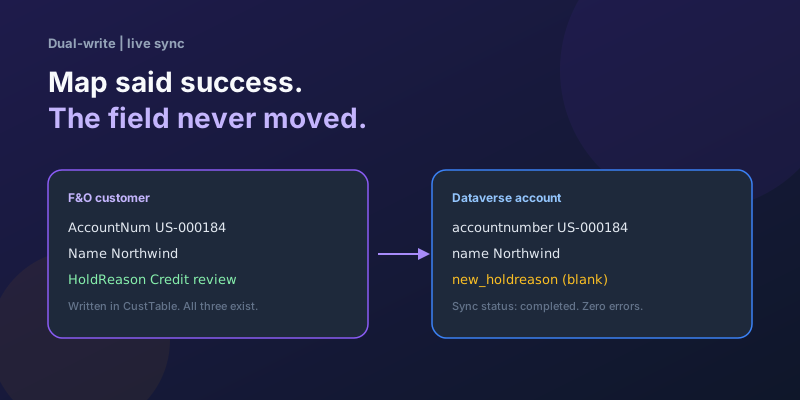
Dual-Write Dropped My Field and Reported Success
Why a dual-write map can complete with zero errors while a custom F&O field never lands in Dataverse — staging tables, unpublished maps, and change tracking after a schema change.
Elastic Tables in Dataverse: When Cosmos-Backed Storage Beats Standard Tables
What Dataverse elastic tables are, how TTL, partitioning, and JSON columns work, and how to decide between elastic and standard tables.
Business Process Flows in Dynamics 365: Branching, Stage-Gating, and the Limits Nobody Warns You About
A practical guide to designing branching Business Process Flows in model-driven Dynamics 365 apps, with stage-gating, automation hooks, the storage model, and hard limits.
Client Scripting in Model-Driven Apps Done Right: formContext, Execution Context, and Async
Modern client-side scripting for model-driven apps using formContext over the deprecated Xrm.Page, with handler wiring, async Xrm.WebApi patterns, and maintainability tips.
Newsletter
New posts, straight to your inbox
One email per post. No spam, no tracking pixels, unsubscribe anytime.
Comments
- No comments yet. Be the first.