Choosing the Right Dataverse Column: Choice vs Choices vs Lookup vs Customer
The column type you pick on day one outlives almost every other decision in a Dataverse model. Choices are painful to convert later, lookups change how you report, and the polymorphic customer column quietly complicates every query that touches it. Here is how to choose deliberately.
The four contenders
- Choice (option set): a single selection from a fixed set of label/value pairs stored on the row. One value per record.
- Choices (multi-select): the same idea but the user can select several values. Stored as a delimited set of integer values.
- Lookup: a reference to a row in another table. The "value" is a real record with its own columns, security, and lifecycle.
- Customer / regarding (polymorphic lookup): a special lookup that can point at more than one table. Customer points at Account or Contact; regarding columns (activities) can point at many table types.
Everything below is about matching one of these to the shape of your data.
Choice vs lookup: the central decision
This is the one people get wrong most often. The test is not "how many options" — it is what the option is.
Use a choice when the values are:
- A small, stable, business-defined vocabulary (status categories, priority, rating).
- Things that have no attributes of their own — "High" is just a label, it does not have an owner, an address, or related records.
- Unlikely to be managed by end users.
Use a lookup when the values:
- Are themselves entities with their own data — a Product has a price and a code; a Region has a manager.
- Need to be created/maintained by users at runtime, not by a customizer deploying a solution.
- Will grow unbounded (a list of suppliers, customers, projects).
- Need their own security, ownership, or auditing.
A blunt heuristic: if you would ever want a value to have a column of its own, it is a lookup, not a choice. Choices have no schema; the moment "Gold tier" needs a discount percentage attached, your choice was always meant to be a lookup table.
The reporting and maintenance consequences
This is where the long-term cost lands.
- Choice values are integers with localized labels. In raw exports and some analytics surfaces you get the integer, not the label, and you carry a mapping. Renaming a label is easy; changing the underlying value is not, and you cannot reorder values without care.
- Choices are deployed as metadata. Adding an option means a customization and (typically) a deployment through environments. Business users cannot self-serve.
- Lookups join cleanly. Reporting tools follow the relationship to the related table, and you report on the related record's real columns. Adding a new option is just adding a row — no deployment.
- Converting a choice to a lookup later is a migration project, not a setting. You build the target table, seed it, remap every record, repoint dependencies, and retire the old column. Avoid the conversion by choosing correctly up front.
Local vs global choices
When you do pick a choice, decide between local and global:
- A local choice is defined on a single column and used nowhere else.
- A global choice is defined once and reused across many columns and tables.
Guidance:
- Use a global choice when the same vocabulary genuinely appears in multiple places — a shared "Region" or "Yes/No/Unknown" list. One definition, consistent values everywhere, one place to maintain.
- Use a local choice when the vocabulary is specific to one column and unlikely to be shared. Do not reach for global "just in case" — it adds a shared dependency, and a poorly named global choice becomes a dumping ground that nobody dares change because dozens of columns depend on it.
The trade-off is consistency vs coupling. Global reduces duplication but increases blast radius when you edit it. Reserve it for vocabularies that are truly cross-cutting.
Choices (multi-select): use with caution
Multi-select choices are convenient and frequently regretted. They feel like the natural answer to "the record can be tagged with several values," but:
- They are harder to query and report on than a single choice, because the value is a set, not a scalar. Filtering "contains" semantics and aggregating across the set is clumsier in many reporting tools.
- They do not give you a clean place to hang per-value data.
- Rollups and aggregations across the set are awkward.
When the multi-valued relationship is important — you want to count, report, secure, or attach data to each selected value — model it as a many-to-many relationship (an intersect table) or an explicit child table instead. Reserve multi-select choices for genuinely lightweight tagging where you will never need to report deeply on the individual values.
The customer (polymorphic) column
Customer and other polymorphic columns can point at multiple tables. Account/Contact for customer; many tables for an activity's regarding.
They are powerful — one column that handles "the other party might be a company or a person." But the polymorphism has costs:
- Queries must account for the target table. You often cannot blindly join; you branch on which table the reference points to. In FetchXML and OData you frequently need separate link/expand logic per target type.
- Tooling and reporting handle polymorphic columns less gracefully than plain lookups.
- You cannot freely change the set of target tables after the fact.
Use a customer column when the dual Account-or-Contact nature is intrinsic to the data (typical in sales scenarios). If in practice it is always an Account, prefer a plain lookup to Account — it is simpler to query and report on. Do not adopt polymorphism for flexibility you will not use; you pay for it on every query.
Status vs status reason
Every table has two system choices that people reinvent unnecessarily:
- Status (statecode): a small, mostly fixed set of states — typically Active and Inactive (some system tables add more). This is the high-level lifecycle.
- Status Reason (statuscode): a more granular choice whose available values are filtered by the parent status. You can add your own status reasons and map each to a status.
The important mechanic: status reasons are scoped to a status. "Won" and "Lost" might both be reasons under an Inactive status; "In Progress" and "On Hold" under Active. The platform enforces valid transitions through this mapping.
Do not build a custom "record status" choice when status reason already models exactly this and integrates with deactivation, views, and process. Extend status reason instead of bolting on a parallel field — otherwise you maintain two notions of "what state is this record in" that drift apart.
Decision checklist
Run a new column through this in order:
- Does the value have, or might it ever have, columns of its own? Yes -> lookup (or a child table). No -> continue.
- Will users create/manage the values at runtime, or will it grow unbounded? Yes -> lookup. No -> choice is viable.
- Single value or several per record? Several with reporting needs -> many-to-many / child table. Several, purely lightweight tags -> multi-select choices. Single -> choice.
- Is this the same vocabulary used elsewhere? Yes and truly cross-cutting -> global choice. No -> local choice.
- Is it really the record's lifecycle state? Yes -> use status / status reason, do not invent a parallel field.
- Could the reference target more than one table, and do you genuinely need that? Yes -> customer/polymorphic lookup. Only ever one table -> plain lookup.
Pick with the five-year view, because that is how long you will live with it. The cheap, reversible decision today — a local choice instead of a lookup — is the expensive migration two years from now when "Gold tier" suddenly needs a discount percentage.
Keep reading
Dataverse Cascade Delete: Parental, Restrict, and the Children You Lose
What Parental, Referential Restrict, and Remove Link actually do on delete, assign, and merge, and which preset to pick before a parent row takes its children with it.

Sales Agent Creates CRM Records From Copilot Chat, and Sales Development Agent Quotes on Its Own: What Went GA on September 30
Two Dynamics 365 Sales agent capabilities reached general availability on September 30, 2026: inline record creation in Microsoft 365 Copilot Chat, and autonomous quote generation in Sales Development Agent. Setup, security, and the escalation path.
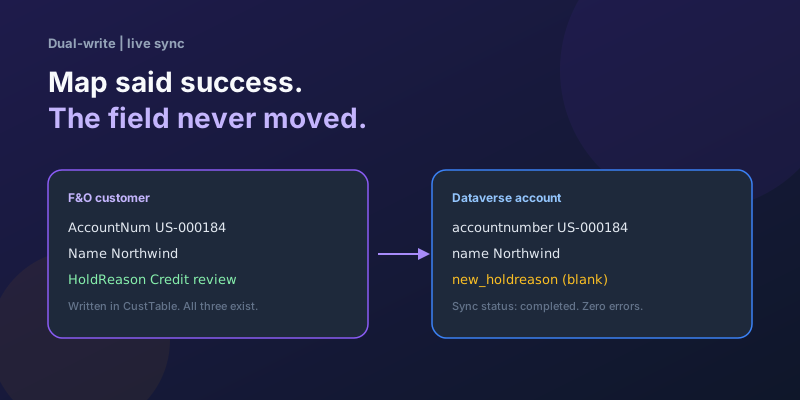
Dual-Write Dropped My Field and Reported Success
Why a dual-write map can complete with zero errors while a custom F&O field never lands in Dataverse — staging tables, unpublished maps, and change tracking after a schema change.
Elastic Tables in Dataverse: When Cosmos-Backed Storage Beats Standard Tables
What Dataverse elastic tables are, how TTL, partitioning, and JSON columns work, and how to decide between elastic and standard tables.
Business Process Flows in Dynamics 365: Branching, Stage-Gating, and the Limits Nobody Warns You About
A practical guide to designing branching Business Process Flows in model-driven Dynamics 365 apps, with stage-gating, automation hooks, the storage model, and hard limits.
The Dataverse Plugin Execution Pipeline: Stages, Transactions, and Images Explained
How the Dataverse event pipeline actually works: pre-validation, pre-operation, post-operation stages, the transaction boundary, entity images, depth, and registration guidance.
Newsletter
New posts, straight to your inbox
One email per post. No spam, no tracking pixels, unsubscribe anytime.
Comments
- No comments yet. Be the first.