Managed vs Unmanaged Solutions and Solution Layering in Dataverse
Solution layering is the topic where well-meaning Power Platform teams quietly accumulate technical debt for two years and then discover they can't cleanly update anything. If you understand layers as a stack, almost every confusing behavior becomes predictable. Here's the model I use.
What a solution actually is
A solution is a container — a manifest plus a set of references to components (tables, columns, forms, flows, plugins, web resources, security roles). It is not a copy of your data; it's a record of customizations. Two states matter:
- Unmanaged — the editable, source state. Components inside an unmanaged solution can be modified directly. This is what you build in. The default solution and any solution you create in a dev environment are unmanaged.
- Managed — a sealed, exported artifact. You can't edit a managed component directly; you can only change it by importing a new version of the managed solution, or by layering something on top of it.
Critically, unmanaged is not a "type" the component remembers — it's a state determined by how the component arrived. The same form can exist as a managed component in production and an unmanaged one in dev. That distinction is the entire game.
The ALM flow
The canonical flow, and the reason managed exists:
- Develop in an unmanaged solution in a dev environment. Everything is editable.
- Export as managed (and, separately, often as unmanaged for source control). The managed export is your deployable artifact.
- Import the managed solution into test, then production.
Production should receive only managed solutions. The point is that managed components are locked down — nobody can hand-edit a form in prod and create a snowflake you can't reproduce. Your dev environment is the single source of truth, and the managed artifact is reproducible from it.
People resist this because unmanaged "just works" — you can fix things directly in prod. That convenience is precisely the trap. A direct unmanaged change in production has no upstream source; the next managed import may or may not touch it, and you've forked your environment from your repo.
The layering mental model
Picture every component as a vertical stack of layers, evaluated bottom to top. The component you actually see and run is the top active layer.
TOP  ┌─────────────────────────────┐
     │ Unmanaged layer (active)    │  <- wins if present
     ├─────────────────────────────┤
     │ Managed: Solution B         │
     ├─────────────────────────────┤
     │ Managed: Solution A         │
     ├─────────────────────────────┤
     │ System (base platform)      │
BASE └─────────────────────────────┘
Two rules govern the stack:
- The unmanaged layer always sits on top and always wins. If anyone makes an unmanaged customization to a component in an environment, that unmanaged layer overrides every managed layer beneath it. This is the source of "I imported a new managed solution and my fix didn't show up" — there's an unmanaged layer on top eating your update.
- Among managed layers, the last one imported wins, on a property-by-property basis. If Solution A sets a form's header color and Solution B (imported later) sets the same property, B wins. Properties B doesn't touch fall through to A.
This is why conflict resolution is per-property, not per-component. Two managed solutions can both contribute to the same form; the merged result is the top-most value for each property.
Managed properties
When you export a managed solution, each component carries managed properties that declare what downstream consumers are allowed to change — can this column be customized, can this form be edited, can this entity have new fields added. As the publisher, you set these before export.
Use them deliberately. If you ship an ISV-style managed solution and lock everything down, your customers can't extend it and will hate you. Lock down what truly must not change (logic-critical fields, plugin steps) and leave room (allow new fields, allow form edits) where extension is legitimate.
The danger of unmanaged customizations in production
Because the unmanaged layer always wins, a single hand-edit in prod creates a persistent override that shadows all future managed updates to that component's affected properties. The component is now effectively unmanaged in prod, and your managed pipeline can no longer fully control it.
Worse, this is invisible until it bites. The solution shows as imported successfully; the change just doesn't appear because the unmanaged layer on top is masking it. The fix is to remove the unmanaged layer (in the solution layers view for that component, "Remove Active Customizations") so the managed stack underneath becomes visible again — but that means losing whatever the hand-edit did.
Layering holes from deleting managed components
Here's the subtle one. Suppose Solution A (managed, base) defines a column, and Solution B (managed, on top) also references/extends it. If you uninstall or delete a managed component that a higher layer depends on, you can create a layering hole — a gap where a lower layer was expected but is now missing.
The practical symptom: dependencies break, or a component behaves as though a property is undefined because the layer that supplied it is gone. The lesson is operational:
- Uninstall managed solutions in reverse dependency order (top layers first).
- Don't delete managed components out from under solutions that layer on them.
- Treat your layer order as part of your architecture, not an accident of import sequence.
Segmentation and patches
Two tools for shipping updates without re-shipping the world:
- Segmentation — when exporting, you choose which sub-components (specific columns of a table, specific forms) to include, rather than the whole table. This produces leaner solutions and avoids accidentally carrying along components you didn't mean to update. Add a table to your solution with "Include no components" then explicitly add the columns you changed. This is the single best habit for clean, minimal-footprint deployments.
- Patches — a patch is a child solution that contains only the delta on top of a parent managed solution. You ship the patch to update specific components without reimporting the full parent. Eventually you roll up patches into a new base version. Patches are convenient for hotfixes but accumulate; clone-to-solution periodically to consolidate so your layer stack doesn't sprawl.
The takeaway model
Hold three sentences in your head and you'll predict the behavior every time:
- Unmanaged is editable source; managed is sealed and deployable — and the state depends on how the component arrived, not what it is.
- Layers stack: unmanaged on top always wins, then managed layers resolve last-imported-wins per property, then the system base.
- Production takes only managed solutions, and any unmanaged change there is a permanent override that shadows your pipeline.
Everything else — segmentation, patches, managed properties, layering holes — is detail that hangs off those three rules.
Keep reading
Dataverse Cascade Delete: Parental, Restrict, and the Children You Lose
What Parental, Referential Restrict, and Remove Link actually do on delete, assign, and merge, and which preset to pick before a parent row takes its children with it.

Sales Agent Creates CRM Records From Copilot Chat, and Sales Development Agent Quotes on Its Own: What Went GA on September 30
Two Dynamics 365 Sales agent capabilities reached general availability on September 30, 2026: inline record creation in Microsoft 365 Copilot Chat, and autonomous quote generation in Sales Development Agent. Setup, security, and the escalation path.
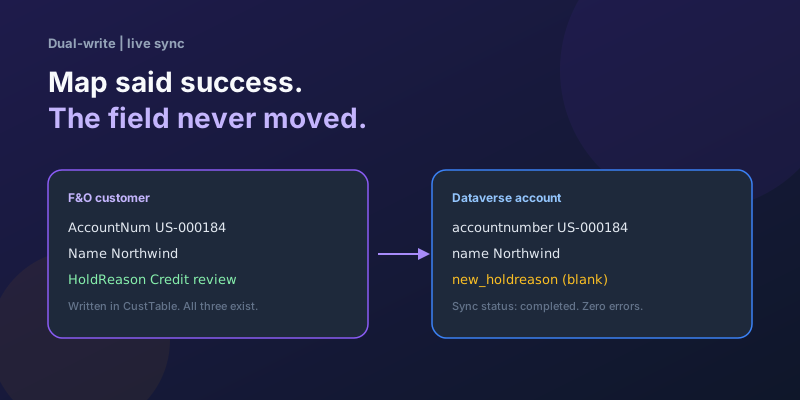
Dual-Write Dropped My Field and Reported Success
Why a dual-write map can complete with zero errors while a custom F&O field never lands in Dataverse — staging tables, unpublished maps, and change tracking after a schema change.
Elastic Tables in Dataverse: When Cosmos-Backed Storage Beats Standard Tables
What Dataverse elastic tables are, how TTL, partitioning, and JSON columns work, and how to decide between elastic and standard tables.
Business Process Flows in Dynamics 365: Branching, Stage-Gating, and the Limits Nobody Warns You About
A practical guide to designing branching Business Process Flows in model-driven Dynamics 365 apps, with stage-gating, automation hooks, the storage model, and hard limits.
The Dataverse Plugin Execution Pipeline: Stages, Transactions, and Images Explained
How the Dataverse event pipeline actually works: pre-validation, pre-operation, post-operation stages, the transaction boundary, entity images, depth, and registration guidance.
Newsletter
New posts, straight to your inbox
One email per post. No spam, no tracking pixels, unsubscribe anytime.
Comments
- No comments yet. Be the first.