Bulk Operations with the Dataverse Web API $batch Endpoint
When you need to push or pull a lot of data through the Dataverse Web API, firing one HTTP request per row is the wrong approach: it is slow, it hammers connection setup, and it burns through your service protection allowance. The $batch endpoint lets you bundle many operations into a single HTTP round trip, and changesets give you database transactions across multiple writes. Getting the payload format exactly right is the hard part, so let's walk through it.
The multipart format
A batch request is an HTTP POST to [org]/api/data/v9.2/$batch with a multipart/mixed content type and a batch boundary you define. Inside the body you place individual requests separated by that boundary. Read operations (GET) sit directly in the batch. Write operations that you want to run transactionally are wrapped in a changeset, which is itself a nested multipart/mixed block with its own boundary.
The boundaries are arbitrary strings — convention is batch_<guid> and changeset_<guid> — but the boundary you declare in the Content-Type header must match the delimiter in the body exactly.
POST https://contoso.crm.dynamics.com/api/data/v9.2/$batch HTTP/1.1
OData-Version: 4.0
OData-MaxVersion: 4.0
Content-Type: multipart/mixed; boundary=batch_AAA111
Accept: application/json
Authorization: Bearer eyJ0eXAi...

--batch_AAA111
Content-Type: application/http
Content-Transfer-Encoding: binary

GET accounts?$select=name&$top=2 HTTP/1.1
Accept: application/json

--batch_AAA111
Content-Type: multipart/mixed; boundary=changeset_BBB222

--changeset_BBB222
Content-Type: application/http
Content-Transfer-Encoding: binary
Content-ID: 1

POST accounts HTTP/1.1
Content-Type: application/json

{"name":"Northwind Trading","telephone1":"206-555-0100"}

--changeset_BBB222
Content-Type: application/http
Content-Transfer-Encoding: binary
Content-ID: 2

POST contacts HTTP/1.1
Content-Type: application/json

{"firstname":"Ada","lastname":"Lovelace","parentcustomerid_account@odata.bind":"$1"}

--changeset_BBB222--

--batch_AAA111--
A few details that trip people up:
- Each request part needs
Content-Type: application/httpandContent-Transfer-Encoding: binary. These are literal and required. - There is a blank line between the part headers and the embedded request line, and another blank line between the embedded request's headers and its JSON body. Missing blank lines is the number one cause of cryptic parse errors.
- The relative URL in each embedded request is relative to the API root (
accounts, not the full path). - The closing boundaries end with a trailing
--(--batch_AAA111--).
Changesets and all-or-nothing behavior
Everything inside a single changeset executes as one transaction. If any operation in the changeset fails, the entire changeset rolls back — none of its writes persist. This is the property that makes batch genuinely useful for data integrity, not just throughput. In the example above, if the contact insert fails (say, a bad lookup), the account insert is rolled back too.
Important boundaries on that guarantee:
- The transaction covers one changeset, not the whole batch. If your batch has two changesets, they are independent transactions. A failure in changeset A does not undo changeset B.
- GET requests cannot go inside a changeset. Changesets are for data modification only. Reads live in the batch directly, between changesets.
- Operation order within a changeset is not guaranteed by the spec — except that Dataverse honors
Content-IDreferences, which is how the dependency below works. Do not rely on side-effect ordering beyond what content-id linking expresses.
Referencing one request from another with Content-ID
This is the killer feature for bulk inserts of parent-child data: you do not need the server-generated GUID of a record created earlier in the same changeset to reference it. Assign each create a Content-ID (a number, unique within the changeset), then reference it elsewhere with $<id>.
In the payload above, the account is Content-ID: 1, and the contact binds its parent with "parentcustomerid_account@odata.bind":"$1". Dataverse resolves $1 to the account it just created. You can chain these: create an account as $1, a primary contact as $2, then PATCH the account to set its primary contact to $2, all in one transactional changeset.
The @odata.bind syntax is how you set lookups in the Web API generally; in a batch it just gains the ability to target a $contentid instead of a literal accounts(<guid>).
Mixing reads and writes
You can absolutely combine GETs and changesets in one batch — useful for "fetch some reference data, then write based on it" patterns, though note the reads execute as separate operations and you cannot feed a GET result into a write within the same batch programmatically; you only get all the responses back together. The response is itself multipart: parse it by the response boundary, and each part carries its own HTTP status line.
Limits you must respect
The Web API caps a batch at 1000 requests total. Beyond throughput limits, Dataverse enforces service protection limits per user, per server node, over a 5-minute sliding window:
- ~6000 requests
- ~20 minutes (1200 seconds) of combined execution time
- ~52 concurrent requests
Crucially, each operation inside a batch counts individually against the request-count limit — a batch of 1000 creates is 1000 requests, not one. Batching reduces network overhead and gives you transactions; it does not buy you a free pass on service protection.
When you exceed a limit, you get HTTP 429 Too Many Requests with a Retry-After header. Honor it:
catch (Exception ex) when (IsThrottled(ex, out var retryAfter))
{
    await Task.Delay(retryAfter);
    // re-issue the batch
}
Do not implement your own fixed-delay retry; read Retry-After and wait exactly that long.
Alternatives and when to use them
- ExecuteMultiple (Organization Service / SDK). The SDK equivalent for server-side or plugin-adjacent code. It batches up to 1000 messages, with
ContinueOnErrorandReturnResponsesflags. Note thatExecuteMultipleis not transactional by default — for atomicity you wrap requests in anExecuteTransactioninstead. Use these when you are in .NET with the SDK rather than raw HTTP. - Bulk operation messages (
CreateMultiple/UpdateMultiple). The modern, highest-throughput path for inserting or updating many rows of the same table. They run plugins once per batch where pipeline logic supports it and are markedly faster than N single creates. Prefer these for large homogeneous loads; the Web API exposes them too. - Data import / dataflows. For one-off or scheduled large migrations, the import tooling or Azure Data Factory's Dataverse connector handle paging, retry, and parallelism for you.
My default: use $batch with changesets when you need transactional, heterogeneous operations from a non-.NET client; use CreateMultiple/UpdateMultiple for large same-table loads; reserve raw single requests for genuinely one-off calls. And whatever you choose, build 429 handling in from the start — it is the difference between a load job that finishes and one that gets your client throttled into a corner.
Keep reading
Dataverse Cascade Delete: Parental, Restrict, and the Children You Lose
What Parental, Referential Restrict, and Remove Link actually do on delete, assign, and merge, and which preset to pick before a parent row takes its children with it.
Sales Agent Creates CRM Records From Copilot Chat, and Sales Development Agent Quotes on Its Own: What Went GA on September 30
Two Dynamics 365 Sales agent capabilities reached general availability on September 30, 2026: inline record creation in Microsoft 365 Copilot Chat, and autonomous quote generation in Sales Development Agent. Setup, security, and the escalation path.
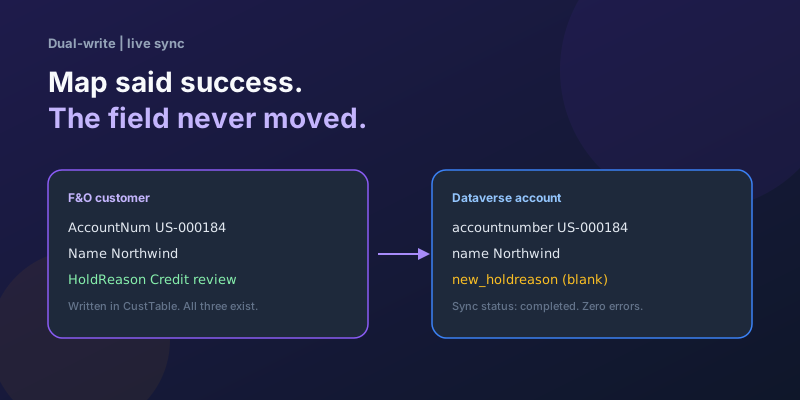
Dual-Write Dropped My Field and Reported Success
Why a dual-write map can complete with zero errors while a custom F&O field never lands in Dataverse — staging tables, unpublished maps, and change tracking after a schema change.
Elastic Tables in Dataverse: When Cosmos-Backed Storage Beats Standard Tables
What Dataverse elastic tables are, how TTL, partitioning, and JSON columns work, and how to decide between elastic and standard tables.
Business Process Flows in Dynamics 365: Branching, Stage-Gating, and the Limits Nobody Warns You About
A practical guide to designing branching Business Process Flows in model-driven Dynamics 365 apps, with stage-gating, automation hooks, the storage model, and hard limits.
The Dataverse Plugin Execution Pipeline: Stages, Transactions, and Images Explained
How the Dataverse event pipeline actually works: pre-validation, pre-operation, post-operation stages, the transaction boundary, entity images, depth, and registration guidance.
Newsletter
New posts, straight to your inbox
One email per post. No spam, no tracking pixels, unsubscribe anytime.
Comments
- No comments yet. Be the first.