Queues and Case Management Fundamentals in Dynamics 365 Customer Service
If you're standing up Dynamics 365 Customer Service, the case-and-queue layer is the spine of the whole thing. Get this right and routing, SLAs, and reporting all fall into place. Get it muddled and agents end up working out of a shared inbox in spirit if not in fact. Here's the mental model and the setup that holds up.
How cases get created
A case (the incident table) represents a single customer problem with a single resolution. Cases arrive through several channels, and you'll usually wire up more than one:
- Manual creation by an agent in the Customer Service workspace or Hub.
- Email-to-case via automatic record creation rules on a queue mailbox — an email hitting
support@yourco.comcreates a case and links the originating email as an activity. - Web/portal forms (Power Pages or a custom front end calling the Web API).
- Channels — chat, voice, social — through the omnichannel layer, which still lands as a case behind the conversation.
The unit of intake for automation is the automatic record creation and update rule (ARC). It watches a queue's incoming activities and decides whether to create a case, link to an existing one, and what to populate. This is where you set "if email matches an open case from this customer, append instead of creating a new case" — critical for avoiding duplicate cases on email threads.
The case resolution process
A case moves through a lifecycle tracked by statecode: Active, Resolved, Cancelled. Resolving a case isn't a simple field flip — it opens a Resolve Case dialog that creates a Case Resolution activity capturing the resolution type and billable/total time. That activity is what powers handle-time and resolution reporting, so don't bypass it by just toggling status with a flow unless you also create the resolution record.
Out of the box there's a Phone to Case Process BPF with stages like Identify, Research, and Resolve. Each stage carries steps (fields) the agent fills as they progress. As with sales BPFs, resist the urge to mark everything required — the BPF should guide, not gate. Many teams replace the OOB BPF with one matching their support tiers, but keep the three-stage shape: understand the problem, work it, close it.
Queues: the routing primitive
A queue is a container of work items. In Customer Service, queues hold cases (and activities/emails). Two flavors:
- Private queues have an explicit membership list. Only members see the queue's items. Use these for teams: "Tier 2 Networking", "Billing Disputes". Membership controls visibility.
- Public queues are visible to everyone in the org (subject to record-level security on the items themselves). Use these for general intake or overflow.
A default behavior worth knowing: every user and team gets a personal queue automatically. When an item is "assigned" to a user, it lands in their personal queue. So queues underpin assignment whether or not you think of it that way.
Queue items, pick, release, route
The records inside a queue are queue items (queueitem), not the cases themselves — a queue item is a pointer to a case plus queue-specific metadata (entered-on, worked-by, due date). The core agent verbs:
- Pick (Work On) — an agent claims an item. It sets worked by so others know it's taken; the item stays in the queue but is visibly owned.
- Release — the agent gives it back, clearing worked by so someone else can pick it.
- Route — move the item to a different queue.
A subtle but important point: a case lives in exactly one queue at a time as a queue item. Routing it moves it; it doesn't copy. If you think a case is in two queues, you have two queue items pointing at the same case via different relationships — usually a misconfiguration.
Basic routing rules vs unified routing
There are two generations of routing, and you should pick one deliberately:
- Basic routing rule sets are ordered if/then rules: "if case origin = phone and product = X, route to Tier 1 Hardware queue." They're simple, deterministic, and easy to reason about. They route to a queue (or a user/team). Good for straightforward, attribute-based assignment.
- Unified routing is the newer, AI-capable engine that can classify and assign work to queues and then to specific agents based on capacity and rules. It's far more powerful, but it's a bigger setup with its own concepts.
For a first deployment, basic routing rule sets to queues are usually enough and dramatically easier to maintain. Move to unified routing when you genuinely need workload balancing or attribute-driven agent assignment — not before. (I'm deliberately not going deep on unified routing's skill-based assignment here; that's its own topic and overkill for most "just get cases to the right team" needs.)
SLAs at a glance
An SLA in Customer Service attaches to a case and tracks KPIs against time targets — typically First Response By and Resolve By. Mechanics worth knowing:
- SLAs are defined as records with SLA items, each item being a KPI with a success condition, a warning threshold, and a failure threshold, plus actions at each (e.g., send an email, escalate).
- They respect business hours (a Customer Service Calendar) so a 4-hour SLA doesn't burn through overnight when nobody's working.
- Pause and resume lets the clock stop while a case is in a "waiting on customer" status — configure which statuses pause the SLA, or your metrics will punish agents for customer delays.
Don't over-engineer SLAs on day one. Two KPIs, sensible business hours, and a pause status covers most needs.
Parent/child cases and merging
Two features for related cases:
- Parent/child cases model a hierarchy: one parent case with multiple child cases. You configure inheritance (which fields children copy from the parent — customer, product, etc.) and a closure preference (can a parent close with open children? do children auto-close with the parent?). Use this when one underlying issue spawns multiple discrete work items.
- Merge combines duplicate cases for the same customer. You select cases (same customer required), pick the primary, and the others are deactivated as Cancelled (Merged) with their activities reparented to the primary. This is the right tool when a customer opens three tickets for one problem.
Common mistakes
- No ARC dedup rule. Email threads explode into dozens of cases because each reply creates a new one. Always configure "update existing case" matching.
- Bypassing the Resolve dialog. Flipping status with a flow skips the resolution activity and breaks reporting. Create the resolution record if you automate closure.
- Public queue sprawl. Everything dumped in one public queue means no real routing. Model queues to teams and use private queues for ownership.
- Confusing the case with the queue item. Deleting a queue item doesn't delete the case; removing a case from a queue is a route, not a delete. Train agents on the distinction.
- SLAs without pause statuses. Clocks running during customer wait make agents look bad and erode trust in the metrics.
Start with clean intake (ARC + dedup), a sane queue model mapped to your teams, basic routing rules, and a couple of SLA KPIs. That foundation handles the vast majority of real support operations before you ever reach for the advanced engines.
Keep reading
Dataverse Cascade Delete: Parental, Restrict, and the Children You Lose
What Parental, Referential Restrict, and Remove Link actually do on delete, assign, and merge, and which preset to pick before a parent row takes its children with it.

Sales Agent Creates CRM Records From Copilot Chat, and Sales Development Agent Quotes on Its Own: What Went GA on September 30
Two Dynamics 365 Sales agent capabilities reached general availability on September 30, 2026: inline record creation in Microsoft 365 Copilot Chat, and autonomous quote generation in Sales Development Agent. Setup, security, and the escalation path.
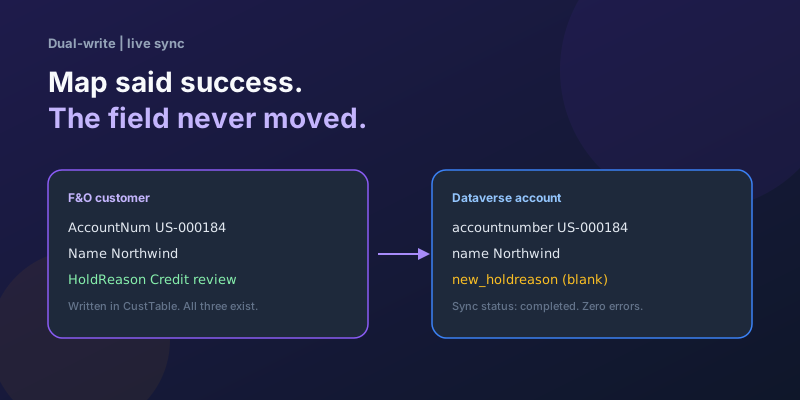
Dual-Write Dropped My Field and Reported Success
Why a dual-write map can complete with zero errors while a custom F&O field never lands in Dataverse — staging tables, unpublished maps, and change tracking after a schema change.
Elastic Tables in Dataverse: When Cosmos-Backed Storage Beats Standard Tables
What Dataverse elastic tables are, how TTL, partitioning, and JSON columns work, and how to decide between elastic and standard tables.
Business Process Flows in Dynamics 365: Branching, Stage-Gating, and the Limits Nobody Warns You About
A practical guide to designing branching Business Process Flows in model-driven Dynamics 365 apps, with stage-gating, automation hooks, the storage model, and hard limits.
The Dataverse Plugin Execution Pipeline: Stages, Transactions, and Images Explained
How the Dataverse event pipeline actually works: pre-validation, pre-operation, post-operation stages, the transaction boundary, entity images, depth, and registration guidance.
Newsletter
New posts, straight to your inbox
One email per post. No spam, no tracking pixels, unsubscribe anytime.
Comments
- No comments yet. Be the first.