Sales Agent Creates CRM Records From Copilot Chat, and Sales Development Agent Quotes on Its Own: What Went GA on September 30
In this series: Copilot in Dynamics 365

Two Dynamics 365 Sales features reached general availability on September 30, 2026, and they point in different directions. One puts the seller in the loop with a form inside a chat. The other takes the seller out of the loop for low-complexity deals until something goes wrong. Both ride on Sales Agent in Microsoft 365 Copilot, which is itself generally available, and both are governed by the same Dynamics 365 security roles the seller already has.
Create contacts, accounts, and opportunities from Copilot Chat
Message center item MC1464753: users can create contacts, accounts, opportunities, and other Dynamics 365 Sales records directly in Microsoft 365 Copilot Chat. The seller asks — "Create an opportunity worth $50,000, closing next quarter, for Northwind Traders" — and an interactive form appears inline. Fields are prepopulated from the conversation context. The seller reviews, edits, and submits without opening another app or a pop-up.
The details that matter are in the Learn article on setting up record creation:
- The inline form shows fields from the first tab of the default main form configured for the table in your model-driven app. To change what appears, customize the quick create form in Power Apps.
- Data access and record creation follow Dynamics 365 security roles and field-level security. A seller without create permission gets an error, not a record.
- Setup is not a toggle. You download your model-driven app package from Power Apps, upload it as a custom agent in the Microsoft 365 admin center, then copy its tools and knowledge to the Sales agent. After that you test by asking the agent to create a record.
For record types, Sales admin settings has a Forms area. Contact, account, and opportunity are available by default. You can add other out-of-the-box and custom record types that relate to an existing one, one at a time, up to ten record types, and choose the view that defines the fields and their order. Per record type you can allow Create new records inside Sales (inline), Create new records by opening the CRM from a link, or both. ActivityParty and ActivityPointer are not supported.
What to decide before you enable it: which record types sellers may create from chat, and whether the quick create form for each is actually the minimum viable record. A form that prepopulates Estimated close date from "next quarter" is useful. A form that lets a seller create an account with no parent, no territory, and no duplicate check is the data-quality problem you already have, with a faster path to it. Duplicate detection rules and required fields on the quick create form are the controls. Review them for each enabled table.
Sales Development Agent closes low-complexity deals
Message center item MC1464732: Sales Development Agent (SDA) can take leads from qualified opportunities through to closed deals for low-complexity transactions. The listed capabilities:
- Generate quotes in Dynamics 365 Sales and in first- or third-party systems, shared with customers using company-branded templates.
- Connect to quoting and transaction systems managed through the Agent 365 MCP registry.
- Answer questions about the quote and adjust details based on customer feedback.
- Help customers complete self-service transactions.
- Escalate to human sellers when customers are blocked and need assistance.
- Configure each agent instance through an interactive chat experience.
The two words that decide whether this is safe in your tenant are low-complexity and escalate. Define the first precisely: a product list, a price list, a discount ceiling, a deal size, a customer segment. Anything outside that definition should not be in scope for the agent, and the configuration chat is where you draw that line. Then test the second: a customer who asks for a discount beyond the ceiling, a customer who asks a question the knowledge does not answer, a customer who stops responding. Each should produce a handoff to a named seller with the conversation attached, not a quote the agent improvised.
Quotes generated into a third-party system through the MCP registry are an integration surface. The registry is the governance point: which systems the agent may call, with which credentials. If your quoting system is not registered, the agent cannot quote there, which is the correct default.
The common layer: Sales Agent, Work IQ, and the plugins
Both capabilities depend on Sales Agent being set up and connected to Dynamics 365 Sales. The Sales Chat settings page must be opened at least once to initialize and load the supported tables; skipping that step means initialization never runs. Tables are added under Sales Chat settings, and sellers need the right privileges in Dynamics 365 for anything the agent reads or writes.
Two September announcements change the context the agents reason over. Work IQ enters preview on September 30, with rollout through October, grounding Copilot and agents in Dynamics 365 and Power Platform business data alongside Microsoft 365 data; Finance and Operations data follows in late October. And Microsoft describes Dynamics 365 Sales and Customer Service plugins for Copilot Cowork, which coordinate multi-step work such as account research, meeting prep, and follow-ups as one workstream. Those are the surfaces where a seller will ask for the record to be created or the quote to be sent.
A rollout order
- Initialize Sales Chat and add only the tables you intend to expose. Confirm seller security roles match what you want the agent to be able to do.
- Enable inline record creation for contact first. Review the quick create form and duplicate detection. Expand to opportunity when the data coming in is clean.
- Stand up Sales Development Agent in a sandbox with one product line and a tight discount ceiling. Walk every escalation case before a customer sees it.
- Register quoting systems in the Agent 365 MCP registry deliberately. Unregistered means unreachable, and that is the state to start from.
- Measure created records and closed deals by source. The agent should show up in the data as an actor you can audit.
The grounding and plugin design for Dynamics 365 agents is the same problem covered in grounding a Copilot Studio agent on Dataverse: the agent is only as trustworthy as the data and the roles behind it. September 30 did not change that. It made the agent able to write.
Keep reading
Grounding a Copilot Studio Agent on Your Dataverse Data Without the Hallucinations
How to ground a Copilot Studio agent on Dataverse and other knowledge sources, keep answers cited and security-trimmed, test for hallucination, and choose tools vs knowledge.
Copilot in Dynamics 365 Sales: What It Does and How to Configure It
Configure Copilot in Dynamics 365 Sales with practical guidance on summaries, email drafting, meeting prep, data readiness, and governance.
MCP Explained: How Claude Connects to Your Dataverse Data
An introduction to the Model Context Protocol and how the Dataverse MCP server lets Claude read and write business data through natural language.
Querying Dataverse from Claude: A Practical MCP Walkthrough
A hands-on example of using the Dataverse MCP server with Claude to query tables, create records, and update data in Dynamics 365 through natural language.
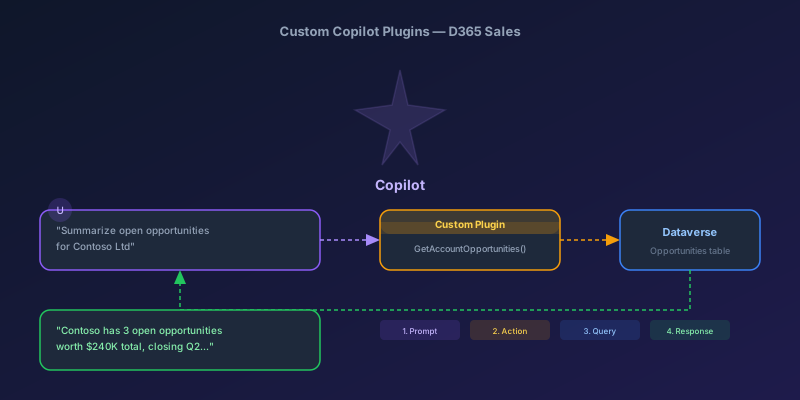
Building Custom Copilot Plugins for D365 Sales: Your First Action Step by Step
A hands-on tutorial for creating custom Copilot plugins in Dynamics 365 Sales — from defining a custom API to registering a plugin that Copilot can invoke, with real examples and permission gotchas.
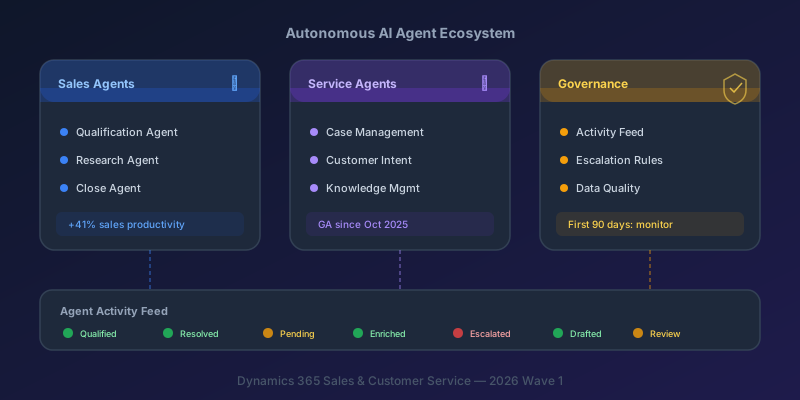
Autonomous AI Agents in D365 Sales and Customer Service: What You Actually Need to Know
A practical breakdown of the Sales Qualification Agent, Case Management Agent, and the governance framework you need before deploying them.
Newsletter
New posts, straight to your inbox
One email per post. No spam, no tracking pixels, unsubscribe anytime.
Comments
- No comments yet. Be the first.