Designing a Lead-to-Opportunity Qualification Process in Dynamics 365 Sales
Most Dynamics 365 Sales implementations get the lead object technically correct and the process socially wrong. The lead lifecycle is simple to configure but easy to design in a way that reps quietly route around. This is how I think about building a qualification process that survives contact with an actual sales team.
The lead lifecycle, concretely
A lead in Dynamics has two state fields that matter. statecode (Status) holds one of three values: Open, Qualified, or Disqualified. statuscode (Status Reason) refines that — New, Contacted, Cannot Contact, No Longer Interested, and so on. Everything else about lead behavior keys off these two fields.
The lifecycle is intentionally one-directional in spirit:
- New / Open — the lead is being worked. Reps add detail, attempt contact, log activities.
- Qualified — the rep believes there is a real sales pursuit here. Qualifying is the moment the lead converts into downstream records.
- Disqualified — dead, with a reason. The lead is deactivated but kept for reporting and re-engagement.
The thing to internalize: a lead is a holding pen for an unvalidated person/company/interest. The moment you have a validated buyer and a sellable pursuit, you qualify and move into the opportunity world. Keeping "leads" alive for months is a smell.
What actually happens when you qualify
This is the part teams misunderstand. When a rep clicks Qualify, Dynamics runs server-side logic that, by default, creates up to three records and maps fields onto them:
- An Account (from the lead's company name fields).
- A Contact (from the lead's person name fields).
- An Opportunity (from the lead's topic/value fields), parented to that account and contact.
The lead itself is set to Qualified and deactivated, and the originating lead is linked to the created records via the originatingleadid lookup. The opportunity's parentcontactid and parentaccountid are populated automatically.
What gets created is controlled by the environment setting and, increasingly, by the Qualify Lead dialog that lets the rep choose. In modern environments you'll see a setting under the app's lead settings: create account/contact/opportunity on qualify — toggles for each. There's also the question of duplicate handling: if an account or contact already exists matching the lead, you want to link to the existing record, not create a duplicate. That's where duplicate detection rules feed directly into the qualify experience.
The field mapping is configurable — and you should configure it
The lead-to-opportunity field mapping lives on the entity relationships between Lead and Account/Contact/Opportunity. In the maker portal, open the Lead table, go to Relationships, find the relationship to Opportunity, and edit the Mappings. Out of the box you get topic, currency, and a few standard fields. Custom fields you add to the lead (budget, source campaign, product interest) will not carry over unless you add a mapping.
A worked example. Say you've added these custom fields to Lead and want them on the new Opportunity:
Lead field                  ->  Opportunity field
rsh_estimatedbudget         ->  rsh_estimatedbudget
rsh_productinterest         ->  rsh_productinterest (option set, same values)
rsh_leadsource_detail       ->  rsh_source_detail
budgetamount (OOB)          ->  budgetamount
Two gotchas with mappings:
- Source and target must be type-compatible. Mapping a text field to a lookup won't work. Two option sets must share the same underlying values for the mapping to land cleanly — use a global choice shared by both tables to avoid silent mismatches.
- Mappings only fire on record creation via the relationship (i.e., the qualify action or "+ New" from the parent). They don't retroactively sync. If you edit the lead after qualifying, nothing flows.
The Lead-to-Opportunity Sales Process BPF
The out-of-the-box business process flow named Lead to Opportunity Sales Process spans two tables. Its stages typically run: Qualify (on Lead) then Develop, Propose, Close (on Opportunity). The BPF is what visually walks a rep from a raw lead through to a closed opportunity, carrying the same process instance across the table boundary.
Key design points when you customize it:
- Each stage has steps (fields) that can be marked required. A required step blocks stage advancement until filled. Use this sparingly — over-requiring fields in the Qualify stage is the single most common reason reps abandon the process.
- The BPF crosses tables, so the
processidandstageidtravel with the record. When the lead qualifies into an opportunity, the same process instance continues on the opportunity. This is why deleting or replacing the BPF mid-deployment is painful. - You can have multiple BPFs and order them; the first one the user has access to and that matches becomes the default. Security roles gate BPF access.
Duplicate detection that actually protects you
Turn on duplicate detection rules and settings at the org level (Settings > Data Management). The two rules that earn their keep:
- Leads with matching email, and Leads vs Contacts with matching email — so a known customer filling out a web form doesn't spawn a phantom lead disconnected from their contact record.
- Accounts with matching name + the qualify flow so qualifying links to the existing account instead of creating a duplicate company.
Publish the rules after creating them (unpublished rules do nothing), and remember they run on create/update and during the qualify dialog, not retroactively. For existing mess, run a bulk duplicate detection job.
Lead scoring: predictive vs rule-based
Two distinct features, often conflated:
- Rule-based scoring is something you build with logic you control — flows or a model in Sales Insights that adds points for attributes (job title contains "Director", engaged with 3+ emails, company size over 500). Transparent and auditable. Good when you have strong opinions and limited data.
- Predictive lead scoring (Sales Insights / Sales Premium) trains an ML model on your historical qualified vs disqualified outcomes. It needs a meaningful volume of closed leads to train — figure a few thousand with reasonable win/loss signal. It surfaces a 0-100 grade and the top positive/negative factors.
Trade-off: predictive scoring is only as honest as your historical data. If reps disqualified leads inconsistently in the past, the model learns that noise. Start rule-based, switch to predictive once your disqualification discipline is real.
Getting reps to actually use it
The process fails on adoption, not configuration. What works:
- Minimize required fields at Qualify. Ask for the few things that genuinely gate a real pursuit. Everything else is optional or auto-populated.
- Make disqualify cheap and reasoned. Reps avoid processes that punish them for honest "no"s. A one-click disqualify with a required reason gives you clean funnel data and keeps the lead list short.
- Pre-populate from the channel. Web forms, LinkedIn, and marketing should stamp lead source and product interest automatically so the rep isn't doing data entry.
- Show them the payoff. When qualifying auto-creates the account/contact/opportunity with mapped fields, the rep saves real time. Demo that. The "qualify saves me re-typing everything" moment is what drives uptake.
- Report on funnel velocity, not just volume. Track days-in-stage and qualify rate. If leads pile up in "New", your intake or scoring is wrong, not your reps.
Get the qualify mapping and duplicate rules right first — those are the mechanics reps feel every day. The scoring and analytics layer is valuable, but it's the icing on a process that has to be frictionless underneath.
Keep reading
Dataverse Cascade Delete: Parental, Restrict, and the Children You Lose
What Parental, Referential Restrict, and Remove Link actually do on delete, assign, and merge, and which preset to pick before a parent row takes its children with it.

Sales Agent Creates CRM Records From Copilot Chat, and Sales Development Agent Quotes on Its Own: What Went GA on September 30
Two Dynamics 365 Sales agent capabilities reached general availability on September 30, 2026: inline record creation in Microsoft 365 Copilot Chat, and autonomous quote generation in Sales Development Agent. Setup, security, and the escalation path.
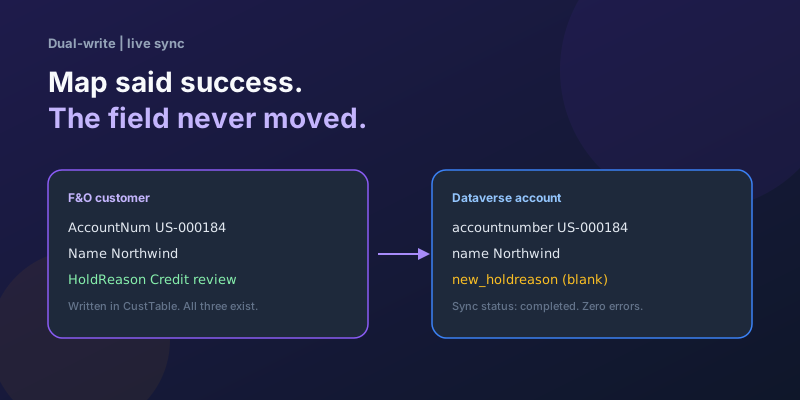
Dual-Write Dropped My Field and Reported Success
Why a dual-write map can complete with zero errors while a custom F&O field never lands in Dataverse — staging tables, unpublished maps, and change tracking after a schema change.
Elastic Tables in Dataverse: When Cosmos-Backed Storage Beats Standard Tables
What Dataverse elastic tables are, how TTL, partitioning, and JSON columns work, and how to decide between elastic and standard tables.
Business Process Flows in Dynamics 365: Branching, Stage-Gating, and the Limits Nobody Warns You About
A practical guide to designing branching Business Process Flows in model-driven Dynamics 365 apps, with stage-gating, automation hooks, the storage model, and hard limits.
The Dataverse Plugin Execution Pipeline: Stages, Transactions, and Images Explained
How the Dataverse event pipeline actually works: pre-validation, pre-operation, post-operation stages, the transaction boundary, entity images, depth, and registration guidance.
Newsletter
New posts, straight to your inbox
One email per post. No spam, no tracking pixels, unsubscribe anytime.
Comments
- No comments yet. Be the first.