Power Apps Collections vs. Dataverse: Where Your App's Data Should Actually Live
Collections are the first power tool a canvas-app maker discovers. ClearCollect some data, bind a gallery to it, edit it instantly with no save latency, no delegation warnings — it feels great. So makers reach for collections everywhere, and a predictable disaster follows: a user fills out a long form backed by a collection, their phone locks, the app reloads, and every entry is gone. Or two users "save" to their own in-memory collections and overwrite nothing, because nothing was ever shared. The convenience of collections hides a fundamental truth that catches people every time: a collection lives in the memory of one running app session, and when that session ends, the data is gone. Knowing where data should actually live is one of the real dividing lines between a demo and a production app.
What a collection actually is
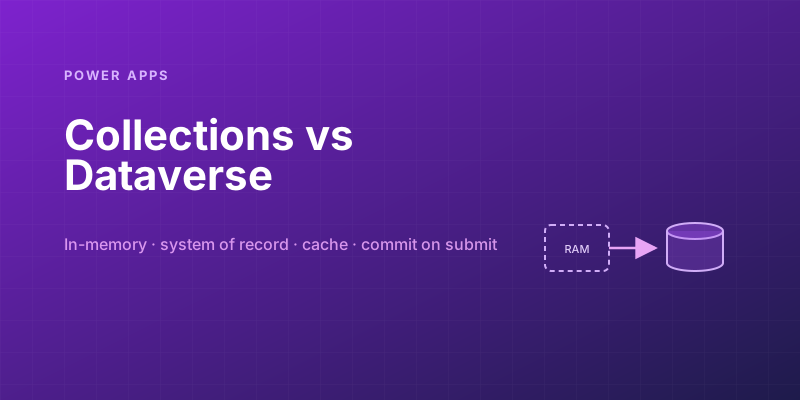
A collection is an in-memory table, local to one user's app session. That's the entire definition, and every property worth knowing follows from it:
- It's fast because it's RAM — no network round-trip to read or write.
- It's private to one session — no other user, and not even the same user on another device, can see it.
- It's temporary — it vanishes when the app closes, refreshes, or crashes. (
SaveData/LoadDatacan persist a collection to the device's local storage, but that's still local to one device, not shared, and not your system of record.) - It's not transactional or concurrent — there's no locking, no conflict resolution, no audit. It's a scratchpad, not a database.
Once you see a collection as "a temporary scratchpad in one person's RAM," the right uses become obvious — and so do the wrong ones.
What Dataverse is
Dataverse is the opposite on every axis: a persistent, shared, secured, server-side database. Data written there survives sessions, is visible to every authorized user, is protected by security roles and field-level security, supports relationships and business logic, and is audited. It's the system of record — the durable truth your app and everything else in the Power Platform reads and writes.
The cost of those guarantees is that every read and write is a network operation against a server that enforces rules, which is slower than touching local RAM and subject to delegation limits (the platform pushes filtering and sorting to the server, and operations that can't be delegated only process the first chunk of rows). That tension — durable and shared but networked and delegation-bound, versus instant and convenient but ephemeral and private — is the whole decision.
The rule that prevents most disasters
State the rule plainly and it resolves most cases instantly:
If losing the data would be a problem, it belongs in Dataverse. If the data is throwaway UI state for the current session, a collection is fine.
Run real requirements through it:
| Data | Lives where | Why |
|---|---|---|
| Submitted orders, customer records, anything users create | Dataverse | Losing it is unacceptable; others need to see it |
| A multi-screen form's in-progress entries | Dataverse (or persisted) | A refresh or lock-screen must not wipe their work |
| The current filter/search/sort selections | Collection / variable | Pure UI state, fine to lose on close |
| A shopping-cart being built before checkout | Collection, then commit to Dataverse on submit | Convenient to assemble locally; durable once submitted |
| Reference data (countries, product list) shown read-only | Collection as a cache of Dataverse | Load once for speed; the truth still lives server-side |
| Per-session UI flags (which panel is open) | Variable / collection | Ephemeral by nature |
The pattern that catches the most people is the multi-step form held in a collection until a final "Submit." It feels clean — assemble everything locally, write once at the end. But everything between "start" and "Submit" is unsaved, in-memory, one lock-screen away from oblivion. For anything longer than a quick single screen, persist as you go (or at least SaveData defensively) so a dropped session doesn't cost the user their work. Users do not forgive an app that loses what they typed, and "it was in a collection" is no comfort to them.
The legitimate, powerful uses of collections
None of this means avoid collections — used well, they're exactly right and make apps feel fast. The strong patterns:
- Caching reference data. Load slow-changing lookup data (product catalog, country list, config) into a collection once on
App.OnStart, then bind galleries and dropdowns to the collection instead of hitting Dataverse repeatedly. Reads become instant, and you sidestep delegation on data small enough to hold in memory. Refresh it when it actually changes, not on every screen. - Staging an edit before committing. Let users build or rearrange something locally — reorder line items, tweak a set of values, assemble a cart — with zero save latency, then write the final result to Dataverse in one deliberate operation. Local convenience during editing, durability at commit. The key word is commit: the collection is the workspace, Dataverse is where it lands.
- Batching writes with
Patch. Instead of a slow write per row inside a loop, accumulate changes in a collection andPatchthe whole set to Dataverse in one call. Fewer network round-trips, a faster and more reliable save.
// Assemble locally for speed...
Collect(NewOrderLines, { Product: drpProduct.Selected, Qty: Value(txtQty.Text) });

// ...then commit durably, in one operation, on Submit:
Patch(OrderLines, NewOrderLines)
Notice the shape of every good pattern: the collection is the fast, local working surface, and Dataverse is the durable destination. Collections shine for the moments between loads; Dataverse owns the truth across them.
The mental model
Stop thinking "collection or Dataverse?" as a tie between two storage options and start thinking of them as two different things with two different jobs. A collection is working memory: fast, local, disposable. Dataverse is the system of record: durable, shared, governed. The skill is letting each do its job — use collections to make the app feel fast and to stage work, and use Dataverse to make sure nothing that matters is ever lost or hidden from the people who need it.
When you're unsure, ask the one question that cuts through it: if this data disappeared right now, would a user be upset? If yes, it does not belong only in a collection — get it into Dataverse. That single instinct prevents the most common and most embarrassing class of canvas-app failures, and it's the habit that turns a maker who builds slick demos into one who ships apps people can actually rely on.
Keep reading
Patch in Canvas Apps: The Blank Column That Overwrites a Real Value
Patch writes every column present in the change record, including blanks from empty form cards. How to update only the fields the user actually edited.

Dataverse Filtered Record Ownership: Row-Level Security Without Owners, Teams, or Sharing
Dataverse's filtered record ownership (preview) secures rows by column values such as region or department instead of owner or business unit. How record filters, entity record filters, and security roles fit together, and what the no-owner model gives up.

Power Platform September 2026 Update: The App-Builder Skill, Agent Plugins, and the Refreshed Model-Driven UI
What matters in Microsoft's September 2026 Power Platform feature update: the model app-builder skill goes GA, the canvas authoring agent plugin goes GA, generative pages embed in forms and reach connectors, model-driven header refresh is GA with display density in preview, and Power Automate gets server-side search.

Canvas Apps: Concurrent() Is How OnStart Stops Feeling Stuck
Load independent Dataverse and SharePoint calls together in a canvas app, and keep the calls that really do depend on each other out of the same Concurrent.
SharePoint Lists vs Dataverse for Canvas Apps: Pick the Storage, Not the Habit
Delegation limits, relationships, security, and ALM — the practical tradeoffs when a canvas app outgrows a list and when it should not migrate at all.
Canvas vs Model-Driven vs Power Pages: Choosing the Right Power Apps Type
Choose between canvas apps, model-driven apps, and Power Pages using a practical matrix for UX, data, licensing, governance, and audience fit.
Newsletter
New posts, straight to your inbox
One email per post. No spam, no tracking pixels, unsubscribe anytime.
Comments
- No comments yet. Be the first.