Dual-Write Dropped My Field and Reported Success
In this series: F&O and Dataverse integration
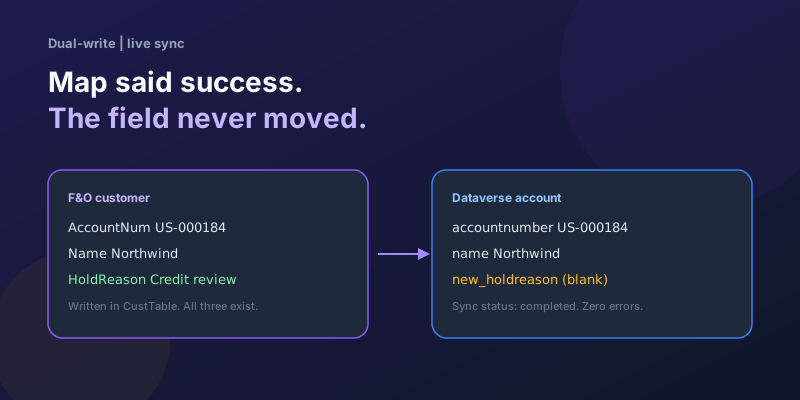
The dual-write health dashboard is green. The error list is empty. The customer that just saved in Finance & Operations shows up in Dataverse two seconds later — name, address, credit limit, all there. The custom hold-reason field you added last sprint is blank. Nobody got a failure email because, from the runtime's point of view, nothing failed.
This is the expensive kind of dual-write bug. A thrown error at least tells you which row to fix. A successful run that omitted a column will sit in production until a salesperson notices the form and a consultant swears the map is "definitely published."
I have walked this loop on customer, vendor, and released-product maps. The field is almost never "broken." It was never on the path the runtime actually uses.
Success means the mapped fields wrote
Dual-write does not copy a table. It copies the columns on the running table map, through the F&O data entity that map is bound to, into the Dataverse columns that map names.
If HoldReason is on CustTable and even on CustCustomerV3Entity in Visual Studio, that is not enough. Live sync will still skip it when any of these is true:
- The entity field exists in metadata but is not mapped to a data source column.
- The entity field is mapped, but the dual-write table map does not include it (or includes it on a draft you never published).
- The Dataverse column does not exist in the environment the map is linked to.
- Change tracking on the entity was initialized before the field existed, and the map was never bounced.
Unmapped columns are not errors. They are invisible. The runtime has no reason to complain.
Type mismatches are different: an enum mapped to a string, or a lookup mapped to a plain text column, usually fails the row. If the row is present and one column is empty, you are in the silent-omit case, not the type-mismatch case. Stop looking at the error log.
Walk the path in this order
Do not start in the dual-write UI. Start at the table and walk outward until the field disappears. That is the break.
1. The table has it, the entity does not
Confirm the field on CustTable (or whichever table actually stores it). Then open the entity the map uses — for customers that is typically a CustCustomerV3-family entity, not "whatever looks like Customer in the AOT."
The field must appear on the entity as a real field with a data source mapping. A display method, a form-only control, or a postLoad virtual field that you never mapped will not dual-write. Dual-write is not the form. It is the entity contract.
If you added the column through a table extension, you still need an entity extension and a field mapping. The compiler will happily build a project where the table has the field and the entity does not. The upgrade-safe version of that work is in extending data entities without breaking upgrades.
2. The entity has it, staging does not
Regenerate the staging table. Dual-write is not DMF, but the entity and its staging shape are still what the platform compiles together. Teams that skip Generate staging table (or a rebuild with that option) see the same symptom on imports: job succeeded, column empty.
Ship the package that contains the regenerated staging table. A field that exists in your dev AOT but not in the UAT binary is indistinguishable from "dual-write dropped it."
3. The entity has it, the running map does not
Open the running table map, not the Excel you edited three weeks ago and stored in a Teams chat.
Check all of:
- The field is in the map, source entity field to Dataverse column.
- You saved and published after adding it. Draft maps do not apply to live sync.
- You are looking at the environment that is actually linked. Custom maps in an unmanaged solution in dev are not automatically in the linked Dataverse environment.
Microsoft out-of-box maps will not grow when you add a custom F&O field. You extend or clone the map. If you "added the field to the entity" and left the standard Customer V3 map untouched, dual-write is doing exactly what you asked: copying the Microsoft columns.
4. The map has it, change tracking still has yesterday's shape
Dual-write live sync depends on entity change tracking. Adding a field to an entity that is already running under a map is a schema change. The tracker that was initialized last month does not automatically start emitting the new column.
The recovery that actually works:
- Pause the table map (or stop it if your process requires a stop).
- Re-enable change tracking on the data entity in Data management, or re-initialize it if the UI offers that after a schema change.
- Publish the updated map.
- Start the map again.
Skipping the pause/start is how you get a green dashboard and a permanently empty column. The next customer update still syncs Name. HoldReason never joins the payload.
Do not "fix" this by running a full initial sync of 200,000 customers unless you mean to. For one new column, a targeted DMF push of the field, then live sync going forward, is the pattern that does not take the map down for a weekend. The broader dual-write sequencing and pause-around-batch advice is in dual-write pitfalls and patterns.
5. Dataverse never had a place to put it
The Dataverse column must exist in the linked environment, on the table the map writes (account, msdyn_vendor, and so on), with a type the map accepts. A column in an unmanaged solution that was never imported, a column on a different table, or a column named new_holdreason while the map still points at new_hold_reason will all present as success-plus-blank.
Publish customizations. Then open a record in a model-driven app and confirm the column is on the form if you expect users to see it — dual-write can fill a column that is not on the form, but "I don't see it" and "it is empty in the table" are different bugs. Check Advanced Find or a FetchXML query against the column, not only the form.
Prove it with one record
Pick a customer you can afford to touch in a non-prod legal entity.
- Set
HoldReasonin F&O to a value you will recognize (CREDIT-REVIEW-TEST). - Save. Wait for dual-write lag on the health dashboard to return to near zero.
- Read the Dataverse row by alternate key / account number, not by scrolling a view.
- If the column is empty, dump the dual-write activity for that key. You want to see whether the outbound payload contained the field. If the payload omitted it, the break is on the F&O/entity/map/tracking side. If the payload contained it and Dataverse is still empty, the break is column name, plugin, or a workflow that clears the value on create/update.
That last case is common and is not a dual-write defect. A plugin on account Update that runs on dual-write inbound traffic can overwrite or skip fields. If you own that plugin, detect dual-write origin and return early for columns you do not master in Dataverse — the same pattern as in the pitfalls post.
A checklist I actually use before calling the map "done"
- Field is on the table and on the entity the map names, with a data source mapping.
- Staging table regenerated; package deployed to the environment that is linked.
- Running table map lists the field; map is published, not draft.
- Dataverse column exists in that environment; names match; type is compatible.
- Map paused, change tracking re-initialized, map started after the schema change.
- One record round-trips in non-prod; payload inspected if the column is still empty.
- Plugins / flows on the Dataverse table do not blank the column on inbound dual-write.
If you cannot tick the first five, do not add retry policies, do not add a Power Automate "sync the field" flow, and do not run initial sync again. You will copy the same omission 200,000 times, still with a green dashboard.
When this is the wrong fight
If the field only needs to be visible in a model-driven app and nobody in Dataverse writes it, dual-write is the heavy tool. A virtual entity, or a business event plus a small write you own, will not spend a week on map versioning. The decision table is in choosing an F&O–Dataverse integration pattern.
Use dual-write when both sides must store the value and users will edit it in both apps. Then treat every new column as a contract change: entity, map, tracking, environment. Success in the dashboard only means the contract you published ran. It does not mean the column you cared about was on that contract.
Keep reading
Dual-Write vs Virtual Entities vs OData: Choosing the Right F&O–Dataverse Pattern
Compare dual-write, virtual entities, OData, and DMF for Finance and Operations to Dataverse integration with latency and failure tradeoffs.
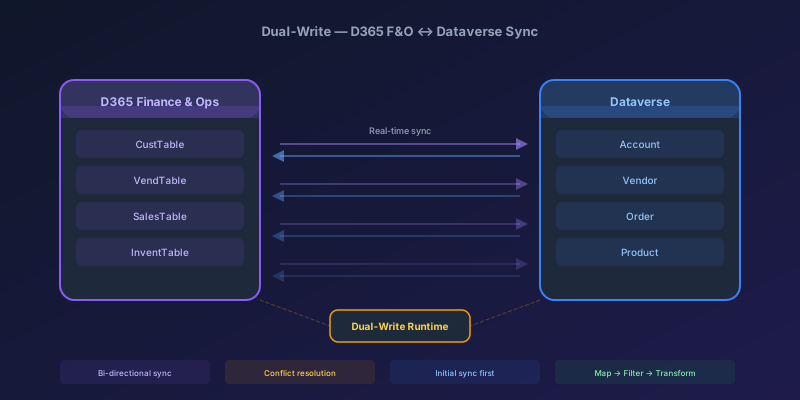
Dual-Write Between D365 F&O and Dataverse: Pitfalls and Patterns That Actually Work
A field-tested guide to dual-write configuration between D365 Finance & Operations and Dataverse — covering initial sync failures, conflict resolution, performance tuning, and when to use alternatives like virtual entities or data export service.
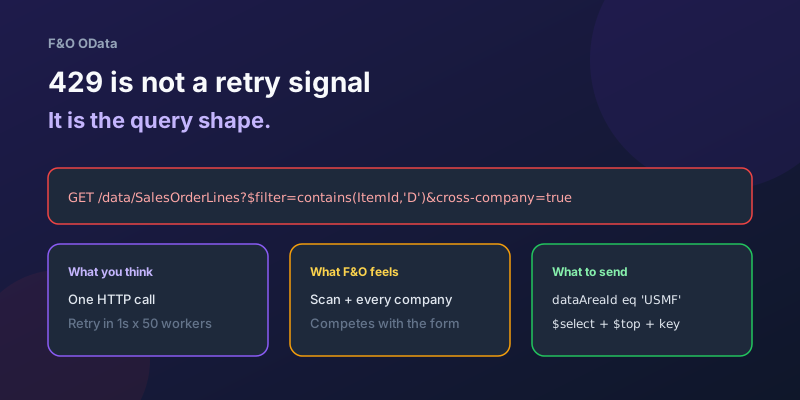
OData 429s from F&O: What Actually Throttles You
HTTP 429 from Dynamics 365 Finance & Operations is usually the query shape, not the request count — cross-company scans, $filter that cannot seek, $batch that still burns SQL, and why retrying harder makes month-end worse.
D365 F&O Data Entities: Composite, Computed, and Virtual Fields Explained
Data entities look like simple tables until you need a nested import, a derived column, or a field with no storage. Knowing the three advanced shapes is what makes integrations actually work.
Extending Data Entities in D365 Finance & Operations Without Breaking Upgrades
Add fields, computed columns, and validation to standard D365 Finance & Operations data entities the upgrade-safe way — with X++ examples and the staging-table traps to avoid.
Recurring Integrations and the REST API in D365 Finance & Operations
Move files in and out of D365 Finance & Operations reliably using the recurring integrations REST API — enqueue, dequeue, acknowledge, and the status polling patterns that keep data flowing.
Newsletter
New posts, straight to your inbox
One email per post. No spam, no tracking pixels, unsubscribe anytime.
Comments
- No comments yet. Be the first.