OData 429s from F&O: What Actually Throttles You
In this series: X++ performance, F&O and Dataverse integration
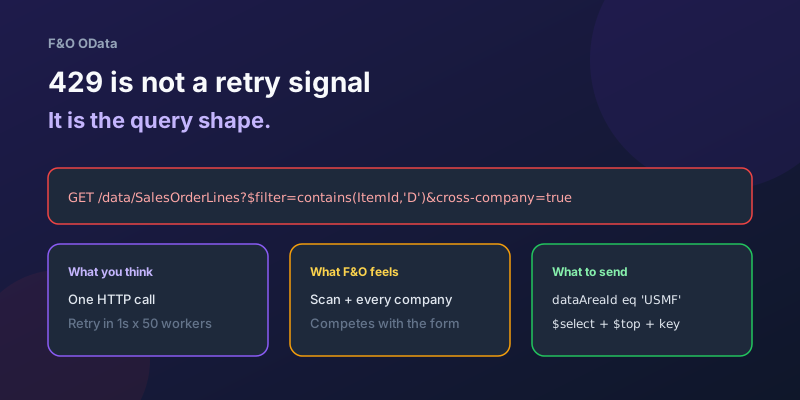
The integration logs 200 successful GETs, then a wall of 429 Too Many Requests. Someone raises the Azure Function concurrency from 8 to 32, shortens the retry delay, and month-end gets worse. The health dashboard for dual-write is unrelated. Interactive users start complaining that sales order forms are sticky. You have not been "rate limited on HTTP." You have been told the online channel is out of budget for the work you are asking SQL to do.
How to handle a 429 — Retry-After, jitter, queues — is in surviving OData throttling. This post is the other half: what spends that budget, so you stop feeding the retry loop.
Throttling is resource-weighted, not stamp-count
Finance & Operations protects interactive users first. Integration OData shares the same AOS and the same SQL as the form you are competing with. A cheap GET by primary key is a different animal from SalesOrderLines with contains(), $expand, and cross-company=true.
Treat every call as costing roughly:
cost ≈ (rows touched in SQL) × (columns materialized) × (companies in scope) × (retries)
Fifty workers retrying a scan is not fifty cheap requests. It is fifty scans, then a hundred, then two hundred, all still tagged "integration" while clerks wait on the same database.
Microsoft does not publish a single "N requests per minute" number you can design to. The number that matters in production is whether your query plan is a seek on (DataAreaId, SalesId) or a scan of SALESLINE. If you do not know which one it is, you are guessing with other people's month-end.
The shapes that burn the budget
1. Cross-company because you omitted the company
Public data entities are often cross-company capable. If the client does not constrain legal entity, the platform has to consider every company the service identity can see.
# Expensive: every company, then you throw away rows in C#
GET /data/CustomersV3?cross-company=true

# Cheap enough to live: one legal entity, filter the service can push to SQL
GET /data/CustomersV3?$filter=dataAreaId eq 'USMF' and CustomerAccount eq 'US-000184'
Passing company=USMF on a recurring-integrations enqueue is not the same as forgetting dataAreaId on OData. I still find Power Automate HTTP actions and Azure Functions that set the AAD token correctly and then query with cross-company=true "just in case we add DEMF later." That just in case is a table scan of every legal entity, every poll.
If you need many companies, fan out one company per call with a concurrency cap — do not ask one query to union the world.
2. $filter the index cannot use
OData $filter is not a license to write LINQ. It becomes SQL. The same rules as X++ query performance apply.
These filters are the usual 429 generators:
| Filter | Why it hurts |
|---|---|
contains(ItemId,'D') / endswith(...) | Leading wildcard; scan |
ItemId eq 'X' or ItemId eq 'Y' or ... (hundreds) | Plan goes sideways; prefer $batch of keyed GETs or an in only if you have measured it |
Filter on a virtual / postLoad field | Cannot be pushed to SQL; entity may evaluate row by row |
ModifiedDateTime gt 2020-01-01 with no company | Wide range plus cross-company |
$filter plus $orderby on a non-indexed column | Sort spill on top of the scan |
Keyed reads are almost free:
GET /data/CustomersV3(CustomerAccount='US-000184', dataAreaId='USMF')
If your integration cannot say the natural key, it is not an OData integration. It is a search, and search belongs in a DMF export, a warehouse, or an indexed entity you designed for that predicate.
3. $select * and $expand as a join explosion
Default payloads are fat. Customer V3, sales order header, and anything with financial dimensions will serialize dozens of fields you never read. $select the columns the caller needs. $expand is a join: expanding lines for every header in a list is how a "simple customer sync" becomes a sales-line scan.
Pagination without $select still ships the fat row. Prefer: odata.maxpagesize=50 keeps pages small; it does not make a bad filter cheap.
$count=true on a large entity is another quiet tax. Do not count 2 million vendor rows to draw a progress bar.
4. $batch is fewer sockets, not free SQL
$batch is the right fix for chatty clients that opened a TCP call per line. It is the wrong fix for "I will stuff 200 updates into one multipart body and retry the whole batch on 429."
Each operation inside the batch still runs. A failed changeset can force you to replay work you already committed unless you designed idempotent upserts. Keep batches small, one legal entity, keyed operations, and treat a 429 on the batch as backpressure on the whole changeset — honor Retry-After once, do not explode the batch into 200 parallel retries.
The retry loop itself is in the throttling post. The design rule here: never multiply concurrency because a batch 429'd.
5. Apply to each / unbounded workers
Power Automate "List rows" against F&O (or HTTP + Apply to each) with default concurrency is a throttle machine. Azure Functions with maxConcurrentCalls left at the host default is the same machine with a nicer logo.
Cap workers. One in-flight OData write per legal entity is a reasonable starting point for journals and orders. Reads can go higher after you have $filter + $select + company, not before.
Retrying harder is how you DDoS yourself
A 429 with Retry-After: 8 means wait at least eight seconds. Immediate retry, retry-on-all-errors with 200ms backoff, and "scale out the function app" all interpret backpressure as spare capacity.
What happens at month-end:
- Your job is slow, so it overlaps the next schedule.
- Both jobs 429.
- Both retry.
- Interactive users now share SQL with two panicked integrations.
- You add more retries because "it eventually works."
Stop the schedule overlap first. Then honor Retry-After. Then cut the query cost so a single attempt is cheap enough that you rarely need attempt four.
If the business volume cannot fit in cheap OData, move it. Recurring integrations / DMF exist so nightly catalogs do not sit on the online endpoint. Dual-write and virtual entities are different contracts again — do not scrape F&O OData every 30 seconds to keep Dataverse "in sync." That pattern is choosing an F&O–Dataverse integration.
How I tell "bad query" from "too many callers"
You need both telemetry and a plan. Correlation id, company, entity, $filter fingerprint, duration, 429 vs 200, attempt number.
| Signal | Likely cause |
|---|---|
| One endpoint, p95 duration seconds, then 429s | Scan / expand / cross-company — shape |
| Many endpoints, short durations, 429s in a burst | Concurrency / retry storm — rate |
| Only during a batch job or DMF run | You are competing with heavy SQL already — pause or reschedule |
| Only one legal entity 429s | Data volume or a custom entity in that company — index / entity design |
429 disappears if you $select three fields and key-get | You were serializing the universe — payload |
If p95 is already terrible before the 429s start, fixing retry policy will not save you. Open Trace Parser or LCS SQL insights on the entity view and look for scans. The OData URL is just how the scan arrived.
A bar I will not ship below
- Every GET/PATCH has a legal entity (
dataAreaIdor a keyeddataAreaIdin the URL). No casualcross-company=true. $filteris sargable: equality or a narrow range on indexed fields, notcontains.$selectis explicit.$expandis justified and bounded.- Workers are capped; retries honor
Retry-Afterand do not raise concurrency. - Bulk and catch-up go through DMF or recurring integrations, not a tighter loop.
OData is the right tool for a portal that creates one customer and needs an answer. It is the wrong tool for "get me everything that changed, in every company, with every column, as fast as the HTTP client allows." The 429 is the platform agreeing with that sentence. Listen to it by changing the sentence, not the retry delay.
Keep reading
Dual-Write Dropped My Field and Reported Success
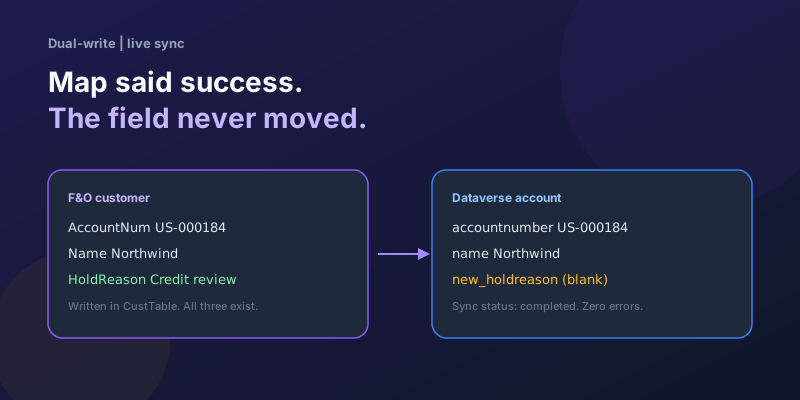
Why a dual-write map can complete with zero errors while a custom F&O field never lands in Dataverse — staging tables, unpublished maps, and change tracking after a schema change.
D365 F&O Data Entities: Composite, Computed, and Virtual Fields Explained
Data entities look like simple tables until you need a nested import, a derived column, or a field with no storage. Knowing the three advanced shapes is what makes integrations actually work.
Extending Data Entities in D365 Finance & Operations Without Breaking Upgrades
Add fields, computed columns, and validation to standard D365 Finance & Operations data entities the upgrade-safe way — with X++ examples and the staging-table traps to avoid.
Recurring Integrations and the REST API in D365 Finance & Operations
Move files in and out of D365 Finance & Operations reliably using the recurring integrations REST API — enqueue, dequeue, acknowledge, and the status polling patterns that keep data flowing.
Surviving OData Throttling in D365 Finance & Operations Integrations
Design resilient D365 Finance and Operations OData integrations with 429 handling, Retry-After, batching, backoff, jitter, and DMF fallbacks.
Scaling Batch Processing in D365 Finance & Operations: Groups, Threads, and Parallel Tasks
How to scale D365 F&O batch: batch groups bound to servers, max threads per AOS, splitting work into parallel tasks with SysOperation, task dependencies, and troubleshooting.
Newsletter
New posts, straight to your inbox
One email per post. No spam, no tracking pixels, unsubscribe anytime.
Comments
- No comments yet. Be the first.