Next.js 16 proxy.ts: Rename the Function, Drop Edge, and Do Not Trust the Matcher for Auth

You renamed middleware.ts to proxy.ts and the build still complains, or it is silent and a Server Action on a "protected" page is no longer on the matcher. Next.js 16 did not only change a filename. The named export, the runtime, and the config flags changed with it. The Cache Components migration is a different knob. This one is the network boundary.
Three names have to move
The v16.0.0 upgrade guide is specific. The middleware filename is deprecated. The named export middleware is deprecated. Flags that contained the word, such as skipMiddlewareUrlNormalize, are now skipProxyUrlNormalize.
The file lives at the project root, or inside src if that is where app lives — the same level as app or pages. The file must export a single function, either as a default export or named proxy. Multiple proxy functions in that file are not supported.
import { NextResponse } from "next/server";
import type { NextRequest } from "next/server";

export function proxy(request: NextRequest) {
  if (request.nextUrl.pathname.startsWith("/admin")) {
    const session = request.cookies.get("session");
    if (!session) {
      return NextResponse.redirect(new URL("/login", request.url));
    }
  }
  return NextResponse.next();
}

export const config = {
  matcher: ["/admin/:path*", "/login"],
};
A default export still works. The upgrade guide recommends naming the function proxy even then. The official migration is the codemod, not a hand rename that leaves the old export:
npx @next/codemod@canary middleware-to-proxy .
That command renames the file and the function. If you only renamed the file, Next.js is still looking at a deprecated export.
The runtime is Node, and you cannot set it
Proxy defaults to the Node.js runtime. The runtime config option is not available in a Proxy file. Setting it throws. That is a build error, not a warning you can ignore until next quarter.
The edge runtime is not supported in proxy. If a library or a geo check still needs Edge, the upgrade guide's instruction is to keep using middleware. A later minor is where they said further Edge instructions would land. Do not copy export const config = { runtime: "edge" } into proxy.ts to "keep it fast." The file will not compile.
Node here is the reason a lot of Edge-only packages break on the rename. The rename is the easy part. The handler that called an Edge crypto API, or assumed a subset of Node, is the part that fails after the codemod.
Without a matcher, you run on CSS
The docs are blunt. Without a matcher, Proxy runs on every request, including _next/static, _next/image, and files in public/. Auth redirects then block stylesheets and the page looks broken while the HTML is fine.
matcher values must be constants so the build can analyze them. A variable is ignored. Named parameters work (/admin/:path*). Negative lookaheads work. The usual exclude list is API routes, Next internals, and metadata files:
export const config = {
  matcher: [
    "/((?!api|_next/static|_next/image|favicon.ico|sitemap.xml|robots.txt).*)",
  ],
};
Excluding _next/data in that regex does not skip _next/data routes. Next.js still invokes Proxy for them on purpose, so a page you protected does not leave its data route open. If you were counting on that exclude to "skip JSON," you did not skip it.
The matcher also skips Server Actions
Server Functions are not their own hop in the execution order. They are POST requests to the route that uses them. A matcher that excludes /settings also skips the Server Action posted from /settings.
That is the silent auth hole. You moved the session check into Proxy, excluded /api or a page you thought was "server-only," and the Action on that page no longer sees the proxy. The Next.js docs say to verify authentication and authorization inside each Server Function rather than relying on Proxy alone. A matcher change, or moving an Action to another route, can drop coverage without a type error.
Proxy still runs in this order, after headers and redirects from next.config and before filesystem routes. It is a gate on the request, not a wrapper around every function your page imports.
Request headers go on the request, not the response
To pass a value from Proxy into the app, use headers, cookies, a rewrite, a redirect, or the URL. Shared modules and globals are the wrong channel — Proxy is invoked separately from render.
When you set request headers, clone them and pass them as the request, not as the response:
const requestHeaders = new Headers(request.headers);
requestHeaders.set("x-pathname", request.nextUrl.pathname);

const response = NextResponse.next({
  request: { headers: requestHeaders },
});
response.headers.set("x-proxy", "1");
return response;
NextResponse.next({ request: { headers } }) is what the upstream page and Route Handler see. Putting those headers on the NextResponse itself sends them to the browser. The docs call out that mix-up because both objects have a headers field and only one of them is the incoming request.
On redirects, Response.redirect is valid. You do not have to use NextResponse.redirect.
What this file is not for
The Proxy docs say the old name encouraged Express-style middleware, and that this feature is a last resort. Next.js wants you to solve the problem with a better API first.
Authorization. A cookie existing is not a permission. Proxy can bounce an anonymous request off /admin. The Admin page and its Server Actions still check the session and the role. The session-cookie pattern belongs in both places, not only at the boundary.
Work that must finish after the response. The second argument is a NextFetchEvent. event.waitUntil(promise) keeps the Proxy invocation alive until that promise settles — logging, analytics. It is not a job queue. If the platform kills the isolate, the promise dies with it.
A second proxy file. One file. One function. If you need two jobs — refresh a session cookie, then guard /admin — they go in the same proxy export, with the matcher covering both paths.
Static export. Proxy is not supported on a static export. Node server, Docker, and adapters that implement it are. If the site is files on a CDN with no server, this file does not run.
The getting-started note is the filename. The traps are the export name, runtime throwing, a matcher that also drops Server Actions, and request headers hung on the response. Move all three names, leave Edge on middleware if you still need it, and treat Proxy as a bounce, not as the authorization system.
Keep reading
Next.js 16 Cache Components: Replacing revalidate and force-dynamic With 'use cache'
How Cache Components in Next.js 16 replace route segment configs with the use cache directive and cacheLife, what becomes a build error, and the cookies-outside-the-cache rule that trips every migration.
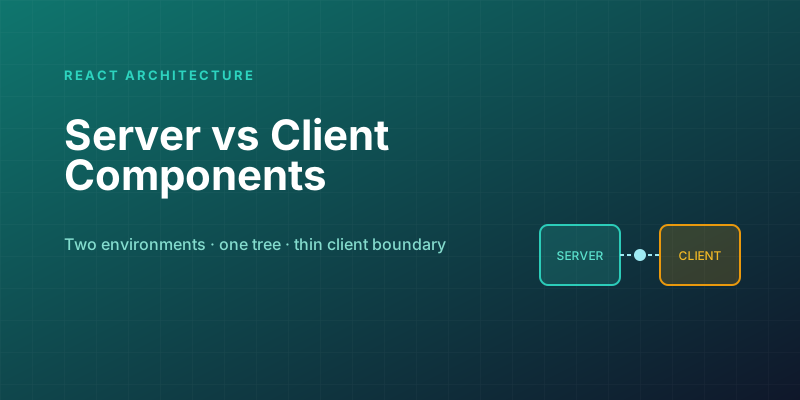
Server Components vs. Client Components: A Mental Model That Sticks
The hardest part of React Server Components isn't the syntax — it's knowing which kind of component you're writing and why. Here is the mental model that makes the boundary obvious.

Next.js Partial Prerendering: The Production Migration Guide
PPR was the experimental flag in Next.js 15; in 16 it's been folded into Cache Components. Learn how static shells and dynamic holes work, how to migrate incrementally, and how to measure the LCP gains.
Next.js 16 and React 19: What Actually Matters in 2026
A practical guide to the features that changed how we build React apps — Server Components, the new compiler, and the patterns that stuck.
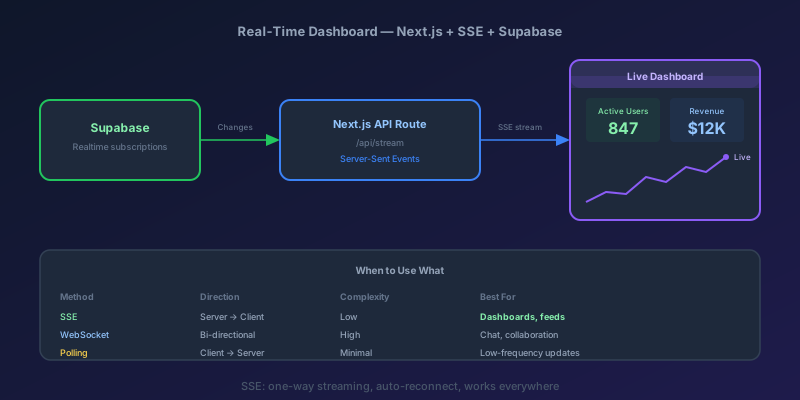
Building a Real-Time Dashboard with Next.js, Server-Sent Events, and Supabase
A step-by-step guide to building a live-updating dashboard using Next.js API routes, Server-Sent Events, and Supabase Realtime — with reconnection handling and smooth UI transitions.
Pass the CancellationToken or the Work Continues After the Client Left
ASP.NET Core binds CancellationToken to the aborted request. Forward it to EF Core and HttpClient, and do not turn a client disconnect into a 500.
Newsletter
New posts, straight to your inbox
One email per post. No spam, no tracking pixels, unsubscribe anytime.
Comments
- No comments yet. Be the first.