Dataverse Cascade Delete: Parental, Restrict, and the Children You Lose
Deleting an account should not be a surprise about contacts. In Dataverse that surprise is a property of the one-to-many relationship, not of the delete button. The relationship type picks a preset. Custom lets you set each action. Get the delete action wrong and you either wipe child rows or block a delete nobody can explain.
The three presets
| Type | Delete | Assign, share, reparent |
|---|---|---|
| Parental | Cascade All. Children are deleted with the parent | Those actions cascade too |
| Referential, Restrict Delete | The parent cannot be deleted while a child points at it | Do not cascade |
| Referential, Remove Link | The parent is deleted and the child's lookup is cleared | Do not cascade |
Parental is the one that destroys data. The account-to-contact relationship that ships as parental is the familiar case: delete the account and the contacts whose parent customer is that account are deleted with it. On that built-in relationship the delete behavior is locked to Cascade All. The designer will not let you switch it to Restrict. Opportunities on a parental relationship go the same way. Parental is the correct model when the child has no meaning without the parent, the way an order line has no meaning without the order. It is the wrong model for a case, a note you still need, or a contact who also sells to someone else. A custom relationship is where you still get to choose.
Restrict is the opposite contract. The delete fails while children exist, and the user has to remove or reparent them first. The error is annoying and it is the point.
Remove Link orphans on purpose. The child stays, the lookup becomes empty. Use it when the child is a real record that should survive, and an empty parent is an allowed state. If the lookup column is required, it cannot be cleared, and the delete fails anyway. Remove Link is not a quiet Restrict. It only works when empty is a legal value.
Delete is not the only action
Cascade configuration is per action. Delete accepts only Cascade All, Remove Link, or Restrict. Assign, share, unshare, and reparent also accept Cascade Active and Cascade User Owned.
Cascade Active touches active children and leaves inactive ones on the old parent. Cascade User Owned touches children owned by the same user as the parent and leaves everyone else's rows where they are. After an assign, those skipped rows still point at the parent and still show the previous owner. That is how ownership and the lookup drift apart. If the business rule is "the team that owns the account owns its contacts," Parental or Cascade All on assign is the setting that enforces it. Cascade User Owned will not move a contact another user owns.
Merge is narrower. On tables that can be merged, Cascade is the only valid merge behavior: the children follow the surviving row. There is no Restrict option on merge.
Change the type before the table has history
The type is metadata, and it travels in the solution. A managed solution imported later can overwrite the cascade behavior you set in dev. Read the relationship in the layer you will ship, not only in the unmanaged sandbox.
Changing a custom relationship from Parental to Restrict does not bring back rows a previous delete already removed. It only changes the next delete. If you need the children, restore from backup. Do not plan on the relationship change as an undo.
Many-to-many relationships do not use this cascade model; they have an intersect row instead. That choice is covered in native and manual many-to-many. Who is allowed to delete the parent in the first place is still a security role, which is a separate decision from what the relationship does after the delete is allowed.
Keep reading

Sales Agent Creates CRM Records From Copilot Chat, and Sales Development Agent Quotes on Its Own: What Went GA on September 30
Two Dynamics 365 Sales agent capabilities reached general availability on September 30, 2026: inline record creation in Microsoft 365 Copilot Chat, and autonomous quote generation in Sales Development Agent. Setup, security, and the escalation path.
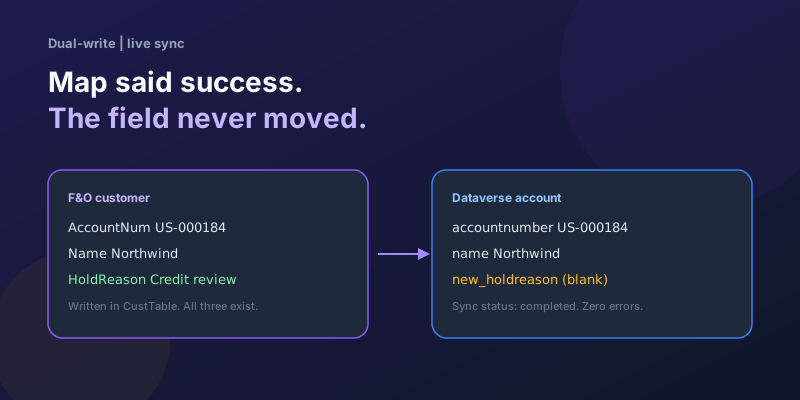
Dual-Write Dropped My Field and Reported Success
Why a dual-write map can complete with zero errors while a custom F&O field never lands in Dataverse — staging tables, unpublished maps, and change tracking after a schema change.
Elastic Tables in Dataverse: When Cosmos-Backed Storage Beats Standard Tables
What Dataverse elastic tables are, how TTL, partitioning, and JSON columns work, and how to decide between elastic and standard tables.

Business Process Flows in Dynamics 365: Branching, Stage-Gating, and the Limits Nobody Warns You About
A practical guide to designing branching Business Process Flows in model-driven Dynamics 365 apps, with stage-gating, automation hooks, the storage model, and hard limits.
The Dataverse Plugin Execution Pipeline: Stages, Transactions, and Images Explained
How the Dataverse event pipeline actually works: pre-validation, pre-operation, post-operation stages, the transaction boundary, entity images, depth, and registration guidance.
Client Scripting in Model-Driven Apps Done Right: formContext, Execution Context, and Async
Modern client-side scripting for model-driven apps using formContext over the deprecated Xrm.Page, with handler wiring, async Xrm.WebApi patterns, and maintainability tips.
Newsletter
New posts, straight to your inbox
One email per post. No spam, no tracking pixels, unsubscribe anytime.
Comments
- No comments yet. Be the first.