Assign Is Not Update: The Owner Change That Missed Your Plug-in
The account plug-in was registered on Update, filtering attributes ownerid, pre-operation, synchronous. It was supposed to stamp contoso_previousowner from the pre-image and write a row in contoso_ownershipaudit. A salesperson used Assign on the command bar. The form showed the new owner. The custom column stayed blank. The audit table was empty. Plugin Trace Log had nothing for that correlation id. The platform did not Update ownerid. It sent Assign. An Update step does not subscribe to Assign, and filtering attributes do not apply to a message that is not Update.
That is the whole property. Dataverse operations are messages. Create, Update, and Delete are three of them. Assign, SetState, Merge, Associate, and Disassociate are others. The column that moved is not the subscription. The message is.
The pipeline post is stages, images, and depth. This post is the message name: which callers send which one, what InputParameters actually contain, and why the Target as Entity cast that is correct on Update is a no-op on Assign.
The Assign dialog never hits Update
Assign is a first-class message. The model-driven Assign dialog, the SDK AssignRequest, and the Power Automate "Assign a row" action all send it. Sharing is not this path: GrantAccess, ModifyAccess, and RevokeAccess write principal object access, not ownerid.
AssignRequest has two inputs, and neither is an Entity:
var request = new AssignRequest
{
    Target = new EntityReference("account", accountId),
    Assignee = new EntityReference("systemuser", newOwnerId)
};
service.Execute(request);
In the plug-in, those land as InputParameters["Target"] and InputParameters["Assignee"]. Both are EntityReference. There is no attribute bag. There is no ownerid on Target. A pre-image can still be registered on the Assign step if you need the previous owner without a retrieve. If the image is missing, retrieve the row. Do not wait for a Target column that this message does not send.
A PATCH of ownerid through the Web API, or an SDK Update that includes ownerid, is a different caller. That path does fire Update. Integrations that "just set the lookup" and users who click Assign are not the same operation. One registration never covers both.
The cast that silently skips Assign
Teams reuse one IPlugin class on several steps. That is fine until the class assumes Update's shape. This is the line that made the Assign registration look like it "did nothing":
if (!context.InputParameters.TryGetValue("Target", out var raw)
    || raw is not Entity target)
{
    return;
}

var newOwner = target.GetAttributeValue<EntityReference>("ownerid");
On Update, raw is Entity. On Assign, raw is EntityReference. The is not Entity branch returns. Trace Log is empty because you returned before ITracingService wrote anything. The step ran. Your logic did not.
Branch on MessageName first. Then read the parameters that message actually has:
public void Execute(IServiceProvider serviceProvider)
{
    var context = (IPluginExecutionContext)serviceProvider
        .GetService(typeof(IPluginExecutionContext));
    var factory = (IOrganizationServiceFactory)serviceProvider
        .GetService(typeof(IOrganizationServiceFactory));
    var service = factory.CreateOrganizationService(context.UserId);

    if (string.Equals(context.MessageName, "Assign", StringComparison.OrdinalIgnoreCase))
    {
        var record = (EntityReference)context.InputParameters["Target"];
        var assignee = (EntityReference)context.InputParameters["Assignee"];
        StampPreviousOwner(service, context, record, assignee);
        return;
    }

    if (string.Equals(context.MessageName, "Update", StringComparison.OrdinalIgnoreCase)
        && context.InputParameters.TryGetValue("Target", out var raw)
        && raw is Entity target
        && target.Contains("ownerid"))
    {
        var assignee = target.GetAttributeValue<EntityReference>("ownerid");
        StampPreviousOwner(service, context, target.ToEntityReference(), assignee);
    }
}
Register the class twice: once on Assign (no filtering attributes; Assign has none), once on Update with filtering attributes ownerid. The Update step still needs a pre-image if StampPreviousOwner reads the old owner. The Assign step needs its own image or a retrieve. Images are per step. Copying the Update step in the Plugin Registration Tool does not copy the image onto Assign.
Assignee can be systemuser or team. An audit row that assumes a user lookup will fail when someone assigns to a team. Store an EntityReference (or both a user and a team lookup, only one filled) instead of casting to user and hoping.
SetState is the same hole on status
Deactivate used to mean SetStateRequest. Microsoft's current guidance is to Update statecode and statuscode together. Both messages still exist. A workflow from 2019, a SOAP client, and some command-bar paths still send SetState. A modern form save, a Web API PATCH, and a plug-in that calls service.Update send Update.
SetState's inputs are not Target:
var request = new SetStateRequest
{
    EntityMoniker = new EntityReference("account", accountId),
    State = new OptionSetValue(1),   // Inactive
    Status = new OptionSetValue(2)
};
service.Execute(request);
In the plug-in that is EntityMoniker, State, and Status. A class that only looks for Target as Entity returns here the same way it did on Assign. An Update step with filtering attributes statecode never runs for a SetState caller. A SetState-only step never runs for a PATCH.
If the rule is "whenever this row becomes inactive," register both messages, or stop letting callers pick: expose a Custom API and send the form, the flow, and the integration through that. Two steps on one class is the smaller change.
Opportunity close is not SetState either. WinOpportunity and LoseOpportunity carry an OpportunityClose activity. Qualify of a lead is QualifyLead. A status plug-in on Update will miss those, and a close plug-in will miss a PATCH of statecode.
Merge does not deactivate through your Update step
The merge dialog sends Merge. Inputs are the winning Target (EntityReference), SubordinateId (the losing row), optional UpdateContent (an Entity of columns to copy onto the winner), and PerformParentingChecks. The platform reparents children, copies what you asked, and deactivates the subordinate.
That deactivation is part of Merge. It is not a promise that your Update step on statecode will run on the losing row, and it is not a promise that Assign will run if ownership changed as part of reparenting. If you have to block a merge — "do not merge accounts with open orders" — register on Merge, read SubordinateId, and throw InvalidPluginExecutionException there. An Update validation that never saw a Target will not save you.
UpdateContent is the one Entity on this message. It can be missing. When it is present, it is columns for the winner, not a full row. Do not treat it like an Update Target for the subordinate.
Associate is not a lookup write
Changing parentcustomerid on a contact is Update of that lookup. Adding a row to a native N:N is Associate. Removing it is Disassociate. The many-to-many post is the data model. The pipeline fact is the message:
var relationship = (Relationship)context.InputParameters["Relationship"];
var target = (EntityReference)context.InputParameters["Target"];
var related = (EntityReferenceCollection)context.InputParameters["RelatedEntities"];
There is no Entity Target. Filtering attributes do not exist. The relationship schema name is how you tell "account_contacts" from a second N:N on the same table. One plug-in class registered on Associate for the table fires for every N:N on that table unless you inspect Relationship.SchemaName and return.
A manual N:N (the table you created with two lookups) is Delete or Update of that table. Native N:N has no intersect you own. Associate and Disassociate are the whole surface.
What to register
| User-visible action | Message to subscribe | Target shape | Filtering attributes |
|---|---|---|---|
Assign dialog, Assign a row, AssignRequest | Assign | EntityReference + Assignee | None |
PATCH / SDK Update of ownerid | Update | Entity with ownerid | ownerid |
Deactivate via SetStateRequest | SetState | EntityMoniker + State + Status | None |
PATCH of statecode / statuscode | Update | Entity with those columns | statecode,statuscode |
| Merge duplicates | Merge | Winner ref, SubordinateId, optional UpdateContent | None |
| Native N:N add/remove | Associate / Disassociate | refs + Relationship | None |
| Lookup column on a form save | Update | Entity with the lookup | that lookup |
Create, Update, and Delete still own rules that must run on every write of a column. Assign and SetState are not special Updates. They are other operations that happen to change the same columns.
Do not compensate by registering Update with no filtering attributes so it "catches everything." It still will not catch Assign. It will run on every save, which is the opposite of the performance habit.
The salesperson's Assign was successful. The platform never constructed an Update Target, so the step that looked for ownerid on that Target had nothing to handle. Register Assign, read Assignee, and keep the Update step for the callers that actually Update. Status, merge, and N:N are the same split: subscribe to the message the caller sent, not the column you watched change in the UI.
Keep reading
Dataverse Custom APIs: Contracts, Binding, and When They Beat Plug-in Steps
Build Dataverse Custom APIs with request/response properties, unbound vs entity binding, plug-in registration on the message, and Web API or SDK calls.
Dataverse Cascade Delete: Parental, Restrict, and the Children You Lose
What Parental, Referential Restrict, and Remove Link actually do on delete, assign, and merge, and which preset to pick before a parent row takes its children with it.

Sales Agent Creates CRM Records From Copilot Chat, and Sales Development Agent Quotes on Its Own: What Went GA on September 30
Two Dynamics 365 Sales agent capabilities reached general availability on September 30, 2026: inline record creation in Microsoft 365 Copilot Chat, and autonomous quote generation in Sales Development Agent. Setup, security, and the escalation path.
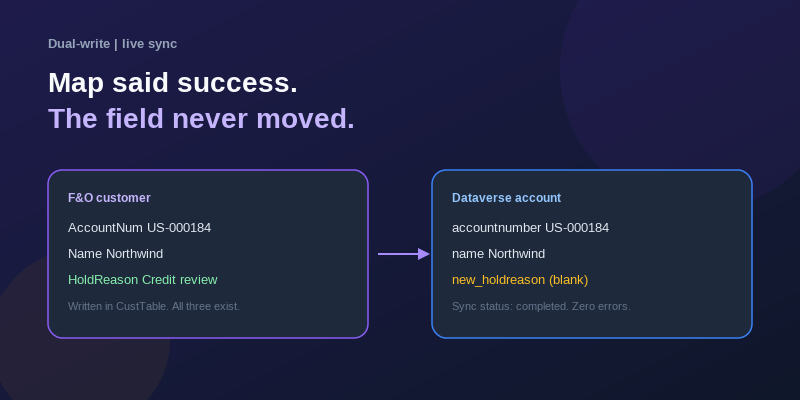
Dual-Write Dropped My Field and Reported Success
Why a dual-write map can complete with zero errors while a custom F&O field never lands in Dataverse — staging tables, unpublished maps, and change tracking after a schema change.
Elastic Tables in Dataverse: When Cosmos-Backed Storage Beats Standard Tables
What Dataverse elastic tables are, how TTL, partitioning, and JSON columns work, and how to decide between elastic and standard tables.
Business Process Flows in Dynamics 365: Branching, Stage-Gating, and the Limits Nobody Warns You About
A practical guide to designing branching Business Process Flows in model-driven Dynamics 365 apps, with stage-gating, automation hooks, the storage model, and hard limits.
Newsletter
New posts, straight to your inbox
One email when a new post goes up. Double opt-in, unsubscribe anytime. Not a daily digest.
Comments
- No comments yet. Be the first.