Dataverse Custom APIs: Contracts, Binding, and When They Beat Plug-in Steps
Teams keep hiding business operations inside Create and Update plug-ins. A caller changes statuscode, or stamps a Boolean, and a pipeline step infers intent from the column mix. That works until an import, a dual-write sync, or a form save hits the same columns for a different reason. A Custom API is the named operation those callers should have invoked: a message with declared inputs, declared outputs, and a plug-in that runs only when someone asks for that operation.
This is not a replacement for pipeline plug-ins on Create and Update. Those still own rules that must fire on every write. Custom APIs own commands.
A Custom API is a message you designed
A Dataverse Custom API is a first-class message. You create it in a solution. Its unique name is the message name. Request parameters become InputParameters. Response properties become OutputParameters. A C# plug-in (or a low-code instant plug-in) implements Execute against that message the same way it would against Create.
That is the whole point. Callers do not poke columns and hope the right step notices. They call contoso_ReserveInventory with a product, a quantity, and a warehouse. The platform authorizes the call, runs your plug-in, and returns a reservation id. The contract lives in metadata, so it travels with the solution.
Classic process Actions still exist. They can mix workflow designer steps with a plug-in, and they still show up in the process UI. For new work, Custom APIs are the better contract: typed request and response components, optional GET functions, an execute privilege you can name, and a flag that blocks other plug-ins from attaching to the message. Keep a classic Action only when a functional owner must author steps in the process designer.
| You need… | Use |
|---|---|
| A named command with a typed request and response | Custom API |
| A rule that must run on every Create or Update | Table plug-in step |
| Derived values with no side effects | Formula or calculated column |
| A maker-owned button that still runs on the server | Instant low-code plug-in (it is a Custom API) |
| Workflow-designer steps a consultant owns | Classic Action, and plan to migrate |
Logic placement more broadly is covered in business rules vs Power Fx vs plug-ins. Custom APIs sit on the C# (or instant Power Fx) side of that table, as the entry point, not as a substitute for field-level truth.
Design the contract before the plug-in
Create the Custom API in the solution first. The unique name cannot change afterwards, and neither can binding type or "Is Function". Get those three right, then add parameters.
Unique name. Publisher prefix plus a verb phrase: contoso_ReserveInventory. This string is the Web API action name, the SDK OrganizationRequest name, and the plug-in registration message. Treat it as a public identifier.
Is Function. No means an Action (HTTP POST, side effects allowed). Yes means a Function (HTTP GET, treat it as a read). Functions cannot take Entity or EntityCollection request parameters. If the operation creates, updates, or deletes rows, it is an Action.
Binding type. The maker UI calls unbound Global.
| Binding | Runs against | Typical call |
|---|---|---|
| Global (unbound) | Nothing; inputs are explicit parameters | POST /api/data/v9.2/contoso_ReserveInventory |
| Entity | One row; the platform supplies Target | POST /accounts(id)/Microsoft.Dynamics.CRM.contoso_ApproveCredit |
| Entity collection | The table, not a row | POST /accounts/Microsoft.Dynamics.CRM.contoso_RecalculateCredit |
Pick Global when the operation spans tables, or when there is no single row that owns the command. Pick Entity when the command is "do this to this account". Collection binding is the rare case: a command over the set, not over one id.
Allowed custom processing step type. Sync and Async lets you (and later, other assemblies) register steps on the message. None means only the plug-in type you attach on the Custom API record itself will run. Use None when you do not want a second vendor's step quietly attaching to your command.
Execute privilege name. If you leave this empty, any caller who can reach the organization can invoke an unbound API. That is a common production hole. Point it at a custom privilege, or at an existing privilege that already describes the operation, and grant that privilege through a security role. Bound APIs still require the caller to have rights on the bound row; the execute privilege is an extra gate, not a replacement for table permissions.
Is private. Private APIs stay out of $metadata. Integrations that generate clients from metadata will not see them. You can still POST the unique name if you know it. Use private for internal helpers, not for anything a Power Automate maker is supposed to discover.
Request parameters and response properties are separate solution components. Add them in the same solution as the API. If you ship the API without its parameters, callers get a message that does not match what your plug-in reads.
A working contract for an unbound reservation command:
| Direction | Unique name | Type | Optional |
|---|---|---|---|
| Request | Product | EntityReference (contoso_product) | No |
| Request | Quantity | Integer | No |
| Request | WarehouseCode | String | No |
| Response | ReservationId | Guid | — |
| Response | RemainingQty | Integer | — |
Keep parameter unique names stable. Renaming a request parameter is a breaking change for every Web API, SDK, and flow caller.
Implement the message, not a table event
Register the plug-in on the Custom API unique name. For a Global API, primary entity is none. For an entity-bound API, primary entity is the bound table. Stage is almost always post-operation (40). There is no platform write at stage 30 for a custom message, so pre-operation vs post-operation does not mean "before/after the row is saved" the way it does on Update. Synchronous post-operation still runs in a transaction: throw InvalidPluginExecutionException and the reservation row, the stock update, and the API call all roll back together.
If you set a plug-in type on the Custom API record in the maker portal, Dataverse creates that step for you. You can also register the step with the Plug-in Registration Tool. The first plug-in walkthrough covers assembly registration; the only difference here is the message name.
using System;
using Microsoft.Xrm.Sdk;
using Microsoft.Xrm.Sdk.Query;

public sealed class ReserveInventoryPlugin : IPlugin
{
    public void Execute(IServiceProvider serviceProvider)
    {
        var tracing = (ITracingService)serviceProvider.GetService(typeof(ITracingService));
        var context = (IPluginExecutionContext)serviceProvider.GetService(typeof(IPluginExecutionContext));
        var factory = (IOrganizationServiceFactory)serviceProvider.GetService(typeof(IOrganizationServiceFactory));
        var service = factory.CreateOrganizationService(context.UserId);

        if (!string.Equals(context.MessageName, "contoso_ReserveInventory", StringComparison.OrdinalIgnoreCase))
        {
            return;
        }

        if (!context.InputParameters.Contains("Product") ||
            !(context.InputParameters["Product"] is EntityReference productRef) ||
            productRef.LogicalName != "contoso_product")
        {
            throw new InvalidPluginExecutionException("Product is required.");
        }

        var quantity = context.InputParameters.Contains("Quantity")
            ? (int)context.InputParameters["Quantity"]
            : 0;
        var warehouseCode = context.InputParameters.Contains("WarehouseCode")
            ? context.InputParameters["WarehouseCode"] as string
            : null;

        if (quantity <= 0)
        {
            throw new InvalidPluginExecutionException("Quantity must be greater than zero.");
        }

        if (string.IsNullOrWhiteSpace(warehouseCode))
        {
            throw new InvalidPluginExecutionException("WarehouseCode is required.");
        }

        tracing.Trace(
            "Reserving {0} of {1} at {2}. Correlation: {3}",
            quantity, productRef.Id, warehouseCode, context.CorrelationId);

        var query = new QueryExpression("contoso_stockbalance")
        {
            ColumnSet = new ColumnSet("contoso_onhand", "contoso_reserved"),
            Criteria = new FilterExpression
            {
                Conditions =
                {
                    new ConditionExpression("contoso_productid", ConditionOperator.Equal, productRef.Id),
                    new ConditionExpression("contoso_warehousecode", ConditionOperator.Equal, warehouseCode)
                }
            },
            TopCount = 1
        };

        var balances = service.RetrieveMultiple(query).Entities;
        if (balances.Count == 0)
        {
            throw new InvalidPluginExecutionException(
                $"No stock balance for warehouse {warehouseCode}.");
        }

        var stock = balances[0];

        var onHand = stock.GetAttributeValue<int>("contoso_onhand");
        var reserved = stock.GetAttributeValue<int>("contoso_reserved");
        var available = onHand - reserved;

        if (quantity > available)
        {
            throw new InvalidPluginExecutionException(
                $"Only {available} units available at {warehouseCode}.");
        }

        var reservationId = service.Create(new Entity("contoso_inventoryreservation")
        {
            ["contoso_productid"] = productRef,
            ["contoso_quantity"] = quantity,
            ["contoso_warehousecode"] = warehouseCode
        });

        stock["contoso_reserved"] = reserved + quantity;
        service.Update(stock);

        context.OutputParameters["ReservationId"] = reservationId;
        context.OutputParameters["RemainingQty"] = available - quantity;
    }
}
Two habits from table plug-ins still apply: keep it fast, and do not wait on HTTP inside the transaction. The two-minute sandbox ceiling is the same. Depth still increments if this plug-in creates rows that themselves have steps. A depth guard is reasonable; using depth as a substitute for a named command is how you ended up here in the first place.
For an entity-bound API, read InputParameters["Target"] as an EntityReference. Do not expect a full Entity. Retrieve the columns you need.
Output parameter names must match the response properties you declared. Writing a key that does not exist on the Custom API does not become part of the HTTP response.
Call it like an API, because it is one
Unbound Action, Web API:
POST https://contoso.crm.dynamics.com/api/data/v9.2/contoso_ReserveInventory HTTP/1.1
OData-MaxVersion: 4.0
OData-Version: 4.0
Accept: application/json
Content-Type: application/json
Authorization: Bearer eyJ0eXAi...

{
  "Quantity": 5,
  "WarehouseCode": "WH-SEA",
  "Product@odata.bind": "/contoso_products(11111111-1111-1111-1111-111111111111)"
}
EntityReference request parameters use @odata.bind against the entity set. Entity-typed parameters (a full row payload, not a lookup) use an object with @odata.type. Do not mix those shapes; the platform rejects the wrong one with an unhelpful type error.
Entity-bound Action:
POST https://contoso.crm.dynamics.com/api/data/v9.2/accounts(22222222-2222-2222-2222-222222222222)/Microsoft.Dynamics.CRM.contoso_ApproveCredit HTTP/1.1
Content-Type: application/json
Accept: application/json

{
  "ApprovedLimit": 250000
}
The bound id is in the URL. You do not pass Target in the body.
A Function (Is Function = Yes) is a GET. Query parameters map to request parameters. Use a Function only when the plug-in is a pure read. A GET that writes stock is a cache-busting surprise for every proxy and retry.
SDK callers do not need a generated early-bound class:
var request = new OrganizationRequest("contoso_ReserveInventory")
{
    ["Product"] = new EntityReference("contoso_product", productId),
    ["Quantity"] = 5,
    ["WarehouseCode"] = "WH-SEA"
};

var response = service.Execute(request);
var reservationId = (Guid)response["ReservationId"];
var remaining = (int)response["RemainingQty"];
Power Automate uses Perform an unbound action (or the bound action) on the Dataverse connector. The unique name is the action. If the API is private, makers will not see it in the picker; use HTTP against the Web API instead, the same way you would for other Dataverse HTTP calls.
Custom APIs count as organization requests against service protection limits. A chatty client that fires one reservation per line should batch at the application level, or accept that $batch is for CRUD and this message is one request per command. The multipart $batch payload does not make a Custom API cheaper; it only groups HTTP.
What Custom APIs are not
They do not fire because a row changed. If inventory must be consistent even when someone edits contoso_reserved in a grid, you still need a table step — or you remove write access to that column and force every change through the API. Most teams want both: the command for the happy path, and a narrow Update step that rejects direct edits to columns the command owns.
They are not a place to dump a RetrieveMultiple that belongs in a query. If the caller only needs rows, use OData or FetchXML. A Function is justified when the result is computed, authorized, or shaped in a way a query cannot express.
They are not Copilot. Copilot in Sales can invoke a Custom API as an action; that wiring is a descriptor on top of this contract, covered in custom Copilot plugins. Build and test the API with the Web API first. Then hang Copilot off a description that matches what the API actually does.
Idempotency is your problem. Dataverse will not deduplicate two POSTs with the same body. If the client retries after a timeout, a second reservation is a second row unless you key the operation — an alternate-key upsert on a client-supplied reservation token is the usual fix, the same idea as upsert with alternate keys.
Registration and ALM details that bite
Include three component types in the solution: the Custom API, every request parameter, every response property. Missing a parameter in the managed export is a silent contract change in the next environment.
Do not change binding type or Is Function after create. Create a new unique name and deprecate the old one. Callers already compiled the old message into URLs and flow actions.
Register the step in the same solution as the API. An unmanaged step in production that points at an API from a managed solution is how you lose the implementation on the next upgrade.
Trace MessageName, the bound Target id, and the correlation id. When a flow, a model-driven command, and Copilot all call the same API, correlation is the only way to tell which entry point failed.
Test from more than one client. A plug-in that works from the Plug-in Registration Tool's Execute dialog can still fail from the Web API if an EntityReference was declared and the caller sent an Entity, or if a response property type does not match what you put in OutputParameters.
The Custom API is the public surface. The plug-in is the implementation. Keep the surface small, privilege it on purpose, and stop encoding commands as column side effects on Create and Update.
Keep reading
Dataverse Cascade Delete: Parental, Restrict, and the Children You Lose
What Parental, Referential Restrict, and Remove Link actually do on delete, assign, and merge, and which preset to pick before a parent row takes its children with it.

Sales Agent Creates CRM Records From Copilot Chat, and Sales Development Agent Quotes on Its Own: What Went GA on September 30
Two Dynamics 365 Sales agent capabilities reached general availability on September 30, 2026: inline record creation in Microsoft 365 Copilot Chat, and autonomous quote generation in Sales Development Agent. Setup, security, and the escalation path.
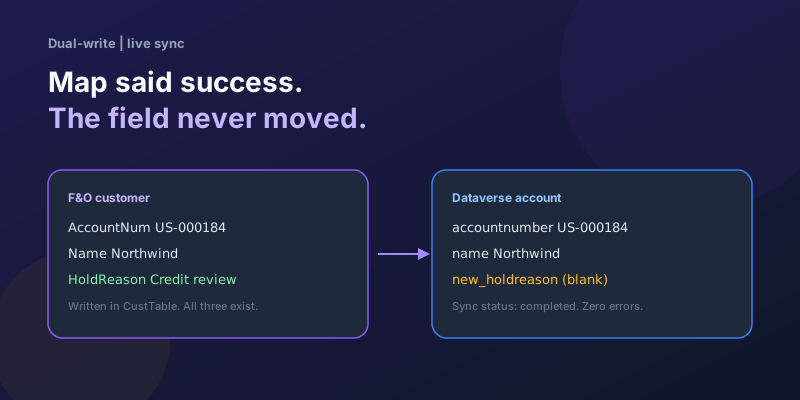
Dual-Write Dropped My Field and Reported Success
Why a dual-write map can complete with zero errors while a custom F&O field never lands in Dataverse — staging tables, unpublished maps, and change tracking after a schema change.
Elastic Tables in Dataverse: When Cosmos-Backed Storage Beats Standard Tables
What Dataverse elastic tables are, how TTL, partitioning, and JSON columns work, and how to decide between elastic and standard tables.
Business Process Flows in Dynamics 365: Branching, Stage-Gating, and the Limits Nobody Warns You About
A practical guide to designing branching Business Process Flows in model-driven Dynamics 365 apps, with stage-gating, automation hooks, the storage model, and hard limits.
The Dataverse Plugin Execution Pipeline: Stages, Transactions, and Images Explained
How the Dataverse event pipeline actually works: pre-validation, pre-operation, post-operation stages, the transaction boundary, entity images, depth, and registration guidance.
Newsletter
New posts, straight to your inbox
One email per post. No spam, no tracking pixels, unsubscribe anytime.
Comments
- No comments yet. Be the first.